
H/D LCD Controller Board for 11.6" 13.3" 14" 15.6" 1366×768 30 Pin eDP
4.4Editor score
HD 1366×768 resolution support
30-pin eDP interface standard
12V 2A power requirement
Choosing the right LCD controller board for laptop screen projects requires understanding resolution, interface types, and power needs. A compatible board ensures stable signal transmission and vibrant display quality for DIY monitor builds.
We evaluated ten top-rated driver boards based on user feedback, technical specifications, and compatibility with common panel models. Each option supports specific resolutions and connection standards to meet varied repair and conversion requirements.
Each pick highlights key features, supported screen models, and installation details to simplify your selection process. Prices and availability change frequently so verify current listings before ordering your required components.
4.4Editor score

4.0Editor score
5.0Editor score
As an Amazon Associate we earn from qualifying purchases.
The following comparison highlights key specifications and compatibility details for all ten controller boards featured in this guide to help you identify the right fit.


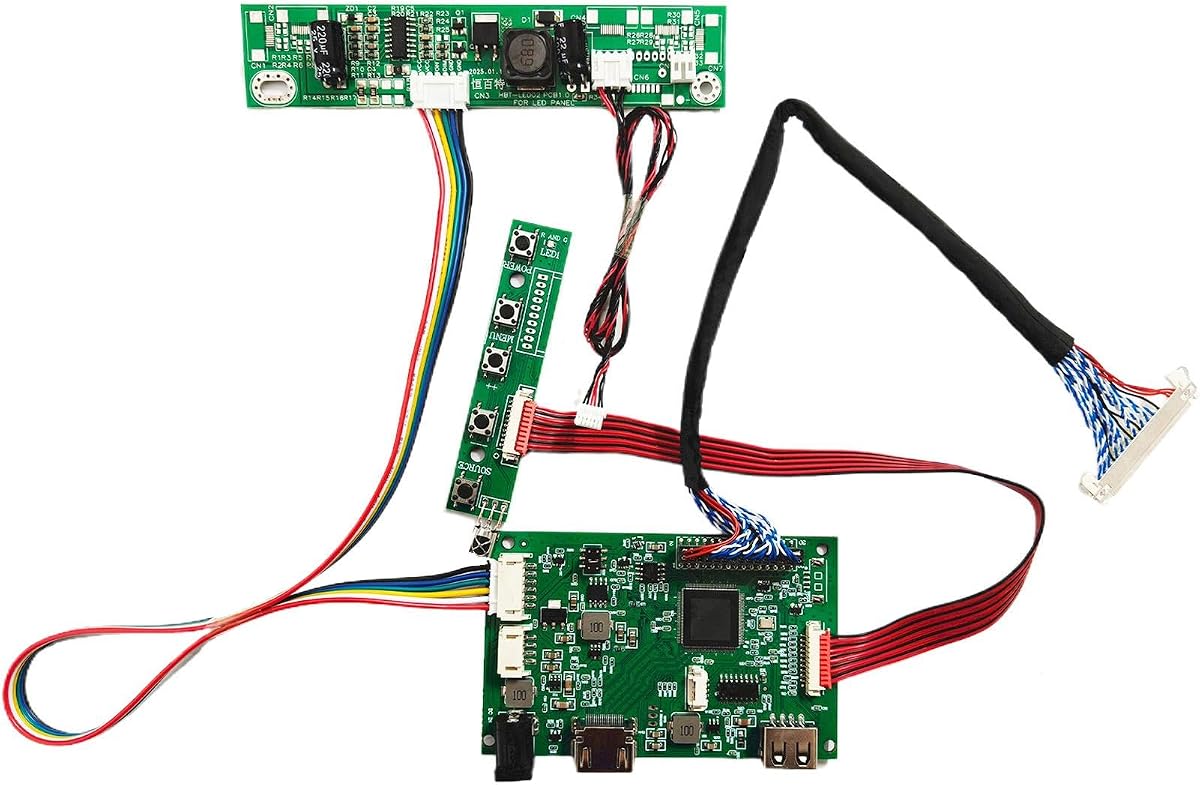
This H/D LCD Controller Board is a solid budget option for repairing 1366×768 laptop screens ranging from 11.6 to 15.6 inches. It features a 30-pin eDP interface and stable signal transmission for DIY monitor builds.
We may earn a commission when you buy through this link, at no additional cost to you.
The board comes with a preconnected signal cable that simplifies installation significantly. Its LED indicator provides clear feedback on signal status while the low standby power usage adds efficiency.
Users should ensure their panel resolution matches 1366×768 exactly since this board does not support 1080p displays. Current supply must meet 2A minimum to avoid flickering or restart cycles.
If you need a reliable and affordable driver for standard HD panels this board delivers consistent performance. It is ideal for beginners seeking a straightforward repair solution without unnecessary complexity.
The preconnected signal cable reduces wiring errors and speeds up the installation process for non technical users.
Solid green LED light confirms proper signal connection and helps identify issues quickly during testing.
We may earn a commission when you buy through this link, at no additional cost to you.
This VSDISPLAY controller supports 15.6 inch 1366×768 panels with a 40-pin LVDS interface and offers both VGA and DVI video inputs. It includes a speaker connector for audio output in DIY setups.
We may earn a commission when you buy through this link, at no additional cost to you.
The board provides clear LED feedback during power on checks and supports plug and play functionality with compatible screens. It handles common LP156WH and B156XW panel models well.
Power requirements must be met with at least 2A current or restart issues may occur. Users should verify their screen pin count matches 40 pin exactly before purchase.
For those with older LVDS panels this board provides a straightforward conversion path. Its video input flexibility makes it useful for connecting legacy computers or media players.
VGA and DVI inputs allow connection to various devices without needing additional adapters or converters.
Built-in speaker connector enables sound from external devices without extra audio hardware.
We may earn a commission when you buy through this link, at no additional cost to you.
This VGA Controller Board delivers full 1920×1080 resolution on 30-pin eDP screens ranging from 11.6 to 17.3 inches. It supports numerous NV140FHM and B156HAN panel models and requires no driver installation.
We may earn a commission when you buy through this link, at no additional cost to you.
The plug and play design allows direct cable connection for immediate display activation. A keyboard with cable is included for basic menu navigation and power control.
Power supply must meet 2A minimum to maintain stable operation and avoid screen blackouts. Some users report needing higher current for larger 17.3 inch panels.
For DIY Full HD laptop screen conversions this board provides reliable performance at an accessible price point. Its wide panel support makes it a versatile choice for many common screen models.
Supports 1920×1080 resolution for sharp and clear image quality on modern panels.
Built-in keyboard allows easy menu access and power functions without separate peripherals.
We may earn a commission when you buy through this link, at no additional cost to you.
This controller targets 17 to 19 inch panels with 1280×1024 resolution and supports multiple M170EG models. It includes VGA and DVI inputs plus a speaker connector for audio in DIY monitors.
We may earn a commission when you buy through this link, at no additional cost to you.
The plug and play setup works with compatible screens after connecting cables according to provided link pictures. It offers solid performance for older or specialized gaming panels.
Power input requires at least 3A current to prevent restart issues. Users should verify their panel model number matches supported listings before ordering.
Ideal for repurposing larger 17 inch panels this board balances affordability with needed functionality. Its high rating suggests reliable performance for its intended resolution range.
Specifically optimized for 17 to 19 inch screens with 1280×1024 resolution panels.
Speaker connector enables audio playback directly through external speakers without extra hardware.
We may earn a commission when you buy through this link, at no additional cost to you.
This controller supports 21.5 and 23.8 inch panels with 1920×1080 resolution and includes an inverter board for additional functionality. It works with models like M215HW03 and LM238WF1.
We may earn a commission when you buy through this link, at no additional cost to you.
The package includes a USB cable for touch screen support and a VGA DVI controller board. Setup is plug and play with compatible screens and correct resolution settings.
Power input must be 12V with over 3A current for stable operation. Users should check compatibility carefully since some similar models may not work.
For larger DIY monitor builds this board provides necessary Full HD support. Its inclusion of an inverter and touch USB cable adds extra value for advanced projects.
Designed for 21.5 and 23.8 inch panels with 1080p resolution capabilities.
Comes with an inverter board to support backlight functionality without separate purchase.
We may earn a commission when you buy through this link, at no additional cost to you.
This H/D Controller Driver Board is designed for 1920×1080 panels with 30-pin eDP connectors ranging from 11.6 to 15.6 inches. It comes with a preconnected signal cable for simpler installation.
We may earn a commission when you buy through this link, at no additional cost to you.
Compatible models include B156HAN01 and LP156WF4 panels. The board ensures vibrant color reproduction and supports plug and play setup with correct alignment.
Power input requires 12V with at least 2A current to avoid flickering issues. Users should verify their screen interface is eDP not LVDS before buying.
For Full HD laptop screen repairs this board offers solid performance and ease of use. Its preconnected cable reduces setup time for most DIY projects.
Supports 1080p resolution for crisp and detailed image quality on compatible panels.
Signal cable comes preconnected to minimize wiring errors during installation.
We may earn a commission when you buy through this link, at no additional cost to you.
This Taidacent Universal LVDS Controller Board supports screen sizes from 10 to 65 inches and provides HDMI DVI and VGA inputs. It uses the NT68676 chipset and offers multiple language OSD options.
We may earn a commission when you buy through this link, at no additional cost to you.
The board is suitable for diverse LVDS panels and DIY kits. Setup involves matching the correct LVDS pinout to the target display.
Power requirements vary by panel size so users should consult documentation for specific voltage needs. Its versatility comes at a higher price than dedicated boards.
For universal applications and varied screen sizes this board offers flexibility. Its multi language support and multiple inputs make it ideal for international or multi device setups.
Handles screens from 10 to 65 inches making it a universal choice for diverse projects.
Supports English plus many international languages for broader accessibility.
We may earn a commission when you buy through this link, at no additional cost to you.
This VSDISPLAY controller offers HDMI USB and VGA inputs for 21.5 and 23.8 inch panels with 1920×1080 resolution. It includes an inverter board and supports image rotation by 180 degrees.
We may earn a commission when you buy through this link, at no additional cost to you.
The USB input allows video and picture playback directly from flash drives. A keyboard with cable is included for menu navigation and power control.
Users must provide their own 12V power adapter with at least 2A current. The board is not compatible with LM215WF3 models so verification is critical.
For advanced DIY monitors needing multimedia input options this board excels. Its USB playback capability and perfect rating make it a top tier choice.
USB input supports video picture and text playback directly without needing a computer source.
Supports 180 degree image rotation for flexible display orientation in kiosks or signage.
We may earn a commission when you buy through this link, at no additional cost to you.
This controller targets 15.6 inch panels with 1366×768 resolution and uses a 40-pin LVDS interface. It provides HDMI and VGA inputs for versatile connection options.
We may earn a commission when you buy through this link, at no additional cost to you.
Features include adjustable brightness and contrast parameters for optimized image quality. The board supports remote control commands for rapid response during operation.
Since there are no user ratings available buyers should verify compatibility thoroughly before ordering. Power requirements depend on the specific panel being used.
For repurposing standard 15.6 inch laptop screens this board offers essential connectivity. Its adjustable parameters allow customization for different viewing environments.
Brightness and contrast can be adjusted dynamically for better visual experience.
Design reduces signal loss to ensure accurate image display without distortion.
We may earn a commission when you buy through this link, at no additional cost to you.
This driver board is designed specifically for B173HW01 and B173HW02 panels with 1920×1080 resolution and 40-pin LVDS interfaces. It supports HDMI and VGA inputs and handles brightness adjustments.
We may earn a commission when you buy through this link, at no additional cost to you.
The kit integrates tightly with notebook power systems for stable operation and low power consumption. It is optimized for exact model matches to ensure communication stability.
Users must confirm their screen model and pinout match exactly before purchasing. The compact design is ideal for laptop rebuilds rather than external monitors.
For 17.3 inch laptop screen rebuilds this board offers perfect compatibility. Its high rating indicates reliable performance when matched correctly to supported models.
Strictly designed for B173HW01 and B173HW02 panels to ensure stable signal and operation.
Supports 1920×1080 for clear image quality on larger 17.3 inch screens.
We may earn a commission when you buy through this link, at no additional cost to you.
Selecting the right controller board requires matching screen specifications and desired input options carefully.
Ensure the board supports your screen's exact resolution such as 1366×768 or 1920×1080 to avoid display issues.
Always check resolution before purchasing to prevent incompatible displays or wasted money.
Verify your panel uses 30-pin eDP or 40-pin LVDS connectors since mismatching interfaces will prevent operation.
Check the connector type carefully to ensure physical compatibility with your screen.
Most boards need 12V power with specific amperage ranging from 2A to 3A depending on screen size.
Provide a proper power adapter to avoid flickering or unexpected restarts.
Consider which video inputs you need such as HDMI VGA or DVI based on your source devices.
Choose boards that match your computer or media player outputs.
Confirm the board supports your panel's physical dimensions from 11.6 to 23.8 inches typically.
Verify size limits before ordering to ensure mechanical fit and signal stability.
Compare your screen's model number against the board's compatible list to guarantee proper fit.
Cross reference the model number to avoid compatibility issues.
Some boards include speaker connectors for sound while others do not.
Check if audio output is required for your specific use case.
Select boards with preconnected cables and driver free operation to simplify installation.
Look for plug and play features to reduce setup complexity and errors.
Connect the signal cable to the board ensuring Pin 1 aligns with the red circle marker for correct orientation.
Plug in the required 12V power adapter and wait for the green LED to confirm stable power before connecting video input.
Avoid exposing the board to moisture or dust and store it in a dry place when not in use to extend lifespan.
eDP uses a 30-pin connector and is common in newer laptop screens while LVDS uses 40 pins and is found in older panels. You must match the board to your panel's interface type for proper function.
Flickering often means the power adapter does not supply enough current. Use a 12V adapter with at least 2A or 3A output depending on your board specifications.
Most boards support a range such as 11.6 to 15.6 inches but all panels must share the same resolution and interface type. Always confirm the model list before buying.
Power adapters are usually sold separately so you will need to buy a matching 12V DC adapter with the correct amperage rating.
Use the cable provided with the board and align Pin 1 with the marker on the connector. Using an old laptop cable may cause compatibility issues.
Many boards include HDMI input but some older ones may only support VGA or DVI. Check the product description for available input ports.
These boards are designed for external use and rely on external power so fitting them inside a laptop case is difficult and not recommended.
If the resolution does not match the board will show a blank screen or distorted image. Ensure your board supports the exact pixel count of your panel.
The top picks highlight versatile boards for budget and premium needs including Full HD support and multimedia input options.
Prioritize matching resolution and interface type to ensure stable operation and clear display quality.
Prices and stock change frequently so verify the latest listings and compatibility before ordering your chosen board.