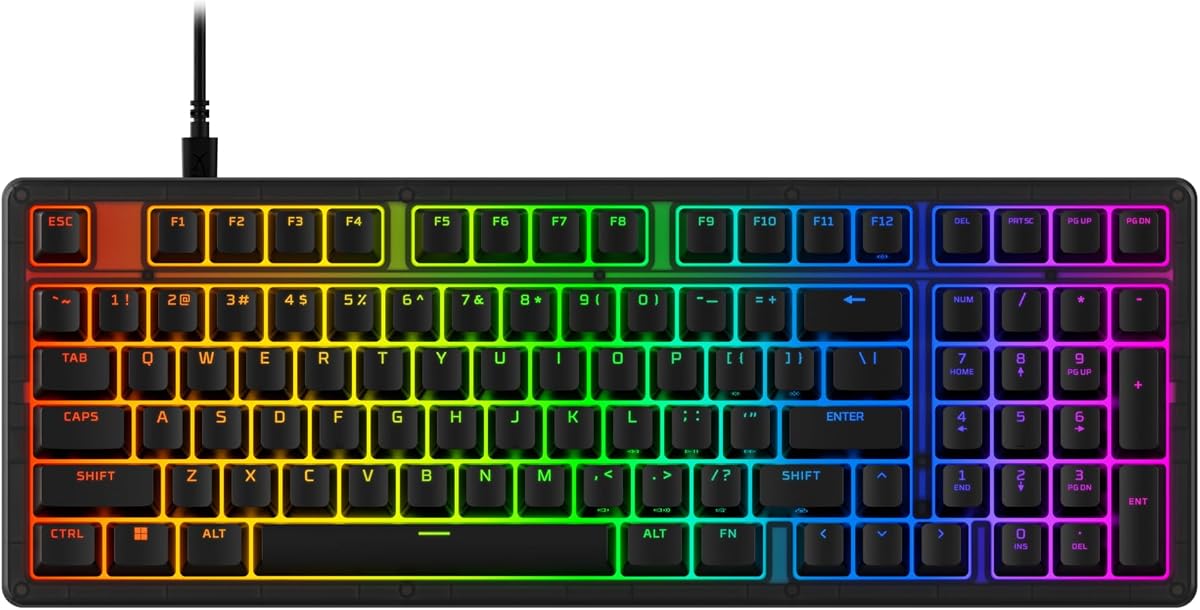
HyperX Eve 1800
4.6Editor score
10-zone customizable RGB lighting
Dedicated media buttons included
Compact 1800 form factor
Finding the right input device is crucial for modern workflows. A compact keyboard saves desk space while maintaining functionality. The 1800 layout offers a balanced approach between full-size and tenkeyless designs.
We evaluated ten leading models based on build quality, switch performance, and layout efficiency. Our comparison includes mechanical and membrane options suitable for various budgets. Each product brings unique features for different user needs.
Every pick highlights key strengths and potential trade-offs for informed decisions. We focus on specs and user feedback rather than subjective claims. Please note that pricing and availability may change over time.
4.6Editor score

4.6Editor score

4.4Editor score
As an Amazon Associate we earn from qualifying purchases.
This table provides a side-by-side comparison of all ten selected models. Use it to quickly identify key specifications and features relevant to your specific use case.




The HyperX Eve 1800 is an excellent choice for gamers seeking a compact layout without breaking the bank. Its 1800 form factor delivers full-size functionality in a condensed package. With a solid 4.6 rating users appreciate its balance of features and value.
We may earn a commission when you buy through this link, at no additional cost to you.
Customization is key with this model. The 10-zone RGB lighting allows you to sync colors with your gaming setup or aesthetic preferences. Dedicated media buttons provide quick access to volume and gaming modes. The membrane switches offer cushioned feedback suitable for long sessions.
While it lacks mechanical switches, the anti-ghosting and 12-key rollover ensure reliable performance during intense gameplay. The HyperX NGENUITY software lets you build macros and adjust lighting patterns. This level of software support is impressive at this price point.
If you want a compact gaming keyboard with essential features and a reasonable price, this is a strong contender. It suits casual gamers or those with limited desk space. The included software adds depth to the user experience.
The 1800 form factor keeps all essential keys while freeing up space for mouse movement and accessories.
HyperX NGENUITY software enables macro recording and detailed lighting adjustments for personalization.
We may earn a commission when you buy through this link, at no additional cost to you.
The Cherry G80-1800 is built for environments where reliability is paramount. This mechanical keyboard features MX Black switches known for their linear feel and longevity. With over 100 million actuations per key it is designed for continuous heavy use.
We may earn a commission when you buy through this link, at no additional cost to you.
Flexibility is a major benefit. The keyboard supports both USB and PS/2 connections with an adapter included. This allows compatibility with older systems or Unix computers using Codeset 3. The long cable ensures you can reach distant ports easily.
The build quality reflects its industrial purpose. Individual keys have gold crosspoint contacts ensuring stable performance. The compact dimensions fit well in tight spaces like 19 rack applications. It is a functional tool rather than a gaming peripheral.
Choose this keyboard if you need a robust mechanical solution for professional or industrial settings. Its focus on durability and compatibility makes it stand out. The price reflects its specialized engineering and build quality.
Support for both USB and PS/2 ensures this keyboard works across modern and legacy computer systems.
MX Black switches provide a reliable typing experience rated for hundreds of millions of keypresses.
We may earn a commission when you buy through this link, at no additional cost to you.
The HyperX Origins 2 1800 stands out for its level of customization and performance. It features hotswap sockets that let you change switches without soldering. The swappable housing design means you can refresh the look without buying a new board.
We may earn a commission when you buy through this link, at no additional cost to you.
Performance is top-tier with an 8k polling rate. This ensures near-instantaneous input communication with your PC. The Linear Red switches are factory-lubed for smooth actuation and a subtle sound. An O-ring mount enhances sound quality and comfort.
High profile design elevates the key surface for easier engagement. Flip-down feet allow you to adjust the angle to your preference. The NGENUITY software supports layers of customization including macros and RGB patterns. Open-source design files are available for 3D printing housings.
This is the ideal pick for enthusiasts who want control over every aspect of their keyboard. It combines premium features with a compact layout. The investment is justified by the flexibility and speed it offers.
5-pin hotswap sockets allow you to test different switches and personalize your typing feel easily.
Communication speeds of up to 8000 times per second reduce latency for competitive gaming.
We may earn a commission when you buy through this link, at no additional cost to you.
Cherry is a legacy name in switch technology and this model reflects that heritage. The G80-1800LPCEU is an industrial keyboard designed for high-demand environments. It meets strict ISO standards for safety and quality ensuring reliable deployment.
We may earn a commission when you buy through this link, at no additional cost to you.
Mechanical keyswitches provide tactile feedback and durability over time. The compact layout fits into tight workstations without sacrificing functionality. It is built to withstand daily use in professional settings like control rooms or offices.
The keyboard uses gold contact technology for reliable signal transmission. Its simple design avoids unnecessary frills focusing on core functionality. The build quality ensures a long service life reducing replacement costs.
Select this keyboard for business or industrial applications where consistency is key. It is a workhorse device designed to perform without interruption. The price reflects its quality and certification standards.
ISO 9001 and 14001 certifications confirm the manufacturing quality and environmental standards.
Individual mechanical switches offer a long service life suitable for frequent typing tasks.
We may earn a commission when you buy through this link, at no additional cost to you.
The Logitech Alto Keys K98M brings premium mechanical typing to a compact wireless form. It uses a UniCushion gasket mount to absorb vibrations for a satisfying keystroke. The hot-swappable switches let you customize your experience without tools.
We may earn a commission when you buy through this link, at no additional cost to you.
Productivity features are strong. The Action Keys can be programmed via the Logi Options+ app to access AI-enhanced features. Connectivity is seamless with both Bluetooth and Logi Bolt USB support. You can switch between up to three devices easily.
Battery life is excellent at up to 12 months on a single charge. The USB-C recharging keeps you going without interruption. The layout is 1800 style so you keep the numpad for data entry. White backlighting is bright but RGB is absent.
This keyboard is perfect for professionals who value typing comfort and wireless freedom. The build quality and battery life justify the premium cost. It balances productivity and style well.
The UniCushion gasket mount delivers a soft satisfying typing feel by dampening vibrations.
Program Action Keys to access common apps and AI tools with a single keystroke.
We may earn a commission when you buy through this link, at no additional cost to you.
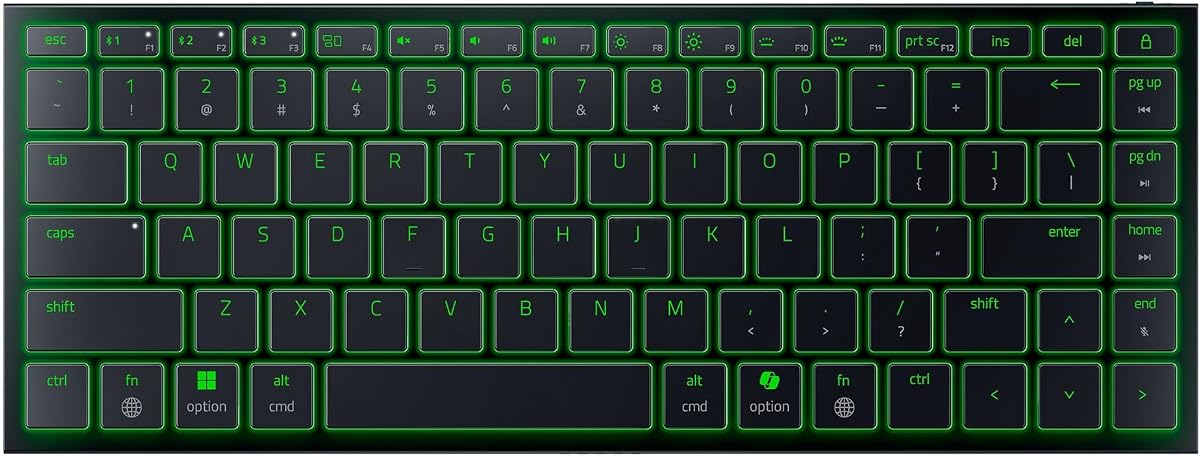
The Razer Joro is designed for gamers and workers on the go. It packs a function row and arrow keys into a 75% layout. This ultra portable design weighs only 374g and is very thin. It fits easily into a backpack.
We may earn a commission when you buy through this link, at no additional cost to you.
Low profile switches reduce strain during long sessions. The ultra low profile keys minimize actuation distance for precise input. THX Chroma RGB allows dynamic lighting effects synced with your games. It is a stylish choice for travel.
Connectivity includes Bluetooth 5.0 allowing you to pair up to three devices. You can switch between a PC and handheld with shortcuts. Snap Tap prioritizes inputs between two keys for faster directional changes. This feature helps in competitive scenarios.
Choose the Joro if portability is your main concern. It offers a balance of gaming features and mobility. The battery life is solid with a power saving mode for extended use.
Snap Tap technology allows prioritized inputs for faster directional changes without releasing keys.
At just 16.5mm thin the Joro is easy to carry anywhere without bulk.
We may earn a commission when you buy through this link, at no additional cost to you.
This model maintains the reliable standards of the G80 series. It features 104 keys providing a full layout without sacrificing too much space. Gold crosspoint contacts ensure durability and consistent performance over time.
We may earn a commission when you buy through this link, at no additional cost to you.
Codeset 3 support allows use on Unix computers. This makes it valuable for legacy systems or specialized workstations. The compact 16 inch dimensions save desk space while keeping all keys accessible. It is designed for high performance demands.
The keyboard is sturdy and built for continuous use. The ergonomic design helps reduce strain during typing. While it lacks modern RGB lighting the focus is on function and longevity. The price reflects its industrial build quality.
Pick this keyboard if you need a dependable full-size mechanical option for professional use. Its Unix support is a unique advantage. It is a practical tool for specific environments.
Get 104 keys in a compact form factor for maximum utility without extra bulk.
Gold crosspoint contacts ensure a long service life and reliable key response.
We may earn a commission when you buy through this link, at no additional cost to you.
The Cherry Stream is designed for office environments where noise is a concern. It features a compact TKL layout that removes the number pad. This brings the mouse closer for a more ergonomic arm position. The SX scissor technology ensures a precise pressure point.
We may earn a commission when you buy through this link, at no additional cost to you.
Typing is quiet with minimal key chatter. This makes it ideal for shared workspaces. The keyboard includes practical multimedia keys for quick adjustments. The lettering is abrasion-resistant so it stays legible over time.
Build quality is solid with a metal plate and rubberized feet. It remains stable on the desk even during fast typing. The non-slip feet prevent sliding. It is a practical choice for those who value quiet and ergonomics.
Select this keyboard if you type frequently in a quiet environment. Its ergonomic design and low noise are key benefits. It is a cost-effective solution for everyday use.
Whisper-quiet performance ensures you won't disturb colleagues in shared offices.
Removing the number pad brings the mouse closer for a healthier wrist posture.
We may earn a commission when you buy through this link, at no additional cost to you.
The Logitech Pebble Keys 2 is a slim portable keyboard for multi-device users. It connects via Bluetooth 5.1 to Windows macOS and Chrome OS. You can switch between three devices instantly with Easy-Switch buttons. The design is sleek and colorful.
We may earn a commission when you buy through this link, at no additional cost to you.
Battery life is exceptional at up to three years on two AA batteries. Auto-sleep mode helps save power when not in use. The keys are round and scooped for a familiar laptop-like feel. It includes recycled plastic for a smaller footprint.
Portability is the main strength. The keyboard is slim enough to slide into a bag. Shortcut keys provide instant access to search and emoji. The minimalist design fits modern setups well.
Choose this keyboard if you travel often and switch between devices. Its battery life and connectivity make it reliable. It is a great accessory for tablets and phones.
Connect and switch between three devices across different operating systems easily.
Up to 3 years of battery life means less hassle with power management.
We may earn a commission when you buy through this link, at no additional cost to you.
The ProtoArc XK04 is a foldable keyboard designed for mobile typing. It unfolds to a compact size and folds down for pocket storage. The built-in PU leather cover protects the keys when folded. This makes it a perfect travel companion.
We may earn a commission when you buy through this link, at no additional cost to you.
Bluetooth 5.1 ensures a stable connection up to 33ft away. You can pair three devices and switch without re-pairing. The auto-sleep standby saves power for up to 150 days. USB-C charging is convenient for modern devices.
Keycaps are small at 0.55 inches which fits the compact layout. It works well for messaging and notes on the go. The design is optimized for phone and tablet use. The cover adds a premium feel.
If you need a keyboard that fits in a bag for mobile use this is a top choice. The foldable design and protection are practical. It adds physical typing to your mobile setup.
Foldable design makes it easy to carry in a bag for instant typing access.
The integrated leather cover shields the keys from damage when folded.
We may earn a commission when you buy through this link, at no additional cost to you.
Selecting the right keyboard requires understanding your specific needs. This guide covers key factors to consider before making a purchase.
Mechanical switches offer durability and tactile feedback while membrane switches are quieter and affordable. Decide based on whether you prioritize gaming performance or office silence.
Choose mechanical for longevity and membrane for budget or shared spaces.
The 1800 layout keeps the numpad but reduces overall footprint compared to 104-key boards. Ensure it fits your desk and matches your typing habits.
Check dimensions to confirm the compact size fits your workspace.
Wired models provide stable connections while wireless options offer flexibility. Bluetooth and USB receivers support multi-device setups effectively.
Select wireless for multi-device use or wired for zero-latency tasks.
RGB lighting adds style while single-color backlighting ensures visibility in low light. Some models have no backlight which keeps costs down.
Consider backlighting based on your lighting conditions and aesthetic preferences.
Aluminum and sturdy plastic cases enhance durability. Metal plates inside improve typing stability and reduce flex.
Look for solid materials if you move the keyboard frequently.
Customizable software allows for macros and lighting patterns. Not all brands offer robust suites.
Check for companion apps if you need advanced key customization.
Double-shot or PBT keycaps resist wear better than standard printing. Legibility is key for long term use.
Prioritize durable keycaps if you type frequently every day.
Adjustable feet and low-profile designs reduce wrist strain. Compact layouts bring the mouse closer for better posture.
Choose features that support your posture during long work sessions.
Connect your keyboard via USB or pair via Bluetooth. Install any necessary driver software from the manufacturer's website to enable full features.
Clean regularly with a soft brush or compressed air. Wipe keycaps with a microfiber cloth to remove dust and oils. Avoid harsh chemicals.
Store in a cool dry place. If traveling use a protective sleeve or case to prevent scratches or damage to the switches.
A 1800 layout is a compact design that keeps the numeric keypad but removes some navigation keys found in full-size boards. This saves desk space while maintaining essential functions for data entry.
Mechanical switches generally offer longer lifespan and tactile feedback ideal for gaming. Membrane switches are quieter and often more affordable making them suitable for shared offices.
Most modern keyboards work with macOS but may require remapping keys. Check compatibility details and use companion software to adjust function key behavior.
Try reconnecting the device or replacing batteries if wireless. Cleaning debris under keycaps and updating software can resolve most hardware issues.
Only select models like the HyperX Origins 2 offer hot-swap sockets. This allows changing switches without soldering giving you more customization options.
Compact layouts reduce hand travel to arrow keys which can speed up editing. However comfort is subjective so it is best to test the feel first.
We have explored ten top models ranging from the budget-friendly HyperX Eve to the premium Logitech Alto Keys. Each offers a unique balance of layout features and build quality.
Prioritize switch type and connectivity based on your primary use case. Gamers might want high polling rates while office users should focus on ergonomics and noise.
Prices and availability can change quickly so verify details before buying. We hope this guide helps you find the perfect compact keyboard for your setup.