
LG UltraFine evo 32U990A-S
4.5Editor score
Thunderbolt 5 Connectivity
Nano IPS Black Panel
High Pixel Density
Choosing the right 6K monitor transforms your workflow by delivering exceptional clarity and color precision. These displays offer millions more pixels than standard options, ensuring every detail is visible without zooming or panning constantly during complex tasks.
We evaluated leading models based on panel quality, connectivity options, and ergonomic design. Our analysis focuses on real-world performance for creative work, gaming, and productivity to ensure each recommendation meets high standards for reliability and visual fidelity.
Each pick highlights specific strengths like touch capabilities, refresh rates, or color accuracy. Prices and availability change frequently so check current listings before buying to ensure you get the best value and support for your specific setup needs.
4.5Editor score

3.9Editor score

3.7Editor score
As an Amazon Associate we earn from qualifying purchases.
This table provides a side-by-side overview of key specifications for all selected models to help you quickly identify which monitor aligns best with your specific performance and connectivity requirements.




The ASUS ProArt PA32QCV stands out as a top choice for professionals needing precise color and resolution. It holds a solid rating for its reliable performance in creative environments where detail matters most for daily tasks and long-term projects.
We may earn a commission when you buy through this link, at no additional cost to you.
Its 6K IPS display delivers vibrant colors with 98% DCI-P3 coverage ensuring your work looks accurate across different devices. Factory calibration guarantees Delta E under 2 so you can trust what you see without extra tools or software adjustments during workflow.
Connectivity is robust with dual Thunderbolt 4 ports supporting power delivery and daisy-chaining for cleaner desks. The MacBook color preset mode simplifies matching screens for seamless transitions between devices during collaborative projects or client reviews.
This monitor is ideal for designers and editors who prioritize color fidelity and connectivity. While the price is premium, the five-year warranty and included Adobe subscription add value making it a worthwhile investment for professional workstations.
Calman Verified status ensures your edits meet industry standards for print and video delivery without guesswork.
Auto KVM switching lets you control two laptops with one mouse and keyboard saving time during multitasking.
We may earn a commission when you buy through this link, at no additional cost to you.
This Dell monitor offers an expansive 52-inch curved display that immerses you in your work. With 120Hz refresh rate and high resolution it handles smooth motion and detailed visuals making it great for both productivity and content creation tasks.
We may earn a commission when you buy through this link, at no additional cost to you.
The IPS Black panel improves contrast significantly over standard panels providing deeper blacks and vivid colors. Eye comfort features like TÜV certification and ambient light sensors reduce strain during long sessions ensuring you stay focused longer comfortably.
Thunderbolt connectivity allows charging up to 140W which powers high-performance laptops directly through the monitor. Picture-by-Picture and KVM support let you manage multiple sources efficiently without cluttering your desk with extra hardware or cables.
Ideal for multi-monitor setups needing a single large screen this model delivers exceptional real estate. The cost is high but justified by the size and connectivity features that simplify complex workflows in professional environments effectively.
The 21:9 aspect ratio accommodates multiple windows side by side perfect for coding or video editing timelines.
Hardware low blue light reduces eye fatigue ensuring you can work longer without headaches or strain.
We may earn a commission when you buy through this link, at no additional cost to you.
The G32P delivers impressive resolution with 223 PPI ensuring sharp text and images. It balances performance and cost well offering 99% color coverage that meets most professional needs without requiring a premium price tag for entry-level creators.
We may earn a commission when you buy through this link, at no additional cost to you.
Its glossy panel enhances vibrancy making HDR content look rich and detailed. The ergonomic stand allows full adjustments while the aluminum body ensures durability. Eye care features like low blue light mode help maintain comfort during extended work sessions.
Power delivery through USB-C simplifies cabling by charging laptops while streaming video. This reduces desk clutter and keeps your workspace tidy for better focus on tasks. The build quality feels premium despite the competitive price point.
Best suited for those needing high detail without gaming refresh rates. The combination of color accuracy and sturdy build makes it a reliable choice for design and photo editing where static images are prioritized over motion.
223 PPI ensures text edges are crisp making reading documents and code easier on the eyes.
CNC-machined aluminum provides stability and sleek aesthetics that complement modern office setups perfectly.
We may earn a commission when you buy through this link, at no additional cost to you.
Samsung brings 6K resolution to gaming with this model offering unique dual-mode refresh rates. It supports high speed action and detailed visuals making it versatile for both competitive play and media consumption in one device.
We may earn a commission when you buy through this link, at no additional cost to you.
Fast IPS technology ensures quick response times reducing blur in fast scenes. The ergonomic stand and multiple inputs like HDMI 2.1 allow easy connection to consoles or PCs. HDR10+ gaming adds depth and contrast for immersive experiences.
While primarily a gaming monitor it serves well for media tasks due to its resolution. The stand adjusts easily to different angles for comfort. However, the price reflects its niche status and may not suit all creative workflows equally well.
Gamers wanting high resolution and speed will appreciate this balance. The G-Sync compatibility ensures smooth performance without tearing. It is a strong choice for those prioritizing visual fidelity and motion handling in a single screen.
Switch between 6K for visuals or 3K for speed depending on your current gaming needs instantly.
1ms response time reduces ghosting ensuring fast moving objects remain sharp during action sequences.
We may earn a commission when you buy through this link, at no additional cost to you.
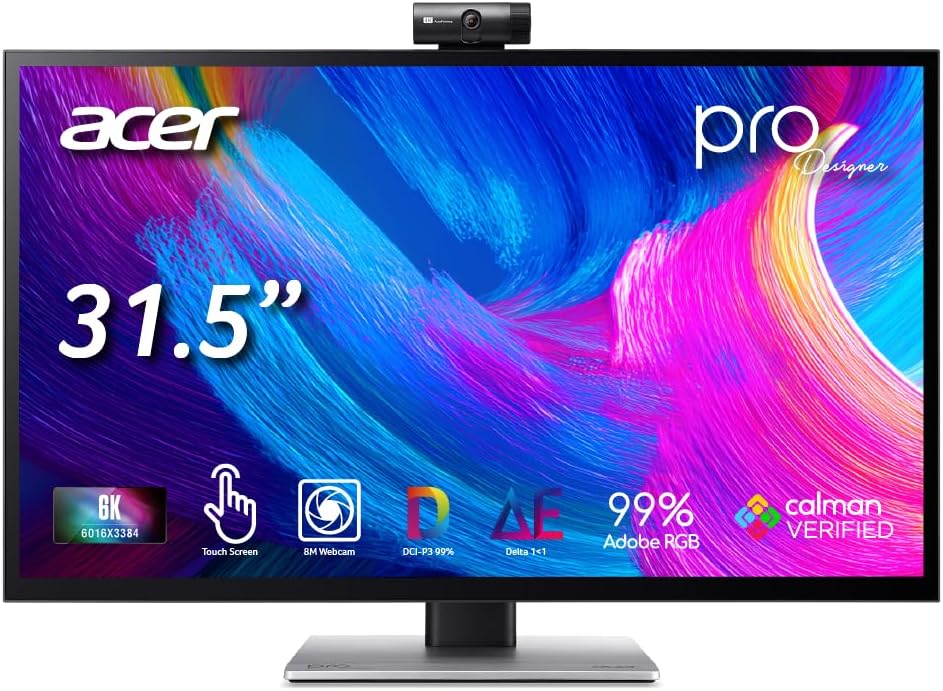
This monitor allows direct drawing on screen removing the need for a separate tablet. With factory calibration and touch support it streamlines workflows for sketching or retouching directly in your main workspace for efficiency and comfort.
We may earn a commission when you buy through this link, at no additional cost to you.
Color accuracy is ensured with Delta E under 1 verified by Calman. The built-in webcam and mics save space on your desk during calls. USB-C connectivity powers your laptop while transmitting video simplifying cable management significantly.
Ergonomic adjustments let you position the screen for comfortable drawing angles. While the cost is high, the all-in-one design saves money compared to buying separate peripherals. It is ideal for artists who want direct interaction.
Best for professionals needing precision input without leaving their desk. The included Creator Hub software enhances productivity by managing color spaces. This is a powerful tool for those who value speed and convenience in their creative process.
Retouch photos directly on screen saving steps and keeping your tools in one place for speed.
DisplayHDR 600 ensures your edits look accurate on HDR screens before final delivery to clients.
We may earn a commission when you buy through this link, at no additional cost to you.
The G32X offers strong performance with a clean design. It holds a high customer rating reflecting its reliability and ease of use. Color coverage meets professional needs while anti-glare tech helps reduce reflections during long viewing sessions.
We may earn a commission when you buy through this link, at no additional cost to you.
Its IPS panel ensures wide viewing angles so colors stay consistent. The ergonomic stand supports full adjustments. Build quality feels premium with CNC aluminum. Connectivity includes high-speed ports for multitasking with peripherals or external devices.
Power delivery via high-speed port charges laptops while streaming video. This simplifies desk setup and reduces cable clutter significantly. The universal mount option gives flexibility for arm setups if needed for specific ergonomic setups later.
Best for general professionals needing reliability and clarity. Its balanced specs make it suitable for mixed tasks. The high rating suggests satisfaction across different use cases making it a safe choice for most setups.
Anti-glare coating minimizes distracting reflections ensuring you focus on work even in bright rooms.
VESA compatibility allows third-party arms giving you full control over positioning for comfort.
We may earn a commission when you buy through this link, at no additional cost to you.
This Dell model focuses on connectivity with dual Thunderbolt 4 ports supporting high power transfer. The 52-inch size provides ample screen space for complex workflows. It serves well as a central hub for devices and peripherals needing power.
We may earn a commission when you buy through this link, at no additional cost to you.
Remote control and KVM functionality simplify switching between systems. Dell software aids color management ensuring accuracy across different apps. IPS Black technology improves contrast for better image quality in low light or dark mode applications.
The high power delivery reduces need for separate chargers keeping desks cleaner. However, setup may require careful configuration to maximize features. It is best for enterprise environments where connectivity is prioritized over casual use.
Ideal for IT or studio setups needing robust docking. The remote helps manage settings easily. This is a strong choice for those needing reliable connections and power delivery in a single large display.
140W delivery powers most laptops fully while streaming video reducing wall adapter clutter.
Included remote allows quick adjustments without reaching for physical buttons on the panel bezel.
We may earn a commission when you buy through this link, at no additional cost to you.
This LG monitor offers future-ready connectivity with Thunderbolt 5 enabling faster data transfer. The high pixel density ensures crisp text and images. KVM functionality simplifies control of multiple systems making it ideal for hybrid work setups.
We may earn a commission when you buy through this link, at no additional cost to you.
Color accuracy covers professional standards well. DisplayHDR 600 supports bright visuals for media consumption. Bundle items add value with cleaning kits and cable ties. This makes it a complete solution out of the box for new users.
Adjustable stand supports various positions for comfort. While expensive, the tech is advanced. It suits those planning to stay current with standards. The bundle ensures you have tools to maintain it easily.
Best for tech-forward professionals needing speed and clarity. The KVM helps manage multi-PC setups without extra hardware. This is a solid investment for those prioritizing long-term compatibility and performance.
Thunderbolt 5 delivers transfer speeds that handle large files faster than older standards for efficiency.
224 PPI ensures every pixel is sharp making text easy to read for long periods.
We may earn a commission when you buy through this link, at no additional cost to you.
This Dell monitor includes a protection plan adding security to the purchase. It offers 6K resolution with bright visuals suitable for standard work. USB-C simplifies connections for compatible laptops making setup quick and easy for any office.
We may earn a commission when you buy through this link, at no additional cost to you.
Response times are fast enough for general use. Brightness ensures visibility in various lighting. The bundle simplifies buying with extra support. It focuses on dependability for business environments needing consistent uptime.
Setup is straightforward with included cables. While color specs are standard, reliability is strong. This is best for users prioritizing service over extreme color accuracy. Peace of mind is the main selling point.
Ideal for corporate or home offices needing warranty support. The high resolution ensures crisp text. This is a practical choice for those who value service and reliability in their hardware selection.
Two-year protection reduces worry about hardware failures ensuring your workflow stays uninterrupted.
450 Nit brightness keeps screens visible even in well-lit rooms without needing to dim lights.
We may earn a commission when you buy through this link, at no additional cost to you.
This renewed option offers a larger screen at lower cost. It includes high refresh rates and Thunderbolt hubs. VESA mounting only gives flexibility for existing arms. It suits those needing space without new monitor stand purchase.
We may earn a commission when you buy through this link, at no additional cost to you.
Renewed condition may vary but offers value. High refresh supports smooth motion. It is a smart pick for tight budgets needing large displays. Ensure your desk supports VESA mounts before purchasing for success.
Connectivity remains strong with USB-C support. This helps save on total setup cost. It works well for secondary displays or budget setups. Check warranty terms with renewed items for peace of mind.
Ideal for budget-conscious users needing size. It maximizes value by removing stand costs. This is a practical choice for those willing to handle mounting to save money.
Buying without stand saves money if you already have a compatible VESA mount or arm.
120Hz ensures smooth scrolling and motion making it suitable for video editing or casual gaming.
We may earn a commission when you buy through this link, at no additional cost to you.
Choosing a 6K monitor involves balancing resolution, color accuracy, and connectivity to match your specific workflow needs.
IPS panels are standard for color accuracy and viewing angles while OLED offers deeper contrast but may cost more or burn in over time. Select based on whether you prioritize color or contrast for your tasks.
Prioritize IPS for mixed use or OLED for cinema and dark room work.
Look for 98% DCI-P3 or 99% Adobe RGB coverage if you work in video or print. Wide gamuts ensure accurate colors that match final outputs without needing calibration software.
Choose DCI-P3 for video and Adobe RGB for print to meet industry standards.
6K resolution offers clarity but pixel density matters. Higher PPI makes text sharper which reduces eye strain during reading. Ensure your GPU supports the resolution at desired refresh rates.
Aim for high PPI to ensure text is clear and easy to read.
Thunderbolt 4 or 5 hubs are vital for laptops with limited ports. Look for high power delivery to charge devices directly. HDMI 2.1 ensures future-proofing for external devices.
Ensure enough USB-C ports to connect all devices without dongles.
60Hz is common for professional work but 120Hz offers smoother motion. Gamers or video editors will benefit from higher refresh rates. Balance refresh rate with budget and GPU capabilities.
Choose higher refresh rates for gaming or motion video work.
Adjustability like tilt, height, and swivel is essential for comfort. VESA mount compatibility adds flexibility. Proper ergonomics prevent strain during long sessions.
Ensure the stand offers full adjustability to fit your posture.
Professional displays should come with extended warranties. Support quality matters when issues arise. Check for on-site service availability to reduce downtime.
Prioritize models with longer warranty periods for long-term security.
Balance cost with features you truly need. Premium panels cost more but offer better longevity. Check for bundle deals or refurbished options for savings.
Compare features against price to ensure you pay only for what you need.
Proper setup involves calibrating colors if not factory calibrated to ensure accuracy. Use software tools or hardware calibrators depending on your budget and needs.
Keep the screen clean with microfiber cloths to avoid scratching. Avoid direct sunlight to prevent glare and heat stress on the panel.
Use VESA mounts to position the monitor at eye level for comfort. Adjust brightness settings to match ambient light to reduce eye strain during long work.
A 6K monitor offers significantly higher pixel density leading to sharper text and finer detail. This reduces the need for zooming or scaling making it easier to view small elements without distortion or blurring.
Yes, driving 6K resolution requires significant GPU power especially at high refresh rates. Ensure your graphics card supports the resolution and output standard like Thunderbolt or HDMI 2.1 for best performance.
Yes, models with higher refresh rates and low response times are suitable for gaming. They offer crisp visuals and smooth motion. However, ensure your system can run games at that resolution without lag.
Accurate colors ensure what you see matches the final output for print or video. Without it, colors may appear washed out or incorrect leading to rework. Look for factory calibration and high gamut coverage.
Yes, most modern MacBooks support 6K via Thunderbolt. Ensure the monitor supports the correct bandwidth and color profiles for Mac. Check compatibility for specific models before purchasing.
Curved monitors offer a more immersive experience reducing eye strain by keeping corners equidistant. They are ideal for large screens. Flat panels are better for color accuracy and straight line work.
Thunderbolt 5 offers faster data transfer and power delivery rates. It supports higher bandwidth for external storage and displays. It is future-proof for upcoming high-speed devices.
Built-in speakers are convenient for basic audio but lack quality. For professional work, external speakers provide better sound. Use built-ins only for casual communication if needed.
The 6K monitor market offers diverse options from touch-enabled creative tools to ultra-wide productivity screens. Top picks like the ASUS ProArt and LG UltraFine lead with color and connectivity.
Prioritize your specific needs such as touch or color accuracy before buying. Balance these features with your budget to avoid overspending on unneeded specs.
Always check current prices and availability as models update quickly. Review warranties and support options to ensure long-term satisfaction with your display.