
Newmen GM326 Mechanical Keyboard
4.4Editor score
Hot-swappable linear switches
Rainbow LED backlighting
Ergonomic stepped keycaps
Discover the top 75 percent mechanical keyboards for 2026. This guide compares ten models for features, build quality, and performance to help you choose.
Finding the right mechanical keyboard can transform your daily computing experience. The 75 percent layout offers a perfect balance between compact design and functionality. It retains essential keys while saving valuable desk space for better mouse movement.
We evaluated ten top models based on connectivity, switch quality, and build materials. Our analysis focuses on gasket mounts, hot-swap capabilities, and wireless performance. Each product brings unique strengths to different user needs and budgets.
Every pick highlights specific benefits like RGB customization or multimedia knobs. Prices and availability change frequently so verify details before purchasing. These keyboards range from budget-friendly options to premium setups with screens.
4.4Editor score

4.6Editor score

4.7Editor score
This side-by-side comparison highlights the distinct features of each model. From connectivity options to switch types and special features like screens or knobs. Every product aims to deliver a tailored typing experience.




The AULA F75 Pro stands out with its versatile connectivity and refined build quality. It offers Bluetooth 5.0, 2.4GHz wireless, and USB-C wired modes for seamless switching between devices. The pre-lubed Reaper switches deliver a smooth and creamy typing experience right out of the box.
We may earn a commission when you buy through this link, at no additional cost to you.
Its advanced structure includes PCB single key slotting and five layers of filling silencer to reduce noise and enhance stability. The side printed PBT keycaps ensure durability and a soft touch while allowing light to shine through. The multi-function knob adds convenient control for volume and lighting adjustments.
While the driver is limited to Windows systems and the keyboard is heavier than some rivals, these trade-offs are acceptable for the feature set. The battery life is excellent, and the hot-swap design allows for easy customization without soldering.
Ideal for users seeking a premium wireless experience with a balance of gaming and productivity features. The AULA F75 Pro delivers a solid typing feel and robust connectivity that justifies its position as a top choice.
Connect up to five devices via Bluetooth 5.0, 2.4GHz wireless, or USB-C. Switch instantly with side buttons or shortcuts for efficient multitasking.
Supports 3-pin and 5-pin switches with a hot-swappable base. Easily replace switches and enjoy pre-lubed stabilizers for a smooth feel.
We may earn a commission when you buy through this link, at no additional cost to you.
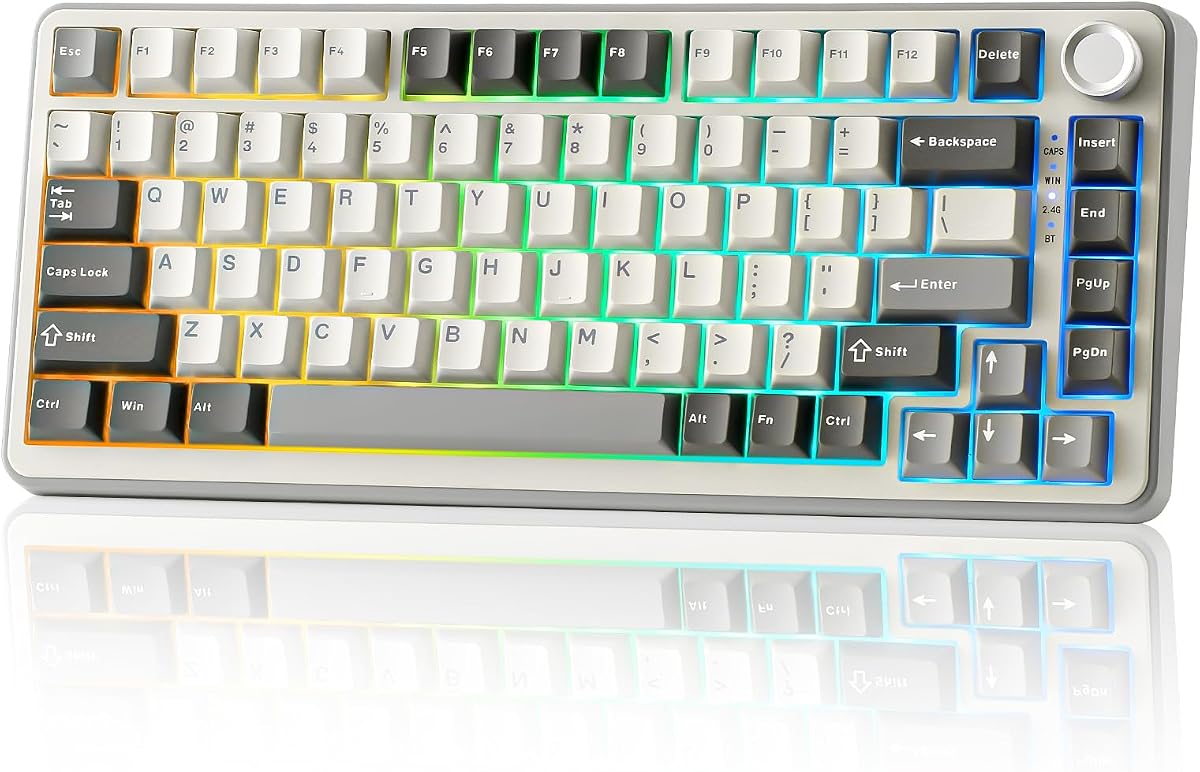
The Newmen GM326 offers incredible value with its hot-swappable design and compact 75% layout. It saves desk space while keeping essential keys like arrows and F-row for daily tasks. The multi-function knob allows quick volume adjustments and backlight customization without cluttering the keyboard.
We may earn a commission when you buy through this link, at no additional cost to you.
Its linear red switches are smooth and responsive, suitable for both gaming and typing. The detachable USB-C cable ensures easy portability, making it a solid choice for travelers. RGB backlighting provides multiple modes to personalize your workspace.
Though it lacks wireless connectivity and uses ABS keycaps that may shine over time, the performance remains reliable. The anti-ghosting feature ensures accurate key registration during intense sessions. For the price, it delivers essential mechanical keyboard features effectively.
Perfect for budget-conscious users who want customization without breaking the bank. The Newmen GM326 proves you can get a quality hot-swap experience at an accessible price point.
Switch mechanical keys freely without soldering. The PCB supports 3-pin switches, allowing you to tailor sound and feel.
Detachable USB-C cable enables easy transport. Perfect for home, office, or business trips where reliability matters.
We may earn a commission when you buy through this link, at no additional cost to you.
The Womier SK80 distinguishes itself with a vibrant color multimedia screen on the top right. This feature lets you view custom GIFs, system info, and settings at a glance. The gasket-mounted design with EVA positioning plate ensures a soft and responsive typing feel that reduces noise.
We may earn a commission when you buy through this link, at no additional cost to you.
Hot-swappable PCB supports 3-pin and 5-pin switches, giving you freedom to customize the typing experience. South-facing LEDs illuminate key legends clearly. The music syncing RGB mode creates immersive lighting effects that react to your audio.
While it requires wired connectivity and software for full customization, the build quality is premium. Cherry profile keycaps add comfort during long sessions. The screen adds a unique interactive element not found in most keyboards.
Ideal for enthusiasts who value aesthetics and innovation. The Womier SK80 combines gaming performance with a display that personalizes your desk setup like no other.
Customize GIFs and view system stats on the built-in display. Enhances the visual appeal and utility of the keyboard.
Soft EVA pads cushion the PCB for reduced noise and enhanced durability. Delivers a thocky feel for premium typing.
We may earn a commission when you buy through this link, at no additional cost to you.
The RK ROYAL KLUDGE R75 features a gasket mount design that optimizes sound and feel. Five layers of sound-absorbing material reduce vibration for a creamy typing experience. Triple mode connectivity with Bluetooth 5.1, 2.4GHz wireless, and USB-C offers flexibility.
We may earn a commission when you buy through this link, at no additional cost to you.
Pre-lubed cream switches are smooth and quiet. The CNC metal knob provides precise volume control and can be hot-swapped. PBT keycaps resist wear and ensure long-term durability. Over 20 RGB modes allow extensive customization.
While battery life drops with RGB enabled, the typing feel is exceptional. The switch is hot-swappable for easy customization. The layout retains essential keys while saving space for mouse movement.
Suitable for users prioritizing typing comfort and sound dampening. The RK ROYAL KLUDGE R75 delivers a premium gasket mount experience at a competitive price.
Five layers of damping material reduce key noise and vibration. Provides a soft and stable typing experience.
Connect via Bluetooth 5.1, 2.4GHz, or USB-C. Switch up to three devices for efficient workflow.
We may earn a commission when you buy through this link, at no additional cost to you.
This retro keyboard combines a gasketed mount with a multi-function knob for volume control. The 75% layout saves space while retaining arrows and function keys. Pre-lubed linear switches provide smooth typing. Hot-swap PCB allows easy customization without soldering.
We may earn a commission when you buy through this link, at no additional cost to you.
Full-key macro programmability via driver enhances productivity. RGB lighting supports music rhythm effects for immersion. The gasketed mount ensures stability and quiet operation. The design is minimalist yet functional for office or gaming setups.
The lack of wireless connectivity is the main trade-off. However, the wired connection ensures zero latency and stable performance. It is a solid choice for users focused on sound and tactile feedback.
Best for those who prioritize a stable typing experience and compact size. The retro gasket keyboard delivers smooth performance and modern features at an accessible price.
Tight fit between internal components ensures stability. Provides a quiet and tactile typing experience.
Customize keys for enhanced workflow. Optimizes gaming performance and typing efficiency through software.
We may earn a commission when you buy through this link, at no additional cost to you.
The MageGee keyboard features a tenkeyless design that retains arrows and function keys. It uses mechanical red switches for smooth linear action. The LED blue backlight provides multiple modes for immersive ambiance. Full anti-ghosting ensures precise key registration.
We may earn a commission when you buy through this link, at no additional cost to you.
Ergonomic ABS keycaps and adjustable kickstands enhance comfort. The metal panel adds durability. It is plug-and-play with no drivers needed. Compatible with Windows, macOS, and Linux systems.
The lack of hot-swap or wireless limits customization. However, the straightforward design ensures reliability. The blue backlight is distinct and functional for low-light gaming.
Perfect for users seeking a simple, wired mechanical keyboard. The MageGee offers a reliable entry point into mechanical gaming without unnecessary complexity.
Retains arrows and F-keys. Saves desk space for better mouse movement during gaming sessions.
No drivers required. Just connect via USB and start typing or gaming immediately.
We may earn a commission when you buy through this link, at no additional cost to you.
This gasket-mounted keyboard uses sound-absorbing pads for a quiet and cushioned feel. The PBT keycaps resist oil and wear over time. Hot-swappable sockets let you change switches easily. Full anti-ghosting ensures accurate input during gaming.
We may earn a commission when you buy through this link, at no additional cost to you.
RGB lighting is customizable via software. The carbon design is sleek and durable. The gasket structure provides a softer typing feel than standard mounts. It is compatible with Windows and macOS.
The wired-only connectivity may not suit wireless users. However, the focus on sound dampening makes it ideal for shared spaces. The PBT keycaps maintain texture longer than ABS.
Best for users prioritizing sound isolation and build quality. The gasket-mounted keyboard delivers a refined experience with premium materials.
Internal pads reduce noise. Creates a quieter typing experience perfect for offices or night use.
High-quality PBT resists wear. Maintains texture and look over extended use.
We may earn a commission when you buy through this link, at no additional cost to you.
The AULA S75 PRO features an interactive LCD screen for real-time updates. It supports BT5.0, 2.4GHz wireless, and USB-C. The screen displays battery status, GIFs, and volume levels. Hot-swap design allows 3-pin and 5-pin switches.
We may earn a commission when you buy through this link, at no additional cost to you.
The multi-function knob adjusts brightness and settings. RGB lighting offers 19 effects. The 75% layout saves space. PBT keycaps are side-engraved and durable. The software supports macros for enhanced efficiency.
The screen requires wired mode for setup. This is a minor inconvenience for a premium feature. The wireless modes ensure freedom after initial configuration. The battery life supports long sessions.
Ideal for users who want visual customization and wireless convenience. The AULA S75 PRO balances functionality with modern aesthetics.
Real-time battery, GIFs, and settings at a glance. Adds a unique visual element to your setup.
Seamlessly switch between five devices via Bluetooth or 2.4GHz. Reliable performance for all users.
We may earn a commission when you buy through this link, at no additional cost to you.
The Keychron K2 features a 75% layout with a unique Mac layout. It connects via Bluetooth 5.1 for up to three devices. The Super Red switch offers linear responsiveness. White LED backlight is elegant for low-light typing.
We may earn a commission when you buy through this link, at no additional cost to you.
Battery lasts up to 72 hours of typing. N-key rollover ensures accuracy. Extra keycaps for both OS are included. The Type-C connection enables wired mode. Compatible with Windows, macOS, iOS, and Android.
Limited RGB and wired mode restrict customization. However, the Mac layout is superior for Apple users. Battery life is among the best in the category. The build is sturdy and premium.
Best for Mac users seeking Bluetooth reliability. The Keychron K2 delivers seamless integration with Apple devices and long battery life.
Includes dedicated Mac function keys. Comes with extra keycaps for seamless cross-platform use.
4000mAh battery supports up to 72 hours. Reduces charging frequency significantly for daily use.
We may earn a commission when you buy through this link, at no additional cost to you.
The YUNZII B75 PRO uses a gasket mount with 5-layer padding for stability. Tri-mode connectivity ensures seamless switching. Hot-swappable sockets allow customization. South-facing LEDs provide clean RGB illumination. The multi-function knob adjusts volume and backlight.
We may earn a commission when you buy through this link, at no additional cost to you.
Creamy linear switches are smooth. The 4000mAh battery supports long wireless sessions. Double shot keycaps and precision stabilizers enhance feel. Compatible with Windows and macOS.
Software requires wired mode, limiting quick tweaks. However, the typing experience is solid. The RGB is vibrant and customizable. It balances gaming and productivity well.
Ideal for users wanting wireless freedom with premium feel. The YUNZII B75 PRO offers a creamy experience with extensive connectivity.
Advanced gasket structure with padding. Delivers solid typing feel and reduced noise for comfort.
Bluetooth, 2.4GHz, and USB-C support. Reliable wireless performance for any workflow or device.
We may earn a commission when you buy through this link, at no additional cost to you.
Selecting the right keyboard requires evaluating several factors. We outline the key aspects to ensure you find a model that fits your workflow.
The 75 percent layout is compact yet functional. It retains arrow keys and F-row for productivity while saving desk space. This design suits users who need essentials without a large footprint.
Choose a 75 percent keyboard if you value space efficiency without sacrificing function.
Mechanical switches define typing sound and feel. Linear switches offer smooth action, while tactile provide feedback. Pre-lubed switches reduce noise and improve quality.
Select switches based on your preference for sound and resistance.
Wireless models use Bluetooth or 2.4GHz for multi-device support. Wired connections ensure zero latency. Tri-mode options provide flexibility for home and office.
Pick a connectivity type that matches your device setup and mobility needs.
Hot-swap keyboards allow you to change switches without soldering. This feature lets you customize sound and feel over time. It is ideal for enthusiasts who value modularity.
Look for hot-swap PCB support if you plan to upgrade switches later.
Gasket mounts reduce noise and provide a softer feel. PBT keycaps resist wear better than ABS. Check for sound-dampening materials inside the case.
A solid build ensures durability and enhances the typing experience.
Drivers allow macro programming and RGB control. Some keyboards require wired mode for settings. Advanced features like screens need specific software.
Ensure the software supports your operating system and desired features.
Wireless keyboards need large batteries for long life. RGB can reduce battery time significantly. A 4000mAh battery supports weeks of use with backlight off.
Check battery capacity and estimated usage time before buying wireless models.
Knobs allow quick volume and brightness adjustments. Some models include LCD screens for visual feedback. These controls enhance convenience during gaming or work.
Look for knobs or screens if you want faster access to settings.
Start by connecting your keyboard via the desired mode. Bluetooth pairs with devices for wireless use while 2.4GHz offers low latency. Press side buttons or shortcuts to switch devices effortlessly.
Customize your setup using the software or driver. Adjust RGB lighting and macros to fit your workflow. For hot-swap keyboards, replace switches gently without force.
Maintain the keyboard by cleaning keycaps regularly. Use a brush or compressed air to remove debris. Avoid liquids and keep the surface dry for longevity.
A 75 percent keyboard saves desk space while keeping essential keys like arrows and F-keys. It offers a compact footprint without sacrificing functionality for daily tasks.
Many models support Bluetooth 5.0 or 5.1 along with 2.4GHz wireless. This allows switching between multiple devices for seamless workflow across computers and tablets.
Hot-swap switches let you change keys without soldering. This allows you to experiment with different types and feel without replacing the entire keyboard.
Linear switches are smooth and quiet, while tactile ones offer feedback. Consider if you prefer minimal resistance or a bump for typing accuracy.
Most models work with macOS via USB or Bluetooth. Some like Keychron K2 include dedicated Mac keycaps and layouts for native compatibility.
A gasket mount uses padding to cushion the PCB. This reduces noise and vibration for a softer and more stable typing experience.
Most models offer RGB or LED backlight. Customization may vary with software support allowing color changes and dynamic effects for gaming.
Clean keycaps with a brush or compressed air regularly. Avoid spills and keep the keyboard dry. Check for firmware updates to maintain performance.
The top picks like the AULA F75 Pro and Womier SK80 lead with versatility and innovation. They deliver premium features like tri-mode connectivity and multimedia screens for enthusiasts.
Prioritize layout and connectivity based on your setup. Wireless models offer flexibility while wired options ensure zero latency. Choose hot-swap if you value future customization.
Always check current prices and availability before purchasing. These keyboards provide a great balance of size and power for any user in 2026.