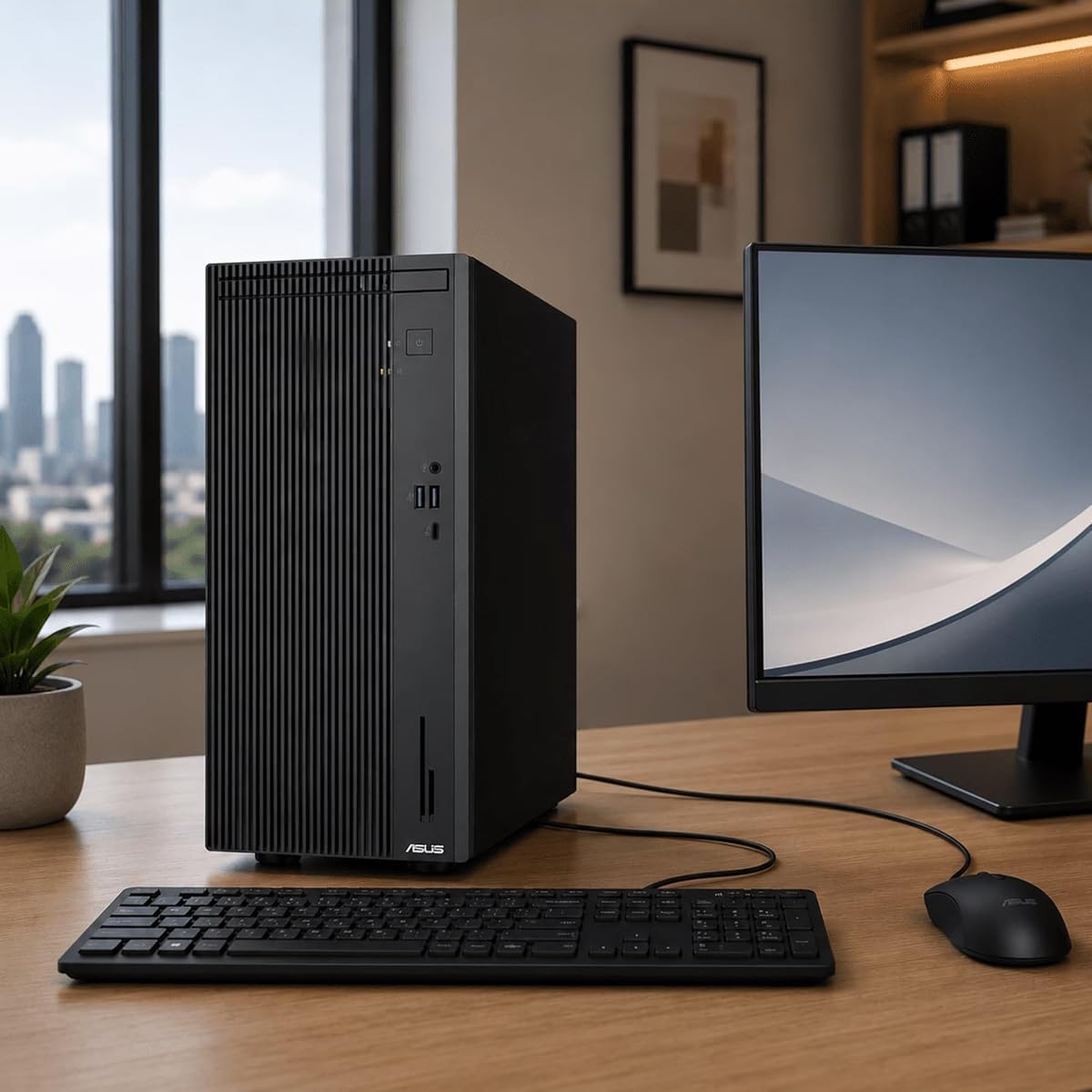
ASUS V500 Business Tower Desktop Computer
5.0Editor score
10-core Intel Core i7 processor
16GB DDR5 memory included
Supports dual monitor setups
Explore our expert guide comparing the top ASUS Desktop PC models for business and gaming, detailing specs and performance to help you choose the right system.
Finding the right computer for your needs can be challenging when faced with so many options available today. ASUS offers a wide range of desktop solutions tailored for professionals, gamers, and home users who demand reliability and speed in their daily computing tasks.
We have carefully analyzed ten distinct models from the ASUS lineup to determine which ones stand out in performance, build quality, and value. This guide breaks down the key specifications and features of each system so you can make an informed decision without confusion.
Each recommendation highlights specific strengths whether you need a compact office tower or a high-performance gaming rig. Please note that availability and pricing can fluctuate frequently so we encourage you to check current listings before making your final purchase decision.
5.0Editor score

4.7Editor score

5.0Editor score
The following table provides a side-by-side comparison of all ten ASUS Desktop PC models included in this guide to help you quickly identify which system best matches your specific performance and connectivity requirements.


This ASUS V500 Business Tower Desktop Computer stands out as a reliable choice for small offices and home users who need a balanced system without breaking the bank. It carries a perfect user rating which reflects high satisfaction among buyers who appreciate its straightforward setup and solid everyday performance.
We may earn a commission when you buy through this link, at no additional cost to you.
At its core lies the Intel Core i7-13620H processor which offers ten cores and sixteen threads to handle multiple applications simultaneously. The inclusion of 16GB of DDR5 memory ensures that switching between spreadsheets, browsers, and video calls remains smooth. Storage is handled by a combination of internal and external drives providing ample space for documents and media files.
While it lacks a dedicated graphics card this system relies on integrated Intel UHD Graphics which are sufficient for daily tasks and media consumption. The limitation is acceptable given the focus on business productivity rather than gaming. Users looking for heavy graphical workloads might need to consider a higher model.
If you are looking for a dependable machine for administrative tasks this system delivers excellent value. It comes ready to use with a keyboard and mouse included making it easy to get started immediately. We recommend it for professionals who need a fast and reliable desktop for standard office work.
The 10-core processor ensures that even with many apps open the system remains responsive and lag-free for typical business workflows.
Support for both HDMI and DisplayPort allows you to connect multiple monitors to expand your workspace efficiently.
We may earn a commission when you buy through this link, at no additional cost to you.
The ASUS ROG G700 Gaming Desktop PC represents a strong middle ground for users who want serious performance without stepping into the ultra high-end tier. With a rating of 4.7 stars it has garnered positive feedback for its ability to handle modern titles and demanding software with ease.
We may earn a commission when you buy through this link, at no additional cost to you.
This system is built around the Intel Core Ultra 7 265F processor which delivers exceptional speeds for both gaming and creative workloads. The 32GB of DDR5 RAM is a standout feature ensuring that background tasks do not slow down your gameplay. The NVIDIA GeForce RTX 5060 graphics card supports ray tracing and high frame rates for an immersive visual experience.
Although it is priced higher than standard office PCs the value is evident in the hardware quality and included accessories. The RGB keyboard and mouse add a nice touch to your setup right out of the box. The cooling system is designed to keep temperatures in check during long gaming sessions.
We recommend this machine for gamers and content creators who need a versatile rig. It balances performance and features well enough to be a long-term investment. If you want a desktop that can game and work efficiently this is our top recommendation.
The Ultra 7 processor paired with DDR5 memory provides the speed necessary for seamless multitasking and streaming.
RTX technology brings realistic lighting and shadows to your games enhancing the overall immersion and fidelity.
We may earn a commission when you buy through this link, at no additional cost to you.
The ASUS S501MER Desktop PC brings the latest 14th Gen Intel Core i7 processor to the desktop market making it a compelling option for power users. It holds a solid rating indicating that many users are happy with its raw performance capabilities despite some mixed feedback.
We may earn a commission when you buy through this link, at no additional cost to you.
At the heart of this system is the Core i7-14700 which offers a massive cache and high clock speeds for demanding applications. The 16GB of DDR5 RAM provides a smooth baseline for daily use while the 1TB PCIe SSD ensures rapid data access. Wi-Fi 6E support means you get the fastest possible wireless speeds available today.
One potential trade-off is the variation in user experiences likely due to shipping or setup differences. The physical design is compact which fits well in smaller spaces but the included keyboard and mouse are standard. You might prefer to use your own peripherals for better comfort.
This desktop is ideal for users who prioritize processing power over graphics performance. It is well-suited for software development data analysis and heavy multitasking. If you need the newest CPU technology in a reliable chassis this model is worth considering.
The 14th Gen i7 processor ensures you are future-proofed for upcoming software demands and efficiency improvements.
Wi-Fi 6E capability allows for faster downloads and streaming without being tethered to an ethernet cable.
We may earn a commission when you buy through this link, at no additional cost to you.
The ASUS V500 Home & Business Desktop Computer impresses with a perfect rating driven by its generous 32GB of RAM which sets it apart from similar models in this category. It is designed for users who need to keep many applications open at once without experiencing slowdowns.
We may earn a commission when you buy through this link, at no additional cost to you.
Powered by the 13th Gen Intel Core i7 processor this system handles business applications and entertainment needs with equal ease. The 32GB memory is a significant advantage for professionals working with large datasets or virtual machines. The 1TB PCIe SSD ensures that your storage remains fast and responsive.
While it lacks a dedicated graphics card the integrated Intel UHD Graphics are capable of driving multiple displays up to 4K resolution. This makes it a strong candidate for a trading desk or design workflow where screen real estate is critical. The price reflects this premium memory configuration.
We suggest this desktop for power users who need memory headroom but do not require gaming graphics. It is a solid investment for stability and speed. If your work involves heavy multitasking this configuration will keep you productive throughout the day.
With 32GB of RAM you can run dozens of browser tabs and heavy apps simultaneously without any system lag.
The support for dual 4K monitors ensures your work is displayed with high precision and color accuracy.
We may earn a commission when you buy through this link, at no additional cost to you.
The ASUS ROG G700 (2026) Gaming Desktop PC pushes the boundaries of home computing with its latest generation components and aggressive styling. Although it has no rating yet it represents the cutting edge of what ASUS offers in the gaming market right now.
We may earn a commission when you buy through this link, at no additional cost to you.
Equipped with the Core Ultra 7 265KF and an RTX 5070 this machine is built for high fidelity gaming and intensive creative tasks. The dual-glass chassis is not just for looks it also facilitates better airflow and showcases the internal RGB lighting. The cooling system is robust enough to handle the heat generated by these powerful components.
One limitation is the high price point which places it in a premium bracket compared to average desktops. However for enthusiasts who demand top tier performance this cost is often justified by the hardware quality. The tool-less access design makes it easier to upgrade components in the future.
We recommend this system for serious gamers and streamers who want a desktop that looks and performs like a flagship. If you want to play the latest titles at max settings this model delivers that experience. It is a top choice for those building a high-end setup.
The RTX 5070 GPU ensures that you can tackle ray tracing and high resolutions with ease and fluidity.
The glass chassis and RGB lighting make this PC a standout centerpiece in any modern gaming room.
We may earn a commission when you buy through this link, at no additional cost to you.
The ASUS ROG GM700 (2025) Gaming Desktop PC is a robust offering for those who prefer AMD architecture. It has received positive ratings for its raw performance and ability to handle modern gaming workloads with stability and efficiency.
We may earn a commission when you buy through this link, at no additional cost to you.
Driven by the AMD Ryzen 7 9800X3D this system excels in frame rates and application speeds. The 2TB NVMe SSD provides ample room for a large library of games and files without needing external drives. The 32GB of DDR5 RAM ensures that background processes do not hinder your experience.
One trade-off is the cost as this system is priced at a premium level compared to average desktops. Additionally it is heavily optimized for gaming which might be overkill for basic office work. The aesthetics are also tailored for a gaming room rather than a formal office environment.
We recommend this desktop for AMD enthusiasts who want a high-performance machine out of the box. It is perfect for gamers who need to store a lot of content locally. If you prefer the AMD ecosystem and need power this is a great choice.
The Ryzen 9800X3D is widely regarded as one of the best processors for gaming performance currently available.
A 2TB SSD means you can install almost every game you own without worrying about running out of space.
We may earn a commission when you buy through this link, at no additional cost to you.
The ASUS V500 Tower Desktop is tailored for business environments with the inclusion of Windows 11 Pro. It holds a mixed rating suggesting that while the hardware is capable there may be some variability in customer experience or setup expectations.
We may earn a commission when you buy through this link, at no additional cost to you.
This model features the 10-core Intel Core i7-13620H which provides reliable performance for daily business tasks. The 16GB of DDR5 RAM keeps applications running smoothly while the 1TB SSD ensures quick boot times. A unique selling point is the included ADATA 64GB USB flash drive which adds immediate storage convenience.
One limitation is the limited positive feedback which might indicate shipping issues or specific user expectations. The keyboard and mouse are basic wired units which work well but may not be preferred by all users. The system is designed to be reliable rather than flashy.
We suggest this system for small businesses needing professional operating system features. It is a practical choice for offices that require Windows 11 Pro for networking and security. If you value business tools over gaming features this desktop fits the bill.
Windows 11 Pro offers better security and group policy management ideal for secure office environments.
The included USB drive is a helpful extra for transferring files quickly to and from the desktop.
We may earn a commission when you buy through this link, at no additional cost to you.
The ASUS ROG Strix G700 Desktop stands out as a true workstation with its incredible 128GB of RAM and 11TB of storage. It boasts a perfect rating indicating that users who buy this system are overwhelmingly satisfied with the performance and quality.
We may earn a commission when you buy through this link, at no additional cost to you.
Powered by the Core Ultra 9 processor this machine is built for heavy-duty content creation and enterprise-level tasks. The 11TB storage ensures you never run out of space for large video projects or datasets. Windows 11 Pro is included to support advanced security and management needs.
One trade-off is the massive price tag which makes it inaccessible for most casual users. The hardware is also so powerful that it may be overkill for simple tasks. However for professionals who need this power it is a rare find in a prebuilt system.
We recommend this desktop for high-end creators and engineers who need maximum capacity. If your work involves 8K video editing or massive simulations this model will handle it. It is the ultimate choice for power users.
128GB of RAM is an exceptional amount that allows for seamless editing of 8K video and complex rendering.
With 11TB you can store years worth of media and data without needing external storage solutions.
We may earn a commission when you buy through this link, at no additional cost to you.
The ASUS V500 Home & Business Desktop Computer is an impressive high-memory model that caters to professionals needing exceptional multitasking capabilities. With 64GB of RAM it sits at the top of the business lineup for memory configuration.
We may earn a commission when you buy through this link, at no additional cost to you.
This system relies on the 13th Gen Intel Core i7 processor to drive efficiency and speed. The 64GB of RAM ensures that virtual machines and heavy applications run without any lag. The 1TB PCIe SSD keeps your data access rapid and responsive for all your daily needs.
While the price is higher than average the memory capacity justifies the cost for power users. It lacks a dedicated GPU but supports 4K displays which is great for multi-monitor setups. The system is robust and reliable for consistent daily use.
We suggest this desktop for those who need to run complex software simultaneously. It is ideal for financial analysts or developers who need large memory buffers. If you want a reliable workhorse with plenty of memory this is a top choice.
64GB of RAM allows for virtually unlimited multitasking and ensures your system never slows down.
Support for dual 4K monitors makes this perfect for professionals who need detailed visual workspaces.
We may earn a commission when you buy through this link, at no additional cost to you.
The ASUS Business Desktop Computer PC is a sleek and reliable option for corporate environments. It has received a perfect rating which highlights its stability and consistent performance in professional settings.
We may earn a commission when you buy through this link, at no additional cost to you.
This system is powered by the Core i7-13620H processor and 16GB of fast DDR5 RAM. The inclusion of Windows 11 Pro provides essential security and management tools for businesses. The 1TB SSD ensures that your system boots quickly and runs applications efficiently.
While it does not offer extensive internal upgrades its compact design saves desk space. The included keyboard and mouse are standard but functional for office work. The focus is on providing a secure and managed environment for employees.
We recommend this desktop for businesses that need a secure and standardized system. It is perfect for office environments where security and reliability are priorities. If you need a no-nonsense business PC this model delivers.
Windows 11 Pro ensures that your business data is protected with advanced security features.
5600MHz DDR5 RAM provides excellent speed for daily business tasks and multitasking.
We may earn a commission when you buy through this link, at no additional cost to you.
Choosing the right desktop involves evaluating several key factors to ensure the system meets your specific performance and budget requirements.
The processor is the brain of your computer and dictates how fast tasks are completed. For business tasks an Intel Core i7 or AMD Ryzen 7 is sufficient but for gaming or video editing look for the latest Ultra 9 or high core count options.
Always match the processor to your intended workload to avoid overspending or underperforming.
RAM determines how many applications you can run simultaneously without slowdown. 16GB is a good starting point but 32GB or more is ideal for heavy multitasking or professional workloads.
More memory ensures smoother performance when switching between complex programs.
If you plan on gaming or rendering video ensure the system has a dedicated graphics card like the RTX 5060 or RX 9070 XT. Integrated graphics work for basic tasks but lack the power for modern titles.
Select a GPU that matches your desired resolution and frame rate targets.
SSDs provide much faster boot times than traditional hard drives so prioritize systems with PCIe NVMe SSDs. Ensure the capacity is enough to store your files and applications locally.
A fast SSD improves the overall responsiveness of your desktop significantly.
Check for the number of USB ports HDMI and DisplayPort connections to ensure you can connect all your peripherals. Wi-Fi 6E and Ethernet options are also important for stable network connections.
Ample connectivity ensures you do not need extra hubs for your devices.
Windows 11 Pro is recommended for business use due to better security and management features while Home is suitable for general personal use. Ensure the OS matches your organizational needs.
The right OS simplifies your workflow and enhances system security.
Consider the size and weight of the tower especially if you have limited desk space. Some models have advanced cooling systems that may be bulkier but perform better under load.
A compact design helps maintain a clean and organized workspace.
Look for models that come with a standard warranty or optional extended protection plans. This ensures peace of mind should hardware issues arise after purchase.
Good support guarantees longevity and reliability for your investment.
Start by placing the desktop on a stable flat surface with good airflow to prevent overheating. Ensure you connect the power cable and monitor securely using HDMI or DisplayPort for the best visual output.
Install necessary software and drivers from the ASUS website to ensure all hardware components function correctly. Keep your system updated to maintain security and performance over time.
Clean the exterior regularly with a soft dry cloth to remove dust. Avoid placing liquids near the computer to prevent accidental damage to the internal components.
Yes many of the ROG models are specifically designed for gaming with dedicated graphics cards and high refresh rate support. The business models are better for office work but can handle light gaming due to integrated graphics.
Most models have spare slots allowing you to add more RAM later. Check the specifications to see if the memory is expandable or soldered before purchasing.
These desktops generally do not include a monitor. You will need to purchase one separately unless specified otherwise in the bundle details.
The models with higher RAM and dedicated GPUs like the ROG Strix are ideal for video editing. Look for at least 32GB of RAM and a strong GPU for smooth playback.
Most newer models include Wi-Fi 6 or 6E for fast wireless speeds. Check the specific connectivity section of each product for confirmation.
Some models come with trials of Office 365 but you will need to subscribe for continued use. Ensure you check what software is included before purchasing.
We have explored ten diverse models ranging from business towers to powerful gaming rigs. The best choice depends on whether you need raw power for creative work or reliable performance for office tasks.
Prioritize the features that matter most to you such as memory capacity or graphics power. A well chosen desktop will serve you well for years without needing frequent upgrades.
Always verify the latest availability and features on the product page before purchasing to ensure you get the exact configuration you need.