
Pankia Box Physical Click Keyboard Auto Clicker Mouse Jigglier Simulated Finger Tapper Game Assistance Keep Computer Laptop Active
3.6Editor score
Three adjustable ports
Simple speed settings
Durable construction
This expert guide compares the top automated keyboard clicker tools for gamers and professionals to help you choose the best physical device for your needs.
Finding the right automated keyboard clicker can save you hours of repetitive work or keep your games active without constant input. Physical devices offer reliability that software cannot match. We have reviewed the top models available now to help you make an informed decision for your setup.
Our team analyzed ten distinct products based on build quality, speed customization, and ease of use. We looked at physical arms, programmable units, and specialized clickers to see which ones deliver consistent performance. Each entry in this list has been selected for its ability to handle specific clicking tasks efficiently.
Each product pick below highlights key features, pros, and cons to give you a clear picture of what to expect. You will find detailed breakdowns of how these tools operate and who they suit best. Please note that prices and availability can change frequently, so check the latest listings before buying.
3.6Editor score

4.0Editor score

4.3Editor score
The following table provides a side by side overview of all ten products we reviewed. It highlights the core specifications and unique selling points for each device to help you compare them quickly.




This device offers a straightforward approach to automated clicking with its random speed options. It aims to keep systems active without constant manual input. The physical design ensures it works independently of software constraints. While it has a modest rating, users appreciate its utility for specific tasks like keeping games alive. It serves as a basic tool for those needing occasional automation without complex setup.
We may earn a commission when you buy through this link, at no additional cost to you.
The standout feature is the availability of fifteen different random click speeds. This variety allows users to select a pace that mimics human activity closely. The indicator light provides visual feedback on the active mode, making operation intuitive. You can press a button to switch between modes easily. This flexibility helps in scenarios where different tasks require different click frequencies.
However, the device does not offer advanced programmable settings like loop times or rest periods. It relies on hardware buttons for mode selection which might be less convenient for dynamic needs. Some users might find the physical arm adjustments require fine tuning for different keyboard layouts. The heat generation is a consideration if used at maximum speed for long periods. These trade-offs are acceptable for casual users but might limit power users.
This product is ideal for individuals who need a simple, plug and play solution for repetitive clicking. It suits gamers who want to prevent logout without complex software. If you need basic automation and value simplicity over advanced features, this is a strong candidate. We recommend checking current availability and compatibility with your specific keyboard before purchasing to ensure a good fit.
You can choose from fifteen random speeds to match your specific needs.
An indicator light flashes to show the current mode number clearly.
We may earn a commission when you buy through this link, at no additional cost to you.
This programmable unit stands out for its high degree of customization options. It allows you to define loop times, click intervals, and rest periods precisely. The physical arm design ensures it works without software installation. With a solid four star rating, it appeals to users needing reliable automation for games or tasks. It bridges the gap between simple clickers and complex software tools effectively.
We may earn a commission when you buy through this link, at no additional cost to you.
The key strength lies in its ability to set independent speeds for each of the three ports. This means you can customize different clicking patterns simultaneously to meet diverse needs. You can also specify random time ranges and click counts for more human like behavior. The device supports timed operations which is crucial for long sessions. This level of control makes it versatile for various automation scenarios.
Users must be mindful of the heat related damage warning if exceeding five clicks per second. This limit ensures longevity but might feel restrictive for high intensity tasks. The physical arm has three adjustable parts which can be tricky to position on some keyboards. Despite this, the durability and ease of use generally outweigh these minor inconveniences. The premium price is justified by the feature set.
For users seeking a robust physical clicker that mimics human behavior closely, this is an excellent choice. It fits well for game assistance where software might be blocked. If you need to automate repetitive clicks with precise timing control, consider this model. We suggest reading the manual carefully to maximize the programmable features for your specific use case.
Each of the three ports can have its clicking speed adjusted independently.
Set random time ranges and click counts to simulate natural activity.
We may earn a commission when you buy through this link, at no additional cost to you.
This budget friendly option provides a simulated finger tapper experience for gaming. It places an arm on the keyboard or mouse to click automatically. The three ports allow for separate speed adjustments to suit different tasks. Users looking for a cost effective solution to keep computers active will find this useful. It delivers on the core promise of physical automation without complex setup requirements.
We may earn a commission when you buy through this link, at no additional cost to you.
The primary advantage is the ability to adjust speeds across all three ports independently. This flexibility helps in scenarios where different keys require different click frequencies. The device is designed to be versatile across various keyboard types. You can place it to click on screens or specific keys easily. This adaptability makes it a good entry point for automated clicking.
One notable caution is the warning against clicking more than five times per second to avoid heat damage. This limits its use in high speed scenarios where rapid inputs are needed. The arm has three adjusting parts which may require some trial and error to position correctly. While the guarantee offers peace of mind, the physical limitations should be considered. These factors define its best use cases.
Ideal for users who want a simple physical solution to prevent system sleep or game timeouts. It works well for basic repetitive tasks that do not require high speed. If you are new to automated clickers and want to test the waters, this is a safe choice. We recommend ensuring your keyboard layout allows for proper arm placement before finalizing your purchase.
All three ports can adjust the speed separately for diverse needs.
Supports both keyboard and mouse clicking applications effectively.
We may earn a commission when you buy through this link, at no additional cost to you.
This device distinguishes itself with a digital display that shows click speed numbers clearly. It offers press and release modes for varied automation control. The ABC groups allow sequential execution of different click patterns. Powered by 5V it is safe and compatible with many power sources. It is suited for users who want visual feedback on their automation settings.
We may earn a commission when you buy through this link, at no additional cost to you.
The standout feature is the ABC configurable content logic. You can set click head travel distance and running speed with precision. The device supports any single-use combination with fixed random time up to 999 seconds. This allows for latency settings from 0.1 seconds to 80 hours. The host directly sets the time without needing computer programming which is very convenient.
However, the logic of executing groups sequentially can be complex to configure initially. Users must understand how to close or open groups like B and C for specific effects. It requires USB power which limits mobile use unless a power bank is available. The display is a plus but the button design might be small for some hands. These aspects require a learning curve but offer deep control.
This tool is great for advanced users who need precise timing combinations without software. It is useful for tasks requiring long wait times between click sequences. If you value visual speed feedback and programmable latency, this device delivers. We suggest reviewing the setup instructions carefully to get the most out of the ABC logic features.
The digital display function shows click speed clearly in numbers.
Enable arbitrary combination of fixed time and random time up to 80 hours.
We may earn a commission when you buy through this link, at no additional cost to you.
This product is a set of mechanical switches rather than a standalone device. It provides the clicky components used in keyboards or 3D printed fidgets. The switches offer crisp tactile feedback and waterproof durability. With a high 4.7 rating, users value the build quality and style. It is essential for custom keyboard builds or DIY clicker projects.
We may earn a commission when you buy through this link, at no additional cost to you.
The key strength is the premium material construction with plastic housing and copper washers. These switches have a service life of up to 50 million cycles ensuring longevity. The clear housing complements LED backlighting for a polished look. They are waterproof and dustproof which adds to their reliability in various environments. The 50 pack is ample for multiple projects or replacements.
Keep in mind these are components requiring installation rather than a ready to use device. You will need to integrate them into a mechanical keyboard or custom build. The loud clicky sound might not be suitable for quiet office settings. While excellent for tactile feel, they do not automate clicking on their own. They serve as the core mechanism for custom clickers.
This set is perfect for enthusiasts building custom keyboards or 3D printed clickers. If you want a satisfying tactile experience in your typing or fidget gear, these are ideal. We recommend them for hobbyists who need durable mechanical components. Ensure you have the tools and knowledge to install them correctly for best results.
Service life of up to 50 million cycles ensures durable performance.
Made of plastic housing copper washers and precision steel springs.
We may earn a commission when you buy through this link, at no additional cost to you.
This device holds a perfect 5.0 rating indicating high user satisfaction. It is a physical clicker designed to prevent offline status without installation. The random click setup helps mimic human activity closely on online platforms. Users appreciate its durability and low noise operation during use. It is a strong choice for those needing reliable passive automation.
We may earn a commission when you buy through this link, at no additional cost to you.
The key strength is its independence from computer software which ensures security and consistent performance. You can modify the height and position of the click head yourself for flexibility. It simulates keyboard and mouse activity effectively to keep games active. The motor does not heat up which supports continuous operation. This reliability makes it trustworthy for long sessions.
While the rating is excellent, specific customization details like speed ranges are less explicit. It focuses on simplicity which might limit advanced users needing precise control. The price point might be higher than basic options given its robust build. However, the lack of installation requirements often outweighs this for many buyers. The low noise is a significant plus for shared spaces.
For users prioritizing reliability and security over complex settings, this is a top choice. It is ideal for preventing logout or idle timeout issues efficiently. If you want a set and forget solution that is safe and sturdy, consider this model. We recommend it for anyone looking for a highly rated physical automation tool.
Physical device works independently of your computer software.
Motor does not heat up allowing for continuous operation.
We may earn a commission when you buy through this link, at no additional cost to you.
This product is specifically the clicking arm component for the Pankia Box system. It cannot be used alone and requires the base box to function. The arm has three adjusting parts to make keyboard clicking easier. It serves as a replacement or upgrade part for the full setup. Users buying this should ensure they have the compatible base unit already.
We may earn a commission when you buy through this link, at no additional cost to you.
The primary value is extending the utility of the existing Pankia Box system. It supports both keyboard and mouse clicking applications. You can adjust parts to fit different key positions easily. While it offers a hands free solution, it relies on the main unit for power and control. This makes it a specialized purchase rather than a standalone device.
The low rating suggests some users might find it limited without the full context. Heat damage is a concern if clicked more than five times per second. It is designed specifically for the Pankia ecosystem so compatibility is key. Despite the drawbacks, it provides a necessary part for those fixing or expanding their setup. It is not for general standalone use.
This is an ideal replacement part for Pankia Box owners needing an extra arm. If you are building a custom setup with a compatible controller, this fits. We recommend checking compatibility with your main unit before buying to avoid waste. It is a niche product best suited for specific system expansions.
Clicking arm only for use with Pankia Box base unit.
Three adjusting parts make it easier to click on keyboards.
We may earn a commission when you buy through this link, at no additional cost to you.
This clicker focuses on adaptability with an adjustable height feature to fit various keyboards. It supports a wide time range from 0.1 seconds to 9 seconds for random clicks. The rubberized cover protects the keyboard and reduces noise. Host settings are direct without programming requirements for simpler use. It is built to be versatile across desktop tablet and laptop setups.
We may earn a commission when you buy through this link, at no additional cost to you.
The main benefit is the adjustable height which accommodates different keyboard profiles. You can set random click times manually without needing complex code. The simulation of manual clicking includes irregular clicking for realistic behavior. The rubberized cover prevents damage to keys during operation. These features make it a user friendly choice for many environments.
The price point is on the higher end compared to basic models. Manual configuration of time settings might be tedious for frequent changes. It works well for general use but lacks the deep logic of programmable units. The wide time range is a strong point for varied tasks. Overall it offers a balance between ease of use and functional versatility.
For users wanting a flexible tool that fits different desk setups, this is a good option. If you need simple random clicking with physical protection for your keyboard, it fits. We recommend it for those who value ease of use and adaptability in an automated tool.
Can be adjusted to fit different heights of keyboards.
Rubberized cover protects keyboard and reduces sound.
We may earn a commission when you buy through this link, at no additional cost to you.
This product is a manual fidget tool rather than an automated clicker. It provides two sound profiles one quiet and one clicky for different settings. The four keys offer a familiar typing feel for stress relief. Each unit includes a keychain for portability in bags or work pouches. It is designed for shared and private spaces.
We may earn a commission when you buy through this link, at no additional cost to you.
The dual profile allows users to switch between quiet and audible feedback. The tactile feel mimics a real keyboard which helps reduce anxiety. It is compact and clip on which makes it great for travel or breaks. Users can share one quiet and one clicky for different needs. This makes it a versatile personal accessory for hands.
It is important to note this is not an automated tool for tasks. It requires manual pressing which limits its use for keeping systems active. The value lies in stress relief and focus rather than automation. For those who want a keyboard feel without typing on a real board it works well. It is a physical toy for fidgeting needs.
Ideal for adults who need a tactile outlet during work or travel. If you want a portable clicky fidget that can be used in offices quietly, this fits. We recommend it for those seeking anxiety relief rather than automated clicking. It is a fun and practical gift for keyboard enthusiasts.
Pink quiet and green clicky profiles for different settings.
Compact keychain clip allows carrying during commutes.
We may earn a commission when you buy through this link, at no additional cost to you.
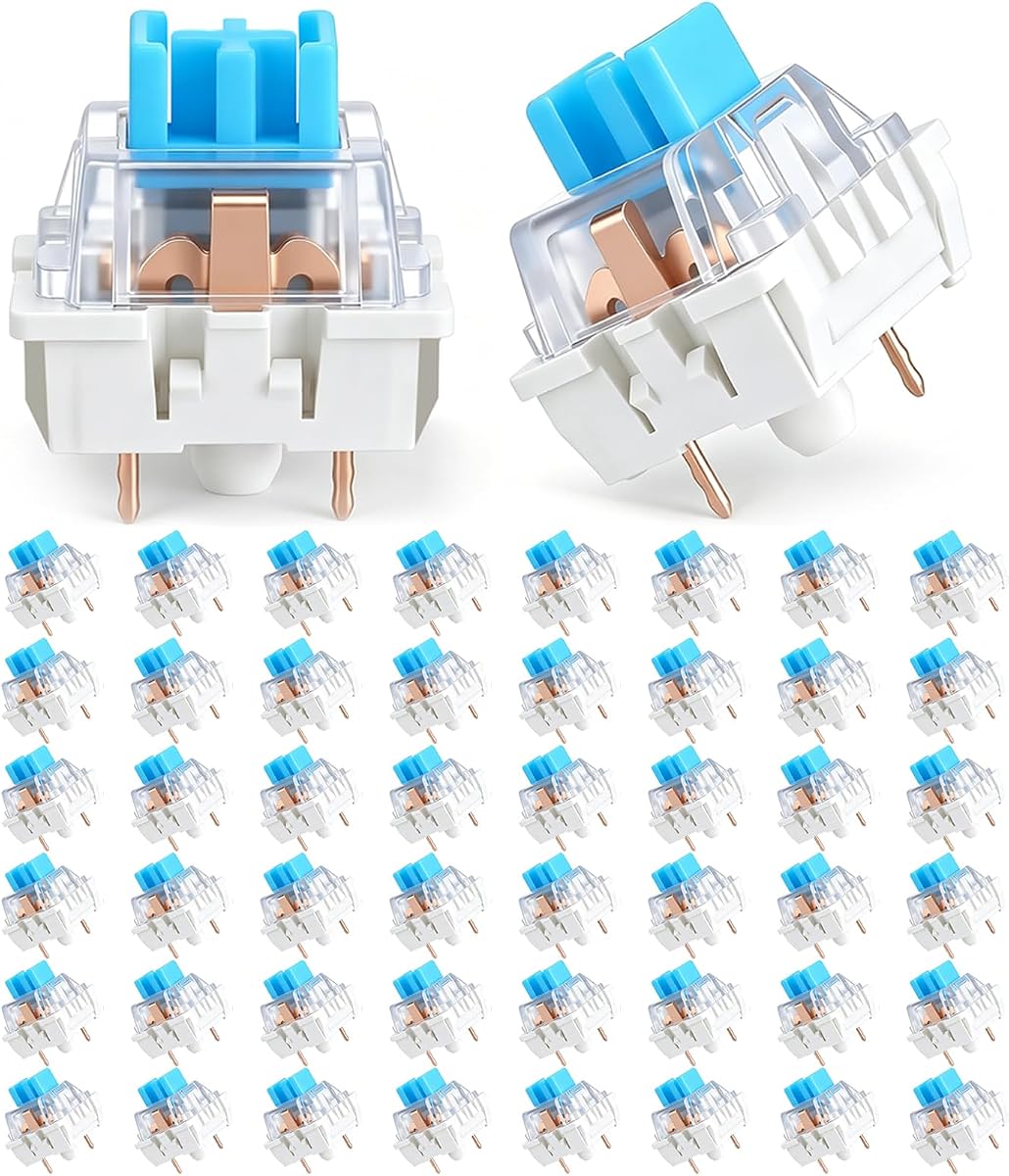
This set offers 108 blue click switches ideal for custom projects. They provide distinct tactile feedback with a pronounced mechanical sound. The switches have a service life of 80 million cycles for high durability. They are waterproof and come in a protective PVC plastic box. This makes them a strong choice for gaming keyboards or stress relief toys.
We may earn a commission when you buy through this link, at no additional cost to you.
The key strength is the rapid and responsive key travel that minimizes fatigue. The distinct tactile feedback is synchronized with auditory cues for a satisfying experience. The packaging protects pins from bending which ensures they arrive intact. They are made of durable materials like plastic housing and copper spacers. This quality supports long term use in various builds.
The loud sound may disturb others in quiet environments like libraries. This limits their suitability for shared offices unless used with ear protection. Installation is required to use them in keyboards which adds complexity. While great for enthusiasts, casual users might prefer a complete device. The focus is on component quality and tactile feel.
This product is perfect for builders looking for high quality blue switches. If you want a durable clicky component for 3D printed toys or keyboards, choose this. We recommend it for users who value tactile feedback and long service life in components.
Service life of about 80 million cycles ensures longevity.
Pronounced click sensation with crisp mechanical sound.
We may earn a commission when you buy through this link, at no additional cost to you.
Selecting the right automated keyboard clicker involves considering several factors. Here are key aspects to review before making a purchase.
Decide between physical arms and component switches. Physical arms automate clicks directly while switches build custom tools. Consider your technical comfort level and setup goals.
Look for adjustable speeds to match your needs. Devices offering random speeds mimic human behavior better than fixed rates. This helps avoid detection and ensures natural activity.
Advanced users should check for loop and rest settings. More programmable options allow precise control over click patterns. This flexibility is useful for complex tasks.
Check materials and construction for durability. Metal and plastic builds should withstand repeated use. A sturdy device lasts longer under pressure.
Ensure the clicker fits your keyboard or mouse type. Wide compatibility across models ensures versatility. Verify your setup before buying to avoid issues.
Simple button controls reduce setup time. Physical devices without software are easier to deploy quickly. Avoid complex configurations if you value convenience.
Consider heat limits and safety warnings during use. Overheating can damage devices if used at high speeds. Choose models with clear safety guidelines for longevity.
Determine your spending limits for the tool. Prices vary from component sets to full units. Balance features with cost to find the best value for your needs.
Place the clicker arm firmly on the desired key or mouse. Ensure it is stable to avoid misaligned clicks during operation. Adjust any arms to fit the target area precisely.
Power the device via USB or adapter if required. Set the speed or mode using the provided buttons. Verify the light indicator shows the correct active setting.
Clean the clicker regularly with a dry cloth to remove dust. Store it in a dry place to prevent heat damage. Check connections often for consistent performance.
Usage depends on game policies. Some games allow physical tools while others prohibit automation. Check terms of service before using to avoid bans.
Many physical models support both keyboards and mice. Place the arm on the mouse button to automate clicks. Ensure stable contact for consistent triggering.
Physical devices do not need software installation. They work independently with USB power. This ensures compatibility across different operating systems easily.
Overheating may occur if click speed is too high. Limit usage to five clicks per second if specified. Allow cooling breaks between long sessions to protect the device.
Most models offer adjustable speed settings. Look for random or fixed options to control click rates. This helps tailor automation to specific task requirements.
Some brands sell individual components like arms. Check manufacturer support for spare parts. This extends the life of your main device.
We reviewed ten tools ranging from simple physical arms to complex programmable units. Each serves a specific need from game assistance to custom builds. The best choice depends on your automation depth and budget.
Focus on durability and ease of use for daily tasks. Adjustable speeds and compatibility are essential for versatility. Choose a model that matches your technical comfort level.
Remember that prices and stock change frequently. Verify current listings before buying to get the best deal. We hope this guide helps you select the right clicker for your needs.