
Rii Gaming Keyboard and Mouse Set
4.5Editor score
Ergonomic Design
LED Backlit Keys
4 DPI Levels
Discover the top rated Baldurs Gate 3 Keyboard and Mouse options for immersive gameplay, performance, and comfort in our comprehensive 2026 comparison guide.
Finding the right Baldurs Gate 3 Keyboard and Mouse can transform your RPG experience. Good peripherals offer precision, comfort, and reliability during long gaming sessions. We evaluate features like response time, ergonomics, and customization to help you choose the perfect setup for your adventures in Faerun.
Our team analyzed ten top-rated combos based on user feedback, technical specifications, and value. We considered factors such as backlighting, build quality, and compatibility across systems. This list highlights diverse options ranging from budget-friendly sets to wireless choices that suit various playstyles and desk setups effectively.
Each pick showcases key strengths and potential trade-offs to guide your decision. You will find detailed reviews, comparison tables, and buying advice to simplify your search. Remember that product availability and pricing can change frequently, so verify current details before making your final purchase decision today.
4.5Editor score

4.5Editor score
4.4Editor score
This side-by-side comparison highlights the core specifications of each selected product. We focus on key attributes like connectivity, lighting, and durability to help you differentiate between similar models quickly and efficiently.


The Redragon S101-3 PRO stands out as a top contender for gamers seeking a complete setup without breaking the bank. Its combination of a full-size RGB keyboard and a precision mouse makes it ideal for Baldurs Gate 3 sessions where command inputs and cursor accuracy matter.
We may earn a commission when you buy through this link, at no additional cost to you.
This set shines with its extensive customization options. You can adjust colors, brightness, and lighting modes through intuitive software. The five dedicated macro keys allow you to record complex spell sequences or actions, giving you a tactical edge during combat encounters in the game.
While it offers great value, users should note that the software is necessary to unlock the full potential of the lighting and macro features. Additionally, the wrist rest is integrated rather than removable, which might not suit everyone's ergonomic preference or desk space requirements.
We recommend this kit for first-time gamers, students, or anyone needing a reliable upgrade from basic peripherals. Its durability and responsive keys ensure you stay comfortable during long play sessions. For those prioritizing features over cost, this is an excellent starting point for your gaming journey.
The software allows deep personalization of lighting patterns and macro commands to match your unique playstyle and aesthetic preferences.
Ergonomic design elements like the wrist rest and quiet keys reduce fatigue and distraction during marathon gaming nights.
We may earn a commission when you buy through this link, at no additional cost to you.
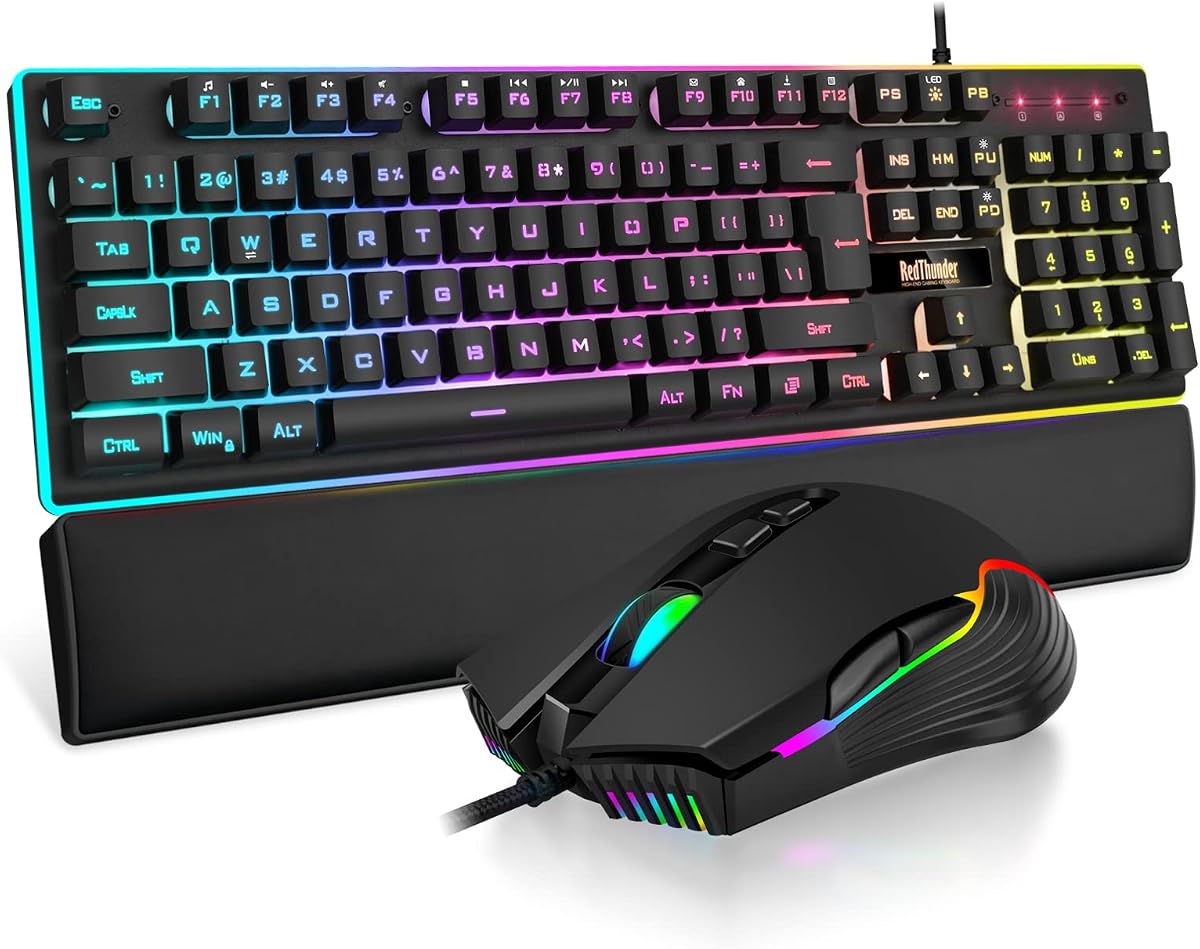
The RedThunder K10 Wired delivers a premium feel at a competitive price point. Its mechanical-style keys and high-DPI mouse cater to players who demand responsiveness and tactile feedback during intense gameplay moments in Baldurs Gate 3.
We may earn a commission when you buy through this link, at no additional cost to you.
Key strengths include the robust construction with a built-in steel plate that ensures durability. The mouse boasts a 7200 DPI optical sensor capable of tracking fast movements accurately. The soft leather wrist rest adds a layer of comfort that helps prevent strain during long sessions.
Some users may find the lack of wireless capability a limitation if they prefer a clutter-free desk. Also, the price is slightly higher than budget alternatives, though the added build quality justifies the cost for most serious gamers seeking reliability.
This combo is ideal for gamers who want a professional-grade setup without spending a fortune. The adjustable tripod base and anti-slip materials provide stability and comfort. If you prioritize tactile feedback and precise tracking, this set offers a compelling package for your PC gaming needs.
The steel plate construction resists flex and damage, ensuring your keyboard remains stable and functional over years of heavy use.
The optical sensor delivers rapid response times and smooth cursor movement, essential for navigating complex game environments efficiently.
We may earn a commission when you buy through this link, at no additional cost to you.
For those on a tight budget, the Rii Gaming Keyboard and Mouse Set offers surprising value. It provides essential gaming features like backlighting and ergonomic design without the high cost associated with branded gaming peripherals.
We may earn a commission when you buy through this link, at no additional cost to you.
Its simplicity is its strength. The 3-LED backlit keyboard and breathing light mouse create a visually appealing setup. You do not need to install drivers, making it perfect for quick setup on laptops or secondary PCs. Compatibility extends to Android boxes and Raspberry Pi too.
While it lacks the advanced durability of mechanical switches, it still offers a mechanical feel for satisfying typing. The key life is rated for millions of clicks, which should suffice for casual users. However, heavy daily gamers might prefer more robust options for long-term reliability.
This set is perfect for students, casual gamers, or as a backup peripheral set. Its easy installation and wide compatibility make it a versatile choice. If you need a reliable, affordable kit to get started with gaming, this product delivers exactly that.
Plug-and-play functionality means you can start gaming immediately without the hassle of downloading or configuring drivers.
The LED lighting effects add a touch of style to your desk setup without overwhelming complexity or power usage.
We may earn a commission when you buy through this link, at no additional cost to you.
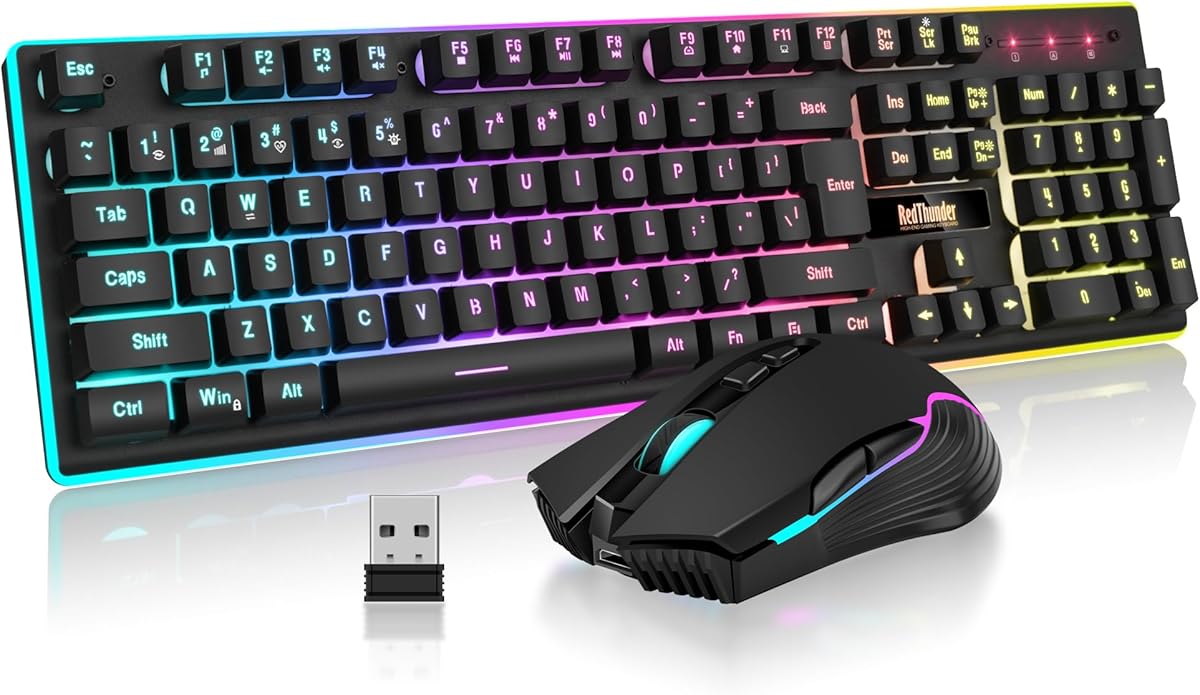
The RedThunder K10 Wireless brings freedom from cables to your desktop setup. This combo maintains the mechanical feel and RGB style of its wired counterpart but adds the convenience of a reliable 2.4G wireless connection.
We may earn a commission when you buy through this link, at no additional cost to you.
Its rechargeable batteries allow for hours of continuous use. The keyboard features a substantial 3000mAh cell, while the mouse includes an 800mAh unit. Smart energy-saving functions help extend life when idle. The shared USB receiver simplifies setup across different computers or laptops.
However, the battery life drops significantly when all backlighting is active, which might require frequent charging. Some users reported needing to reset the pairing code if the connection drops. These minor issues do not negate the benefits of reduced desk clutter and portability.
This model suits gamers who prefer wireless setups for a cleaner workspace. It balances performance and convenience well. If you value untethered movement and rechargeable power sources, this wireless combo is a solid investment for your gaming station.
Built-in batteries eliminate the need for disposable cells, saving money and reducing waste over time.
One receiver manages both devices, freeing up USB ports and simplifying connectivity for multi-device setups.
We may earn a commission when you buy through this link, at no additional cost to you.
The K1 RGB LED Combo offers a visually stunning setup with its extensive lighting options. It features eight light colors and multiple modes to suit any mood. This makes it an attractive choice for users who prioritize aesthetics alongside functionality.
We may earn a commission when you buy through this link, at no additional cost to you.
Functionally, it delivers solid performance with its full-size layout and responsive keys. The double-shot injection molding ensures characters never fade, even after heavy use. The mouse provides six speed levels to adapt to different tasks or game types. A waterproof cable adds durability against spills.
On the downside, it uses membrane switches rather than true mechanical ones. This might feel less crisp to enthusiasts accustomed to tactile feedback. The lighting software is minimal, limiting deep customization beyond preset modes. However, for casual users, this works perfectly.
We recommend this kit for gamers who value style and basic performance. Its ergonomic design reduces hand fatigue effectively. If you want a colorful, reliable entry-level set that looks great in low light, this K1 combo hits the right balance for your needs.
Double-shot molding ensures legends remain vibrant over time, enhancing visibility and aesthetics during long-term use.
Adjustable DPI settings allow you to fine-tune cursor speed for precise aiming or rapid navigation as needed.
We may earn a commission when you buy through this link, at no additional cost to you.
This Large Print Light Up Combo focuses on accessibility and clarity. The oversized keys and high-contrast fonts make it easier for visually impaired users or those working in low light to find the right keys quickly and comfortably.
We may earn a commission when you buy through this link, at no additional cost to you.
The design supports long hours of typing with its ergonomic kickstand and comfortable layout. Adjustable backlighting offers seven colors and three brightness settings. The wired connection ensures stable performance without charging worries. It works well across Windows, Mac, and Linux systems.
Gamers might find the mouse lacks high-DPI settings, but it serves well for standard navigation. The silent typing is great for shared spaces, reducing distractions. While not marketed as a gaming set, its reliability and comfort make it a practical choice for mixed-use desks.
Ideal for seniors, students, or office workers who need clear visibility and comfort. This combo prioritizes ergonomics and accessibility over flashy gaming features. If you need a dependable keyboard and mouse setup that is easy on the eyes, this is an excellent option.
Bold, large characters ensure keys are easily identifiable, reducing typing errors and eye strain during extended use.
Silent keys allow for focused work or gaming without disturbing others nearby, creating a more pleasant environment.
We may earn a commission when you buy through this link, at no additional cost to you.
The BlueFinger RGB Set offers great value by including a mouse pad with your keyboard and mouse. This bundle is perfect for setting up a complete gaming station quickly. The keyboard features a durable steel plate to resist falls and damage.
We may earn a commission when you buy through this link, at no additional cost to you.
The rainbow backlighting makes typing in the dark easy and adds a cool aesthetic. Anti-ghosting keys let you press multiple buttons simultaneously without conflicts. The mouse features breathing LED lights and a simple ergonomic design. Braided cables add a touch of durability to the set.
One limitation is the fixed RGB modes and basic DPI adjustments. You cannot personalize lighting extensively beyond the presets. However, for the price, this set provides everything needed for casual gaming or office tasks. The included pad saves you from buying extra accessories separately.
We suggest this for budget-conscious users wanting a ready-to-go bundle. Its sturdy build and included accessories make it a smart choice for students or home offices. If you want a complete package without separate costs, this BlueFinger set delivers practical value.
Getting a mouse pad included reduces extra costs and ensures a smooth surface for optimal mouse tracking performance.
Braided USB cables resist tangling and wear, extending the lifespan of your peripherals compared to standard rubber wires.
We may earn a commission when you buy through this link, at no additional cost to you.
This USB Wired Large Print Combo emphasizes comfort and visibility. The keys are printed three times larger than standard, making them ideal for seniors or visually impaired users. Quiet low-profile keys reduce noise while maintaining responsive feedback.
We may earn a commission when you buy through this link, at no additional cost to you.
The keyboard includes multimedia hotkeys and a spill-resistant build. An integrated wrist rest supports your hands during long tasks. The mouse offers four DPI levels for flexible speed adjustments. Three backlight colors help you see keys in dark environments without needing extra lamps.
A drawback is that some multimedia functions may not work on macOS. Also, the limited backlight colors restrict aesthetic choices. However, these issues are minor for general users. The ergonomic design and large fonts prioritize ease of use and comfort above all else.
Best suited for home offices, libraries, or shared spaces requiring quiet and accessible tools. This set provides reliable performance with added comfort features. If you need a straightforward, easy-to-see setup that reduces strain, this combo is a solid practical option.
The design protects against accidental liquid spills, adding durability for busy or casual usage environments.
Dedicated hotkeys allow quick access to volume and media controls, enhancing workflow without switching apps.
We may earn a commission when you buy through this link, at no additional cost to you.
The SABLUTE Wired Large Print Combo focuses heavily on ergonomics. An integrated palm rest and foldable stand provide a comfortable typing angle. This design helps reduce wrist fatigue significantly, making it ideal for extended writing or work sessions.
We may earn a commission when you buy through this link, at no additional cost to you.
Keys are four times larger for better accuracy and visibility. The mouse features an ergonomic grip to reduce hand strain. Seven-color backlighting offers flexibility for low-light conditions. It uses a simple plug-and-play connection that works across most operating systems without drivers.
Gamers might find the mouse lacks advanced DPI options or gaming-specific features. However, the comfort and readability are top-notch. This setup prioritizes health and ease of use over competitive performance metrics. It suits users who type or work many hours daily.
We recommend this for students, seniors, or office staff needing ergonomic support. The included rest adds value without extra cost. If your main goal is comfort and easy visibility during long periods of computer use, this combo delivers exactly that reliably.
The built-in rest helps maintain neutral wrist alignment, lowering the risk of repetitive strain injuries during typing.
Large, bold fonts ensure keys are easy to read, improving speed and accuracy even for those with vision challenges.
We may earn a commission when you buy through this link, at no additional cost to you.
The VEILZOR Wireless Combo offers a modern wireless experience with rechargeable convenience. Its USB-C charging means no batteries to buy. The silent click technology ensures a quiet workspace. A unique phone holder adds utility for multitasking.
We may earn a commission when you buy through this link, at no additional cost to you.
Ergonomic features include a wrist rest and adjustable tilt legs. The RGB lighting adds style with multiple color and mode options. The mouse contours comfortably to your hand with three DPI settings. Wireless range is reliable for typical desk use.
While the mouse has limited DPI customization, it suits everyday use well. Battery life varies based on how much you use RGB. If you keep lighting off, it lasts weeks. The phone holder is a nice touch for viewing guides or streaming during gaming.
This kit is perfect for office users or home gamers wanting a clean wireless setup. It balances style, silence, and practicality. If you need a quiet, rechargeable combo that reduces clutter and adds comfort, this VEILZOR set is a strong candidate.
USB-C charging provides convenient power management without needing disposable batteries, saving money and reducing waste.
The built-in phone holder keeps your device accessible for reference, making multitasking easier during work or play.
We may earn a commission when you buy through this link, at no additional cost to you.
Selecting the right peripherals requires balancing budget, comfort, and specific gaming needs. This guide breaks down key factors to consider for a tailored decision.
Decide between wired and wireless based on your setup preferences. Wired options offer consistent connection and zero latency, ideal for competitive play. Wireless combos provide a clutter-free desk and mobility but require charging or battery management. Choose what fits your workflow best.
Key switches impact feel and sound. Membrane switches are quieter and cheaper but offer less tactile feedback. Mechanical switches are more durable and provide a satisfying click, which many prefer for gaming. Consider your noise tolerance and typing style when selecting.
Long gaming sessions can cause strain, so prioritize comfortable designs. Look for wrist rests, adjustable tilt angles, and contoured shapes. A proper ergonomic setup reduces fatigue and supports better posture during extended use in game worlds like Baldurs Gate 3.
RGB lighting and macro keys enhance your experience. RGB allows you to personalize aesthetics to match your setup. Macro keys help automate complex commands or spells. Ensure the software is intuitive if you plan to use these advanced features regularly.
Mouse precision is vital for aiming and navigation. DPI determines cursor speed; higher DPI allows faster movement. Adjustable DPI lets you switch between detailed cursor movement and rapid movement. Ensure the mouse supports settings that match your gameplay style comfortably.
Invest in units that last. Look for sturdy materials like metal plates or reinforced frames. Check ratings for key lifespan. A durable set ensures your investment pays off over years, maintaining performance despite frequent use and accidental impacts during intense sessions.
Peripherals range from budget-friendly to premium. Set a realistic budget based on your needs. Often, mid-range sets offer the best balance of features and cost. Focus on core features like reliability and comfort rather than just flashy extras to maximize value.
Verify that the product supports your operating system. Most work with Windows but check Mac or Linux limits. Also ensure the ports (USB-A or USB-C) match your computer. Compatibility issues can cause frustration, so confirm support before purchase.
Start by connecting the device securely to your computer's USB port or inserting the wireless receiver. Install any required software to unlock macros or RGB settings. Ensure drivers are updated for smooth operation and avoid connectivity issues.
Clean your peripherals regularly using a soft cloth or compressed air. Dust buildup can cause key sticking or sensor issues. Avoid spills by keeping drinks away. For wireless models, monitor battery levels and charge before power drains completely.
Customize settings to suit your preferences. Adjust DPI to match your screen resolution. Set up macros for complex in-game actions if supported. Regularly check software updates to maintain security and performance compatibility with new game patches.
Not necessarily. Mechanical switches offer durability and tactile feedback, which many gamers prefer. However, membrane switches work fine for casual play. Your choice depends on budget and personal feel preference rather than game requirements.
Full-size keyboards with number pads offer maximum flexibility. Compact layouts save space but may limit function key access. Choose a layout that fits your desk and ensures you can reach essential keys without stretching your hands.
Modern 2.4G wireless connections are highly reliable with low latency comparable to wired options. They are excellent for reducing desk clutter. Just ensure you keep batteries charged for uninterrupted play sessions without dropouts.
Use compressed air to blow out dust from key crevices and mouse sensors. Wipe surfaces with a slightly damp microfiber cloth. Avoid harsh chemicals. Regular maintenance extends device life and ensures keys do not stick or fail prematurely.
Start around 800 to 1200 DPI for general use. Higher settings suit faster screen movements but may reduce precision. Experiment with settings to find a balance between speed and accuracy that feels natural to your gameplay style.
Most listed models support Mac OS for basic functions. However, multimedia keys or specific software features may be limited. Check product details for Mac-specific notes before purchasing to ensure full compatibility with your system.
Quality mechanical keyboards can last over 50 million keystrokes. Membrane sets typically last fewer cycles but still endure years of casual use. Proper care and avoiding liquid damage will significantly extend the lifespan of your peripherals.
A mousepad provides a consistent surface for accurate tracking and protects your desk. While optical mice work on many surfaces, a dedicated pad ensures smooth movement and reduces friction for better performance during precise cursor control.
We have highlighted ten top-rated options catering to different needs and budgets. The Redragon S101-3 PRO leads in value while the RedThunder K10 Wired offers premium precision for serious gamers looking for performance.
Focus on ergonomics and connectivity first when making your choice. Comfort during long sessions is critical, and reliability ensures you do not miss key in-game moments. Prioritize features that align with how you play most.
Prices and availability change often so check current listings before buying. Verify the latest specs to confirm compatibility with your setup. A right choice enhances your immersion and makes every adventure in Faerun more enjoyable.