
Nettbe 60 PCS Reusable Cable Ties
4.8Editor score
Reusable nylon adhesive material
60 pieces per pack
Adjustable cord straps
Managing cables in a gaming PC setup can be challenging but essential for aesthetics and safety. Proper organization reduces clutter and improves airflow around your hardware components significantly.
We evaluated ten highly rated products based on durability, ease of installation, and versatility. Each option offers unique features to suit different desk layouts and cable volumes effectively.
Each pick highlights specific strengths for various gaming environments and budget ranges. Prices fluctuate frequently so check current listings before making your final purchase decision today.
4.8Editor score
4.6Editor score
4.6Editor score
As an Amazon Associate we earn from qualifying purchases.
The following table provides a side-by-side comparison of all ten selected products highlighting their key specifications and features for easy decision making.




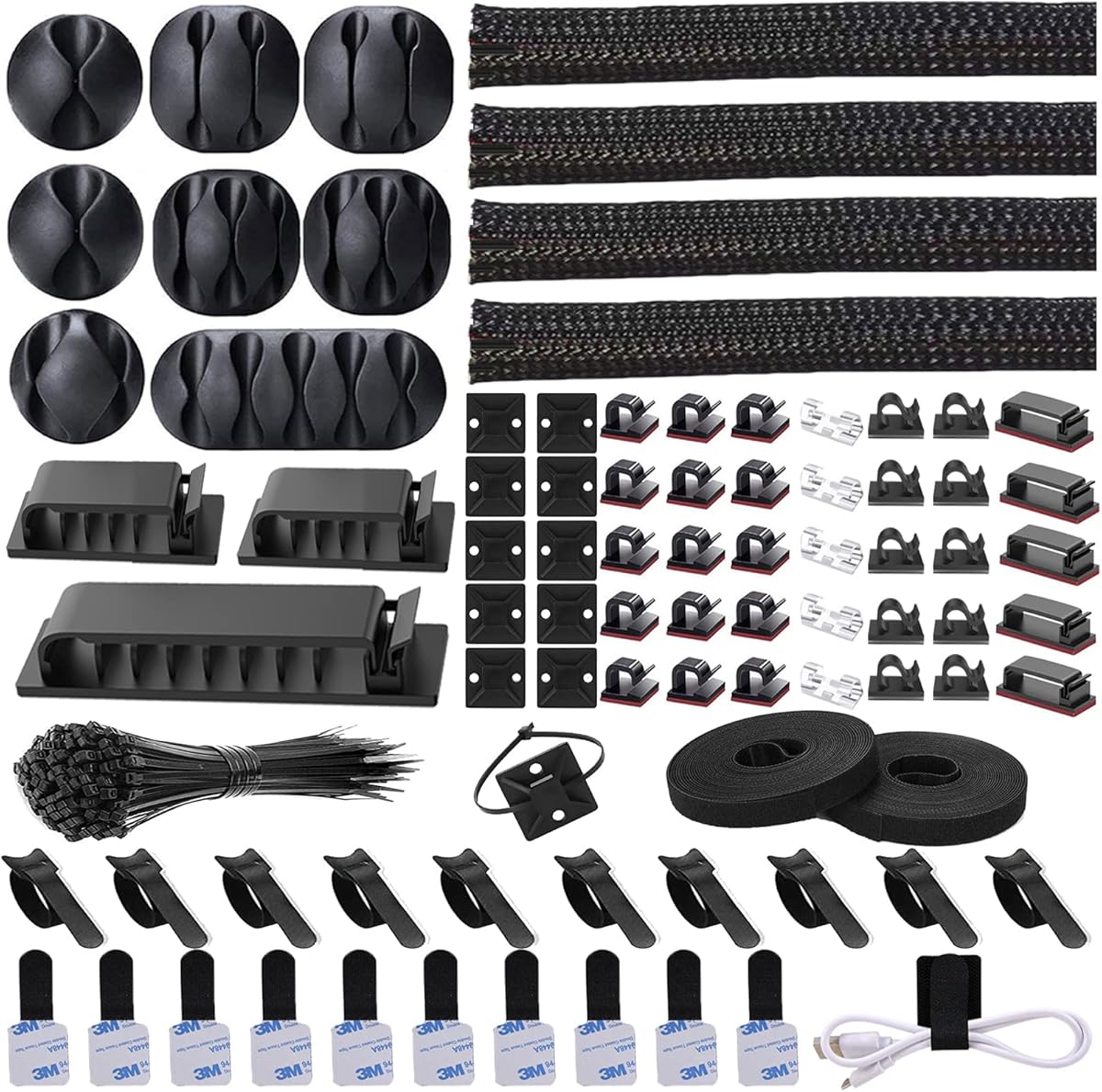
The N NOROCME kit stands out as a comprehensive solution offering 192 pieces to tackle any cabling mess with ease and efficiency.
We may earn a commission when you buy through this link, at no additional cost to you.
Its diverse array of clips and sleeves ensures every cable type has a dedicated holder making it ideal for complex gaming setups.
While the adhesive is strong it may require heat for removal which is a minor trade-off for the secure hold it provides.
Anyone needing a full toolkit for organizing cables will find this kit indispensable for maintaining a clean and safe gaming environment.
This kit provides everything from clips to sleeves ensuring no cable goes unmanaged in your setup.
Made from sturdy polyamide materials the components are built to last for years without degradation.
We may earn a commission when you buy through this link, at no additional cost to you.
This kit mirrors the NOROCME offering with a similar comprehensive set of tools designed for versatile cable management needs.
We may earn a commission when you buy through this link, at no additional cost to you.
The inclusion of multiple clip types allows for flexible placement options whether under desks or behind entertainment centers.
Installation is straightforward with peel and stick adhesive though removal requires care to avoid damaging surfaces.
It is an excellent choice for users who need a variety of solutions to organize cables across different areas.
Multiple clip designs allow you to mount cables in diverse locations to suit your specific layout.
Split sleeves make it easy to load existing wires without disconnecting them from devices first.
We may earn a commission when you buy through this link, at no additional cost to you.
Alex Tech offers a specialized sleeve designed to protect cables from curious pets while maintaining organization and safety.
We may earn a commission when you buy through this link, at no additional cost to you.
The 10ft length covers long runs of cables making it suitable for connecting PCs to distant displays or power sources.
It is UL recognized which adds an extra layer of trust regarding safety standards for electrical wiring.
Pet owners especially will appreciate the durability against chewing which prevents accidents and extends cable life.
The thick material prevents cats from accessing the wires inside which keeps both the pet and cables safe.
UL recognition ensures the product meets safety standards for use around electrical wiring and devices.
We may earn a commission when you buy through this link, at no additional cost to you.
YECAYE provides J channels that are perfect for routing multiple cables along desks or walls discreetly.
We may earn a commission when you buy through this link, at no additional cost to you.
The PVC material is flame retardant offering peace of mind regarding electrical safety and durability over time.
Installation involves peeling adhesive tape which bonds quickly but removal requires heating to avoid residue damage.
It is ideal for office desks where multiple peripherals need a tidy and professional appearance.
The flame retardant PVC reduces fire risks making it safer for home and office environments.
The outward facing opening makes adding or removing cables simple without removing the entire channel.
We may earn a commission when you buy through this link, at no additional cost to you.
Nettbe offers a high volume of reusable ties at a very low price point which is perfect for bundling cables.
We may earn a commission when you buy through this link, at no additional cost to you.
The hook and loop system allows for repeated adjustment and reuse without wasting money on disposable ties.
These ties are short so they work best for bundling bundles rather than securing cables to surfaces.
Budget conscious shoppers will find this pack essential for basic wire management tasks in any home or office.
With 60 pieces at this price it offers unmatched value for basic bundling needs.
The adjustable straps can be used multiple times reducing waste and long term costs.
We may earn a commission when you buy through this link, at no additional cost to you.
Scanfield provides compact trays that fit well under smaller desks without consuming too much vertical space.
We may earn a commission when you buy through this link, at no additional cost to you.
The two pack allows you to manage cables in multiple zones or for dual monitor setups effectively.
Installation relies on strong adhesive which is sturdy but requires a flat surface for best results.
It is a great choice for those with limited space who need a no drill solution quickly.
The 17 inch size is ideal for fitting under compact desks without obstructing legs.
The strong adhesive backing eliminates the need for screws making installation clean and simple.
We may earn a commission when you buy through this link, at no additional cost to you.
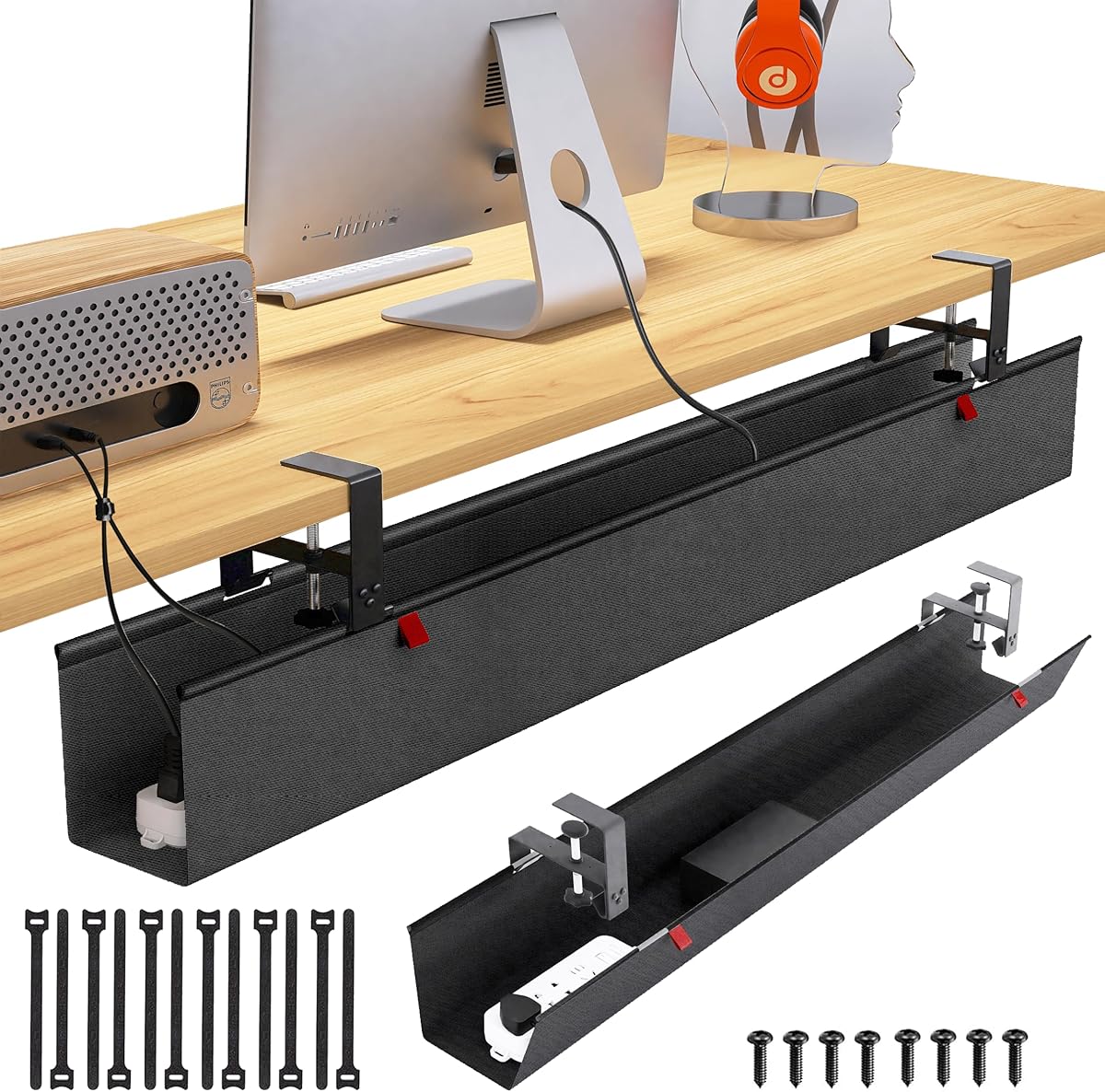
Univivi offers a massive 36 inch tray designed to hold power strips and heavy equipment under large desks.
We may earn a commission when you buy through this link, at no additional cost to you.
The dual installation options allow for clamping or screwing ensuring stability regardless of desk thickness.
Fabric construction prevents sagging even when loaded with heavy gear which is rare in this category.
Serious gamers with extensive setups will appreciate the space and durability this tray provides.
Clamp or screw options ensure the tray stays secure on various desk materials and thicknesses.
The 36 inch length accommodates power strips and adapters for multi device gaming setups.
We may earn a commission when you buy through this link, at no additional cost to you.
This metal mesh tray balances durability with ventilation to keep power supplies cool during intense gaming sessions.
We may earn a commission when you buy through this link, at no additional cost to you.
The 15 lb capacity ensures it holds heavy equipment without bending or losing stability over time.
Assembly requires screws to join the two parts but it takes only a few minutes to complete.
Users who prioritize cooling and durability will find this mesh design highly effective for managing under desk equipment.
The mesh structure allows air to flow freely preventing heat buildup around power strips.
Solid metal construction ensures the tray remains rigid even when fully loaded with equipment.
We may earn a commission when you buy through this link, at no additional cost to you.
CableGenie clips feature an elastic loop that allows for quick cable adjustments without tools or mess.
We may earn a commission when you buy through this link, at no additional cost to you.
Made in the UK these clips come with screws and adhesive for versatile mounting on various surfaces.
The one handed operation makes swapping cables effortless which is ideal for frequently used setups.
They are perfect for small cable bundles where flexibility and ease of access are top priorities.
The stretchy loop holds cables snugly while allowing easy access without cutting or tying.
Screws and adhesive pads give you the choice to mount on walls or irregular objects.
We may earn a commission when you buy through this link, at no additional cost to you.
This tray offers a premium aesthetic with blackout fabric that conceals all wires for a stealthy look.
We may earn a commission when you buy through this link, at no additional cost to you.
The anti sag base ensures heavy equipment stays supported while the fabric prevents dust accumulation.
Side opening allows easy routing of thick cables which simplifies managing complex gaming setups effectively.
It is the top choice for gamers who want a clean professional look without visible wires cluttering the floor.
The black fabric blocks the view of colorful cables ensuring a clean and professional under desk look.
The reinforced base supports heavy power bricks without bowing which maintains a neat appearance.
We may earn a commission when you buy through this link, at no additional cost to you.
Selecting the right cable management solution requires understanding your setup needs and the types of cables you use.
Materials like polyamide, PVC, and Oxford fabric determine how long your organizers will last under regular use. High quality materials resist wear and tear and ensure your cables remain protected from pets and environmental hazards.
Always choose products made from sturdy materials that can withstand repeated handling and stress over years.
Installation can be adhesive, screw based, or clamp based depending on your desk and wall surfaces. Some setups allow drilling while others require non damaging solutions to preserve furniture aesthetics.
Ensure the installation method matches your workspace constraints to avoid damaging walls or desks during setup.
The number of cables you need to hide dictates the size and capacity required. Under desk trays vary from 17 to 48 inches so measure your space accurately before purchasing.
Select a size that accommodates your power strips and adapters without overcrowding the available area.
Power strips and adapters can generate heat so mesh or breathable fabric trays help prevent overheating issues.
Choose designs that allow air circulation around electrical components to maintain safety and device longevity.
Color and design impact how well the organizer blends with your setup. Black options are common for gaming PCs but transparent clips may suit minimalist white setups.
Pick colors that match your desk and walls to maintain a clean and professional look overall.
Adjustable clips or sleeves allow you to reorganize cables as you upgrade components or change layouts.
Look for reusable and flexible options to accommodate future changes without buying new tools.
Fire retardant and UL recognized products offer extra protection against electrical fires and hazards.
Prioritize safety certified products especially when managing high voltage cables near power strips.
Prices range from affordable bundles to premium trays. Consider long term value and how many items you get for the price.
Balance your budget with the features you need to avoid overspending on unnecessary upgrades.
Start by unplugging all cables and disconnecting devices to avoid electric shock while organizing. Group cables by function such as power, video, or data to streamline the process.
Use sleeves or ties to bundle cables together before placing them in trays or holders. Secure the bundles with ties that are tight enough to hold but not so tight they pinch wires.
Regularly inspect adhesive pads and clips for signs of wear. Replace adhesive pads if they lose stickiness and clean clips periodically to maintain their holding strength and appearance.
The best solution depends on your specific needs. Kits like NOROCME offer versatility for all setups while under desk trays are ideal for concealing power strips. Choose based on your desk space and cable volume.
Adhesive clips and cable trays with strong backing allow for secure mounting without drilling. Ensure surfaces are clean before application to maximize hold strength and durability.
Sleeves are better for bundling cables together while trays are better for holding power strips. Using both often provides the most complete solution for different areas of a setup.
Yes, keeping cables off the floor and organized prevents blocking airflow to fans and vents. Mesh trays specifically allow air to circulate around power equipment effectively.
High quality adhesive clips can last years on clean surfaces. However, dust and heat can reduce effectiveness over time so periodic checks and replacement are recommended.
Many under desk trays support standing desks but check clearance limits. Some models require a fixed height so ensure compatibility before purchasing.
Use a hairdryer to heat the adhesive gently and peel slowly. This softens the bond allowing removal without leaving residue or damaging the surface.
PVC, polyamide, and Oxford fabric are durable and resistant to wear. These materials protect cables effectively and maintain their shape over long periods.
The ten products reviewed offer diverse solutions ranging from simple ties to large under desk trays. Each excels in specific scenarios making it easy to find a match for any gaming setup.
Prioritize capacity and ease of installation to ensure your management system remains effective as you add new components. Safety features like flame retardancy should also be a key consideration.
Remember to check current prices before purchasing as they fluctuate often. Select the option that best balances your budget with your specific organizational needs today.