
LGA 1155 Motherboard H61
5.0Editor score
Supports Intel 2nd 3rd Gen
Dual Channel DDR3 Memory Slots
M.2 SSD Interface Included
This guide compares the top ten cheap motherboard options for budget builders seeking reliable performance and modern features across AMD and Intel platforms
Finding a cheap motherboard does not mean sacrificing essential features or build quality for your next computer upgrade or new system build project.
We analyzed ten top ranked models based on compatibility, connectivity, power delivery, and user feedback to ensure you get the best value available now.
Each pick highlights key strengths and trade offs so you can choose wisely while keeping in mind that product prices and availability shift frequently.
5.0Editor score
4.5Editor score

4.5Editor score
The following table provides a side by side overview of all ten selected models highlighting their core specifications and key differentiators for quick comparison.





The GIGABYTE B550M K stands out as a top contender for builders seeking a reliable cheap motherboard without compromising on essential modern features like PCIe 4.0 support and dual M.2 slots.
We may earn a commission when you buy through this link, at no additional cost to you.
Its enhanced power solution with digital 3+3 VRM design ensures steady power delivery to AMD Ryzen processors, while advanced thermal armor helps maintain system stability under load during extended use.
While the audio codec is basic compared to premium boards, this trade off is acceptable for budget focused builds where graphics performance and storage speed take priority over high fidelity sound.
This board is ideal for gamers and professionals building entry level to mid range PCs who need compatibility with Ryzen 5000 series processors and future proof connectivity options.
The digital VRM design and premium chokes provide consistent voltage regulation which is crucial for maintaining performance and longevity of your AMD processor over time.
With two M.2 slots supporting PCIe 4.0 and 3.0 speeds you can install multiple high speed NVMe SSDs for fast boot times and rapid application loading.
We may earn a commission when you buy through this link, at no additional cost to you.
This LGA 1155 motherboard offers one of the lowest entry prices available making it a viable option for ultra budget builds or legacy system replacements where cost is the primary constraint.
We may earn a commission when you buy through this link, at no additional cost to you.
Despite its age it supports dual channel DDR3 memory up to 16GB and includes an M.2 interface for NVMe SSDs which is a rare find at this price point for older hardware.
However the platform is outdated limiting performance potential and future upgrade paths so it should only be considered if you already have compatible older Intel processors on hand.
Ideal for very tight budgets or specific industrial applications where newer components are not required and basic functionality is sufficient for daily tasks.
Supports second and third generation Intel Core processors and Xeon E3 v2 making it useful for upgrading older workstations without replacing the CPU.
VGA and HDMI interfaces allow direct video output from the CPU eliminating the need for a dedicated graphics card in basic office or home setups.
We may earn a commission when you buy through this link, at no additional cost to you.
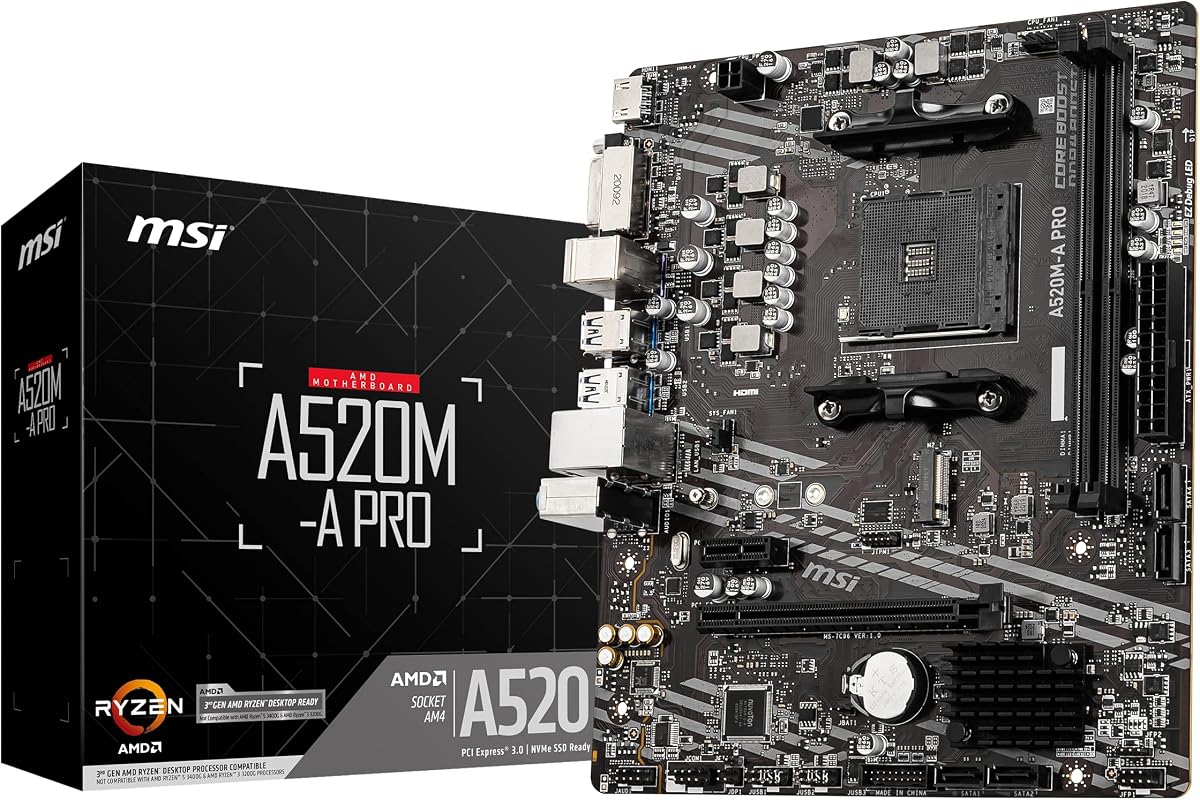
The MSI A520M-A PRO Gaming delivers excellent value by supporting fast DDR4 memory up to 4600MHz and including studio grade audio features that enhance multimedia experiences for gaming and content creation.
We may earn a commission when you buy through this link, at no additional cost to you.
Its turbo M.2 slot running at PCIe Gen3 x4 maximizes performance for NVMe based SSDs ensuring rapid storage speeds even if the chipset limits GPU bandwidth to PCIe 3.0.
While lacking PCIe 4.0 for graphics cards the board remains highly capable for most users since modern GPUs often bottleneck before hitting the limit of PCIe 3.0 throughput.
This choice is perfect for budget gamers who prioritize memory speed and audio quality over maximum PCIe bandwidth and want reliable performance from Ryzen processors.
Audio Boost technology provides studio grade sound quality which improves immersion in games and clarity in media playback without requiring external sound hardware.
Support for up to 4600MHz DDR4 memory allows for higher frame rates and snappier system responsiveness compared to standard JEDEC speed limits.
We may earn a commission when you buy through this link, at no additional cost to you.
ASRock B550M-HDV is a strong contender offering PCIe 4.0 support for graphics cards and storage alongside high memory speeds up to 4733MHz which helps squeeze extra performance out of budget builds.
We may earn a commission when you buy through this link, at no additional cost to you.
The board features three video outputs including HDMI DVI-D and VGA ensuring maximum monitor compatibility for office or home systems that rely on integrated graphics for display.
With a reliable 6 power phase design and Full Spike Protection it guards against electrical surges and provides stable power for supported Ryzen processors during everyday computing tasks.
Consider this model if you need PCIe 4.0 connectivity and multiple display outputs without paying for expensive premium features or excessive USB ports you may not use.
Three video output options ensure you can connect to various monitors including older VGA displays or modern 4K HDMI screens without needing adapters.
Full Spike Protection on USB Audio and LAN ports helps safeguard sensitive components from electrical damage caused by power surges or static discharge.
We may earn a commission when you buy through this link, at no additional cost to you.
The MSI PRO B550M-P is designed for users who want reliable performance with features like Core Boost technology and double M.2 connectors for flexible storage configurations in a compact form.
We may earn a commission when you buy through this link, at no additional cost to you.
It supports PCIe 4.0 x16 slots for cutting edge graphics cards and includes Frozr AI cooling which automatically adjusts system fan settings based on CPU and GPU temperatures for efficiency.
While the audio is standard the board provides well connected ports including Gigabit LAN and USB 5Gbps Type-A ensuring essential needs are met for modern productivity and gaming tasks.
This is a smart choice for builders needing dual M.2 storage without overspending on high end features while maintaining compatibility with the latest AMD Ryzen 5000 processors.
Core Boost technology combines optimized power circuit layouts and digital power regulation for precise current delivery to the CPU ensuring stability under load.
Frozr AI cooling adjusts fan speeds based on real time temperatures helping to reduce noise while keeping critical components within safe operating ranges.
We may earn a commission when you buy through this link, at no additional cost to you.
This model stands out by integrating Wi-Fi and Bluetooth capabilities alongside a premium thermal solution that uses high quality materials to dissipate heat effectively from the motherboard.
We may earn a commission when you buy through this link, at no additional cost to you.
The Flash BIOS Button allows users to update firmware even without a CPU or memory installed which simplifies compatibility troubleshooting for newer processors without requiring extra hardware.
With Core Boost technology and studio grade audio it delivers steady current delivery and immersive sound quality making it suitable for gaming setups where wireless access is essential.
Choose this if you need wireless connectivity and easier BIOS updates without building a full premium system and are willing to pay slightly more for these conveniences.
Integrated Wi-Fi and Bluetooth allow easy connection to wireless peripherals and networks without needing external USB adapters or cables.
Flash BIOS Button enables updating the motherboard firmware with just a USB drive and power button press removing the need for a CPU during updates.
We may earn a commission when you buy through this link, at no additional cost to you.
The GIGABYTE B550 Gaming X V2 uses an ATX form factor with a digital twin 10+3 power phase design providing superior stability for demanding applications and potential overclocking scenarios.
We may earn a commission when you buy through this link, at no additional cost to you.
It includes a front USB 3.2 Gen 1 Type-C port which offers convenient high speed connectivity for modern devices without requiring adapters on the rear panel.
Advanced Thermal Armor and integrated I/O shield simplify assembly and improve heat dissipation while Q Flash Plus enables effortless BIOS upgrades without installing CPU RAM or GPU first.
This board is best for builders with larger cases who want robust power delivery and modern connectivity features including RGB customization for a personalized system look.
The 10+3 power phase design with premium chokes ensures steady power delivery and reduced electrical noise for better CPU performance and longevity.
Integrated I/O shield and Q Flash Plus feature streamline the build process making it easier to upgrade firmware and install components quickly.
We may earn a commission when you buy through this link, at no additional cost to you.
The Gigabyte A520M K V2 is designed for compact cabinets with its Micro ATX format offering a straightforward solution for basic office or home builds where space saving is a priority.
We may earn a commission when you buy through this link, at no additional cost to you.
It supports high speed DDR4 memory upgrades and includes essential connectivity like HDMI and D-Sub for versatile video output options without unnecessary complexity or extra cost.
While it lacks advanced features like PCIe 4.0 or extensive USB counts it provides reliable performance for everyday computing tasks using compatible AMD Ryzen processors.
Ideal for small form factor builds or secondary machines where simplicity and space efficiency outweigh the need for high end expansion capabilities.
The Micro ATX form factor allows fitting into smaller cases making it perfect for desktop PCs with limited desk space or portable setups.
Support for DDR4 memory enables high speed RAM upgrades to improve system responsiveness and multitasking capabilities without excessive cost.
We may earn a commission when you buy through this link, at no additional cost to you.
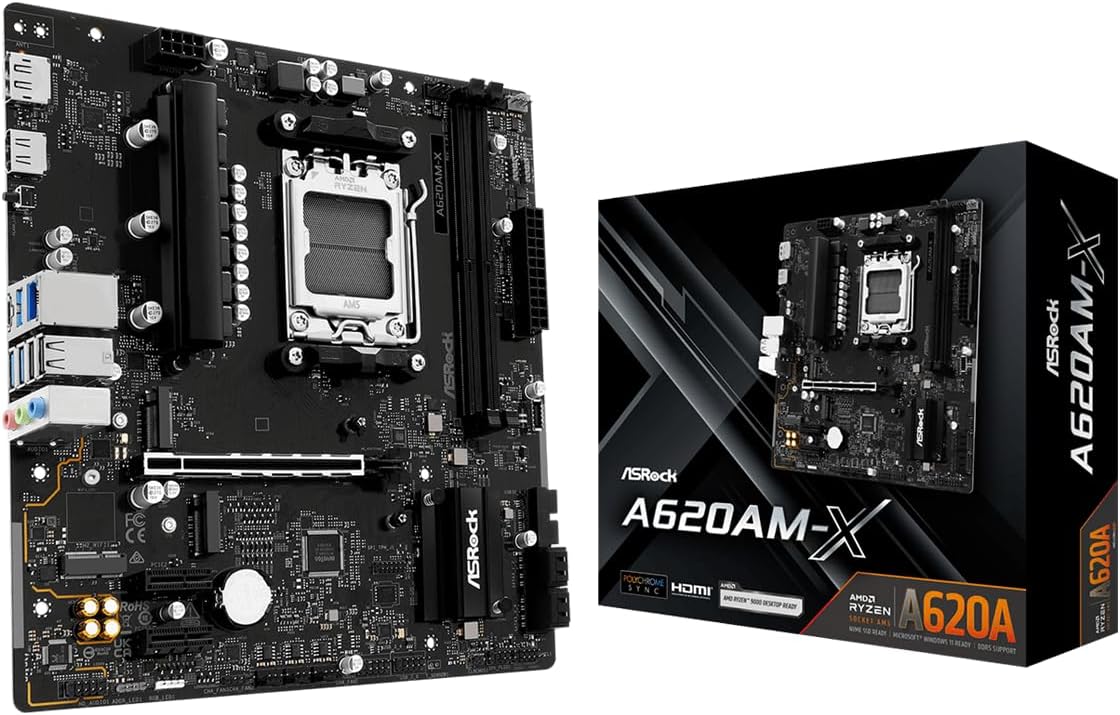
The ASRock A620AM-X provides an affordable entry point to the latest AMD AM5 ecosystem supporting future Ryzen processors and DDR5 memory up to 8000+ OC for next generation performance.
We may earn a commission when you buy through this link, at no additional cost to you.
With Realtek 2.5G LAN it ensures high speed wired networking which is crucial for gaming and large file transfers while dual Hyper M.2 slots offer flexible storage configurations.
BIOS Flashback support enables easy updates without CPU installation ensuring future compatibility with new processors as they are released by AMD.
Consider this board if you plan to build a system today that you intend to upgrade years later without replacing the motherboard due to its long term platform support.
Support for AM5 socket and DDR5 memory ensures you can upgrade to future AMD processors without needing a new motherboard for years to come.
Realtek 2.5G LAN provides faster wired internet speeds than standard Gigabit options improving online gaming and download times significantly.
We may earn a commission when you buy through this link, at no additional cost to you.
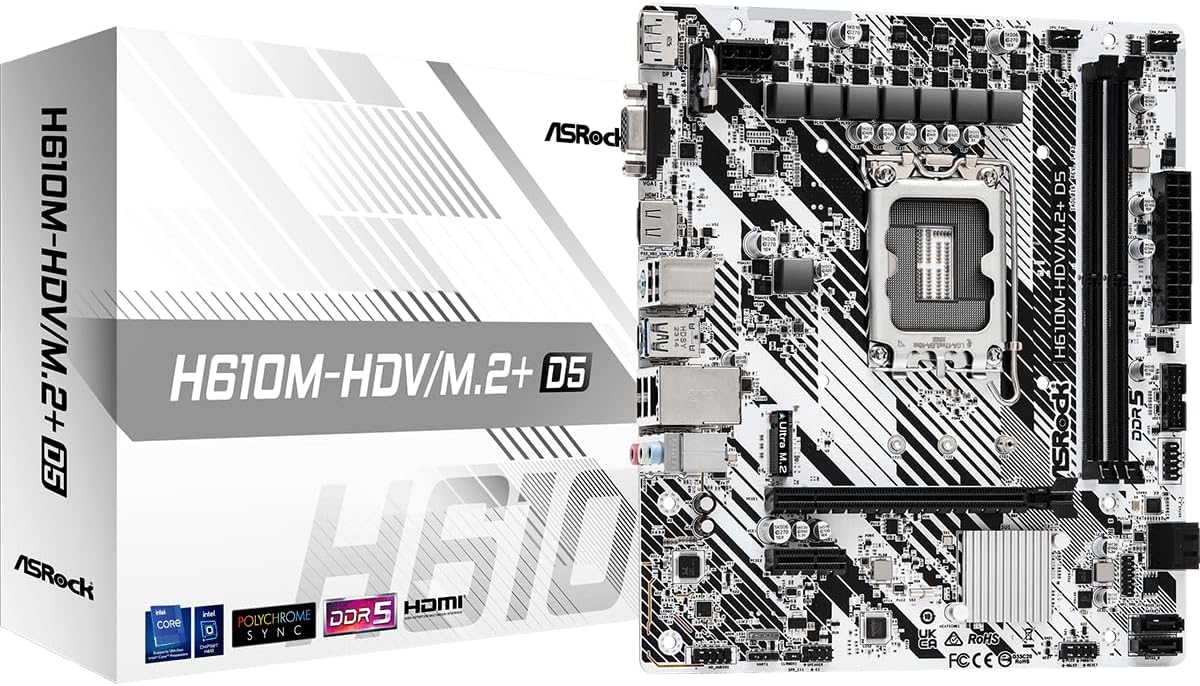
This ASRock board supports 12th through 14th Gen Intel Core processors with DDR5 memory up to 5600MHz delivering modern performance at a budget friendly price point.
We may earn a commission when you buy through this link, at no additional cost to you.
With a 6+1+1 power phase design it ensures stable power delivery for daily tasks while offering HDMI DisplayPort and D-Sub outputs for versatile monitor compatibility.
Although it lacks advanced overclocking features common in premium Z series boards it is well suited for general productivity and gaming where extreme tuning is not required.
Choose this if you prefer Intel processors and want to utilize DDR5 memory without spending on higher end chipsets for a balanced budget build.
Supports 12th 13th and 14th Gen Core processors ensuring compatibility with a wide range of Intel CPUs released in recent years.
DDR5 memory support enables faster data transfer rates and improved system responsiveness compared to older DDR4 based systems.
We may earn a commission when you buy through this link, at no additional cost to you.
Selecting the right cheap motherboard requires understanding your CPU needs and future upgrade plans to avoid wasted money or compatibility issues.
Ensure the motherboard socket matches your chosen processor such as AM4 for older Ryzen or LGA1700 for newer Intel chips to guarantee basic system function.
Always check the manufacturer CPU support list before buying to confirm compatibility with your specific model and BIOS version.
Chipsets like B550 offer PCIe 4.0 support while cheaper A520 options limit to PCIe 3.0 affecting GPU and SSD performance potential.
Choose a chipset that aligns with your performance needs without overpaying for features you will not use in your build.
Check DDR4 or DDR5 support as well as maximum speed limits since faster RAM significantly improves gaming and multitasking performance.
Select a board that supports at least 16GB capacity and speeds matching your CPU capabilities for balanced system efficiency.
Verify the number and type of PCIe slots available for graphics cards and expansion devices to ensure you can install required components.
Budget boards usually have one main PCIe x16 slot but may lack additional slots for future expansion like sound or capture cards.
Look for M.2 slots supporting NVMe drives which provide much faster speeds than traditional SATA SSDs for boot times and loading.
At least one M.2 slot is standard now but having two allows for dual high speed storage configurations in larger builds.
Adequate VRM phases and heatsinks ensure stable power for your CPU preventing throttling under load or instability during operation.
For budget CPUs basic power delivery is fine but high end chips require stronger VRM to maintain peak performance safely.
Count rear USB ports and verify types like USB-C availability for connecting modern peripherals without needing extra adapters.
Ensure you have enough ports for all your devices including keyboard mouse drives and monitors to avoid constant swapping.
Verify the motherboard size matches your PC case such as Micro ATX or ATX to avoid physical fitting issues during assembly.
Compact builds often benefit from Micro ATX boards while larger cases allow for more features with ATX options.
Install the motherboard first by securing it with standoff screws in your case before inserting CPU RAM or graphics cards to prevent accidental short circuits.
Connect all front panel wires carefully following the manual guide for power switches and LED indicators to ensure correct system function.
Update the BIOS immediately after building to ensure full CPU compatibility and access the latest features or stability improvements from the manufacturer.
Yes many budget motherboards offer reliable performance for gaming if they support your CPU and have enough RAM speed and PCIe bandwidth. Focus on power delivery and compatibility rather than expensive features.
Depends on socket and chipset limits. AM4 boards support 5000 series but LGA1155 is limited. Always check the CPU support list for future upgrade paths.
Most entry boards do not allow CPU overclocking but memory overclocking is often supported. Check chipset features like B550 for limited overclocking capabilities.
ATX boards are larger with more slots and ports. Micro ATX boards are smaller with fewer slots but fit in both cases and save space.
Built-in Wi-Fi saves cost on adapters and ensures stable wireless connectivity. It is convenient but not mandatory if you use Ethernet.
No USB ports vary by version like 3.0 or 3.2 and Type-C vs Type-A. Check rear panel labels to match your devices speed requirements.
The ten models reviewed offer diverse options from ultra budget to future proof AM5 entry with strong choices for both AMD and Intel users in 2026.
Prioritize CPU compatibility power delivery and memory support to ensure your build meets performance needs without overspending on unnecessary features.
Prices and availability change so always verify current stock and pricing before purchasing to ensure you get the best deal for your budget.