
USB C Docking Station Dual Monitor for HP,Laptop Docking Station 3 Monitors
4.3Editor score
Affordable entry price
Quad video output support
Includes VGA port
This guide compares the top 10 docking stations for 3 monitors to help you find the perfect multi-monitor setup for your Windows or macOS laptop.
Creating a powerful multi-monitor workspace starts with finding the right docking station for 3 monitors. A quality dock transforms your laptop into a full desktop experience, supporting extended displays, fast data transfer, and efficient charging all through one connection. Whether you need triple screens for trading or creative work, the right hub makes it possible.
We evaluated ten top-rated models based on port variety, display support, charging speed, and real-world reliability. Our comparison covers options for Windows, Chrome OS, and macOS users, highlighting key differences in video output technologies like MST and DisplayLink. This list helps you avoid common compatibility pitfalls while maximizing productivity.
Each pick shows detailed specs, pros, cons, and who it suits best. Note that prices and stock change frequently, so check current listings before buying. With careful selection, you can build a stable, high-performance workstation that grows with your needs without cluttering your desk with endless cables.
4.3Editor score

4.3Editor score

4.4Editor score
The table below compares all ten models side-by-side. See which docks support triple 4K, offer extra ports like Ethernet or card readers, and provide enough power for your laptop under heavy loads.


This Selore docking station stands out for its smart LCD screen that shows weather and charging status. It supports three independent displays on Windows via MST, making it a top pick for multitaskers.
We may earn a commission when you buy through this link, at no additional cost to you.
The 17-in-1 expansion includes 3 HDMI and 2 DisplayPort outputs. You can mix ports to get 4K@60Hz on all three screens. The 10Gbps USB ports handle fast file transfers while the Gigabit Ethernet ensures stable networking.
Privacy mode lets you double-press the power button to turn off external screens instantly. The silicone suction base keeps the dock stable even when plugging and unplugging devices frequently.
Buy this if you want a dock with extra smart features beyond just connectivity. Just confirm your laptop supports MST for full triple display functionality on Windows.
The built-in Wi-Fi syncs weather data to the LCD, giving you quick info without unlocking your laptop.
With 3 HDMI and 2 DP ports, you can configure multiple triple-monitor setups depending on your laptop's capabilities.
We may earn a commission when you buy through this link, at no additional cost to you.
The TobenONE 18-in-1 dock offers an incredible array of connectivity options for power users. It supports triple 4K displays, making it ideal for video editing or financial trading setups.
We may earn a commission when you buy through this link, at no additional cost to you.
With nine USB ports, you can connect nearly all your peripherals at once. The 100W PD charging keeps your laptop powered under heavy loads while you transfer files through fast USB-C and USB-A ports.
Its design focuses on eliminating cable clutter, keeping your desk neat and orderly. The aluminum housing helps dissipate heat during prolonged use.
Ideal for Windows users who need maximum connectivity without buying separate hubs. Just ensure your laptop has full-featured USB-C ports for full functionality.
Nine USB ports let you connect keyboards, mice, drives, and more without needing extra hubs.
Smoothly carry out video editing and conferencing simultaneously without lag thanks to 4K@60Hz support.
We may earn a commission when you buy through this link, at no additional cost to you.
Plugable's USB-C triple monitor dock is one of the few that works reliably with M1/M2/M3 Macs through DisplayLink. It standardizes your desktop setup for enterprise fleets or home offices needing extra screens.
We may earn a commission when you buy through this link, at no additional cost to you.
The 13-in-1 design includes three HDMI outputs for extended displays. You can get 4K@30Hz on one screen and 1080p@60Hz on the others. It also provides 100W charging for your host laptop and 20W for front devices.
Compliance with TAA and NDAA regulations makes it suitable for government and education deployments. Lifetime support from North American experts ensures long-term reliability.
This is the top choice for Mac users needing triple extended displays. Just note you cannot stream protected content like Netflix through this dock.
Supports M1 through M5 Macs by bypassing single-display limits via DisplayLink Manager installation.
Built for IT departments needing standardized deployment with reliable networking and video output.
We may earn a commission when you buy through this link, at no additional cost to you.
Designed for hybrid teams, this Plugable dock enables reliable multi-monitor setups across Windows, macOS, and ChromeOS. It uses DisplayLink to bypass single-display limitations on Apple Silicon devices.
We may earn a commission when you buy through this link, at no additional cost to you.
The 12-in-1 expansion includes three HDMI ports for extended displays. It provides six USB 3.0 peripherals and wired Gigabit Ethernet for stable network access. The integrated USB-C power delivery ensures your laptop stays charged.
Expert lifetime support backed by North American technical engineers means you get help if issues arise. It is trusted by IT professionals for deployment in managed workspaces.
Choose this if you need enterprise-grade reliability and Mac compatibility. Just ensure your environment does not require streaming protected content.
Integrated DisplayLink graphics deliver native high-performance multi-display support for enterprise use cases.
Wired Gigabit Ethernet ensures low-latency connections for video conferencing and cloud-based tasks.
We may earn a commission when you buy through this link, at no additional cost to you.
For budget-conscious buyers, this HoDo dock offers excellent value. It supports up to four video outputs via 2 HDMI, DP, and VGA, letting you connect multiple screens without breaking the bank.
We may earn a commission when you buy through this link, at no additional cost to you.
The 8-in-1 design includes 100W PD charging to keep your laptop powered. Three USB 2.0 ports handle basic peripherals like mice and keyboards without lag. It works best with laptops supporting DP1.4.
While USB speeds are limited to 2.0, this is sufficient for office peripherals. The team promises to solve any issues within 24 hours, ensuring peace of mind.
Pick this if you need a cheap way to add multiple displays. Ensure your laptop supports DisplayPort Alternate Mode for video output.
Affordable entry point for triple or quadruple display setups without complex features.
Four video ports let you mix HDMI and VGA for older monitor compatibility.
We may earn a commission when you buy through this link, at no additional cost to you.
Acer's dock impresses with its robust aluminum build and included 110W power adapter. It supports three independent screens on Windows via MST, delivering triple 4K@30Hz if your GPU supports Display Stream Compression.
We may earn a commission when you buy through this link, at no additional cost to you.
The 13-in-1 layout consolidates networking, storage, audio, and power into one sleek unit. The security slot lets you lock the dock to your desk, adding physical security to your workspace.
With excellent support that answers within 18 hours, you get reliable assistance when needed. The included adapter ensures you have everything for full performance right out of the box.
Buy this for a premium feel and reliable power. Just confirm your Windows laptop supports MST and DSC for triple 4K output.
The aluminum body dissipates heat efficiently to maintain peak performance during prolonged use.
Integrated security slot enables locking the dock and laptop for added physical security.
We may earn a commission when you buy through this link, at no additional cost to you.
This Selore hub delivers blazing 10Gbps data transfer for users who need fast file access. It transforms your laptop into a triple monitor workstation with plug-and-play simplicity on Windows.
We may earn a commission when you buy through this link, at no additional cost to you.
The 13-in-1 design includes three HDMI 4K@60Hz ports. Use the one-touch button to switch between mirror and extend modes instantly. SD and microSD card readers allow quick offloading of photos and videos.
The 100W PD port ensures your laptop stays powered even during intensive tasks. Ethernet provides stable internet for video conferencing without relying on Wi-Fi.
Choose this for high-speed data transfer and simple controls. Just ensure your laptop supports DisplayPort Alt Mode or Thunderbolt 3/4.
10Gbps ports let you offload 4K videos instantly for creators on the go.
Dedicated button controls screen switching without software setup or drivers.
We may earn a commission when you buy through this link, at no additional cost to you.
The TobenONE DisplayLink dock is designed for users who want the ultimate multi-monitor setup. It supports up to four extended 4K@60Hz displays, making it a powerhouse for financial analysis and production.
We may earn a commission when you buy through this link, at no additional cost to you.
With 18 ports and a 120W adapter included, you get everything you need right out of the box. The four USB 3.1 ports enable super-speed transfers of large video files.
It works seamlessly on Mac and Windows with simple driver installation. Expert lifetime support ensures you have help whenever you need it.
This is the top pick for pro users needing four screens. Just ensure your OS supports DisplayLink for full performance.
Combine 3 HDMI and 3 DP to extend to triple or quad 4K@60Hz monitors.
The included 120W adapter handles both dock and laptop charging without extra purchases.
We may earn a commission when you buy through this link, at no additional cost to you.
This Plugable dock offers driverless plug-and-play on Windows and ChromeOS. It uses MST to deliver a dual 4K or triple display setup with 1x 4K@60Hz and 2x 1080p@60Hz.
We may earn a commission when you buy through this link, at no additional cost to you.
The 15-in-1 expansion includes six USB ports and a 2.5GbE Ethernet port for fast networking. A dedicated 30W USB-C port lets you fast-charge your phone while working.
It is ideal for traders and creatives needing quick media transfers and stable connections. Lifetime support from US-based experts backs the device.
Choose this for driverless Windows use. Just note it does not support Apple Silicon for extended displays.
Connect and go on Windows 11 or ChromeOS without installing extra software.
2.5GbE Ethernet port ensures low-latency connections for streaming and cloud tasks.
We may earn a commission when you buy through this link, at no additional cost to you.
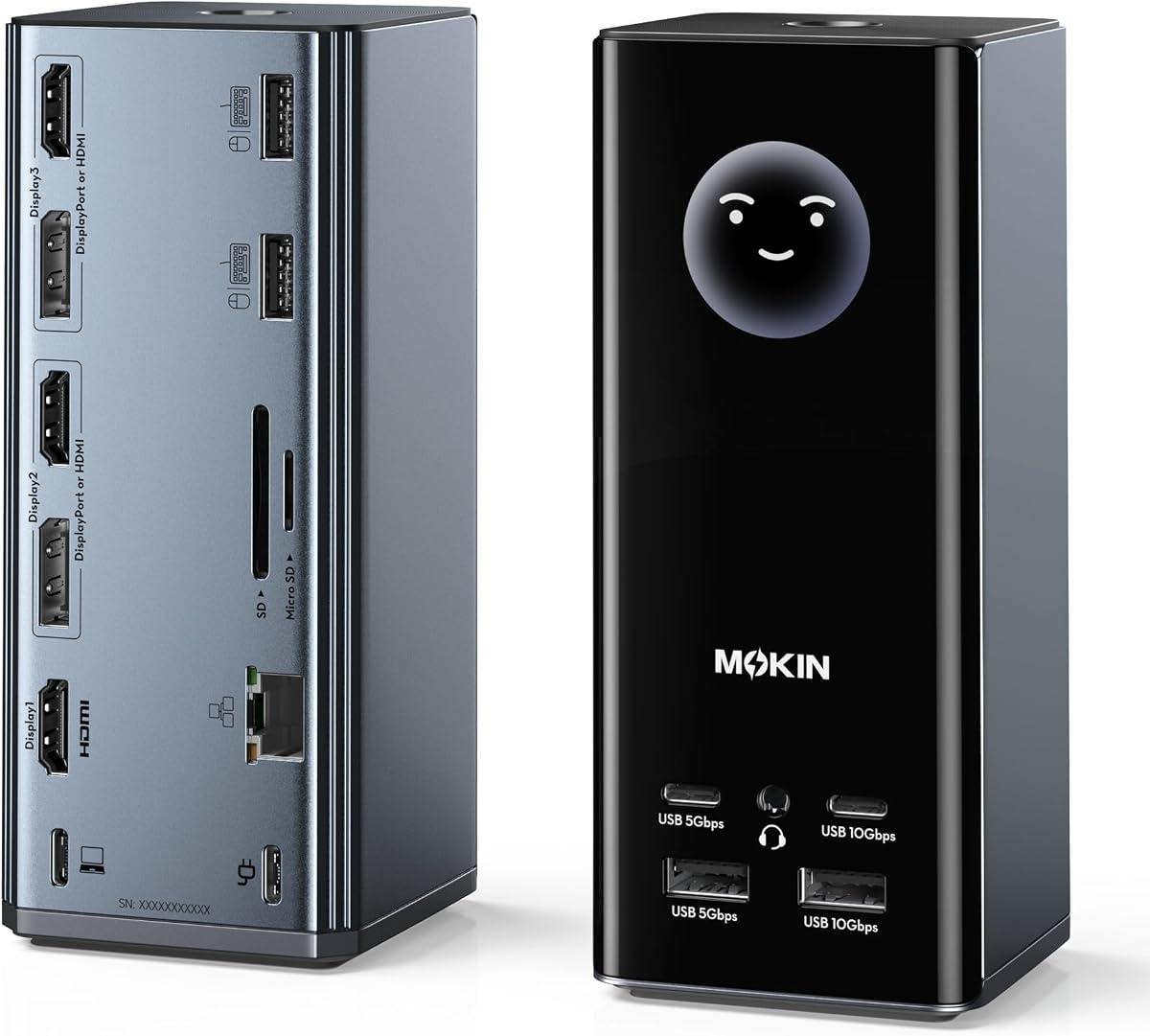
MOKiN's dock features a smart LCD that shows real-time weather and charging wattage. This visual intelligence keeps you informed without checking your phone or laptop.
We may earn a commission when you buy through this link, at no additional cost to you.
The 17-in-1 design includes 3 HDMI and 2 DP for flexible screen combos. On Windows, you can get triple 4K@60Hz output. The privacy lock button instantly turns off screens for security.
Silicone suction cups keep the dock stable. It also includes Gigabit Ethernet and SD readers. The USB-C PD supports 85W laptop charging.
Buy this for its unique smart features. Just confirm your laptop supports DisplayPort Alt Mode for full performance.
Monitor charging wattage and port status instantly on the integrated LCD.
Double-tap the button to lock sensitive info on screens instantly.
We may earn a commission when you buy through this link, at no additional cost to you.
Choosing the right dock requires understanding your laptop's capabilities and display needs. Here are key factors to consider for a smooth setup.
Most docks use MST or DisplayLink for multiple screens. MST splits bandwidth and works natively on Windows. DisplayLink uses software to extend displays and works on Mac but requires drivers.
Pick MST for Windows speed and DisplayLink for Mac compatibility.
Triple 4K@60Hz needs high bandwidth. Ensure your dock supports Display Stream Compression if your GPU allows. Otherwise, expect some screens at lower refresh rates.
Check your laptop GPU for 4K triple support before buying.
A dock with 100W PD keeps your laptop charged under load. Some include adapters while others do not. Higher wattage ensures stable triple-monitor performance.
Always use the recommended adapter for full features.
Look for USB 3.0 or higher for fast data transfer. Ethernet and SD readers add convenience for specific workflows.
Count all ports needed for your peripherals before choosing.
Windows laptops handle MST easily. macOS often limits to two external displays unless using DisplayLink. Chrome OS varies by model.
Verify OS compatibility to avoid unexpected limitations.
Aluminum builds dissipate heat better. Consider horizontal or vertical options based on your desk space.
Stable bases prevent disconnects during use.
Lifetime support from the manufacturer ensures help with troubleshooting. Check return policies for compatibility issues.
Choose brands with proven technical support.
Connect your laptop to the dock using the provided USB-C cable before plugging in your monitors. This ensures the system recognizes all displays correctly.
Power on your monitors and let your OS detect them. In Windows or macOS display settings, arrange the screens to match their physical layout on your desk.
Avoid exposing the dock to dust or liquids. Clean the ports with compressed air occasionally to maintain stable connections.
Most docks work with Mac via DisplayLink technology, but native MST support is limited. Check if your model supports DisplayLink for extended displays on Apple Silicon. Some docks allow two screens extended and one mirrored.
Driverless docks work on Windows using MST. Others using DisplayLink need driver installation. Always check product specs before buying to prepare for setup steps.
Use the included adapter or one rated for at least 100W to power your laptop and dock simultaneously. Insufficient wattage may cause instability.
Only laptops with high-bandwidth USB-C or Thunderbolt 3/4 ports support triple 4K. Ensure your GPU and OS support MST or DisplayLink for full resolution.
Yes, wired Gigabit Ethernet provides stable and low-latency connections for conferencing and large file transfers. It is recommended for critical tasks.
Some budget models include VGA ports for legacy displays. These may reduce overall resolution to 1080p. Confirm your needs before selecting one.
Some docks offer a privacy button to turn off external displays instantly. This helps secure your workspace without locking your laptop.
Without MST or DisplayLink support, you will get limited displays. Always check your laptop specs before buying to avoid compatibility issues.
We have reviewed ten top models ranging from smart hubs to powerful enterprise docks. The Selore and TobenONE options lead with versatility while Plugable stands out for Mac users.
Prioritize video output technology and power delivery to match your workflow. If you need four screens, DisplayLink-based docks offer the flexibility you require.
Check current listings for availability and exact specs. A good dock can transform your workspace for years with the right choice.