
Surface Docking Station Triple Displays
4.1Editor score
Triple display output
Multiple USB ports
Affordable pricing
Discover the top docking stations for Surface Pro devices in October 2026. We compare features, ports, and compatibility to help you choose the right hub.
Choosing the right docking station for your Surface Pro can transform your portable tablet into a full desktop workstation. It allows you to connect multiple monitors, peripherals, and networks with a single cable for seamless productivity.
We evaluated ten top-rated models based on port variety, charging power, display support, and build quality. Our analysis ensures you find a reliable hub that matches your specific workflow and budget needs effectively.
Each pick highlights key strengths and potential trade-offs to guide your decision. Remember that product availability and pricing can change frequently, so verify current details before making your final purchase decision online.
4.1Editor score

4.4Editor score

4.5Editor score
This side-by-side comparison highlights the key specifications of each docking station to help you quickly identify the model that fits your connectivity needs best.




This docking station stands out as a premium solution for Surface Pro users needing high-speed connectivity and reliable performance. With a rating of 4.4 stars, it offers Thunderbolt 4 ports that enable rapid data transfers and media streaming.
We may earn a commission when you buy through this link, at no additional cost to you.
The versatile compatibility includes multiple USB-C and USB-A ports alongside a robust 2.5G Ethernet connection. Its ability to support two 4K monitors enhances productivity significantly for multitasking professionals.
While the price is higher than average, the rapid charging technology and raised tactile indicators justify the investment. The use of recycled ocean-bound plastic also adds an eco-friendly dimension to this high-performance device.
Ideal for users seeking future-proof connectivity, this dock ensures seamless integration with modern peripherals. It is the top recommendation for those prioritizing speed and reliability in their workspace setup.
Thunderbolt 4 ports enable data transfer speeds up to 40Gbps for professional workflows.
Connect up to two 4K displays simultaneously for an expansive desktop workspace experience.
We may earn a commission when you buy through this link, at no additional cost to you.
The classic Microsoft Surface Dock offers a straightforward way to turn your Surface into a desktop PC. Rated 4.5 stars, it provides essential connectivity with Mini DisplayPorts and USB 3.0 ports.
We may earn a commission when you buy through this link, at no additional cost to you.
Its magnetic Surface Connect cable ensures a secure connection that prevents accidental disconnections. The four USB 3.0 ports accommodate peripherals like keyboards and external drives effortlessly.
However, the lack of USB-C ports may limit compatibility with newer devices. Users should consider their existing accessories before purchasing this older model for modern setups.
This dock remains a solid choice for legacy users or those with specific Mini DisplayPort needs. It delivers dependable performance for standard office tasks and basic expansions.
The magnetic cable snaps securely into place for stable connectivity during daily use.
Four USB 3.0 ports allow connection of multiple legacy peripherals without adapters.
We may earn a commission when you buy through this link, at no additional cost to you.
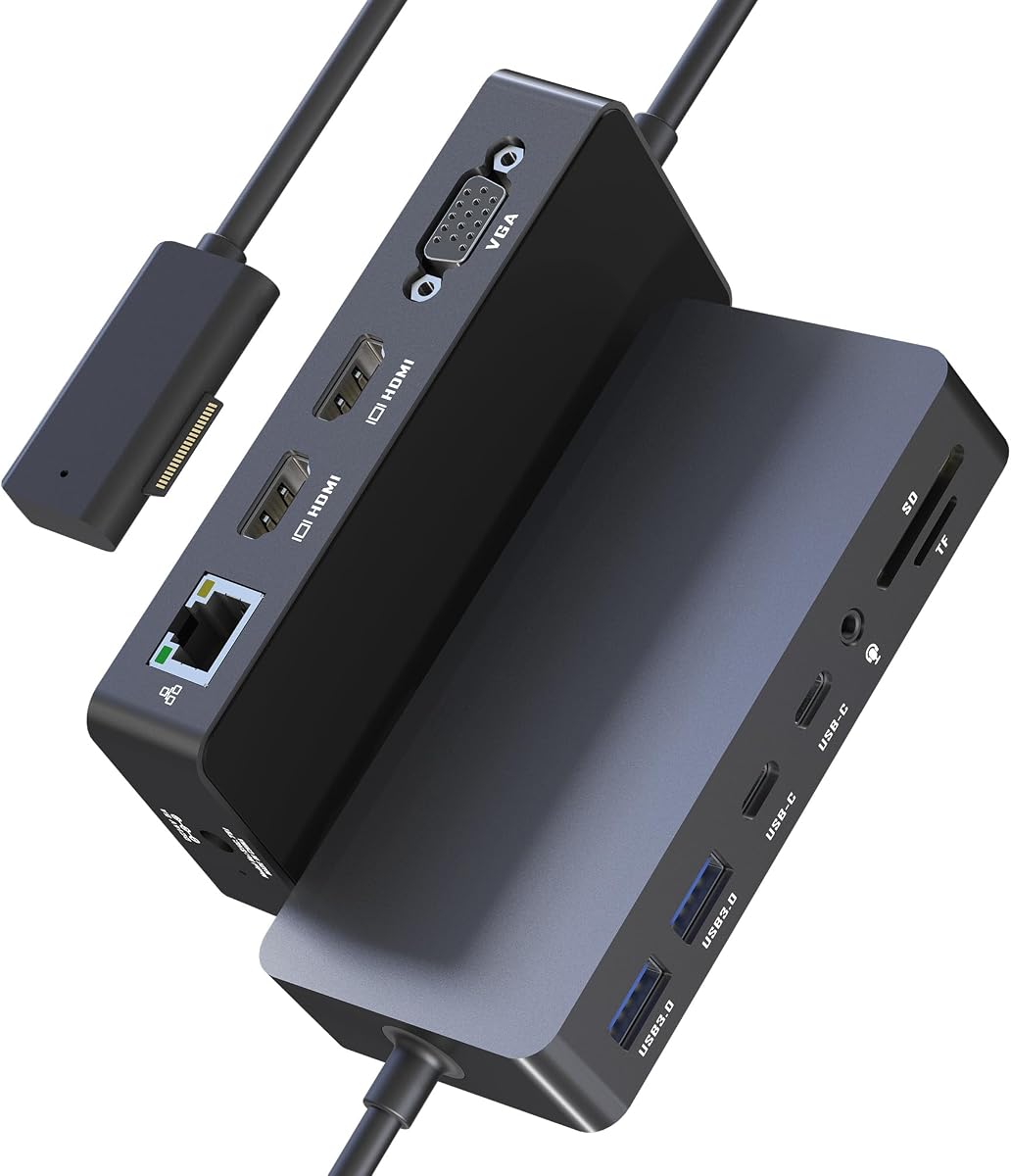
This docking station offers exceptional value for users needing multiple screen outputs without a high cost. With a 4.1 rating, it supports triple displays using HDMI and VGA connections effectively.
We may earn a commission when you buy through this link, at no additional cost to you.
The inclusion of USB ports and an SD/TF card slot makes it versatile for file transfers and connectivity. Users can connect their Surface Pro to three monitors for enhanced productivity setups.
Note that 4K resolution is limited to 30Hz on HDMI ports, which may impact smoothness. For basic office work, this limitation is acceptable given the competitive pricing and feature set.
It is an ideal choice for students or budget-conscious professionals seeking expandability. The straightforward plug-and-play design ensures minimal setup time for immediate use.
Use dual HDMI and one VGA port to extend your workspace across three monitors easily.
SD and TF card slots allow direct photo transfer from cameras without extra cables.
We may earn a commission when you buy through this link, at no additional cost to you.
Rated 4.8 stars, this 12-in-1 station impresses with robust connectivity and high user satisfaction. It supports triple displays and includes a 72W power supply to keep devices charged.
We may earn a commission when you buy through this link, at no additional cost to you.
The 5Gbps data transfer speed allows efficient file movement between external drives and your Surface. Its modern design pairs well with various Surface models for a clean desk setup.
Users should note the 30Hz limit on 4K outputs if they require smooth motion for video. However, for static work environments, this does not significantly impact daily usability.
This is a strong option for remote workers needing reliable performance and affordability. The included warranty adds peace of mind for long-term usage scenarios.
The 72W adapter delivers sufficient power to run the dock and charge your laptop.
5Gbps speeds on USB ports ensure quick file syncing for daily work tasks.
We may earn a commission when you buy through this link, at no additional cost to you.
This model focuses on enhancing productivity with dual 4K HDMI outputs and robust charging capabilities. With a 4.2 rating, it offers a comprehensive 12-in-1 port selection for diverse needs.
We may earn a commission when you buy through this link, at no additional cost to you.
The 72W power supply ensures your Surface remains charged while connected to multiple devices. Ethernet connectivity provides a stable internet connection for critical video calls.
While it supports triple screens, the 30Hz refresh rate may not suit fast-moving content. Users focused on static applications will find the performance adequate for most scenarios.
It serves as a reliable tool for professionals needing consistent connectivity. The broad compatibility list ensures it fits well with most current Surface Pro and Laptop models.
Connect two 4K monitors via HDMI for detailed workspace viewing options.
The built-in Ethernet port offers a secure wired link for network reliability.
We may earn a commission when you buy through this link, at no additional cost to you.
The Surface Dock 2 represents a significant upgrade with dual 4K support at 60Hz for smooth visuals. Rated 4.5 stars, it features four USB-C ports and a powerful 199W power supply.
We may earn a commission when you buy through this link, at no additional cost to you.
This dock is designed for users who require high performance and multiple high-resolution displays. The longer Surface Connect cable adds convenience for flexible desk layouts.
The high price point reflects the premium build and extensive feature set. Users should ensure their Surface model supports the specific video requirements of this advanced dock.
It is the best choice for power users needing top-tier performance and connectivity. The included security lock support adds an extra layer of protection for office environments.
Dual 4K 60Hz output ensures smooth visuals for professional creative work.
Four USB-C ports provide versatile connections for modern USB-C devices easily.
We may earn a commission when you buy through this link, at no additional cost to you.
Rated 4.8 stars, this model offers the same high-performance features as the standard Dock 2. It includes a 199W power supply and supports dual 4K displays at 60Hz.
We may earn a commission when you buy through this link, at no additional cost to you.
The versatility of USB-A and USB-C ports makes it easy to connect a mix of legacy and modern devices. Users appreciate the seamless connectivity for transforming their Surface into a desktop.
While the cost is higher, the performance justifies the investment for demanding workflows. The 80cm cable provides ample reach for comfortable seating positions.
It is an excellent choice for professionals needing reliable and high-quality video output. The wide compatibility ensures it works with various Surface generations.
Mix of USB-A and USB-C offers flexibility for all peripheral types.
The 199W adapter ensures consistent power for charging and peripherals.
We may earn a commission when you buy through this link, at no additional cost to you.
This 12-in-1 station supports dual 4K 60Hz outputs for a crisp visual experience. With a 4.3 rating, it features a 100W DC input for charging and robust gigabit ethernet.
We may earn a commission when you buy through this link, at no additional cost to you.
Users benefit from multiple USB ports and SD card readers for rapid data transfers. The triple monitor support allows for expansive workflows without requiring multiple docks.
The 100W charging input helps power the dock and laptop simultaneously. However, users need to ensure they have a compatible power adapter for optimal performance.
It is a strong choice for multimedia creators needing high refresh rates. The included warranty adds assurance for its longevity in daily usage.
Extend your workspace across three screens easily using HDMI and VGA ports.
Dedicated power port ensures your Surface charges while connected to all devices.
We may earn a commission when you buy through this link, at no additional cost to you.
This renewed model provides premium features at a potentially lower price point. Rated 4.7 stars, it supports dual 4K 60Hz and includes the 199W power supply.
We may earn a commission when you buy through this link, at no additional cost to you.
Users get a USB-C cable included for setup convenience. The rigorous testing for durability ensures consistent performance comparable to new units.
The 1-year limited warranty offers some protection, though less than new units. It is a smart choice for those willing to consider refurbished goods.
Ideal for budget-conscious users wanting high-end performance. The renewed status offers savings without sacrificing significant quality or features.
Get top-tier features like 4K 60Hz at a more accessible price.
The included USB-C cable helps streamline your initial setup process.
We may earn a commission when you buy through this link, at no additional cost to you.
This Surface Dock provides essential connectivity with Mini DP ports and 4 USB 3.0 slots. With a 4.2 rating, it includes a 90W power supply for consistent device charging.
We may earn a commission when you buy through this link, at no additional cost to you.
The gigabit network port ensures fast internet speeds for work tasks. It is designed to work with a wide range of Surface Pro and Laptop models.
Users requiring USB-C should note this model lacks modern port support. However, for those with legacy devices, it offers solid reliability.
It serves as a functional option for basic desktop transformations. The simple design makes it easy to integrate into any workspace quickly.
Four USB 3.0 ports provide ample space for keyboards and mice.
A dedicated gigabit port ensures stable high-speed internet access.
We may earn a commission when you buy through this link, at no additional cost to you.
Selecting the right docking station requires understanding your specific connectivity needs and budget constraints.
Ensure the docking station has the correct mix of USB-A, USB-C, HDMI, and DisplayPort connectors to match your peripherals. Modern setups often benefit from USB-C hubs that support high bandwidth for video and data.
Check that the number of ports matches the number of devices you plan to connect to avoid buying extra adapters.
Look for a dock that provides sufficient wattage to charge your Surface Pro while driving external devices. Higher wattage ensures your laptop does not drain the battery during intensive use.
A 65W or higher power supply is generally recommended for Surface Pro models to maintain full functionality.
Determine if you need single or dual monitor support and the resolution required for your workflow. Some docks support dual 4K monitors while others are limited to 1080p outputs.
Verify refresh rates if you work with video or animation where smooth motion is essential.
A built-in Ethernet port provides a stable and faster internet connection compared to Wi-Fi which is crucial for large file transfers or video calls.
Gigabit Ethernet support is preferred for ensuring maximum network speeds on your wired connection.
Premium docks often use durable materials and better thermal management to prevent overheating during long usage sessions. Look for brands with a reputation for reliability and sturdy construction.
Quality build reduces the risk of port damage or connection failures over time.
Confirm the dock is explicitly listed as compatible with your specific Surface Pro model generation. Some older docks may not support newer Thunderbolt or USB-C standards properly.
Cross-check the manufacturer's compatibility chart before purchasing to ensure seamless functionality.
Set a clear budget range that aligns with your performance needs without overspending on unused features. Entry-level options can serve basic needs while premium models offer better speed and reliability.
Consider long-term value by choosing a model that supports future device upgrades.
Begin by connecting the power adapter to the docking station before plugging in any peripherals to ensure stable power distribution.
Use the appropriate Surface Connect or USB-C cable to link your device to the dock securely, avoiding loose connections that may cause interruptions.
Keep the dock in a well-ventilated area away from direct heat sources to maintain optimal performance and prevent overheating issues.
Docking stations convert your portable device into a full workstation by allowing multiple monitor connections and peripheral access. They simplify cable management and provide stable power delivery for charging.
No, compatibility varies by model generation and port type. Always verify that the docking station supports your specific Surface Pro version for optimal performance.
Yes, most modern docking stations include power delivery features that charge your Surface while connected. Ensure the wattage is sufficient for your device requirements.
Thunderbolt docks offer higher data transfer speeds and support for more powerful external devices compared to standard USB-C docks. They are ideal for demanding creative workflows.
Check all cable connections for tightness and restart your Surface device. Updating drivers or resetting the dock connection often resolves common connectivity problems.
Third-party docks often provide more affordable options with similar features but may vary in build quality. Look for reputable brands with strong user reviews and warranties.
We have explored ten top-rated docking stations for Surface Pro that offer varying levels of performance and connectivity. Each model presents unique features suited for different user needs and preferences.
Prioritize features like power delivery and display support based on your daily tasks to ensure the dock enhances your productivity effectively.
Always verify current product details and pricing before purchasing to confirm compatibility and value for your specific setup requirements today.