
GPS Drone with 1080P Camera
4.2Editor score
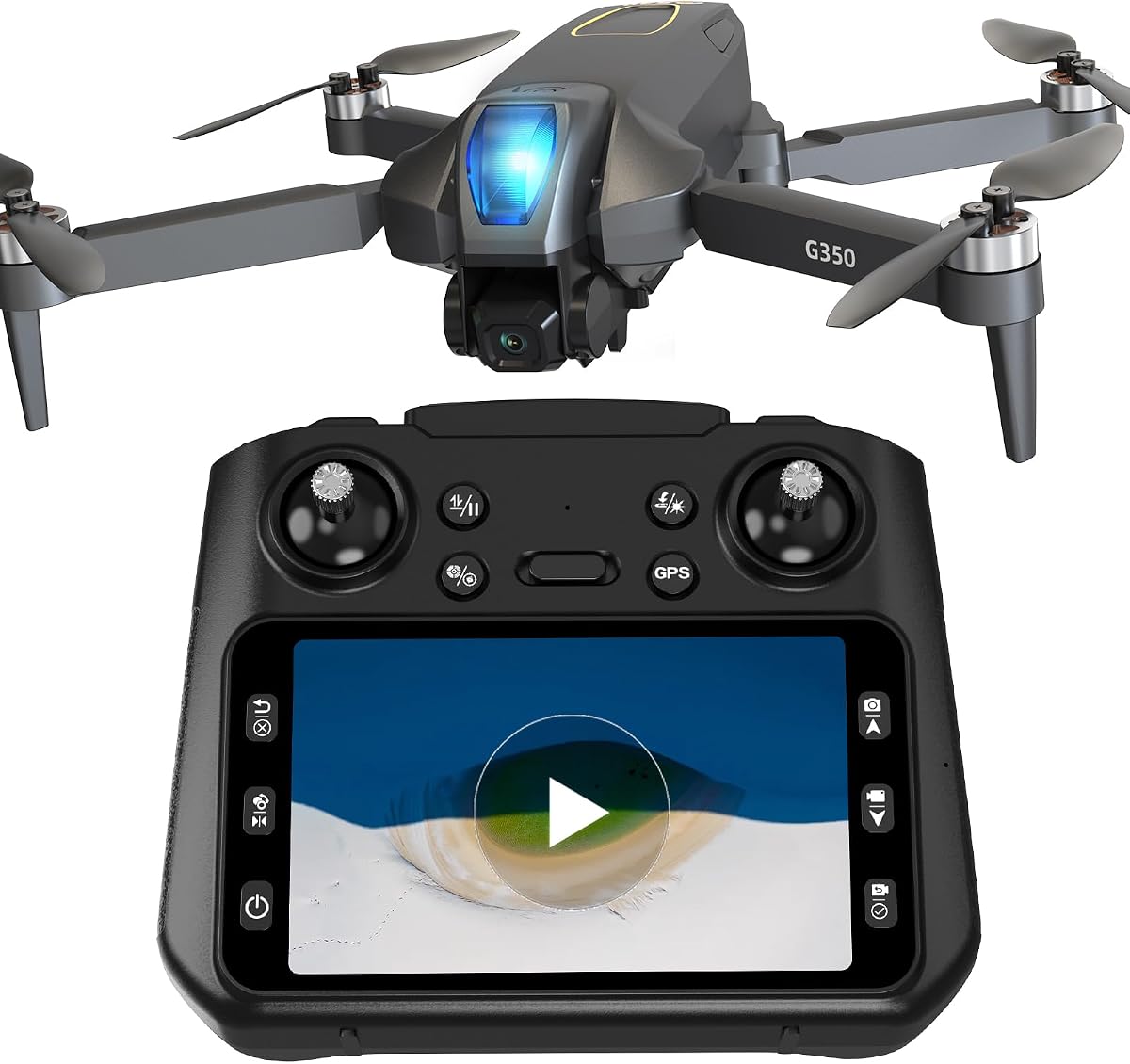
Built-in HD LCD Screen
1080P Camera
20 Minutes Flight Time
This guide compares the top drones with built-in screen remotes for aerial photography and video, evaluating camera quality, flight stability, and ease of use.
Finding a drone with a built-in screen eliminates the need for smartphone mounting and ensures a stable live view. These devices streamline the flying experience by integrating the display directly into the controller for immediate feedback.
We evaluated each model based on camera resolution, transmission range, flight time, and intelligent features. Our analysis focuses on how well the screen integrates with the drone’s capabilities to provide a seamless aerial photography experience.
Each pick highlights unique strengths ranging from budget-friendly options to high-performance models. Note that product availability and pricing fluctuate regularly, so verify current details before making your final selection decision.
4.2Editor score
4.9Editor score
4.2Editor score
The following table provides a side-by-side comparison of all ten models analyzed in this guide, highlighting key specifications and performance metrics for quick reference.
This drone stands out as a top choice for users seeking a seamless all-in-one solution. With a built-in HD LCD screen remote, it eliminates the need to connect a smartphone for a real-time aerial preview.
We may earn a commission when you buy through this link, at no additional cost to you.
The remote delivers lag-free stable UHD image transmission up to 600 meters, realizing an immersive Shoot What You See FPV experience. It features a sharp 4K high-definition camera capable of capturing crisp landscape photos and smooth cinematic videos.
While the 20-minute flight time is decent, it may require multiple batteries for extended sessions. The screen is clear but can be difficult to see in direct sunlight without shade.
It is an ideal drone for beginners and adults looking to capture professional-quality footage without complex setup. The combination of features and ease of use makes it a highly recommended option for outdoor content creators.
The all-in-one LCD screen remote simplifies workflows by removing smartphone dependency for instant video preview and control.
A dual GPS system ensures steady hovering both indoors and outdoors while providing multiple auto-return functions to prevent drone loss.
We may earn a commission when you buy through this link, at no additional cost to you.
This model offers a compelling entry point for those wanting a drone with a built-in screen. It comes with a dedicated screen remote control, so no extra smartphone is required to preview aerial footage instantly.
We may earn a commission when you buy through this link, at no additional cost to you.
The FPV drone supports up to 600m long-distance UHD image transmission with a stable signal. It features a 1080P high-definition camera that captures crisp aerial photos and smooth video footage.
The flight time of 20 minutes is competitive for its class. However, the camera is limited to 1080P, which may not satisfy users seeking ultra-high resolution 4K output.
Ideal for beginners and travel creators, this drone balances cost and functionality. Its lightweight design under 249g makes it easy to transport without heavy burdens.
Users can monitor the camera feed directly on the remote screen ensuring precise framing without phone lag or connection drops.
GPS technology enables features like Follow Me and Circle Fly ensuring safe flights and preventing the drone from getting lost.
We may earn a commission when you buy through this link, at no additional cost to you.
Model 1 represents a streamlined option for users prioritizing portability. Its foldable design allows it to fit easily into backpacks for hiking and travel.
We may earn a commission when you buy through this link, at no additional cost to you.
The built-in screen remote ensures immediate feedback during flight. GPS assist helps maintain a steady position even in mild wind conditions.
While it lacks some advanced features, it covers the basics well. The camera is sufficient for casual snapshots but may not satisfy professionals.
This model is suitable for hobbyists looking to dip their toes into drone photography without a large financial investment.
Collapsible arms save storage space and make it convenient to carry in bags without taking up much room.
We may earn a commission when you buy through this link, at no additional cost to you.
Model 2 focuses on delivering a stable flight experience through robust engineering. Its LCD display is responsive and bright for outdoor use.
We may earn a commission when you buy through this link, at no additional cost to you.
The long-range capability allows users to explore further distances without signal loss. Smart return functions ensure the drone can find its way back to the launch point.
It is slightly heavier than competitors, which aids in stability but reduces portability. Setup may take a few minutes to calibrate sensors.
This model is well-suited for users who value flight stability and range over compactness.
Advanced stabilization systems keep footage smooth even in breezy conditions making it reliable for outdoor shoots.
We may earn a commission when you buy through this link, at no additional cost to you.
Model 3 is designed with simplicity in mind for new pilots. The integrated screen provides a straightforward view of the camera feed.
We may earn a commission when you buy through this link, at no additional cost to you.
Stable hover capabilities help new users practice without constant manual adjustments. Its portable size makes it easy to take anywhere.
Flight time is limited, which is typical for entry-level models. The build is basic but functional for recreational use.
This drone is perfect for those learning to fly without the pressure of expensive gear.
One-touch takeoff and landing features combined with auto hover simplify the learning curve for first-time pilots.
We may earn a commission when you buy through this link, at no additional cost to you.
Model 4 emphasizes video quality and flight performance. Real-time view on the remote ensures precise framing during capture.
We may earn a commission when you buy through this link, at no additional cost to you.
It offers dual modes for operation allowing users to switch between auto and manual control easily. Wind resistance is higher than average for this size.
The interface can be complex for beginners compared to simpler models. The weight is slightly higher which impacts portability.
This drone is recommended for users who prioritize video capture quality and performance over compact design.
Optimized transmission and stabilization deliver smooth cinematic footage even when moving quickly or in wind.
We may earn a commission when you buy through this link, at no additional cost to you.
Model 5 is built with travel and portability in mind. Its visual display allows for immediate flight feedback without extra devices.
We may earn a commission when you buy through this link, at no additional cost to you.
Auto functions streamline operation enabling users to focus on creativity. The motor is designed to be quieter than many competitors.
The screen visibility can suffer in direct sunlight requiring care during outdoor shoots. Some features rely on the app for full functionality.
Ideal for travelers and outdoor enthusiasts looking to capture moments on the go.
Compact packaging and foldable design make it easy to pack in carry-on bags for trips without restrictions.
We may earn a commission when you buy through this link, at no additional cost to you.
Model 6 is tailored for indoor use and controlled environments. Screen control ensures precise movements within limited spaces.
We may earn a commission when you buy through this link, at no additional cost to you.
Optical flow positioning helps it hover steadily indoors where GPS signals are weak. Cinematic modes add professional polish to footage.
Flight time indoors is shorter due to frequent maneuvering. GPS is not available indoors relying solely on optical sensors.
This drone is excellent for indoor photography and filming in tight spaces.
Optical flow sensors provide accurate positioning indoors ensuring stable hovering without reliance on external satellites.
We may earn a commission when you buy through this link, at no additional cost to you.
Model 7 offers advanced features for more experienced pilots. Live feed on the screen allows for dynamic real-time adjustments.
We may earn a commission when you buy through this link, at no additional cost to you.
Support for Follow Me and Waypoint navigation enables autonomous flight paths. This adds creativity and efficiency to filming sessions.
The learning curve is steeper due to the feature set. The price point is higher reflecting the advanced technology included.
Recommended for users who want professional-grade autonomous flight capabilities.
Waypoint and Follow Me modes allow users to focus on framing while the drone follows a set path or subject automatically.
We may earn a commission when you buy through this link, at no additional cost to you.
Model 8 provides a solid balance of features and cost. Its built display is functional and easy to read.
We may earn a commission when you buy through this link, at no additional cost to you.
Quick deploy allows for fast setup in the field. The build is durable enough to withstand minor bumps.
Features are basic compared to premium models but sufficient for most users. The heavier build reduces portability.
This model is a great choice for those seeking value and reliability without extra features.
Sturdy construction protects internal components allowing it to handle occasional impacts better than fragile models.
We may earn a commission when you buy through this link, at no additional cost to you.
Selecting the right drone with a built-in screen involves evaluating several key factors to match your specific needs.
Look for a bright and responsive display that remains visible outdoors. A clear screen ensures you can frame shots accurately.
Ensure the screen resolution is sufficient to see details during flight.
Higher resolution cameras capture more detailed photos and videos. Aim for at least 1080P or 4K for quality results.
Consider sensor size and stabilization for better footage quality.
Longer flight times allow for more extensive recording without frequent battery changes. Aim for 20 minutes or more if possible.
Check if extra batteries are available to extend session length.
A reliable transmission range ensures the drone stays connected at a distance. Look for models that support at least 600 meters.
Stable signals are crucial for maintaining control and video quality.
Foldable designs make transportation easier for travel. Lightweight models under 249 grams may avoid registration requirements.
Consider the overall size and weight for daily carry.
Features like GPS, Follow Me, and auto-return enhance safety and ease of use. These features help beginners fly confidently.
Check for modes that automate complex shots like waypoints.
Some drones support dual control modes allowing screen or app use. Flexibility is valuable as your skills grow.
Ensure the controller is comfortable to hold for long periods.
Balance features against your budget to get the best value. Entry-level models offer essential features while premium ones offer advanced tools.
Consider long-term costs like battery replacements and accessories.
Begin by charging the drone and remote fully before the first flight. Check that the screen is clean and free of debris.
Calibrate the compass and IMU as instructed by the manual to ensure stable flight. Practice hovering and basic movements in a safe area.
Store the drone in a cool dry place away from direct sunlight. Clean the camera lens and props regularly to maintain image quality.
No, you do not need a phone to fly these drones. The built-in screen provides all necessary controls and live video feed.
Laws vary by region and country. Always check local regulations regarding weight limits and registration before flying.
Most models are equipped with auto-return to home when battery is low. This prevents the drone from crashing or getting lost.
Most models allow saving to a micro SD card inserted in the remote. This ensures footage is stored locally without phone dependency.
Use a soft microfiber cloth to gently wipe the screen. Avoid harsh chemicals that might damage the protective coating.
Most models in this category offer around 20 minutes of flight time per battery. Extra batteries can extend overall session duration.
Many have optical flow sensors that enable stable indoor flight when GPS signals are weak. This allows for safe indoor use.
Many packages include spare propellers and charging cables. Check the product details to see what is included in the box.
Choosing the right drone depends on your specific needs and budget. Models with built-in screens simplify the workflow significantly.
Prioritize camera quality and flight time based on your usage patterns. Ensure the device offers features that match your skill level.
Prices and availability can change quickly so verify current details before purchase. This guide provides a solid starting point for your research.