
S K Portable SSD 1TB
4.5Editor score
Lightweight aluminum design
SLC caching for speed
iPhone 4K ProRes support
This guide compares the top external SSD for Mac Mini M4 based on speed, capacity, durability, and price to help you expand storage quickly.
Selecting the right external SSD for Mac Mini M4 is crucial for expanding storage without sacrificing performance. You need drives that match the high-speed USB ports and support modern file systems like APFS seamlessly for smooth operation.
We compared ten top-rated models based on real-world transfer speeds, build quality, and compatibility with macOS. Our analysis focuses on how well each drive handles large files, heat dissipation, and everyday workflows on the M4 chip.
Each pick highlights key features, pros, and cons to help you decide quickly. Prices and availability change often, so verify current details before buying. This list ensures you get reliable storage that fits your specific needs and budget.
4.5Editor score
4.5Editor score

3.9Editor score
This side-by-side comparison lists all ten products with their key specifications. Use this table to quickly find the drive that matches your capacity needs and connectivity requirements.




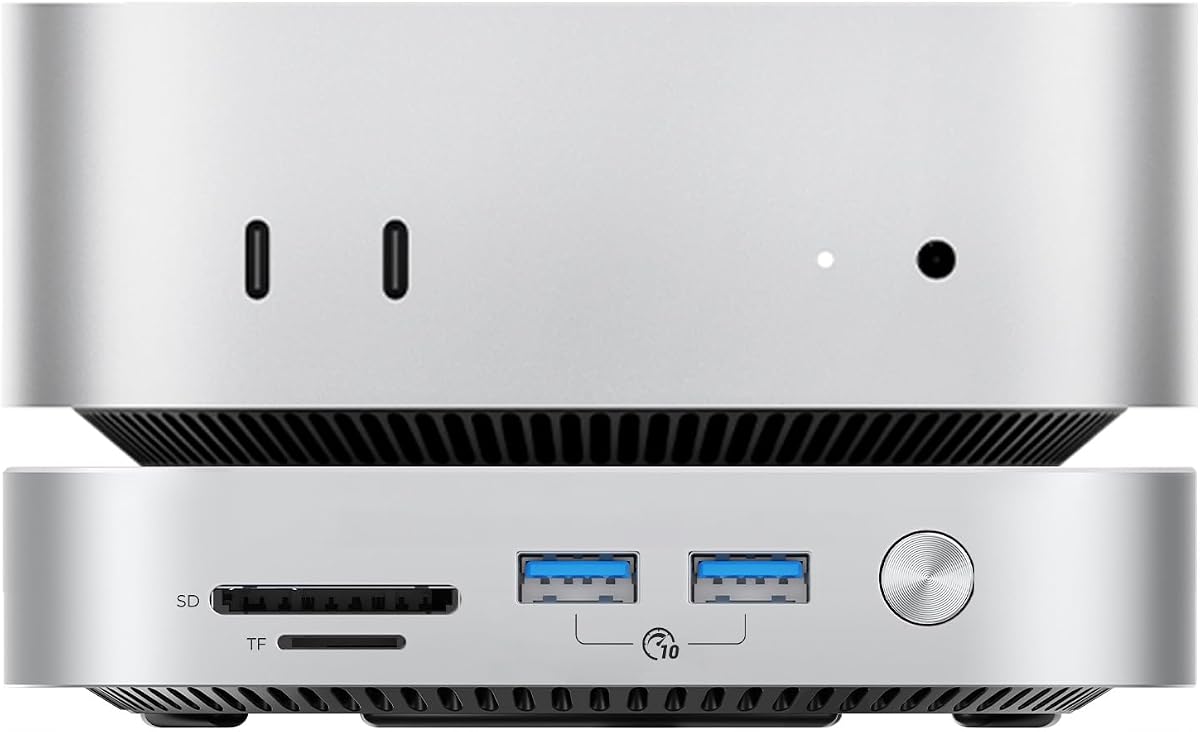
The ORICO 2TB External SSD is a top choice for Mac Mini M4 users seeking expansion. It stands out with its dual-SSD bundle designed specifically for M-series chips, offering plug-and-play setup and Time Machine compatibility.
We may earn a commission when you buy through this link, at no additional cost to you.
This drive delivers 3200MB/s speeds via NVMe, ensuring smooth 4K/8K workflows. The aluminum body features intelligent cooling channels to sustain peak performance. It includes USB-C and USB-A cables, making it ready to use immediately.
While expensive, the performance justifies the cost for professionals. Its 24/7 sleep mode and thermal management are practical for long-term use. The included accessories add value and reduce setup complexity significantly.
Buy this if you need reliable storage for creative projects. It fits well with desktop elegance and handles heavy data transfers. This drive is ideal for users prioritizing speed and ecosystem integration over portability.
The bundle doubles storage while maintaining a clean setup. It attaches easily to Mac Mini M6 and M4 Pro models.
Certified for macOS Sonoma with M-series chip support. This ensures plug-and-play convenience and stable connectivity.
We may earn a commission when you buy through this link, at no additional cost to you.
Samsung T7 Portable SSD offers fast speeds and durability for any user. It is embedded with PCIe NVMe technology to deliver up to 1050MB/s. This makes it nearly twice as fast as previous models like the T5.
We may earn a commission when you buy through this link, at no additional cost to you.
Its aluminum unibody construction provides excellent heat dissipation and drop protection up to 6 feet. The compact design fits easily in pockets. It supports iPhone 15 Pro Res 4K recording for mobile creators.
While not Mac-exclusive, it is broadly compatible with many devices. However, users should ensure USB 3.2 Gen 2 ports for best speeds. The design is sturdy but basic compared to premium options.
This drive suits general backups and moderate creative work. It is reliable for sharing files quickly. Samsung's reputation as a top brand adds confidence for long-term use.
The T7 delivers fast speeds to back up any endeavor. Build your video editing empire efficiently with this reliable storage.
With capacities up to 4TB, save exactly what you need. From large files to game data, it holds it all.
We may earn a commission when you buy through this link, at no additional cost to you.
Lexar 2TB ES3 provides fast transfers and solid durability. It features double layer graphite sheets that conduct heat efficiently to keep the drive cool. This ensures consistent performance during blazing fast transfers.
We may earn a commission when you buy through this link, at no additional cost to you.
The drive offers up to 1050MB/s read speeds. Its sleek design is drop-resistant up to 2 meters, making it suitable for everyday office use. The included 2-in-1 cable works with PC and Mac systems.
While reliable, it lacks encryption tools for sensitive data. The build is sturdy but basic. It is a great option for users needing quick storage without extra features.
Choose this for reliable data transfers at a reasonable cost. It fits well for general storage needs. Lexar ensures a balance of speed and durability for everyday use.
Experience instant storage expansion with high speeds. The graphite cooling system maintains stability under heavy use.
Drop-resistant up to 2 meters for peace of mind. It handles office and field environments with ease.
We may earn a commission when you buy through this link, at no additional cost to you.
The SanDisk Extreme Portable SSD delivers nearly 2x faster speeds than its predecessor. It moves 1000 high-res photos in under 60 seconds. The new model offers up to 2000MB/s transfer speeds for demanding tasks.
We may earn a commission when you buy through this link, at no additional cost to you.
Its IP65 rating protects against spills and dust. It features drop protection up to 3 meters. The 256-bit AES encryption keeps private files secure with password protection. It is pocket-sized for portability.
While powerful, the USB interface is standard. Advanced users may want 2×2 options. The rugged design is robust, making it ideal for fieldwork.
This drive is perfect for users needing security and speed. It suits content creators on the go. The balance of protection and performance is hard to beat.
Move photos in under 60 seconds. The new model offers transfer speeds up to 2000MB/s.
256-bit AES encryption keeps files secure with password protection. Private data stays safe on this drive.
We may earn a commission when you buy through this link, at no additional cost to you.
Lexar ES3 1TB Portable SSD is ultra-thin and lightweight at 42g. It supports USB 3.2 Gen 2 with speeds up to 1050MB/s. This design fits easily in your pocket for easy transport.
We may earn a commission when you buy through this link, at no additional cost to you.
It includes DataShield encryption to protect files. The drive works with iPhone, Android, laptops, and more. Its thin profile is durable yet convenient for on-the-go work.
MagSafe is not supported on this version. Users should check compatibility before purchase. It offers good value for those prioritizing portability and speed.
This drive suits mobile professionals and general users. It is practical for quick data access. Lexar ensures a reliable and secure solution for everyday needs.
The drive is 10.5mm thick and weighs 42g. It fits in your pocket easily for convenience.
Lexar DataShield 256-bit AES encryption protects files. It ensures security for all your important data.
We may earn a commission when you buy through this link, at no additional cost to you.
SSK Portable SSD 1TB offers instant access to files at 1050MB/s. It weighs just 36.6g and features a 2mm thick aluminum alloy case for superior heat dissipation. The LED light shows USB activity clearly.
We may earn a commission when you buy through this link, at no additional cost to you.
It uses SLC caching to maintain steady 10Gbps speeds. It supports iPhone 4K60Hz ProRes HDR capture. It includes both USB-C and USB-A cables for flexibility.
Capacity variance on Windows is noted. Mac shows full capacity. The design is simple but effective for basic needs.
This drive is a great budget option for students and pros. It works well with mobile devices. SSK delivers reliability without extra cost.
SLC caching ensures steady 10Gbps for transfers. No slowdowns for large file transfers occur here.
The aluminum alloy case ensures reliable performance. Temperature peaks at safe levels for consistent operation.
We may earn a commission when you buy through this link, at no additional cost to you.
Crucial X10 delivers ultra-fast speeds up to 2100MB/s for creators and gamers. Its matte blue design is durable. It includes IP65 dust and water resistance for all weather protection.
We may earn a commission when you buy through this link, at no additional cost to you.
It features drop resistance up to 9.8ft and comes with Mylio Photos and Acronis True Image software. It is compact and stores all your photos and videos securely.
The premium price may be high for some. The software is only valid for registration. Still, the durability and speed are top-notch.
This drive suits travelers and professionals. It is ideal for reliable storage on the go. Crucial ensures a solid choice for everyday use.
IP65 dust and water resistance protects in all weather. It is drop resistant up to 9.8ft for reliability.
Store all photos and backups with this compact drive. It is perfect for students and gamers.
We may earn a commission when you buy through this link, at no additional cost to you.
Samsung T9 Portable SSD provides nonstop speed for creators. It sustains read and write speeds up to 2000MB/s during longer processes. Its thermal solution keeps the drive cool under heavy use.
We may earn a commission when you buy through this link, at no additional cost to you.
It uses USB 3.2 Gen 2×2 for high-speed data access. It includes Magician software for firmware updates and monitoring. It is compatible with gaming consoles and desktops.
Users need 2×2 ports to reach peak speeds. It works like a charm but requires specific hardware. The design is stable and robust.
This drive is perfect for high-demand tasks. It is a true team player for projects. Samsung ensures quality and reliability in every transfer.
Race through projects with sustained speeds of 2000MB/s. It performs at high speeds during long processes.
The thermal solution keeps the SSD cool under heavy use. It withstands and controls heat effectively.
We may earn a commission when you buy through this link, at no additional cost to you.
SABRENT Rocket Nano delivers Thunderbolt 3 speeds up to 2700MB/s. It fits 2TB of storage in a compact 2.95 inch aluminum body. The chassis improves heat dissipation during sustained transfers.
We may earn a commission when you buy through this link, at no additional cost to you.
It includes both Thunderbolt and USB cables for flexibility. It is bus-powered and plug-and-play on Mac and PC. It supports 4K and 6K video editing effortlessly.
The price is high for Thunderbolt options. USB fall back speeds are limited to 900MB/s. This drive is for serious professionals.
Choose this for maximum bandwidth on Mac Mini M4. It suits studio work and field editing. Sabrent provides solid coverage and support.
Delivers up to 2700MB/s for uninterrupted editing. It remains backward compatible with all USB ports.
2TB storage in a compact aluminum body. It is shirt-pocket sized and bus-powered.
We may earn a commission when you buy through this link, at no additional cost to you.
SanDisk Professional 4TB PRO-G40 SSD is built for premium strength. It offers speeds up to 3000MB/s via Thunderbolt 3. The design is ultra-rugged with IP68 dust and water resistance.
We may earn a commission when you buy through this link, at no additional cost to you.
It features 4000lb crush resistance and cool aluminum core to maintain transfer speeds. It is formatted for Mac ready APFS. This drive ensures reliability for heavy use.
Its price is high and it is not needed for casual users. The 3m drop resistance adds safety. It is ideal for professionals needing maximum protection.
Buy this if you work in harsh environments. It ensures secure storage for critical data. SanDisk delivers top-tier performance for pros.
Capable of moving 50GB in 1 minute or less. It offers read and write speeds up to 3000MB/s.
IP68 dust and water resistance plus crush resistance. It protects data in tough field conditions.
We may earn a commission when you buy through this link, at no additional cost to you.
This section covers key factors to consider when selecting an SSD for your Mac Mini M4.
Ensure the drive supports USB 3.2 Gen 2 or Thunderbolt 3 to match your Mac Mini M4 ports. Check that it formats easily for APFS on macOS.
Look for drives that plug-and-play without extra drivers on macOS.
Prioritize speeds of 1000MB/s or higher for large files. Thunderbolt 3 drives offer up to 2700MB/s for professional work.
Faster speeds reduce waiting times and improve workflow efficiency.
Choose 1TB for general files or 2TB to 4TB for 4K/8K video. Consider your total project size before buying.
Higher capacity drives cost more but prevent storage shortages.
Look for IP65 or IP68 ratings for water and dust resistance. Drop protection up to 3m is essential for portable use.
Rugged designs prevent data loss from physical damage.
Aluminum bodies dissipate heat better than plastic. Thermal guards sustain peak speeds during heavy transfers.
Good cooling extends the drive lifespan and prevents slowdowns.
Select drives with 256-bit AES encryption for sensitive data. Password protection keeps private files secure from unauthorized access.
Security is crucial for professional backups and personal data.
Ensure the drive includes both USB-C and USB-A cables. Some bundles offer anti-slip bases or software like Acronis.
Complete bundles save money and reduce setup time.
Compare prices relative to speed and capacity. Most drives offer 3-year warranties; premium options extend to 5 years.
Longer warranties provide peace of mind for expensive hardware.
Connect the SSD to your Mac Mini M4 using the provided cable. Format it to APFS for best compatibility via Disk Utility.
Transfer files by dragging and dropping. Use Time Machine for automated backups if the drive is formatted correctly.
Safely eject the drive before unplugging to prevent data loss. Store it in a cool dry place to maintain performance.
Yes, all listed SSDs are compatible with Mac Mini M4 via USB-C or Thunderbolt 3. Check that your Mac has USB 3.2 Gen 2 ports for best speeds.
The Sabrent Rocket Nano or SanDisk PRO-G40 is best for 4K editing due to Thunderbolt speeds. They handle high bandwidth demands smoothly.
Many models like the Samsung T7 and Crucial X10 are drop-resistant and water-resistant. Rugged options like SanDisk PRO-G40 are ideal for extreme conditions.
Yes, most drives come pre-formatted for Windows. Use Disk Utility on Mac to format them to APFS or ExFAT for cross-platform use.
Connect the SSD and set it up in System Preferences for Time Machine. This enables automatic backups without manual intervention.
Aluminum drives dissipate heat better. If hot, unplug and let cool. Ensure good airflow on your desk to maintain performance.
Some drives like the Samsung T9 and Lexar ES3 support iPhone 15 Pro and newer. USB-C to Lightning cables may be needed for older models.
Sabrent and Samsung offer up to 5 years with registration. Most others provide a standard 3-year warranty for peace of mind.
We explored ten top SSDs for Mac Mini M4. The ORICO 2TB stands out for ecosystem optimization, while the SSK 1TB offers budget-friendly speed.
Prioritize speed and durability based on your needs. Thunderbolt drives suit pros, while USB 3.2 drives serve general users well.
Prices change often, so check current listings before buying. The right drive expands your storage efficiently and protects your work.