
fireCable Plus Adapter
4.1Editor score
Eliminates hanging wires
Automatic power syncing
Short compact design
Discover the top Fire TV Stick USB Power Cable Adapter options for clean setups. This guide compares compatibility, power stability, and design features to
Streaming devices often struggle with power issues when connected directly to a TV USB port. A dedicated power cable adapter solves this by ensuring stable energy delivery without needing wall outlets.
We evaluated ten top-rated adapters based on compatibility, power management features, and build quality. Our analysis focuses on models that prevent restarts and support high bandwidth streaming like 4K.
Each pick highlights key benefits, pros, cons, and real-world usage scenarios. Please note that availability and pricing fluctuate regularly, so verify current details before making your final purchase decision.
4.1Editor score

4.6Editor score

4.5Editor score
This side-by-side comparison highlights the key technical differences between each adapter model. We examine output specs, compatibility ranges, and unique features to help you find the perfect match for your TV.


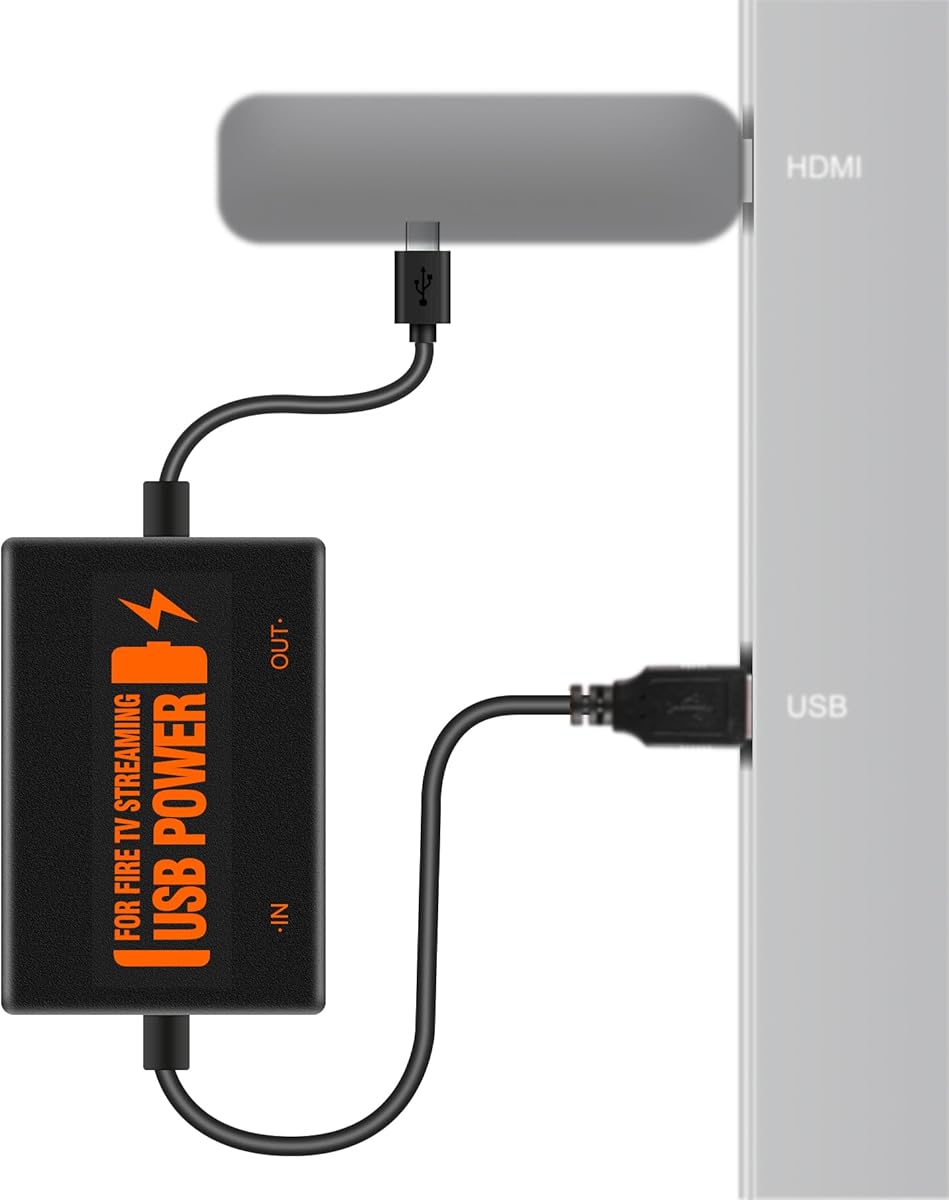


This is the official power cable solution designed specifically for Amazon Fire TV Stick devices. With a strong 4.6 rating, users appreciate its ability to power the stick directly from the TV USB port without needing an external AC adapter.
We may earn a commission when you buy through this link, at no additional cost to you.
The standout quality is its advanced technology which includes special power management circuitry. This circuitry stores excess energy from the USB port and releases it as needed, ensuring the Fire Stick receives consistent power even during high load scenarios like 4K streaming.
While it is highly reliable, the main trade-off is that it relies on your TV USB port providing enough power initially. Some older TVs might not supply enough current without this buffering, but the included circuitry mitigates most of these risks effectively.
This product is best for users who want official, seamless compatibility with their Fire Stick. If you value reliability and want to avoid third-party issues, this is the definitive choice for powering your device from your TV USB.
The integrated energy storage circuit allows the cable to buffer power, preventing restarts caused by USB port insufficiency during peak usage.
It works with all Fire TV Stick models and supports both Micro-B and USB-C connections via the included adapter for maximum flexibility.
We may earn a commission when you buy through this link, at no additional cost to you.
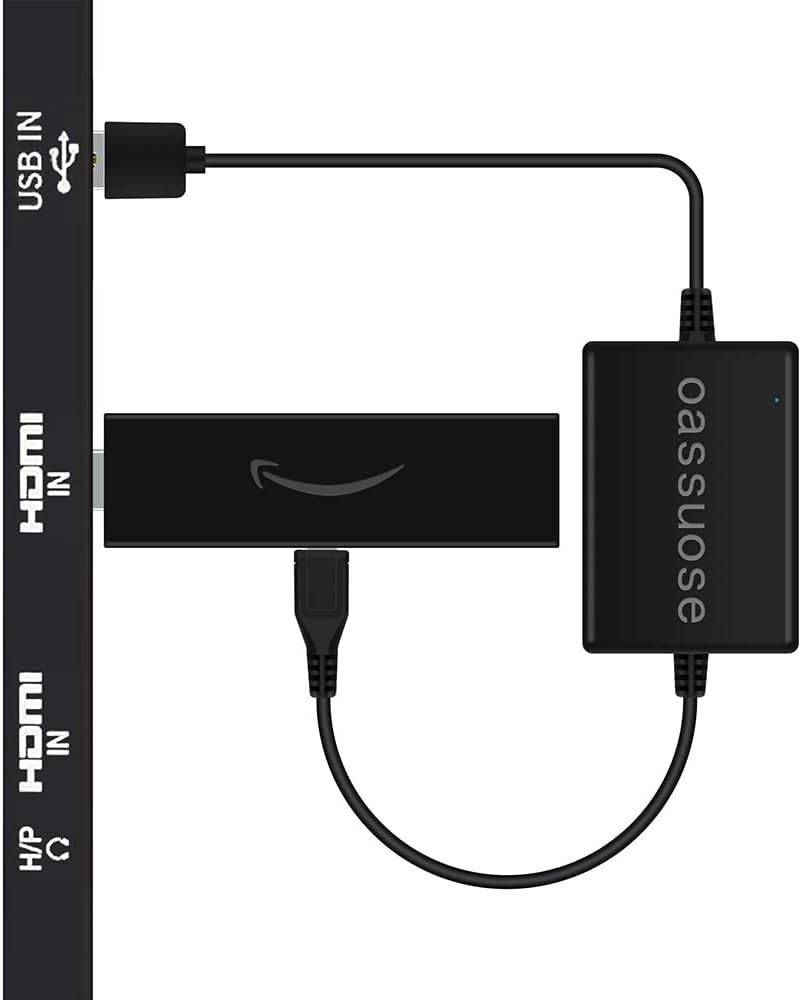
The Oassuose adapter is a premium third-party option known for its robust power management features. It replaces the standard Fire Stick USB cable with a dedicated adapter that draws power directly from the TV's USB port.
We may earn a commission when you buy through this link, at no additional cost to you.
It features a built-in 5V power conversion module that ensures constant voltage and current output. This stability is crucial for preventing the device from restarting due to insufficient power supply, a common issue with standard TV USB ports.
The safety warnings are important to note as it contains a built-in energy storage component. You must avoid puncturing or exposing it to high temperatures. However, this storage is what allows it to buffer power for smooth streaming.
If you need a reliable, clean solution that supports 4K Max models, this is a strong contender. Just ensure you charge it for ten minutes before initial use and follow the safety guidelines for longevity.
The chip inside converts the TV USB voltage into stable power, ensuring your streaming stick runs without interruptions or sudden reboots.
When the TV is turned off, the power supply automatically stops, saving energy and protecting the device from overheating risks.
We may earn a commission when you buy through this link, at no additional cost to you.
This adapter offers an impressive value with a 4.5 rating and features often found in pricier models. It is designed to power streaming sticks directly from the TV USB port, eliminating the need for AC outlets and long cables.
We may earn a commission when you buy through this link, at no additional cost to you.
A unique feature is the Smart LED light which indicates optimal performance. When both lights are on, you know the adapter is delivering the right power. It also prevents TV restart failures caused by insufficient USB power by regulating the current.
The trade-off is that it is not compatible with Roku Ultra or Streaming Stick+ devices that use USB-C ports. You must ensure your device uses a micro USB interface before purchasing to avoid incompatibility issues.
For budget-conscious users who still want intelligent power management, this is an excellent choice. Just remember to charge it for ten minutes before initial setup to ensure the internal components are primed correctly.
The adapter delivers stable power necessary to unlock vibrant 4K streaming, Dolby Vision HDR10+, and Dolby Atmos audio without lag.
Built-in over-current and short-circuit protection ensures safe operation while intelligent power management cuts off power when the TV is off.
We may earn a commission when you buy through this link, at no additional cost to you.
This adapter stands out with a built-in 1800mAh battery that provides supplemental power during supply insufficiency. It connects to the TV USB port and feeds power to your Fire Stick, ensuring stable streaming without needing an AC outlet.
We may earn a commission when you buy through this link, at no additional cost to you.
The 5V/2.1A output fully meets power requirements for Fire Stick 4K and Max models. This consistent supply eliminates lagging or shutdowns caused by insufficient power. The materials are premium for efficient heat dissipation and safety.
The trade-off is that the battery is supplemental only and cannot power the stick independently. You must keep the adapter connected to the TV USB port for the device to receive power at all.
If you experience frequent restarts with standard cables, this battery-backed solution is worth considering. It is an innovative way to ensure your streaming device stays alive even if the USB port fluctuates momentarily.
The supplemental battery ensures smooth video playback during power dips, preventing sudden reboots that can interrupt your viewing experience.
Simply connect the USB to your TV and Micro USB to your Fire Stick for quick setup. Charge the device for ten minutes before first use.
We may earn a commission when you buy through this link, at no additional cost to you.
The fireCable Plus is designed for simplicity and short distance connections. It allows you to power your Fire Stick directly from the TV USB port without needing an AC outlet. The short cable length is ideal for wall-mounted TVs.
We may earn a commission when you buy through this link, at no additional cost to you.
It automatically powers down when you turn off your TV and turns on when you power it up. This saves electricity and keeps the device synchronized. It is particularly useful for users who want to declutter wires near the TV mount.
The main trade-off is its short 3-inch length. You must ensure your TV USB port is at least 6 inches from the HDMI port, otherwise the cable might not reach. Always check your TV manual before buying.
This is a solid choice for simple setups where proximity allows. If your TV ports are close together and you want a clean look, this adapter provides a cost-effective solution to power your stick without cords.
By eliminating the hanging wires from your flat screen TV, it gives your home theater system a clean, wireless aesthetic that looks professional.
The auto power sync feature ensures the device only runs when the TV is on, helping you save on your electricity bill over time.
We may earn a commission when you buy through this link, at no additional cost to you.
This product is a combination power adapter and long cable designed for charging Fire TV Stick and Kindle devices. It includes a 10W power adapter and a 6-foot braided cable for flexible placement near a wall outlet.
We may earn a commission when you buy through this link, at no additional cost to you.
While it is not a direct USB port adapter, it offers a stable power solution for devices that need high current. The UL listed and FCC certified design ensures it is safe and reliable with overheat protection.
The trade-off is that it requires a wall outlet rather than powering directly from the TV USB port. However, the 6-foot length gives you more flexibility in where you position your Fire Stick on the TV.
If you do not have a nearby USB port or need a robust charging solution, this adapter is reliable. The braided cable ensures durability and supports data transmission which some users find helpful for peripherals.
The thick copper wire and braided cable ensure efficient transfer rate and stay cool even when used continuously for long streaming sessions.
Works with Amazon Fire TV Stick HD 4K models and older Kindle devices, making it a versatile accessory for your home entertainment setup.
We may earn a commission when you buy through this link, at no additional cost to you.
The QFUP adapter is designed to power your Fire Stick directly from the TV USB port while eliminating external adapters. It features an advanced circuit chip that effectively improves the conversion rate and stable discharge voltage.
We may earn a commission when you buy through this link, at no additional cost to you.
It includes a built-in battery to keep the TV Stick always having power. This ensures proper current is maintained to your device. The design solves issues of insufficient power errors that often occur with older TVs.
The main trade-off is that the battery requires pre-charge before first use. You must charge the device for ten minutes before using it. If you skip this step, it will not start working immediately.
For those experiencing power fluctuations, this stabilizer is a great fix. The multiple circuit protection ensures safe operation while keeping your setup clean without long cables cluttering your entertainment area.
The advanced chip improves the conversion rate and stable discharge voltage, ensuring your streaming stick receives consistent energy without fluctuations.
Plug and play design makes it simple to connect. Just plug the micro USB into the Fire Stick and the USB connector into the TV port.
We may earn a commission when you buy through this link, at no additional cost to you.
This adapter is a practical solution for powering Fire Stick devices directly from your TV USB port. It eliminates the need for an AC adapter and long power cables, keeping your setup clean and tidy while ensuring stable power.
We may earn a commission when you buy through this link, at no additional cost to you.
It features a built-in 5V power module that ensures stable 5V/2.1A output. This is perfect for 4K streaming where consistent power is required. The energy-saving design automatically stops power when the TV is off.
The trade-off is that it must be charged for 10 minutes before first use. Also, it is not compatible with the Fire TV Stick HD (2nd Gen, 2026) model. Always check your model compatibility before purchasing.
If you want a reliable and energy-efficient way to power your stick without clutter, this is a great choice. The fast customer response time adds to the value proposition for users who need support quickly.
The 5V power module ensures stable output, perfect for 4K streaming without interruptions caused by insufficient USB port power delivery.
Automatically stops powering the Fire Stick when the TV is off, saving energy and protecting the device from unnecessary wear.
We may earn a commission when you buy through this link, at no additional cost to you.
This product offers an adapter plus a long USB cable combo for Fire TV Stick models. It allows you to power your device effectively while providing flexibility in placement. The long 6-foot cable ensures you can reach outlets easily.
We may earn a commission when you buy through this link, at no additional cost to you.
It is compatible with all Fire TV Stick models, making it a universal solution. The kit includes both the adapter and the cable, giving you a complete power solution. Color may vary between black and white depending on stock.
The trade-off is that it is not a direct USB port adapter; it likely uses a wall outlet. This is ideal if your TV does not have a usable USB port. The 6FT cable provides plenty of length to hide wires.
If you need a flexible power solution with technical support available, this is a solid option. The combination of adapter and long cable ensures your device stays powered without worrying about port proximity.
The set includes both a USB Power Adapter and a 6FT USB cable, providing a complete solution for powering your Fire TV Stick anywhere.
Designed to work with all Fire TV Stick models, this adapter ensures you can get power to your device regardless of the specific generation.
We may earn a commission when you buy through this link, at no additional cost to you.
This 2-in-1 adapter is designed for adding USB peripherals to your Fire Stick while continuing to charge it. It allows you to connect devices like keyboards or drives without losing power to the host device.
We may earn a commission when you buy through this link, at no additional cost to you.
It features effortless plug-and-play functionality. Just connect the male port to your device and the female port to a power cable. This makes it simple to expand your Fire Stick capabilities immediately.
The trade-off is that the design is compact at 6 inches which is convenient but might not suit long setups. It is not for smart phones or tablets but works seamlessly with Fire Stick and Classic game consoles.
If you need to add a drive or keyboard to your Fire Stick, this is the perfect companion. The durable design ensures portability and reliable connectivity for all your on-the-go needs.
Specially designed for adding USB peripherals like keyboards, flash drives, or external hard drives while maintaining power to the host device.
Compact 6-inch design is easy to carry and store, making it the perfect companion for your on-the-go needs and travel setups.
We may earn a commission when you buy through this link, at no additional cost to you.
Selecting the right adapter depends on your specific TV ports, streaming needs, and cable management goals. Consider these factors to ensure a stable setup.
Ensure the adapter supports your specific Fire Stick version. Most devices use Micro USB, but newer models may require USB-C. Check your device port before purchasing.
Always verify the connector type matches your Fire Stick to avoid purchasing an incompatible adapter that does not fit.
Look for adapters with internal power management circuitry or battery backup. These features buffer energy to prevent restarts caused by insufficient power.
Prioritize models with advanced chips that regulate voltage and current for a smoother streaming experience without interruptions.
Choose a cable length that suits your TV mount. Short cables reduce clutter but require close ports. Longer cables offer flexibility but may need hiding.
Select a design that fits your space constraints to maintain a clean and organized entertainment setup.
A stable 5V/2.1A output is generally required for 4K streaming. Ensure the adapter can deliver sufficient current to prevent power dips during high usage.
Check the specs to confirm the adapter meets the minimum power requirements of your Fire Stick model.
Certified adapters with UL, FCC, or RoHS labels ensure safe operation with overheat and short-circuit protection. Avoid uncertified products that may risk device safety.
Always choose products with safety certifications to protect your electronics from electrical hazards.
Adapters that automatically power off when the TV turns off save electricity and reduce heat buildup. This feature helps prolong the life of the device.
Prioritize models with auto power sync features to save energy and protect your device.
Reliable brands offer responsive support and warranties. This ensures you can get help if you encounter issues during setup or usage.
Check seller ratings and support policies to ensure peace of mind with your purchase.
Plug-and-play designs are preferred to avoid complex configuration. Ideally, the adapter should require no drivers or extra steps to function.
Select adapters that are easy to install and use without technical barriers.
Begin by charging the adapter for at least ten minutes before initial installation. This ensures the internal battery or circuitry is primed for stable operation.
Connect the adapter to your Fire Stick's Micro USB or USB-C port securely. Then plug the USB A end into your TV's powered USB port.
To maintain longevity, keep the adapter in a well-ventilated area away from heat sources. Avoid bending or crushing the cable to prevent internal damage.
Most Fire TV Stick models use Micro USB or USB-C ports that work with these adapters. However, you must confirm your specific model's port type before purchasing to ensure compatibility.
This usually happens because the TV USB port does not supply enough stable power. Using a dedicated adapter with power management circuitry can buffer energy and prevent restarts.
No, the whole purpose of these adapters is to eliminate the need for an AC adapter. They draw power directly from your TV USB port for a cleaner setup.
Some adapters include a USB-C adapter for newer models. Always check the product details to see if it explicitly supports USB-C connections before buying.
Most manufacturers recommend charging the adapter for about ten minutes before initial use. This ensures the internal components are ready to provide stable power.
Yes, most reliable adapters deliver stable 5V/2.1A output which is sufficient for 4K streaming. Look for models that explicitly mention 4K support.
Most adapters are designed for TV USB ports. Using them with other USB sources may not work correctly if the voltage or current is not consistent.
Yes, most modern adapters automatically stop drawing power when the TV is off. This saves energy and prevents overheating risks.
The Made for Amazon USB Power Cable stands out as the top choice for reliability and official support. It offers advanced power circuitry that ensures stable performance across all Fire Stick models.
If you prefer budget options, consider adapters with built-in power management features that prevent restarts. These often provide excellent value while maintaining streaming stability.
Always check current prices and availability before purchasing to ensure you get the best deal. Verify that the adapter matches your Fire Stick port type for a perfect fit.