
Razer DeathAdder Essential Ergonomic Wired Gaming Mouse, Black
4.5Editor score
6400 DPI Optical Sensor
5 Programmable Buttons
Durable Mechanical Switches
Discover the top gaming mouse for Diablo 4 in 2026. We compare precision sensors, button layouts, and ergonomic designs to help you dominate the Sanctuary
Finding the right gaming mouse for Diablo 4 means balancing speed, precision, and comfort during long raids. A quality mouse helps you execute complex skill rotations and manage inventory without fumbling for keys.
We compared ten top models based on sensor accuracy, button programmability, and ergonomic build. Our analysis covers wired and wireless options tailored for action RPGs and competitive gaming needs.
Each pick highlights specific strengths like adjustable DPI, side buttons, and weight systems. Prices and availability change often, so check current listings before making your final purchase decision for your setup.
4.5Editor score

4.6Editor score

4.2Editor score
This side-by-side comparison highlights the key specifications of each mouse to help you decide which fits your play style and budget for Diablo 4 gameplay.





The Logitech G502 Hero stands out as a top choice for Diablo 4 players due to its precision HERO sensor and extensive button customization. It holds a strong 4.6-star rating reflecting user satisfaction with its build quality and performance. The mouse offers seamless control over complex skill rotations and inventory management which is vital in action RPGs.
We may earn a commission when you buy through this link, at no additional cost to you.
Its HERO sensor delivers up to 25600 DPI with zero smoothing ensuring that your cursor moves exactly as you intend without lag or jitter. The 11 programmable buttons allow you to assign spells and consumables easily reducing reliance on keyboard shortcuts. Adjustable weights let you tune the balance to match your grip style for optimal comfort during extended play.
While the mouse is heavier than some ultralight options this design adds stability that many players prefer for precise aiming and deliberate movements. The required software adds an initial setup step but provides deep customization options that pay off during gameplay. This trade-off is acceptable for users seeking total control over their setup.
If you prioritize accuracy and customization the G502 Hero is an excellent investment for Diablo 4. Its ergonomic design and robust features make it suitable for both casual and competitive gamers looking to enhance their performance in Sanctuary.
Consider your grip style and hand size before purchasing to ensure the shape feels natural. Properly setting up the software will unlock the full potential of this versatile gaming peripheral.
The HERO sensor ensures your movements are translated accurately to the screen allowing for precise dodging and targeting during intense battles.
With 11 programmable buttons you can assign key abilities and macros to minimize downtime and maximize your damage output in raids.
We may earn a commission when you buy through this link, at no additional cost to you.
The Corsair NIGHTSWORD RGB offers a unique tunable weight system that automatically detects the center of gravity for perfect balance. Its 4.5-star rating highlights the comfort and precision users experience during extended gaming sessions. The mouse is designed to adapt to your grip style making it a versatile tool for Diablo 4 gameplay.
We may earn a commission when you buy through this link, at no additional cost to you.
Its optical sensor provides up to 18000 DPI with 1 DPI resolution steps allowing fine-tuned sensitivity adjustments for different combat scenarios. The ten programmable buttons give you ample room to map skills and items without cluttering your keyboard. The contoured shape and rubber grips enhance stability and reduce hand fatigue over time.
Adjusting the weights requires using the software which adds a setup layer but ensures optimal performance tailored to your preferences. The higher price reflects the advanced tuning technology and build quality which justifies the cost for serious gamers. This precision is worth the investment if you value balance in your setup.
Players who prefer a customized feel will appreciate the ability to shift weight between 119g and 141g. This flexibility helps maintain accuracy whether you are moving quickly or aiming carefully in dangerous zones.
Ensure you have the latest drivers installed for the weight system to function correctly. Proper tuning can significantly improve your control and reaction time during critical moments.
The software automatically detects the center of gravity allowing you to adjust weight distribution for maximum comfort and stability.
High-performance rubber grips inspired by pro sports equipment keep your hand secure even during intense and rapid movements.
We may earn a commission when you buy through this link, at no additional cost to you.
The Razer DeathAdder Essential provides an affordable yet reliable option for Diablo 4 players needing solid performance without breaking the bank. With a 4.5-star rating it is praised for its ergonomic design and durability. This mouse offers the core features required for smooth gameplay in a compact and accessible package.
We may earn a commission when you buy through this link, at no additional cost to you.
Its 6400 DPI optical sensor handles most gaming scenarios with adequate precision for tracking and aiming. The five programmable buttons allow you to map essential skills or macros for quick access during combat. Durable mechanical switches support up to 10 million clicks ensuring long-term reliability for daily use.
While the DPI is lower than high-end models it remains sufficient for most players and the dedicated DPI buttons allow quick adjustments on the fly. The ergonomic shape supports the palm grip well reducing strain during long sessions. The limited button count may require keyboard reliance but is acceptable for budget-conscious users.
This mouse is ideal for those new to PC gaming or looking for a secondary device for casual play. It delivers consistent performance and comfort that matches more expensive options in terms of build quality.
Check if the ergonomic shape fits your hand size before purchase to ensure comfort. Proper setup of the software can maximize its utility for your specific game setup.
Despite its budget price the mouse delivers consistent tracking and durability suitable for standard gaming needs in Diablo 4.
The ergonomic form factor supports your hand naturally reducing fatigue during extended gaming sessions and improving overall control.
We may earn a commission when you buy through this link, at no additional cost to you.
The Razer Basilisk V3 combines ergonomic design with advanced features like optical switches and a HyperScroll tilt wheel perfect for Diablo 4. Its 4.6-star rating reflects user satisfaction with its speed and customization options. The mouse offers a balanced approach to performance and comfort for skilled players.
We may earn a commission when you buy through this link, at no additional cost to you.
Its Focus Plus 26K DPI sensor ensures pixel precise accuracy with zero smoothing for reliable tracking during intense battles. The 11 programmable buttons support complex macro functions enabling efficient spellcasting and item use. The HyperScroll wheel allows quick inventory checks without switching to keyboard navigation.
The wired connection ensures zero latency but may limit movement range compared to wireless alternatives. RGB customization requires software setup but adds visual flair that reacts dynamically with supported games. These trade-offs are minor given the performance gains and customization depth.
Players who value rapid actuation and precise control will find the optical switches and ergonomic thumb rest beneficial for long sessions. The balance of features makes it a strong choice for dedicated Diablo 4 gamers.
Ensure you have the latest Synapse software installed to fully utilize the RGB and macro capabilities. Proper configuration will enhance your gaming experience significantly.
Zero unintended misclicks and 0.2ms actuation speed provide crisp response for rapid skill activation and precise aiming.
The tilt wheel supports free-spin and tactile modes allowing quick cycling through weapons and skills during combat.
We may earn a commission when you buy through this link, at no additional cost to you.
The Logitech G305 Lightspeed delivers wireless freedom without sacrificing speed making it ideal for Diablo 4 players who move around. With a 4.6-star rating it is praised for its responsiveness and battery efficiency. The mouse offers reliable performance for both desktop and travel gaming setups.
We may earn a commission when you buy through this link, at no additional cost to you.
Its HERO sensor provides up to 12000 DPI with 400 IPS precision ensuring accurate tracking during fast movement. The 1ms report rate of LIGHTSPEED technology guarantees a lag-free experience comparable to wired mice. The compact design and lightweight build enhance maneuverability for quick turns and dodges.
While it has fewer programmable buttons than MMO mice it remains sufficient for standard action RPG needs. Using AA batteries means longer life but requires occasional replacement though endurance mode can extend this to months. This balance is acceptable for players prioritizing mobility and simplicity.
Travelers and wireless enthusiasts will appreciate the portability and reliable connection offered by the G305. It serves well as a primary device for laptop gaming or secondary setup for home use.
Keep spare AA batteries handy to avoid interruptions during critical gaming sessions. Proper placement of the nano receiver ensures stable connection performance.
LIGHTSPEED technology delivers 1ms report rates providing competition-level responsiveness without the tether of a cable.
Up to 250 hours of gameplay on a single AA battery ensures long playtime without frequent charging or replacement.
We may earn a commission when you buy through this link, at no additional cost to you.
The Corsair Scimitar RGB Elite excels in button capacity offering 17 programmable buttons perfect for complex Diablo 4 builds. Its 4.1-star rating indicates solid performance though comfort varies by hand size. The mouse is designed to handle the frequent actions and macros required for MMO style gameplay.
We may earn a commission when you buy through this link, at no additional cost to you.
Its custom PixArt PMW3391 sensor delivers up to 18000 DPI with 1 DPI resolution for precise tracking. The 12 side buttons can be repositioned via the key slider system to fit your grip comfortably. Durable Omron switches rated for 50 million clicks ensure longevity during intense gaming sessions.
The bulkier design might feel heavy for users with smaller hands or lighter grips. Adjusting the key slider requires initial experimentation but pays off with reduced strain over time. This trade-off is acceptable for players needing extensive input options for spells and skills.
MMO fans who rely on many skill keys will appreciate the customizable button layout and robust build quality. It transforms how you manage your character by allowing quick access to vital commands.
Take time to adjust the side button position to avoid accidental presses. Proper calibration improves efficiency and reduces fatigue during extended play.
Repositioning the 12 side buttons allows you to fit the mouse comfortably to your unique hand shape and grip style.
17 programmable buttons provide ample room for complex macro setups ensuring essential actions are always within reach.
We may earn a commission when you buy through this link, at no additional cost to you.
The UtechSmart Venus Pro Wireless combines high DPI performance with rechargeable convenience ideal for Diablo 4 players seeking versatility. Its 4.4-star rating highlights reliable wireless connectivity and button customization. The mouse offers a budget friendly approach to MMO style controls without sacrificing essential features.
We may earn a commission when you buy through this link, at no additional cost to you.
Its custom PixArt PMW3335 sensor supports up to 16000 DPI with 5 DPI switchable stages for precise tracking. The 16 programmable buttons are designed with different angles to fit your thumb tip comfortably for spell activation. Wireless mode lasts up to 70 hours on a single charge ensuring uninterrupted gameplay sessions.
The software for custom macros is functional but less advanced than premium brands which may limit complex setups. Some users might find the mouse slightly heavier than ergonomic alternatives but the benefits outweigh this concern. This is a minor trade-off for the added button count and rechargeability.
Gamers who need many input options and wireless freedom will find the Venus Pro a practical choice. It bridges the gap between budget and premium features effectively for action RPGs.
Ensure the rechargeable battery is fully charged before extended sessions. Proper macro configuration enhances the button utility significantly.
Different inclination angles on the 12 thumb buttons ensure comfortable and precise clicking without strain or fatigue.
Choose between wireless for mobility or wired for stable connection based on your gaming environment and preferences.
We may earn a commission when you buy through this link, at no additional cost to you.
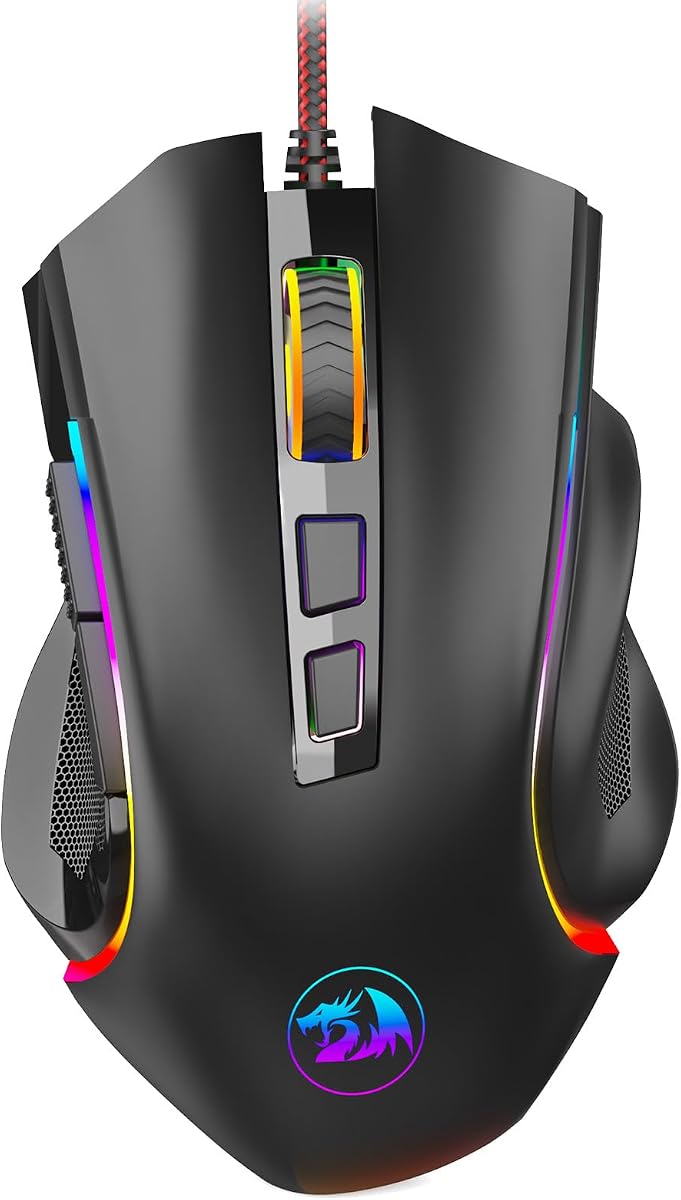
The Redragon M901K offers impressive specs at a budget price point making it a strong candidate for Diablo 4. Its 4.4-star rating reflects good value with robust button customization and DPI flexibility. The mouse delivers solid performance for players seeking extensive control without high costs.
We may earn a commission when you buy through this link, at no additional cost to you.
Its high-performance sensor provides up to 12400 DPI with adjustable polling rates for smooth tracking. The 19 programmable buttons allow extensive macro editing and key remapping for any game scenario. Removable weights let you tune balance up to 40G for a personalized feel.
RGB lighting requires software which is downloadable but may add setup steps. Build quality is generally durable though individual units may vary. These factors are acceptable given the high feature set and affordability.
Budget-conscious gamers needing many buttons will appreciate the flexibility and memory profiles for different games. It effectively bridges the gap between essential needs and advanced customization.
Download the latest software to unlock full macro capabilities. Ensure weights are distributed evenly for optimal balance during play.
With 19 buttons you can map multiple spells and items to one key allowing quick reactions during intense combat.
Eight removable 2.4g weights let you adjust balance to suit your grip and playing style.
We may earn a commission when you buy through this link, at no additional cost to you.
The Redragon M602 Gaming is a proven ergonomic choice with a 4.6-star rating reflecting long-term satisfaction and comfort. It offers reliable performance for Diablo 4 players valuing comfort over extreme DPI. The mouse design focuses on reducing strain during extended play sessions.
We may earn a commission when you buy through this link, at no additional cost to you.
Its high-precision sensor supports up to 7200 DPI with consistent tracking suitable for most gaming scenarios. The ergonomic shape includes dedicated finger positions ensuring a comfortable grip. RGB backlight offers seven modes for visual customization without excessive power draw.
The lower DPI is sufficient for casual and moderate gaming needs but might lack for high-speed tracking. Wired connection ensures zero latency but limits mobility. This balance is acceptable for users prioritizing ergonomics and affordability.
Players seeking a comfortable and reliable option for daily gaming will find this mouse a practical choice. Its design reduces strain and supports long-term usability.
Ensure the software is installed for full macro editing capabilities. Proper ergonomic posture enhances the benefits of the design.
Dedicated finger positions and ergonomic shape support your hand naturally reducing fatigue during long gaming sessions.
Launched in 2015 this model has a history of reliability ensuring consistent performance for everyday gaming.
We may earn a commission when you buy through this link, at no additional cost to you.
The Razer Naga V3 Pro stands as a premium option offering unmatched adaptability and precision for Diablo 4. With a 4.2-star rating it appeals to users who demand top-tier features and wireless freedom. The mouse adapts to multiple genres including MMO and FPS providing future-proof versatility.
We may earn a commission when you buy through this link, at no additional cost to you.
Its Focus Pro 50K Optical Sensor delivers up to 50000 DPI with 930 IPS tracking for unparalleled accuracy. The swappable side plates allow switching between 12 6 or 2-button layouts easily. HyperSpeed Wireless provides low-latency performance with up to 155 hours of battery life per charge.
The high price is justified by the advanced sensor and adaptable design though initial setup may be complex. The lightweight switches reduce actuation force but require precise clicking habits. These trade-offs are acceptable for users prioritizing top performance and flexibility.
Serious gamers who want a single mouse for multiple game types will appreciate the swappable plates and wireless speed. It offers a comprehensive solution for diverse gaming needs.
Ensure you have the right charging dock or cable for optimal power management. Proper plate installation ensures secure button layout changes.
Three magnetic side plates let you adapt the mouse layout from MMO to FPS configurations with minimal effort.
The Focus Pro 50K sensor offers pixel-precise accuracy ensuring reliable tracking during high speed combat and navigation.
We may earn a commission when you buy through this link, at no additional cost to you.
Choosing the right gaming mouse for Diablo 4 involves balancing performance features and comfort to match your play style. Here are key factors to consider before making a decision.
The sensor determines how accurately your movements translate on screen. For Diablo 4 high DPI and zero smoothing ensure precise targeting and quick camera adjustments. Look for sensors with at least 12000 DPI to handle fast-paced combat.
Prioritize sensors with adjustable DPI and polling rates to customize sensitivity for different scenarios.
Diablo 4 requires frequent access to skills and items. Mice with 10 or more programmable buttons allow you to map essential commands reducing reliance on keyboard keys. Ensure the software supports complex macros.
A higher button count improves efficiency especially for complex builds requiring multiple spell activations.
Extended gameplay sessions can strain your hand if the mouse is not ergonomic. Look for contoured shapes that fit your palm and rubberized grips for stability. Comfort reduces fatigue during raids and dungeon runs.
Choose a shape that supports your grip style to maintain control and reduce hand pain over time.
Wired mice offer zero latency but restrict movement. Wireless mice now provide lag-free experiences with long battery life. Decide based on your preference for mobility versus absolute reliability.
Ensure wireless mice have a 1ms report rate for competitive performance in action games.
Lightweight mice allow faster movements while heavier ones provide stability. Adjustable weight systems let you tune balance to your preference. Consider how much mass you prefer for precise aiming.
Adjustable weights enhance comfort and accuracy by tailoring the feel to your hand and play style.
Gaming mice endure frequent clicking and movement. Look for durable switches rated for millions of clicks and sturdy cables. Quality materials ensure longevity during intense use.
High build quality reduces the risk of failures during critical gameplay moments.
Advanced software enables macro programming and DPI profiles. Ensure the software is intuitive and supports multiple device profiles. Good software enhances usability and flexibility.
Customizable software allows you to save different configurations for various games or scenarios.
Install the official software to map buttons to in-game actions. Create profiles specifically for Diablo 4 to store skill bindings efficiently. Test mappings in a safe area before engaging in combat.
Keep the sensor lens clean with a soft microfiber cloth. Dust accumulation can impair tracking accuracy during fast movements. Regularly wipe the underside of the mouse.
Adjust DPI settings based on your screen resolution and personal preference. Lower DPI helps precision aiming while higher DPI facilitates quick turns. Find a balance that feels natural to your hand movements.
For Diablo 4 a DPI between 8000 and 16000 is generally ideal. It allows precise aiming and quick camera turns without losing accuracy. Adjust within this range based on your screen resolution and play style.
Having extra buttons simplifies skill activation and inventory management. At least ten programmable buttons are recommended for complex builds. More buttons reduce keyboard dependency and increase reaction speed.
Yes modern wireless gaming mice offer 1ms report rates comparable to wired models. They provide freedom of movement without lag issues. Ensure you select a reputable brand for consistent performance.
Use a soft microfiber cloth to wipe the sensor lens and body. Avoid harsh chemicals that may damage the finish. Clean regularly to maintain optimal tracking accuracy.
Many gaming mice feature adjustable DPI suitable for productivity tasks. Software allows switching between work and gaming profiles. This flexibility makes them versatile for various uses.
Start with the default weight and adjust if you feel it is too light or heavy. Heavier mice offer stability while lighter ones allow faster movement. Find what feels comfortable during long sessions.
We reviewed ten top gaming mice for Diablo 4 ranging from budget to premium options. Each offers unique strengths in sensor precision button count and ergonomic design. Your choice depends on specific needs like wireless connectivity or macro programming.
Prioritize sensor accuracy and comfort to ensure precise movements during intense combat. Consider the balance of buttons and weight to support your preferred play style effectively. These factors significantly impact performance and endurance in long sessions.
Prices and availability fluctuate so verify current listings before purchasing. Check product reviews and compatibility with your setup. Investing in the right mouse enhances your gameplay experience significantly.