
HUION Artist Drawing Glove
4.5Editor score
Work For Both Hands
Anti-Fouling Design
Comfortable Soft Material
This guide compares the top ten glove for drawing tablet options to help digital artists choose the right fit for their workflow and device.
Digital artists often struggle with smudges and friction when using drawing tablets. A quality glove can solve these issues by providing a smooth surface for your hand to glide across without leaving marks.
We analyzed ten highly rated products based on material comfort, design features, and user feedback. Our comparison focuses on versatility, durability, and how well each glove integrates with different tablet brands.
Each pick highlights specific strengths like palm rejection or breathability. Prices and availability may change frequently, so please verify details before making your final purchase decision online.
4.5Editor score

4.6Editor score
4.4Editor score
The following table provides a side-by-side comparison of all ten products to help you quickly identify the specifications and features that matter most to your drawing needs.


This drawing glove stands out with its 3-layer palm rejection technology designed for digital art enthusiasts. It boasts a high rating of 4.6 stars from verified buyers who appreciate its functional design.
We may earn a commission when you buy through this link, at no additional cost to you.
The high elastic smooth fabric significantly reduces friction between your hand and the touch screen. This allows for a comfortable feeling when drawing on graphics monitors or tracing light pads.
While the material is breathable, the fixed strap design might feel slightly restrictive for some users initially. However, this ensures the glove stays in place and the stylus is more accurate to use.
Digital artists using tablets or iPads will find this glove improves their workflow by preventing accidental touches. We recommend it for anyone seeking reliable palm rejection and comfort during long sessions.
The 3-layer design supports various tablets ensuring you no longer worry about accidentally touching the screen while working.
High elastic smooth fabric provides a comfortable feeling and reduces friction on your touch screen or graphics monitor.
We may earn a commission when you buy through this link, at no additional cost to you.
This glove offers a practical solution for artists looking to protect their tablets without breaking the bank. With a rating of 4.5, it is a reliable choice for daily sketching and inking.
We may earn a commission when you buy through this link, at no additional cost to you.
Made from soft Lycra and Nylon, the material is extremely flexible and comfortable to work with. The anti-fouling design prevents smudges from your hand on a graphic tablet.
While it reduces friction effectively, users should note it does not prevent accidental touching from the touch screen. This limitation is acceptable for non-touch graphics monitors.
We suggest this glove for beginners or hobbyists needing a basic, effective barrier against smudges. Its durable black color ensures it remains pristine without frequent washing.
The package includes one unit that can be used on both hands making it versatile for right or left-handed users.
Soft Lycra and Nylon construction provides extreme flexibility and reduces friction between your hand and the surface.
We may earn a commission when you buy through this link, at no additional cost to you.
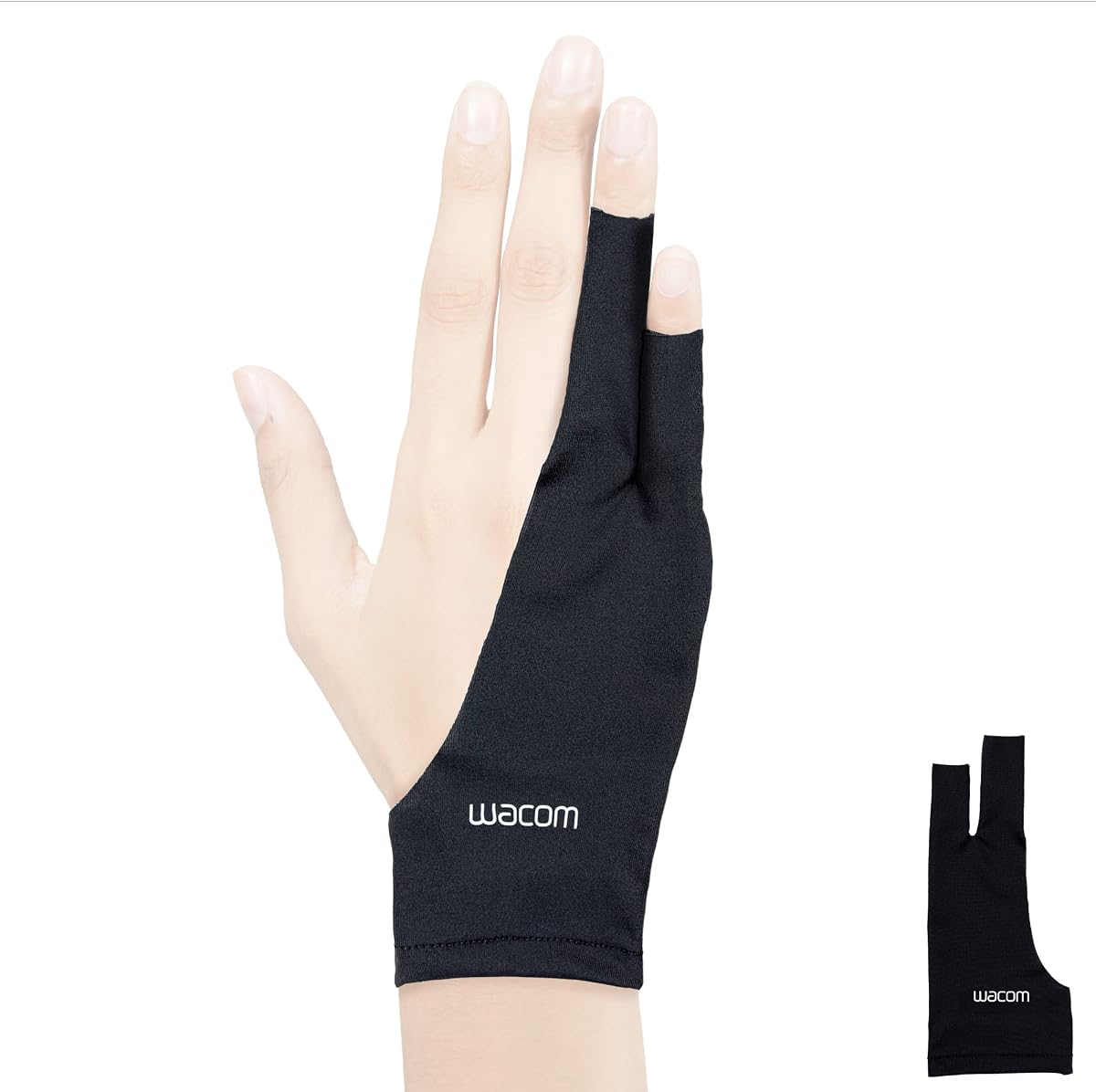
Wacom brings its expertise to this glove designed for users who value eco-friendly materials and premium comfort. It holds a 4.4 rating among customers seeking a brand-known solution.
We may earn a commission when you buy through this link, at no additional cost to you.
The exposed fingertip design allows easy access to touchscreen capabilities and typing on a keyboard. This feature distinguishes it from standard gloves that cover all fingers.
Made of 90% recycled material it offers comfort and stretch while maintaining durability. However, it is designed for general use and might not suit every specific drawing style.
This glove is ideal for environmentally conscious artists who need a premium accessory. We recommend it for those who frequently switch between drawing and typing tasks.
The exposed fingertip design allows user to access touchscreen capabilities and type with ease on a keyboard.
Made of 90% recycled material the eco-friendly recycled polyester and spandex construction offers comfort and stretch.
We may earn a commission when you buy through this link, at no additional cost to you.
This glove is crafted for iPad users needing seamless palm rejection. With a 4.6 rating it promises to adapt to your hand shape effectively for distraction-free creation.
We may earn a commission when you buy through this link, at no additional cost to you.
The 3-layer anti-slip design enhances grip and prevents accidental palm touches on your device. It ensures the screen remains spotless while you focus on your artwork.
While it is comfortable for long sessions the thin fabric might be a concern for heavy usage. The included cleaning cloth helps maintain the glove effectively and hygiene over time.
We recommend this product for iPad artists needing reliable anti-smudge protection. Its smooth glide ensures precision in every stroke enhancing your digital art experience.
It works seamlessly with iPad drawing tablet digital tablet and other digital art accessories for smooth performance.
Soft stretchy fabric with moisture-wicking properties ensures comfort during long creative sessions without irritation.
We may earn a commission when you buy through this link, at no additional cost to you.
XPPen delivers a glove focused on comfort and high elastic material. Its 4.5 rating reflects user satisfaction with the soft skin-friendly texture that stops smudging.
We may earn a commission when you buy through this link, at no additional cost to you.
The flexible cloth offers excellent air permeability which helps keep your hand cool while drawing. This feature is crucial for maintaining comfort during extended drawing sessions.
Users should note that while it is designed for right hands it also fits left hands well. The black color is resistant to dirt making it a low-maintenance choice.
We recommend this glove for users who prioritize breathable comfort. Its soft texture allows for easier glide on graphics tablets reducing unnecessary hand fatigue.
The flexible cloth is high elastic material which have excellent air permeability and high elastic.
The black color is resistant to dirt so you do not need to wash it frequently.
We may earn a commission when you buy through this link, at no additional cost to you.
This pack offers excellent value with four soft painting gloves included in the package. With a 4.6 rating it appeals to artists and learners looking for versatile supplies.
We may earn a commission when you buy through this link, at no additional cost to you.
The lightweight gloves allow your hand to slide smoothly over the tablet screen. This reduces friction and leaves no more scratch effectively improving your work efficiency.
Note that you may need to close the built-in palm detect function before drawing as the glove acts as a buffer. Despite this it is highly rated for men women and teens.
We suggest this pack for groups or artists who lose gloves easily. Its universal fit and high-elastic Lycra fiber make it a great gift for anyone who likes to paint.
Each of them can be wears on left and right hand and don't feel uncomfortable for any user.
It allows the hand to slide smoothly over the tablet screen and eliminates the friction between the screen and surface.
We may earn a commission when you buy through this link, at no additional cost to you.
This glove stands out with its unique skeleton pattern design while maintaining functional quality. It has a strong 4.6 rating from users who appreciate its artistic look and utility.
We may earn a commission when you buy through this link, at no additional cost to you.
Made from soft Lycra and Nylon it is extremely flexible and comfortable to work with. The anti-dust design helps avoid smudges from your hand on a graphic tablet.
While it works perfectly for sketching and inking users should be aware that the glove cannot prevent accidental touching from the touch screen. This is a common trade-off for this type of glove.
We recommend this glove for artists seeking a stylish yet functional accessory. Its flexible use ensures it works for sketching inking coloring and digital drawing on graphics tablets.
It can avoid smudges from your hand on a Graphic Tablet Graphics Monitor or some other items leaving no more scratch.
Made from Soft Lycra and Nylon extremely flexible and comfortable to work with to decrease friction.
We may earn a commission when you buy through this link, at no additional cost to you.
These gloves are designed for animators and digital artists needing smooth movement over screens. With a 4.6 rating they provide a grease-free and scratch-free drawing experience for professionals.
We may earn a commission when you buy through this link, at no additional cost to you.
Crafted from high-quality elastic Lycra material they are soft durable and breathable. The composite silk design creates an air layer for improved comfort during extended use.
The durable construction allows for easy washing and drying without deformation. However, users should select the right size carefully as sizing options are limited to Small Medium and Large.
We recommend these gloves for anyone looking to boost productivity. Their smooth movement over tablets ensures a clean surface for your creative work.
Our drawing gloves feature an upgraded side fabric design with composite silk material creating an air layer for improved comfort and breathability.
Available in three sizes ensuring a perfect fit for various hand sizes and preferences accommodating both left and right-handed users.
We may earn a commission when you buy through this link, at no additional cost to you.
This glove features an upgraded fixed design that ensures comfort while preventing palm stains on your writing tablet. It holds a 4.6 rating for its smudge guard capabilities.
We may earn a commission when you buy through this link, at no additional cost to you.
Made of elastic Lycra the cloth is high elasticity and comfort. It allows your hand to slide smoothly over the tablet screen leaving no grease sweat or scratch.
The cloth elasticity and manual measurement mean a small size deviation is possible. Despite this it offers a comfortable cloth that reduces friction between the screen and hand effectively.
We recommend this glove for artists needing a reliable smudge guard. Its flexible use on tablets iPads and sketching surfaces improves work efficiency.
Our drawing tablet glove has made an Fixed design which is more comfortable to wear and prevents the unfixed part of the palm from staining your writing tablet.
Made of elastic Lycra making the cloth with high elasticity and comfort soft sturdy light and breathable.
We may earn a commission when you buy through this link, at no additional cost to you.
This pack includes four soft drawing gloves suitable for right and left hands. With a 4.6 rating it is a versatile option for artists and learners who paint.
We may earn a commission when you buy through this link, at no additional cost to you.
The lightweight gloves reduce friction between the screen and hand allowing your hand to slide smoothly over the tablet. This improves work efficiency by leaving no grease sweat or scratch.
The moisture-wicking fabric ensures comfort for long sessions of drawing. Users should check the specific size options provided as measurements can vary slightly due to manual sizing.
We recommend this pack for artists who need a variety of gloves. Its widely used design fits graphics monitors drawing tablets and light pads perfectly.
Each of them can be wore on left and right hand and don't feel uncomfortable with a free size option.
It serves as a protective barrier guarding against unsightly smudges on the drawing surface.
We may earn a commission when you buy through this link, at no additional cost to you.
Selecting the right glove involves considering material comfort size fit and specific design features tailored to your digital workflow.
Look for gloves made from soft Lycra Nylon or polyester blends that offer breathability and flexibility. These materials reduce friction and prevent sweat buildup during long creative sessions.
Prioritize breathable fabrics that allow air circulation to keep your hand cool while drawing.
Check the size options provided to ensure the glove fits your hand comfortably without restricting movement. Some brands offer multiple sizes while others use a universal free size design.
Choose a size that allows easy movement of your fingers without feeling too tight or loose.
Consider whether the glove offers palm rejection technology to prevent accidental touches on touchscreens. This feature is crucial for devices that register input from your palm.
Ensure the glove design supports palm rejection if you use a touchscreen tablet or iPad.
Select gloves made from durable high-elastic fibers that can withstand frequent use and washing. Reinforced stitching or composite silk designs often indicate better longevity.
Look for materials that resist wear and tear to ensure your glove lasts through many projects.
Examine features like two-finger designs fixed straps or composite silk layers that enhance comfort and precision. These details can improve your drawing experience significantly.
Opt for designs that complement your specific drawing style and device requirements.
Dark colors like black are often soiling resistant reducing the need for frequent washing. This helps maintain the appearance of your glove over time.
Choose colors that hide stains well to minimize cleaning effort.
Consider brands known for digital art accessories as they often produce higher quality products compatible with various devices. Trusted names usually offer reliable customer support.
Research the brand to ensure compatibility with your specific tablet model.
Compare the number of gloves included in the pack to assess overall value. Some products offer multiple gloves which can be cost-effective for long-term use.
Evaluate the cost per glove to ensure you are getting a fair deal for the quality offered.
Start by placing the glove on your dominant hand ensuring the fingers align correctly with your hand shape. This step ensures comfort and proper function during your drawing session.
Check your tablet settings to disable or enable palm rejection as needed. Some gloves require you to close built-in palm detect functions for smooth operation.
Wash the glove according to the material instructions to maintain hygiene and elasticity. Allow it to air dry completely before next use to prevent shrinkage.
A glove prevents your hand from leaving smudges on the tablet screen which keeps your artwork clean. It also reduces friction allowing your hand to slide smoothly without causing scratches.
Most standard gloves do not support touch input so you may need to disable palm rejection on your device. Some specialized gloves with exposed fingertips allow for better touchscreen compatibility.
Yes many models feature ambidextrous designs that fit both left and right hands. This allows artists to use the glove comfortably on either hand.
Check the product care label but generally hand wash in mild soap and water. Air drying helps maintain the elastic fibers and shape of the glove.
Many gloves are designed to be used on both hands making them suitable for left-handed artists. Ensure the glove fits comfortably before drawing to avoid discomfort.
Lycra and Nylon blends are popular because they are soft breathable and durable. These materials provide comfort and reduce friction effectively during long drawing sessions.
We reviewed ten top-rated gloves highlighting features like palm rejection and breathability to help you make an informed decision. Each option offers unique benefits suited for different artist needs and device types.
Prioritize comfort and material durability to ensure your glove lasts through extensive creative work. The right choice will significantly reduce friction and keep your tablet screen free of smudges.
Remember to verify current availability and product details before purchasing since stock levels may change. Check the official links to ensure you are buying the latest version of your selected glove.