
AceGamer Wireless Pro Controller
4.5Editor score
Hall Effect Joysticks
800mAh Battery Life
Instant Wake-Up Feature
This guide compares the top ten Hall Effect Nintendo Switch 2 Controller options for precision and durability in October 2026 to help gamers choose.
Choosing the right controller can transform your gaming experience significantly. Hall Effect Nintendo Switch 2 Controller models offer precise magnetic sensing to prevent drift. These controllers ensure long-lasting performance for intense gaming sessions.
We analyzed ten top-rated options based on compatibility and feature sets. Each product provides unique strengths for different play styles and budgets. Our comparison highlights key specs to simplify your purchasing decision process.
Every pick below showcases specific benefits and real-world performance insights. Note that product availability and details may change over time. Always verify current listings before finalizing your order online.
4.5Editor score

4.3Editor score

4.6Editor score
This side-by-side comparison details the core specifications and unique features of each Hall Effect Nintendo Switch 2 Controller option to help you find the perfect match for your needs.


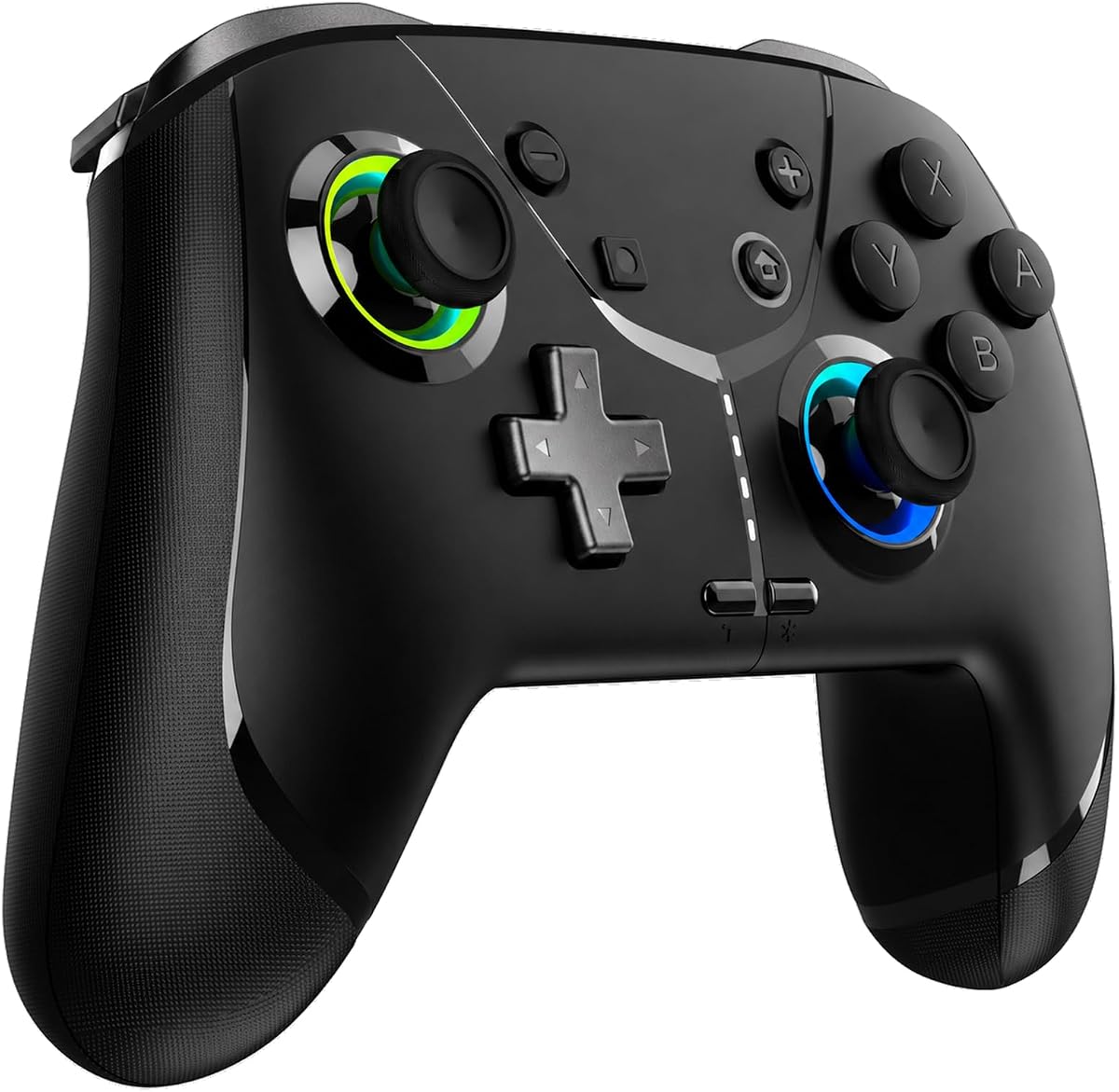


The AceGamer 2 Pack offers exceptional value by providing two fully featured controllers for the price of one standard unit. Its 4.4 star rating reflects strong user satisfaction with reliability and performance across various game genres.
We may earn a commission when you buy through this link, at no additional cost to you.
Each unit features Hall Effect joysticks that eliminate mechanical wear and ensure drift-free play. The 800mAh battery supports twelve hours of continuous gaming while the 4-level vibration adds immersive feedback.
Programmers can assign macros to M1 and M2 buttons for complex combos. Turbo modes allow rapid-fire inputs for shooters. The ergonomic grips ensure comfort during long sessions without slipping due to sweat.
This option is ideal for families needing multiple controllers for local multiplayer. If you need a budget-friendly solution with premium features, this pack delivers unmatched performance per dollar spent.
Receiving two controllers ensures you always have a backup ready. This is perfect for local co-op games where extra hands are needed.
The magnetic sensing system promises up to five million rotations. This significantly extends the lifespan compared to traditional potentiometer sticks.
We may earn a commission when you buy through this link, at no additional cost to you.
The 8Bitdo Ultimate 2 stands out as a flagship choice with its integrated charging dock. It supports Switch 2 with required firmware updates for seamless integration into modern gaming setups.
We may earn a commission when you buy through this link, at no additional cost to you.
TMR joysticks offer enhanced precision and durability alongside a cool RGB fire ring feature. The trigger switch lets you toggle between linear and tactile modes for different game types.
Using the Ultimate Software V2 allows deep customization of buttons and triggers. The dock ensures the controller is always charged when you remove it. Wake-on-shake adds convenience for quick access.
Serious gamers who value build quality will appreciate this option. If you want a polished experience with a dedicated dock, this controller justifies its premium pricing structure.
The dock automatically recharges the controller when docked. This ensures it is always ready for play without searching for cables.
Switching between linear and tactile triggers adapts to racing versus action games. This flexibility improves control accuracy across genres.
We may earn a commission when you buy through this link, at no additional cost to you.
Playnex offers a cost-effective solution with two controllers supporting Switch 2 and PC gaming. The Hall Effect joysticks provide smooth movement essential for action and racing titles.
We may earn a commission when you buy through this link, at no additional cost to you.
You can program the rear M1 and M2 buttons for macros. Turbo speeds and vibration levels adjust to match specific games. The battery supports extended play with USB-C charging convenience.
The 10-meter range ensures stable wireless performance. RGB lighting adds a stylish touch to your setup. Home button wake-up works on supported consoles for quick start.
This pack suits budget-conscious buyers needing reliable controllers. If you need a simple setup for multiple devices without breaking the bank, this choice delivers solid performance.
Works well with Windows PC for Steam games. This broadens your gaming options beyond just the console.
Programmable buttons simplify complex inputs. This helps in grinding or combat scenarios needing repeated actions.
We may earn a commission when you buy through this link, at no additional cost to you.
This AceGamer Pro Controller delivers seamless connectivity across Switch 2 and other platforms. Its one-touch instant wake-up mirrors premium first-party controllers perfectly.
We may earn a commission when you buy through this link, at no additional cost to you.
Hall Effect joysticks solve drift issues with precision up to five million rotations. The 6-axis gyro enables motion control aiming. Vibration adjusts to four levels for immersive feedback.
A dedicated screenshot button captures moments instantly. Macro buttons handle complex combos with ease. The ergonomic design ensures comfort during long sessions without fatigue.
Ideal for competitive players seeking reliable hardware. If you value instant responsiveness and drift prevention, this controller offers a high-quality experience worth the investment.
Compatible with iOS and Android devices too. This makes it versatile for handheld and mobile gaming.
Non-slip grips prevent sweaty hand issues. Comfort remains high even after hours of intense play.
We may earn a commission when you buy through this link, at no additional cost to you.
Diswoe's controller is designed for competitive play with a zero-latency wireless chip. Hall Effect joysticks provide pixel-precise accuracy for fighting and racing games.
We may earn a commission when you buy through this link, at no additional cost to you.
The asymmetrical ergonomic shape reduces wrist fatigue. You can customize vibration across four levels for immersive feedback. Turbo boost handles repetitive inputs effortlessly.
The dedicated screenshot button captures moments instantly. Battery life supports up to 12 hours of play. Home button wake-up ensures quick access to your console.
This choice fits players prioritizing speed and comfort. If you need a reliable controller for fast-paced matches, this model delivers strong performance.
Zero latency ensures instant responses. This is critical for timing-based action games.
Smart auto-sleep saves power when idle. Battery lasts longer across your sessions.
We may earn a commission when you buy through this link, at no additional cost to you.
The Luminex controller features hidden lighting that glows only when active. This creates a personalized gaming atmosphere with 60 LED lights in various colors.
We may earn a commission when you buy through this link, at no additional cost to you.
The multi-function dock charges the controller and syncs with its lighting. App link allows remapping and motor control. Hall Effect joystick ensures smooth accurate gameplay.
One-click wake up simplifies console access. Macro settings handle complex actions easily. Turbo function supports rapid-fire gameplay needs.
Best for fans of RGB aesthetics. If you want a controller that looks and feels custom, this hidden design offers unique style.
Dock and controller lights sync automatically. This adds a polished look to your gaming station.
Adjust lighting and vibration via app. Customization levels exceed basic controller options.
We may earn a commission when you buy through this link, at no additional cost to you.
NBCP offers a standout controller with programmable pattern RGB lighting. The skin-soft texture feels luxurious and keeps hands comfortable during sessions.
We may earn a commission when you buy through this link, at no additional cost to you.
Hall Effect joysticks ensure lifelong accuracy. Wired response reaches 1000Hz for competitive gaming. Turbo modes and programmable back buttons add versatility.
Auto turbo and semi-automatic firing options are available. The ergonomic design fits naturally in palms. Wake-up via one key is seamless.
Choose this if you want style and speed. The high polling rates make it great for PC gaming too.
Programmed LED effects go beyond simple colors. This lets you match your room lighting or game theme.
1000Hz response minimizes input lag. Perfect for competitive players needing every millisecond.
We may earn a commission when you buy through this link, at no additional cost to you.
The aghi controller focuses on macro utility and battery life. One-key wake up works after initial pairing steps. Hall Effect joysticks prevent drift effectively.
We may earn a commission when you buy through this link, at no additional cost to you.
Loop macro recording saves effort during grinding. Back buttons map to complex sequences. Dual vibration motors offer realistic feedback.
The 800mAh battery supports up to 20 hours of play. RGB lighting adds immersion to the experience. Gyro ensures smooth motion control.
This controller suits players who grind often. If macros save you time, this feature set is highly valuable.
Record up to 30 seconds of action. Replaying combos becomes effortless for complex moves.
Charges fully in 2-3 hours. Extended playtime keeps you gaming longer between charges.
We may earn a commission when you buy through this link, at no additional cost to you.
EasySMX includes a unique C-button for voice chat during gameplay. This simplifies communication without extra devices. 1000mAh battery supports up to 22 hours.
We may earn a commission when you buy through this link, at no additional cost to you.
Hall Effect joysticks prevent drift. Mechanical buttons provide tactile feedback. HD rumble enhances immersion. Faceplates allow personalization.
Motion control supports aiming and steering. The ergonomic grip prevents fatigue. Instant wake-up ensures quick access.
Perfect for social gamers who want chat options. If battery life is a priority, this model stands out.
Dedicated button for voice chat simplifies teamwork. This integrates communication directly into control.
22 hours is among the best available. This ensures minimal interruption during long sessions.
We may earn a commission when you buy through this link, at no additional cost to you.
The FUNLAB Firefly Z features a hidden honeycomb LED pattern. It glows in RGB when active for a modern look. One-button wake connects fast without syncing.
We may earn a commission when you buy through this link, at no additional cost to you.
KeyLinker app allows deep remapping and RGB customization. Back paddles handle complex combos. Hall Effect sensors ensure smooth control. Turbo works for shooting games.
Compatible with Switch 2, PC, and mobile. Low-latency wireless and wired modes support versatile use. Battery lasts long on full charge.
Ideal for those wanting total control. If you like app-based customization, this controller grows with your needs.
Customize every button via app. This adapts the controller to your specific play style.
The honeycomb pattern emerges only on power. It looks clean while gaming off.
We may earn a commission when you buy through this link, at no additional cost to you.
Selecting the right controller requires understanding several technical aspects. This section breaks down key factors to consider.
Hall Effect joysticks use magnetic sensors to detect movement without physical contact. This eliminates mechanical wear and prevents drift over time. Look for models that explicitly advertise this feature for longevity.
Prioritize controllers with Hall Effect sensors to avoid frustrating input errors.
Battery capacity varies widely between models. Some offer up to twenty hours of play while others last half that time. Consider how long you play daily before choosing.
Look for USB-C charging and large mAh ratings for extended use.
Controllers may use Bluetooth, wired USB, or both. Bluetooth offers freedom of movement while wired ensures zero latency. Choose based on your play environment.
Ensure your console supports the connection type you need for stable gameplay.
Rear paddles and macro buttons simplify complex inputs. They are useful for fighting games or grinding. Check if remapping is possible via software or hardware.
Select models that allow custom mappings to suit your play style.
A convenient wake-up feature turns on your console instantly. Some require specific button combinations while others use a single press. This saves time when resuming gameplay.
Look for instant wake-up support to reduce friction in daily use.
Comfort during long sessions depends on grip texture and weight. Non-slip materials prevent sweaty hands. Durable construction ensures the controller lasts.
Choose an ergonomic design that fits your hand size comfortably.
Some controllers work on PC and mobile devices too. Versatility adds value if you game across multiple devices. Check supported systems before buying.
Verify compatibility beyond Switch 2 if you use other platforms.
Feedback and gyro sensors enhance immersion. Adjustable vibration levels let you control intensity. Motion control is essential for games requiring physical aiming.
Ensure these features align with the types of games you play most.
To pair your controller, access the console settings and connect via Bluetooth. For initial setup, press the home button to wake the device.
Regularly clean the joystick area with a soft cloth to maintain sensitivity. Dust buildup can interfere with sensors and grip texture.
Avoid exposing the controller to extreme temperatures. Store it in a protective case to prevent physical damage during transport.
Most third-party controllers claim Switch 2 compatibility but require firmware updates. Always check the product listing for specific Switch 2 support notes before purchasing to ensure full functionality.
If you experience drift, try calibrating the joystick via system settings. Disconnect and reconnect the controller. If issues persist, check warranty or consider replacement options.
Yes, many models support Windows PC via Bluetooth or USB cable. Drivers may be needed for full feature access. Check device compatibility lists on the product page.
Battery life ranges from eight to twenty-two hours depending on usage. Features like vibration and lighting drain power faster. Charging times vary between two to four hours.
Some premium models include integrated charging docks. Others require separate docks or USB charging cables. Verify what accessories are included in the package before ordering.
Macros allow you to record complex button sequences to a single back button. Once programmed, pressing that button executes the sequence automatically. This simplifies repetitive actions in games.
Yes, they use magnetic sensing instead of mechanical wear. This prevents stick drift and extends lifespan significantly. They are ideal for heavy daily gamers.
Download the manufacturer app for your device. Connect the controller via USB and follow update prompts. Keep your controller charged during updates to prevent errors.
We reviewed ten top-rated controllers offering Hall Effect joysticks. Each option brings unique strengths for different needs and budgets.
Prioritize battery life and connectivity based on your play habits. Comfort features and customization options should also influence your final decision.
Always check current product listings to confirm availability and details. Prices and availability may vary over time.