
HDMI Splitter 1 in 3 Out, 4K HDMI Distributor for Triple Monitors
4.6Editor score
Affordable price with reliable performance
Supports 4K@30Hz and 3D video
Includes LED indicators for status monitoring
This guide compares the top HDMI splitter for 3 monitors options available in October 2026 based on performance compatibility and features to help you choose.
Finding the right HDMI splitter for 3 monitors can transform your workspace or entertainment setup by allowing you to display content across multiple screens simultaneously. Whether you need extended desktop space for productivity or synchronized displays for presentations, understanding the technical nuances is essential for optimal performance.
We have carefully evaluated ten leading HDMI splitter models available on the market to identify the most reliable options for driving three monitors. Our comparison focuses on resolution support, signal stability, build quality, and compatibility with various source devices to ensure you get the best value.
Each product pick includes detailed specifications, pros and cons, and real-world usage scenarios to help you make an informed decision. Please note that product availability and pricing can change frequently, so we recommend verifying current details before making your final purchase.
4.6Editor score

4.4Editor score

4.2Editor score
The following table provides a side-by-side comparison of all ten reviewed products highlighting key specifications to help you quickly identify the model that best fits your specific requirements.



The UANTIN DisplayPort to HDMI Splitter is an excellent choice for users with DP-enabled graphics cards seeking to expand their setup to three monitors. It boasts a strong rating of 4.4 stars based on user feedback regarding its performance and reliability. The standout quality here is its ability to support up to 4K@60Hz resolution across all three connected HDMI monitors.
We may earn a commission when you buy through this link, at no additional cost to you.
This device is designed with an all-aluminum casing which ensures efficient heat dissipation allowing it to operate stably over long periods. The high-density braided nylon cables included help reduce signal interference and protect against wear and tear. It works seamlessly with Windows systems and supports various DP versions making it versatile for modern desktops and laptops.
While the splitter is highly capable it requires that your graphics card supports multi-screen output and the necessary bandwidth for 4K@60Hz. Additionally it only works as a one-way conversion from DisplayPort to HDMI so it cannot be used in reverse. These limitations are acceptable considering the robust performance it delivers for compatible setups.
If you are looking to enhance your work or gaming environment with three synchronized displays this UANTIN splitter is a top recommendation. Its combination of high-resolution support durable build quality and ease of use makes it a reliable investment for expanding your display capabilities.
This splitter transforms a single DP signal into three HDMI outputs allowing for either synchronized mirroring or split-screen display.
The aluminum casing and braided cables ensure the device withstands daily use and maintains signal integrity over time.
We may earn a commission when you buy through this link, at no additional cost to you.
The NEWCARE 4K@60Hz HDMI Splitter offers a compelling solution for users who need to duplicate one HDMI signal across three displays. With a rating of 4.2 stars it is known for delivering lag-free synchronized audio and video playback. The inclusion of a 4ft HDMI cable and power adapter makes initial setup very convenient.
We may earn a commission when you buy through this link, at no additional cost to you.
It supports UHD 4K@60Hz resolution along with HDR10 and Dolby Vision ensuring vibrant and detailed visuals on all connected screens. The auto downscaler feature allows 4K and 1080P displays to work simultaneously under the same refresh rate which adds flexibility to mixed setups. It is widely compatible with devices like PS5 PC and streaming boxes.
However it is important to note that this splitter only mirrors the same content on all screens and does not support extended desktop mode. It also does not allow connection to external audio devices which limits flexibility for those needing separate sound setups. These constraints should be weighed against the high-resolution performance.
For home theater setups or presentations where all screens show the same content this NEWCARE splitter is a solid choice. Its ability to handle high resolutions and include necessary cables makes it a practical option for immediate multi-screen expansion needs.
Supports 4K@60Hz and HDR formats ensuring clear and vivid imagery for gaming and streaming.
Includes a 4ft HDMI cable and power adapter so you have everything needed to start using it right away.
We may earn a commission when you buy through this link, at no additional cost to you.
The MT-ViKI 4K HDMI Splitter is designed to split one HDMI signal into four identical outputs which can be adapted for three monitor setups. It carries a rating of 4.4 stars and is praised for its stable powered performance even with longer cable distances. The included power adapter ensures consistent signal transmission without flickering.
We may earn a commission when you buy through this link, at no additional cost to you.
One of its key strengths is the built-in amplifier that supports transmission up to 100ft which is beneficial for large rooms or commercial installations. It supports deep color and various audio formats making it suitable for home theaters or retail displays. The rugged metal housing provides excellent heat dissipation and EMI protection.
It does only support 4K@30Hz which might be a limitation for high refresh rate gaming but it is perfect for general viewing. Additionally it does not support extended display modes so all screens must show the same content. These trade-offs are minor considering its reliability and low cost.
If you need a dependable splitter for duplicating content across multiple screens including three monitors this MT-ViKI unit is a great value. Its long-distance transmission capabilities and stable power make it ideal for setups where cables need to run far.
Built-in amplifier supports up to 100ft total cable length ensuring stable signal over long distances.
Includes a dedicated power adapter to prevent signal drops and flickering that can occur with passive USB units.
We may earn a commission when you buy through this link, at no additional cost to you.
The THANDBLE DisplayPort to HDMI Splitter is a versatile adapter that connects one DP device to up to three monitors. It holds a rating of 4.1 stars and is appreciated for supporting both mirroring and extended display modes. This allows for more flexible workspace arrangements compared to simple duplicators.
We may earn a commission when you buy through this link, at no additional cost to you.
It supports up to 4K@60Hz resolution providing vivid images with better color and contrast. The device uses top-notch chips compatible with HP Dell and Lenovo computers and AMD or NVIDIA graphics cards. The nylon braided cable and aluminum alloy shell enhance durability and heat dissipation.
However macOS users will only get mirroring mode and cannot extend displays which limits its utility for Apple users. It also requires a powerful graphics card with at least 18Gbps bandwidth to function correctly. These technical requirements are important to verify before purchasing to ensure compatibility.
For Windows users looking to extend their desktop across three screens this adapter offers a good balance of features and performance. Just ensure your GPU meets the bandwidth requirements and you have the necessary HDMI cables for a smooth experience.
Allows for both mirroring and extended modes on Windows enabling a larger virtual workspace.
Delivers 4K@60Hz resolution ensuring crisp visuals for professional and entertainment use.
We may earn a commission when you buy through this link, at no additional cost to you.
This HDMI Splitter 1 in 3 Out offers a high-performance budget-friendly solution for duplicating a signal to three displays. With a strong 4.6 rating it is highly regarded for its stability and ease of use. It supports 4K@30Hz resolution and features independent LED indicators to show the status of each output port.
We may earn a commission when you buy through this link, at no additional cost to you.
The full aluminum alloy casing provides excellent heat dissipation ensuring stable performance even during continuous 24/7 operation. It supports 3D video and deep color enhancing the visual experience for gaming and media playback. Plug and play functionality means you do not need to install any drivers.
The main limitation is the 30Hz refresh rate at 4K which may not be ideal for competitive gaming. Also the power cable must be connected during use though the adapter is not included. These minor drawbacks are acceptable given the low price and reliable performance.
If you are looking for a cost-effective way to set up three monitors without breaking the bank this splitter is an excellent choice. Its durable build and reliable synchronization make it a solid option for office presentations or home entertainment.
Independent LED indicators allow you to quickly check if each connected display is active and receiving a signal.
Offers a budget-friendly price point without sacrificing essential features like 4K support and aluminum build.
We may earn a commission when you buy through this link, at no additional cost to you.
This HDMI Splitter is designed to take one source and duplicate it to three screens with zero lag and no signal degradation. It has a 4.3 rating and is particularly praised for its reliability in commercial or office environments where sync is critical. The aluminum alloy build keeps it cool and blocks interference.
We may earn a commission when you buy through this link, at no additional cost to you.
It delivers crisp 4K@30Hz visuals and supports 3D Blu-ray format for an immersive viewing experience. The compact size fits easily anywhere making it convenient for desktop setups. LED indicators help you quickly identify which displays are active for easy troubleshooting.
Users should note that for devices like PS5 that run 4K@120Hz resolution must be lowered to 30Hz for compatibility. It also does not support audio output from the splitter ports which limits standalone audio use. These are standard limitations for passive mirrors.
For users prioritizing zero latency and stable performance this splitter is a strong contender. Its compact design and solid build quality make it a reliable tool for expanding your display footprint.
Ensures perfect real-time synchronization across all three screens with no dropped frames or delays.
Rugged aluminum casing blocks electromagnetic interference to maintain a clean and stable signal.
We may earn a commission when you buy through this link, at no additional cost to you.
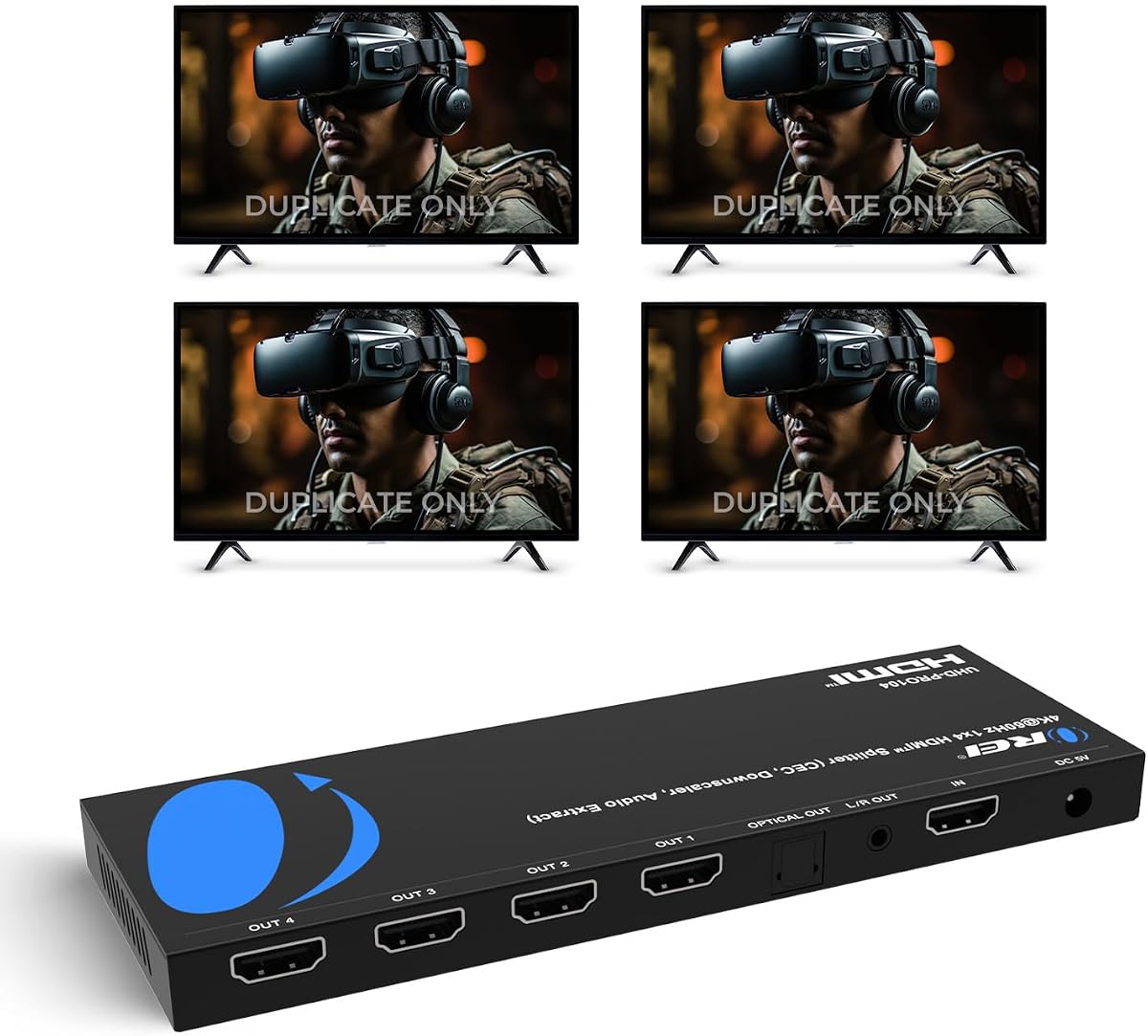
The OREI UltraHD 1×4 HDMI Splitter is a powerful device capable of duplicating a signal to four displays which can be used for three monitor setups. It has a 4.5 rating and is recognized for its 18Gbps bandwidth and 4K@60Hz resolution support. The heavy-duty metal enclosure ensures long-term durability and heat management.
We may earn a commission when you buy through this link, at no additional cost to you.
It supports a wide range of audio formats including LPCM Dolby TrueHD and DTS-HD Master Audio which is beneficial for home theater setups. The plug and play setup means no drivers are required making it easy to install. It works well with HDMI cables up to 30 ft for optimal stability.
It is not a switch and does not include a remote which limits control options for switching between inputs. The mirror only feature means all displays must show the same content. Despite these limitations it performs well for professional AV installations.
For users needing reliable high-bandwidth performance across multiple displays this OREI splitter is a trustworthy option. Its solid construction and wide audio support make it suitable for both home and commercial use cases.
Supports up to 18Gbps bandwidth allowing for 4K@60Hz video and advanced audio formats simultaneously.
Built with a heavy-duty metal enclosure for better heat dissipation and long-term reliability.
We may earn a commission when you buy through this link, at no additional cost to you.
The OREI 1×4 HDMI Splitter with Audio Extractor adds significant value for users needing both video and audio flexibility. It has a 4.3 rating and supports up to 4K@60Hz resolution with HDR10+ and Dolby Vision compliance. The built-in audio extractor allows optical and analog outputs for separate sound systems.
We may earn a commission when you buy through this link, at no additional cost to you.
It features automatic downscaling to convert 4K input to 1080p for mixed-resolution setups which ensures compatibility with older monitors. The advanced EDID and CEC management helps maintain stable signal communication across devices. This makes it ideal for sophisticated home theater or office setups.
The device is more expensive than basic models and requires a dedicated power supply which adds to setup complexity. These factors should be weighed against the added features of audio extraction and HDR support. It is a robust option for those needing advanced functionality.
If you want to distribute video to multiple screens while also extracting audio this OREI splitter is an excellent choice. Its support for modern video standards and audio flexibility makes it a top-tier option for multimedia applications.
Features Optical S/PDIF and analog outputs to separate audio from video for flexible sound system integration.
Fully compliant with HDMI 2.0b and HDCP 2.3 supporting HDR10+ and Dolby Vision for vivid visuals.
We may earn a commission when you buy through this link, at no additional cost to you.
This HDMI 2.1 Splitter is a premium option designed for those who want future-proof high-resolution performance. With a 4.2 rating it stands out by supporting up to 8K@60Hz and 48Gbps bandwidth. It is compatible with PS4 and other modern devices that benefit from advanced video standards.
We may earn a commission when you buy through this link, at no additional cost to you.
It features flexible EDID management with four switching modes allowing you to set output signals for different resolution needs. This ensures compatibility with various displays and projectors. The device also supports advanced audio formats like Dolby Atmos and DTS-HD for immersive sound.
The higher price tag may be a barrier for casual users but the performance justifies the cost for enthusiasts. It also only supports mirroring so it cannot be used to extend your desktop. These are expected trade-offs for a splitter focused on duplication.
If you want to ensure your setup can handle the latest resolutions this splitter is a fantastic investment. Its robust feature set and high bandwidth make it ideal for gaming and professional video applications.
Supports HDMI 2.1 with 8K@60Hz and 48Gbps bandwidth for ultra-high-definition future-proofing.
Four EDID switching modes allow for customized output settings to maximize compatibility with diverse displays.
We may earn a commission when you buy through this link, at no additional cost to you.
The UGREEN HDMI Splitter offers a reliable solution for sending one HDMI signal to multiple displays including three monitors. It has a 4.4 rating and is praised for its wide compatibility with devices like Xbox PS5 and Apple TV. The USB powered design ensures stable video transmission without needing a wall adapter.
We may earn a commission when you buy through this link, at no additional cost to you.
It supports 4K@60Hz resolution and includes EDID control to reduce black screens and flickering. You can connect the higher-resolution display to output 1 for best performance. This setup is ideal for sending the same content to different rooms or screens in the same room.
Keep in mind that it only mirrors content and does not extend displays which is a common limitation. Also ensure all displays support the corresponding resolution to avoid black screens. These constraints are minor given its ease of use and stable performance.
For a straightforward and reliable way to duplicate video signals this UGREEN splitter is a great choice. Its plug and play nature and broad compatibility make it accessible for almost any user.
USB powered design ensures stable video transmission and better performance without extra cables.
Works seamlessly with consoles streaming devices and computers for versatile multi-screen use.
We may earn a commission when you buy through this link, at no additional cost to you.
Choosing the right HDMI splitter for 3 monitors involves understanding several key technical factors to ensure compatibility and performance. This guide breaks down the most important considerations to help you make an informed decision.
When selecting a splitter check the maximum resolution and refresh rate it supports to ensure it meets your display needs. Look for models that support at least 4K@60Hz if you want crisp visuals and smooth motion for gaming or video.
Always verify that the splitter can handle the output of your source device without downscaling unexpectedly to avoid loss of clarity.
Ensure the splitter has the correct input interface such as HDMI or DisplayPort depending on your source device availability. Most splitters are one-way conversion so make sure the input matches your source and outputs match your monitor connectors.
Confirm that the splitter provides enough output ports for your three monitors or consider a 1×4 model for flexibility.
Understand that most splitters are designed to mirror the same content on all screens rather than extend your desktop. If you need separate desktop spaces for productivity look for MST hubs or specialized adapters that support extended modes.
For presentations or entertainment mirrored modes are typically sufficient and widely supported by standard splitters.
Higher resolutions require more bandwidth so ensure the splitter supports HDMI 2.0 or higher for 4K@60Hz. HDMI 2.1 splitters provide even more bandwidth for 8K or higher refresh rates which is crucial for modern gaming.
Check the HDCP version compatibility to ensure it works with your content sources like streaming devices or consoles.
Look for splitters that include a dedicated power adapter to ensure stable signal transmission especially with long cables. Passive USB-powered splitters may struggle with higher resolutions or longer distances causing signal drops or flickering.
If the splitter uses USB power confirm the type of cable included and whether an adapter is necessary for your setup.
Metal casings provide better heat dissipation and protection against electromagnetic interference which prolongs the device lifespan. High-quality connectors such as gold-plated ports help maintain stable signal connections and resist corrosion over time.
Investing in a durable model ensures reliable performance for continuous use in professional or entertainment environments.
Some splitters include audio extraction features allowing you to route sound to separate speakers or a soundbar. If you need audio flexibility check whether the splitter supports optical or analog outputs alongside HDMI video signals.
Standard splitters often transmit audio through HDMI so verify your monitors or TVs have built-in speakers or audio inputs.
Choose reputable brands that offer customer support and warranties to protect against defects and technical issues. Reading user reviews can provide insight into real-world performance and reliability over time.
A good warranty and responsive support team can save you time and money if you encounter compatibility or hardware problems.
To start using your HDMI splitter connect the power adapter or USB power cable first to ensure stable operation before attaching any video cables. Connect the source device to the input port using a high-quality HDMI or DisplayPort cable depending on the splitter model.
Attach each of your three monitors to the HDMI output ports on the splitter and turn on all displays. The splitter should automatically detect the displays and mirror the source content across all screens allowing you to adjust settings on the source device.
For best results keep the splitter in a well-ventilated area to prevent overheating and avoid bending or twisting the cables excessively. Regularly check connections to ensure they are secure and free from debris to maintain optimal signal quality over time.
Most standard HDMI splitters are designed to mirror the same content on all connected displays rather than extending your desktop. To extend your desktop you typically need a graphics card with multiple outputs or an MST hub that supports extended modes. Some advanced DP to HDMI adapters may offer limited extended support but this varies by model and graphics card capabilities.
Many HDMI splitters require a dedicated power adapter to ensure stable signal transmission especially when using higher resolutions like 4K. While some models can work with USB power using a dedicated adapter reduces the risk of flickering or signal drops. Always check the product specifications to confirm the power requirements for your specific model.
HDMI 2.1 splitters support higher bandwidth up to 48Gbps allowing for 8K resolution and higher refresh rates compared to HDMI 2.0 which supports up to 18Gbps. If you have modern consoles or monitors that support 4K@120Hz or 8K HDMI 2.1 splitters are recommended for best performance. HDMI 2.0 splitters are sufficient for most 4K@60Hz use cases.
Screen flickering can occur due to insufficient power or poor quality cables that do not support the required bandwidth for your resolution. Ensure the splitter is connected to a stable power source and use high-speed HDMI cables rated for your resolution. Additionally check that your source device and monitors are compatible with the splitter's supported formats.
Some splitters come with four outputs so you can connect up to four monitors if needed using the same signal duplication method. However splitters do not support independent extended displays beyond the number of outputs available. If you need independent screens consider using a multi-output graphics card or docking station.
Select a splitter that supports at least the maximum resolution and refresh rate of your highest resolution monitor. If you have mixed resolution monitors set the source output to the highest common resolution supported by all displays. Using a splitter with EDID management can help negotiate compatible settings between the source and connected monitors.
In conclusion finding the right HDMI splitter for 3 monitors depends heavily on your specific needs such as resolution support and whether you need extended modes. The top picks like the UANTIN and NEWCARE models offer excellent value and performance for most users looking to duplicate content seamlessly.
When making your decision prioritize factors such as build quality power requirements and compatibility with your existing devices to ensure a smooth setup. High-bandwidth options with HDMI 2.1 support are ideal for future-proofing your display setup against newer standards and resolutions.
We encourage you to verify the current pricing and availability before making a purchase since these details can change frequently. By carefully considering the options outlined in this guide you can confidently choose a splitter that enhances your productivity or entertainment experience.