
Canon MegaTank G3270
4.1Editor score
Up to 2 years of ink included
Wireless print copy and scan
1.35 square LCD display
Ink tank printers have revolutionized home and office printing by eliminating the need for expensive cartridges. These devices use refillable bottles that provide thousands of pages per set, making them ideal for high-volume users who want consistent quality without breaking the bank.
This guide compares ten leading models from Canon, HP, and Epson based on print speed, ink capacity, connectivity options, and overall value. We analyzed specifications and user feedback to highlight the most reliable devices for students, families, and small businesses needing efficient document management.
Each pick below details specific strengths like wireless scanning, auto-duplexing, or photo quality along with any notable limitations. Remember that pricing and availability fluctuate daily so check the current offers before deciding which system fits your workflow and budget requirements best.
4.1Editor score

4.2Editor score

3.8Editor score
As an Amazon Associate we earn from qualifying purchases.
The table below presents a side-by-side view of key specifications for all ten featured ink tank printers to help you quickly identify which model matches your specific printing volume and feature requirements.





The Epson EcoTank ET-2903 stands out as a top choice for home users needing reliable high-volume printing. It earns an excellent rating due to its inclusion of enough ink for up to three years of use right out of the box.
We may earn a commission when you buy through this link, at no additional cost to you.
Its standout qualities include impressive print speeds of eleven pages per minute for black text and six for color which is faster than many competitors. The built-in scanner and copier features ensure all your document management needs are met without extra hardware.
While it lacks an automatic document feeder which might slow down multi-page scanning tasks the high resolution output ensures crisp text and vibrant photos. The EcoFit bottle system prevents messes making refills straightforward even for those new to tank printers.
This model is ideal for families or small offices printing hundreds of pages monthly without worrying about running out of supplies. Its combination of speed capacity and ease of use makes it a standout recommendation for most households seeking long-term savings.
With enough ink to last up to three years users save significantly on replacement costs compared to traditional cartridge models.
The Epson Smart Panel app allows seamless printing and scanning from smart devices supporting AirPrint and Mopria services.
We may earn a commission when you buy through this link, at no additional cost to you.
The Canon MegaTank G3270 offers an accessible entry point for those seeking the benefits of tank printing without a high price tag. It delivers solid performance with an impressive ink yield of up to 7700 color pages from a single set.
We may earn a commission when you buy through this link, at no additional cost to you.
Its wireless capabilities allow users to print from phones or laptops easily while the included ink lasts for up to two years. The single-sided printing limitation is acceptable for budget conscious buyers who do not need frequent double-sided documents.
The 1.35 inch square LCD provides basic navigation which keeps costs down but might feel small for complex menus. Despite this the printer remains reliable for school projects or home office tasks where cost per page is the priority.
Anyone looking for a no-frills tank printer that delivers consistent quality and low operating costs will find this model appealing. It balances essential features well making it a strong contender for the best budget option in this category.
Users can save up to one thousand dollars on ink over time compared to using traditional cartridge based printers.
Seamless wireless printing ensures you can send documents to the printer from anywhere within your home network range.
We may earn a commission when you buy through this link, at no additional cost to you.
The Epson EcoTank ET-4800 targets users who prioritize print quality and environmental sustainability over initial cost. It uses Micro Piezo Heat-Free technology to produce sharp text and vibrant photos on virtually any paper type.
We may earn a commission when you buy through this link, at no additional cost to you.
Its high capacity ink tanks eliminate the need for cartridges reducing waste significantly. While the rating is slightly lower due to setup complexity the long-term benefits for high-volume printing environments are substantial.
The zero cartridge waste feature aligns well with eco-conscious consumers looking to reduce their environmental footprint. The scanner and copier functions work efficiently ensuring all document needs are handled by one central device.
Investing in this model makes sense for small businesses or photo enthusiasts requiring professional results without recurring cartridge expenses. Its reliability and quality justify the premium price for those needing consistent performance over years.
By eliminating disposable cartridges this printer helps reduce the amount of plastic waste ending up in landfills annually.
Heat-Free technology ensures stable print quality while consuming less energy compared to thermal inkjet alternatives.
We may earn a commission when you buy through this link, at no additional cost to you.
The Canon Megatank G3290 enhances the G3270 model with automatic two-sided printing which saves paper and reduces manual handling. Its larger 2.7 inch color touchscreen offers a more intuitive navigation experience for adjusting settings quickly.
We may earn a commission when you buy through this link, at no additional cost to you.
Users appreciate the ability to print duplex automatically making it ideal for schools or businesses needing professional documents. The high ink capacity ensures you can print thousands of pages before refilling which keeps downtime minimal.
While the lack of an automatic document feeder is a drawback for scanning multi-page contracts the print speed and quality remain consistent. The interface is responsive and the wireless connection ensures seamless integration with various devices.
This model is best suited for users who print frequent double-sided documents and want a better user interface. Its balance of features and performance makes it a strong contender for home offices needing efficient paper management.
Auto duplex printing automatically prints on both sides of the page reducing paper consumption significantly over time.
The color touchscreen simplifies menu navigation allowing you to select complex print settings with just a few taps.
We may earn a commission when you buy through this link, at no additional cost to you.
The Epson EcoTank ET-2803 stands out for its modern connectivity features including hands-free voice-activated printing. This allows users to send print jobs using voice commands which adds a layer of convenience for busy households.
We may earn a commission when you buy through this link, at no additional cost to you.
It delivers high-resolution flatbed scanning and a color display for easy navigation making document management simple. The included ink provides up to four thousand five hundred pages black which is sufficient for moderate usage needs.
While voice features depend on compatible smart assistants the standard wireless printing works flawlessly with AirPrint and the Epson app. The EcoFit bottles ensure refills are mess-free reducing the stress of maintenance for users.
This model is perfect for tech-savvy users who want smart home integration alongside reliable printing. Its combination of convenience and efficiency makes it a great choice for families looking to modernize their home office setup.
Voice-activated printing allows you to send jobs without touching the device which speeds up workflow significantly.
The high resolution flatbed scanner ensures clear and accurate copies of documents and photos for future reference.
We may earn a commission when you buy through this link, at no additional cost to you.
The HP Smart Tank 5003 introduces AI-capable features designed to optimize print quality and reduce maintenance needs. It includes up to three years of ink and a mess-free refill system that simplifies the process for users.
We may earn a commission when you buy through this link, at no additional cost to you.
Borderless printing ensures your photos look professional without white borders while the wireless capabilities connect effortlessly to home networks. The scanner and copier functions provide a complete solution for document handling tasks.
Users find the refill system easy to use with bottles that plug directly into the tank without squeezing or spilling. The AI features may improve text clarity but require the latest firmware updates to function correctly.
This printer is ideal for home users wanting a hassle-free experience with smart technology support. Its combination of ink capacity and ease of use makes it a strong contender for families needing reliable printing.
AI-capable features help optimize print settings automatically to ensure sharper text and richer colors consistently.
The easy access refill system prevents spills and keeps your workspace clean while replenishing your ink supply.
We may earn a commission when you buy through this link, at no additional cost to you.
This variant of the HP Smart Tank 5003 offers similar features to the previous model with a focus on value. It includes up to three years of ink and supports borderless prints for enhanced photo quality.
We may earn a commission when you buy through this link, at no additional cost to you.
The mess-free refill system ensures that users can top up ink without worrying about spills or mess. Wireless printing makes it easy to print from mobile devices ensuring flexibility for daily tasks.
While the rating is lower due to software dependencies the hardware remains robust for home office needs. The lack of physical buttons relies heavily on the app which some users may find less intuitive.
It is a great choice for those prioritizing ink longevity and ease of use over advanced features. This model provides a cost-effective entry into the tank printer market with solid performance capabilities.
Borderless printing capabilities allow you to create professional-looking photos without unwanted white edges on paper.
Wireless and mobile printing ensures you can send documents from smartphones or tablets quickly and easily.
We may earn a commission when you buy through this link, at no additional cost to you.
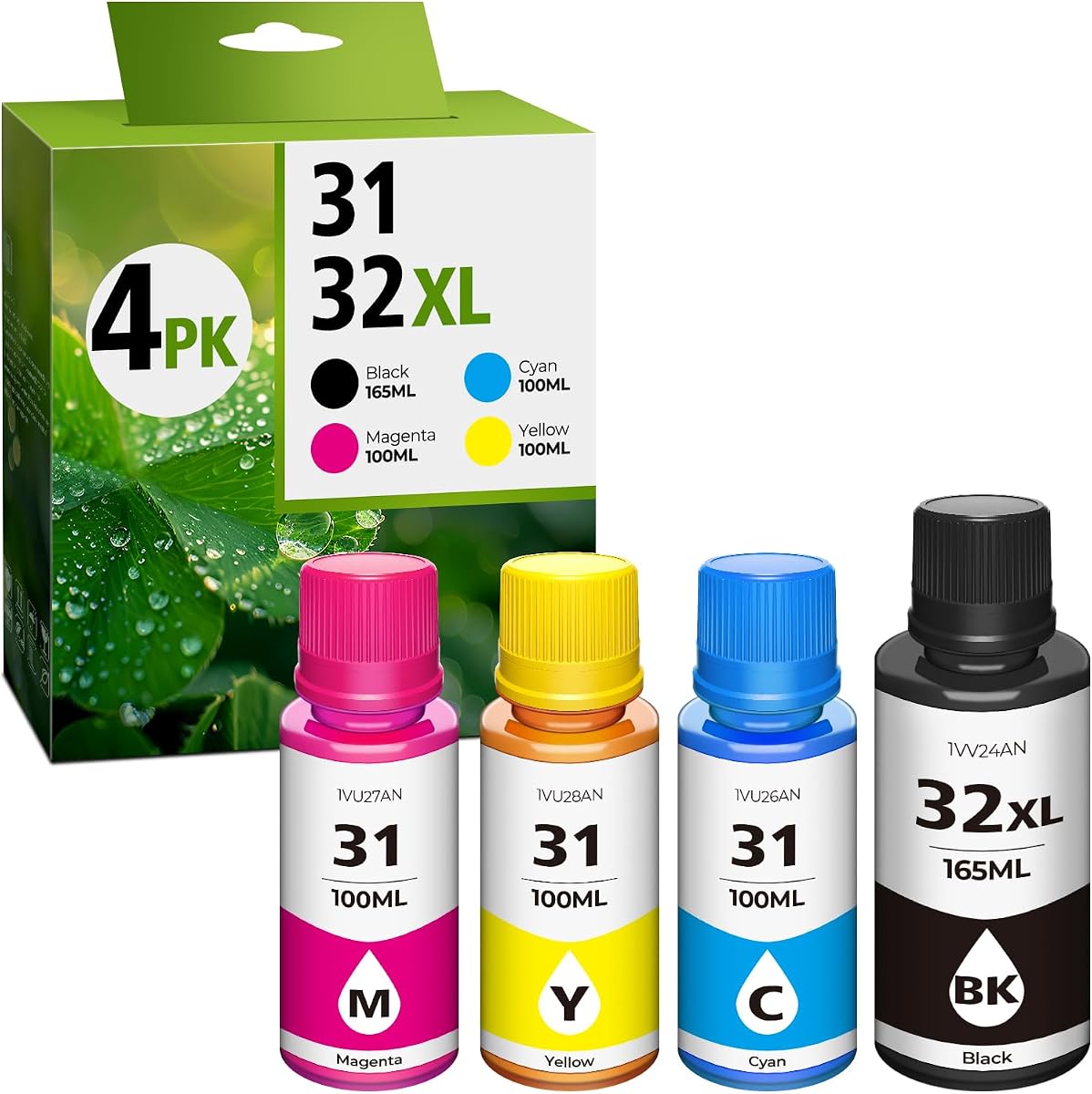
The 31 Ink 32XL refill set provides a cost-effective solution for HP Smart Tank owners looking to reduce ongoing costs. It supports various HP Smart Tank models and offers a high page yield compared to standard cartridges.
We may earn a commission when you buy through this link, at no additional cost to you.
These bottles are designed for easy refilling with minimal effort ensuring a leak-free process. However users should note these are dye inks which may differ from original pigment black ink used by HP.
While highly rated for value compatibility varies by model so checking specific printer compatibility is essential. This option is best for those comfortable with third-party supplies who prioritize savings over official warranty protection.
It extends the life of existing printers by providing affordable replacements when original ink runs out. Users should clean printheads before switching to ensure optimal performance and print quality results.
This refill set is compatible with a wide range of HP Smart Tank models ensuring flexibility for multiple printers.
High page yield ensures each bottle provides thousands of pages reducing the frequency of replacements needed.
We may earn a commission when you buy through this link, at no additional cost to you.
The Epson EcoTank ET-2980 is designed for users needing a smaller footprint without sacrificing ink capacity. It includes enough ink for up to three years making it a reliable choice for consistent home printing needs.
We may earn a commission when you buy through this link, at no additional cost to you.
The supersized ink tanks and EcoFit bottles make refilling simple without the worry of ink drying out. Mobile printing allows you to print from smart devices enhancing convenience for busy households.
While it lacks automatic duplex printing the compact size allows it to fit easily on smaller desks. This trade-off is acceptable for those prioritizing space saving over advanced paper handling features.
This model is perfect for apartments or small home offices where space is limited. Its balance of size and capacity ensures you do not have to compromise on performance due to physical constraints.
The compact size allows the printer to fit easily on small desks without compromising ink capacity or features.
Enhanced mobile printing lets you manage jobs from your smartphone ensuring flexibility throughout your home network.
We may earn a commission when you buy through this link, at no additional cost to you.
The Epson EcoTank ET-2800 offers an entry-level option that still delivers high capacity and reliable performance. It fires off ten ISO pages per minute which is efficient for moderate printing volumes at home.
We may earn a commission when you buy through this link, at no additional cost to you.
Its Micro Piezo Heat-Free technology ensures detailed prints and documents while reducing energy consumption. The wireless connectivity makes it easy to integrate into existing networks without extra hardware.
While the control panel is basic compared to touchscreen models it remains functional for standard tasks. The zero cartridge waste feature adds environmental value which aligns with eco-friendly consumer preferences.
This printer is ideal for students or light users who want long-term savings without a high initial cost. Its simplicity and efficiency make it a practical choice for those new to tank printing technology.
The printer achieves ten ISO pages per minute allowing you to finish large jobs quickly without waiting.
Heat-Free technology ensures stable output and energy efficiency which reduces long-term utility costs.
We may earn a commission when you buy through this link, at no additional cost to you.
Selecting the right ink tank printer involves weighing several critical factors to ensure it meets your specific printing demands and budget constraints.
The most significant advantage of tank printers is the high ink capacity. Look for models that provide at least one thousand pages per set to minimize refill frequency. High yield bottles can last years for light users saving substantial money over time.
Prioritize models with longer ink lifespans to reduce maintenance hassles and maximize the savings potential of the system.
Speed matters if you print large documents regularly. Models with ISO ratings above ten pages per minute are preferable for business environments. Text sharpness and photo vibrancy are also crucial for professional output and client satisfaction.
Choose printers with high DPI ratings for sharp text and vibrant color reproduction across all media types.
Modern printers must support wireless printing to integrate seamlessly with laptops and smartphones. Look for AirPrint or Mopria support to print from iOS and Android devices. Ethernet ports offer stable connections for office environments.
Ensure the printer supports the wireless protocols used by your existing devices to maintain workflow efficiency.
A user-friendly refill system is essential for avoiding messy spills. Brands like Epson use keyed bottles that prevent mixing colors. HP offers plug-in designs that simplify the process significantly.
Select a model with intuitive tank designs to make routine maintenance quick and stress-free for all users.
Most tank printers include a flatbed scanner. Some models also offer an automatic document feeder which speeds up multi-page scanning. Consider if you need to digitize stacks of papers regularly.
Opt for an automatic document feeder if you often need to scan multi-page contracts or books efficiently.
Tank printers usually have a higher initial price than cartridge printers. However the cost per page is significantly lower. Calculate the total cost of ownership over three years to see the true value.
Focus on the long-term savings potential rather than the initial purchase price to get the best financial deal.
Paper trays should hold enough sheets for your needs without constant refills. Look for auto-duplexing to save paper and reduce manual flipping. Some models include specialized trays for photo paper or envelopes.
Check paper tray capacities and duplex options to ensure the printer handles your typical document loads efficiently.
Reliable customer support can prevent downtime. Check warranty length and what it covers including printheads. Longer warranties indicate manufacturer confidence in the product's durability.
Always verify warranty terms and support options to protect your investment against unexpected mechanical issues.
When setting up your printer for the first time ensure you place it on a flat stable surface away from direct sunlight. Fill the ink bottles carefully following the visual guides on the tanks to avoid spills. Allow the printer to run its initial calibration cycle to charge the printheads properly.
Keep your printer turned on regularly to prevent ink drying out inside the printheads. If you must store it for long periods consult the manual for specific preservation steps. Cleaning the printheads occasionally helps maintain consistent quality.
Use genuine manufacturer ink whenever possible to avoid clogging or performance issues. Third-party inks may save money but often void warranties and damage internal components. Always store bottles upright to prevent leakage and keep them out of reach of children.
Yes tank printers have higher upfront costs but lower cost per page. Over time they save hundreds of dollars compared to buying cartridges. The savings increase with higher print volumes.
You can but it may void the warranty. Third-party inks often lack quality control and may cause clogging or leaks. Genuine ink ensures optimal performance and longevity.
Depends on print volume but a single set can last years for light users. Heavy users might need refills every few months. Check the ink level indicators on the display for updates.
Not all models support auto-duplex. Check the specifications for automatic two-sided printing if paper conservation is a priority. Manual duplex requires printing one side then flipping pages.
Yes most modern models support robust wireless connections. Ensure your network is stable and the printer is updated. Mobile apps like Smart Panel offer seamless integration with devices.
Yes tank printers handle various media types including photo paper. Check the maximum thickness supported for best results. Using appropriate settings ensures vibrant and sharp photo outputs.
Ink may dry out causing clogged printheads. Print a test page every few weeks to keep nozzles clear. Regular use prevents the need for complex maintenance cycles.
Yes because they eliminate the need for disposable cartridges. This reduces plastic waste significantly. Eco-friendly options like EcoTank align with sustainability goals better.
Choosing the right ink tank printer depends on your specific volume and budget needs. The Epson EcoTank ET-2903 leads in overall value for most home users. The Canon MegaTank G3270 remains a top budget choice.
Prioritize models that match your daily workload and feature requirements. Look for high capacity and easy maintenance to keep operations running smoothly. Consider connectivity options to ensure seamless device integration.
Remember that prices and availability change frequently so check current deals before finalizing your purchase. These tanks provide long-term value making them a smart investment for modern printing needs.