
Harvopu for iPad A16
4.3Editor score
7 RGB pure backlit
Multi-finger gesture control
420mAh rechargeable battery
This guide compares the top iPad A16 Folio Case with Keyboard options for productivity, protection, and value across various models and feature sets available
Finding the right accessory for your tablet can transform how you work and create daily. A quality folio case with a built-in keyboard offers the perfect blend of protection and productivity for your device.
We evaluated ten leading options based on build quality, typing experience, trackpad functionality, and overall versatility. Each product was analyzed for its unique features and compatibility with specific tablet generations.
Every selection highlights key strengths and potential trade-offs to help you make an informed decision. Please note that availability and pricing may vary over time so check current listings before purchasing.
4.3Editor score

4.4Editor score

4.4Editor score
The following table provides a side-by-side comparison of all ten reviewed products highlighting their core specifications and unique features to help you choose quickly.


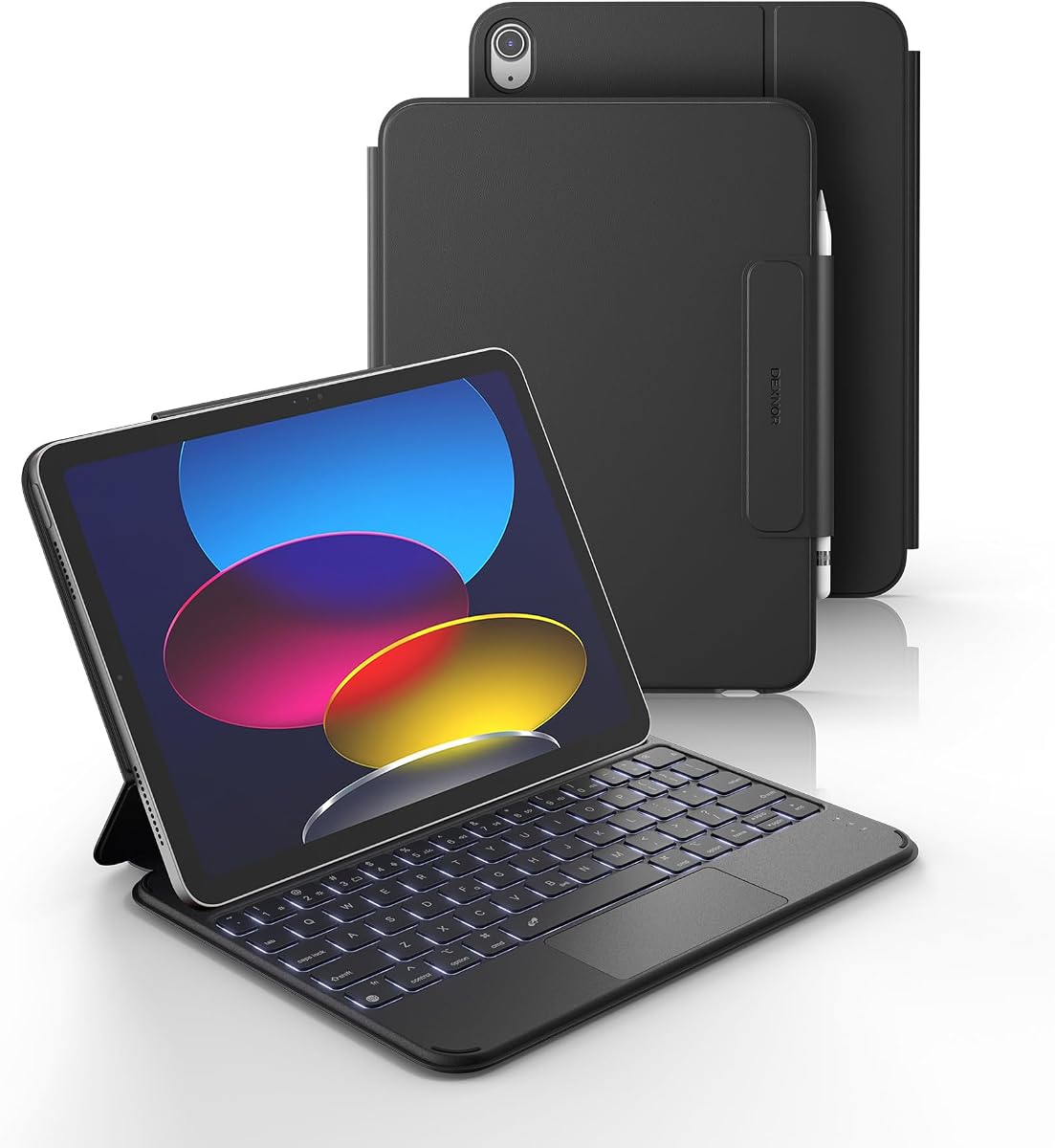


This product stands out as the premier choice for users seeking a premium typing experience. It boasts a high rating and is designed specifically for the latest tablet models ensuring perfect fit and function.
We may earn a commission when you buy through this link, at no additional cost to you.
The two-piece design allows you to detach the keyboard when you need a lighter tablet experience. The built-in trackpad supports multi-touch gestures making navigation intuitive and efficient for everyday tasks.
While it comes at a higher cost, the lack of pairing requirements and robust build quality justify the investment. The adjustable stand ensures comfortable viewing angles whether you are typing or watching videos.
Ideal for professionals and students who value reliability and ease of use. If you want a seamless integration with your device this is the top recommendation for a folio case with keyboard.
The magnetic design ensures the keyboard attaches securely without any Bluetooth pairing steps saving you time every day.
The function row provides quick access to essential controls like brightness and volume enhancing your workflow efficiency.
We may earn a commission when you buy through this link, at no additional cost to you.
This option offers exceptional value for users on a budget without sacrificing essential features. It has a solid rating and includes a trackpad that supports multi-finger gestures for smoother navigation.
We may earn a commission when you buy through this link, at no additional cost to you.
The keyboard features a full row of shortcuts and customizable RGB backlighting which adds a touch of style to your setup. The case is made from stain-resistant materials to keep your device looking new.
You will need to pair it via Bluetooth initially but it reconnects automatically once set up. The battery life is sufficient for daily tasks and charges quickly via the included Type-C cable.
Perfect for students or casual users who want a full laptop experience without the premium price tag. It balances cost and functionality effectively making it a strong contender in the budget category.
Choose from seven backlight colors and three brightness levels to suit your environment and personal preference easily.
Anti-slip grooves allow you to adjust the screen angle for writing or watching content comfortably.
We may earn a commission when you buy through this link, at no additional cost to you.
This model elevates the standard folio experience with a floating magnetic stand that mimics a true laptop setup. It receives high praise for its build quality and ergonomic design features.
We may earn a commission when you buy through this link, at no additional cost to you.
The keyboard offers eleven color options for backlighting allowing you to personalize your typing environment. Palm rejection technology ensures that accidental touches do not disrupt your cursor while you type.
The synthetic vegan leather exterior provides a premium feel while protecting your tablet from daily wear. It is designed to be durable and stable suitable for both travel and stationary desk use.
Recommended for professionals who need a robust and stylish solution for their device. The floating stand and comprehensive protection make it a standout choice for those willing to invest in quality.
The floating stand holds the screen above the keyboard improving posture and reducing neck strain during long sessions.
Select from eleven backlight colors to match your mood or workspace lighting conditions perfectly.
We may earn a commission when you buy through this link, at no additional cost to you.
This product is designed for users who prioritize portability without compromising on essential typing features. It holds an excellent rating and features a lightweight design that makes carrying your device effortless.
We may earn a commission when you buy through this link, at no additional cost to you.
The keyboard uses scissor-style keys for a quiet and responsive typing experience suitable for shared spaces. A built-in pencil holder keeps your stylus secure and accessible whenever you need to draw or take notes.
The case combines synthetic leather with flexible TPU edges to offer protection against scratches and bumps. Backlighting options allow you to type comfortably in low-light conditions while on the go.
A great choice for travelers and students who need a slim profile case. The combination of light weight and functional features makes it a reliable companion for daily use and study sessions.
Weighs significantly less than bulkier alternatives making it ideal for commutes and backpacks.
The integrated pencil holder ensures you never lose track of your stylus when working on the move.
We may earn a commission when you buy through this link, at no additional cost to you.
This keyboard case offers unique dual wireless channel capability allowing you to switch between devices with one click. It maintains a high rating and provides a comprehensive set of features for productivity.
We may earn a commission when you buy through this link, at no additional cost to you.
The trackpad adapts well to the operating system providing smooth scrolling and cursor control. The battery life is robust with a sleep mode that activates automatically to conserve power when not in use.
You will find slots for various accessories in the pencil holder area keeping your workspace organized. The keyboard backlight has three levels of brightness to suit different lighting environments comfortably.
Ideal for users who manage multiple devices and need a versatile typing solution. The ability to pair with two devices simultaneously streamlines your workflow and reduces the need for frequent re-pairing.
Pair with up to two devices and switch between them instantly without complex reconfiguration steps.
The keyboard enters sleep mode automatically after inactivity extending standby time significantly.
We may earn a commission when you buy through this link, at no additional cost to you.
Designed for tough environments this case meets military standards for drop protection to keep your device safe. It features a unique connection method that eliminates the need for Bluetooth pairing or charging.
We may earn a commission when you buy through this link, at no additional cost to you.
The waterproof membrane protects the keyboard from spills and crumbs making it suitable for dining or fieldwork. Four distinct use modes allow you to adapt the case for typing, writing, viewing, or reading tasks.
The Smart Connector draws power directly from the device ensuring you never run out of battery during use. A secure magnetic latch keeps the case closed when not in use and protects the screen.
Best for users who prioritize durability over sleekness. If your device travels to construction sites or outdoor environments this rugged design provides the peace of mind you need.
Shock-absorbent technology helps the case exceed military standard drop tests protecting against mishaps.
Connects instantly and sources power from the tablet eliminating the need for batteries or pairing.
We may earn a commission when you buy through this link, at no additional cost to you.
This model introduces a Folio Duo concept that adapts effortlessly from productivity to pure tablet mode. It carries a strong rating and supports both portrait and landscape orientations for versatile viewing.
We may earn a commission when you buy through this link, at no additional cost to you.
The magnetic detachable design lets you snap on the keyboard for typing and remove it for reading without removing the whole case. It includes a 12-month warranty which adds value and customer confidence.
The keyboard provides a quiet typing experience with a full row of shortcut keys to boost your productivity. A refined leather-style exterior adds a touch of elegance while protecting your device from wear.
Recommended for users who frequently switch between work and media consumption. The flexibility to detach the keyboard makes it a versatile tool for those who want one case for all needs.
The case supports stable positioning in both portrait and landscape modes for creative and media tasks.
Backed by a 12-month warranty and responsive customer support for peace of mind.
We may earn a commission when you buy through this link, at no additional cost to you.
Weighing just 1.16 pounds this case is perfect for mobile professionals and students on the go. It features a robust battery that supports up to 200 hours of typing without backlight usage.
We may earn a commission when you buy through this link, at no additional cost to you.
The power-saving design allows the keyboard to wake up when you open the case and sleep when you close it. This energy efficiency extends the battery life significantly compared to standard options.
It uses a reinforced magnetic system to anchor the tablet securely preventing wobbling during typing sessions. The scissor-switch keys offer a responsive feel similar to a laptop for efficient document editing.
Choose this if weight is your primary concern and you need a battery that lasts a long time. The simple yet effective design makes it a reliable choice for daily commuting and travel.
The 650mAh battery provides up to 200 hours of typing ensuring you stay productive for long periods.
Automatically wakes up on opening and sleeps on closing to conserve energy throughout the day.
We may earn a commission when you buy through this link, at no additional cost to you.
This option features an extra-large precision trackpad that is 65% larger than standard keyboard touchpads. It maintains a high rating and focuses on providing a smooth navigation experience for iPad users.
We may earn a commission when you buy through this link, at no additional cost to you.
The thin design ensures that the accessory does not add unnecessary bulk to your daily routine. Two fixed viewing angles offer stability for working or reading without any wobble during use.
While it lacks backlighting the large trackpad allows for intuitive gestures like three-finger scrolling. The Air Guard corners and reinforced cover protect your device from drops and scratches effectively.
Recommended for users who prioritize navigation comfort over visual lighting features. The large trackpad makes multitasking and app switching much easier compared to smaller alternatives.
The 65% larger touchpad supports intuitive gestures for effortless navigation and multitasking.
Ultra-thin design fits your daily routine while Air Guard corners protect against drops and bumps.
We may earn a commission when you buy through this link, at no additional cost to you.
This product delivers a marathon battery life that lasts over 200 hours on a single charge. It receives an excellent rating and is designed to be a reliable companion for long work sessions.
We may earn a commission when you buy through this link, at no additional cost to you.
The case is encased in premium PU leather which defends against spills and fingerprints while adding minimal bulk. Multiple tilt angles allow you to find the ideal position for typing or viewing content.
A convenient pencil holder is built into the design ensuring you always have your stylus ready. The package includes a USB-C cable making setup straightforward and easy right out of the box.
A solid choice for budget-conscious buyers who want long battery life and a premium feel. The responsive customer care and comprehensive package make it a trustworthy option for daily use.
Delivers 200+ hours of working time allowing you to work for days without recharging the keyboard.
Multiple tilt angles ensure you can adjust the screen to a comfortable position for any task.
We may earn a commission when you buy through this link, at no additional cost to you.
Selecting the right case requires considering several factors to ensure it meets your workflow and protection needs.
Always verify the model number on the back of your iPad before purchasing. Most cases are designed for specific generations and inch sizes so a mismatch can lead to poor fit or functionality.
Check the listing carefully to confirm support for your exact device model to avoid returns and compatibility issues.
Some cases connect via Bluetooth which requires pairing but allows more flexibility in positioning. Others use a Smart Connector which offers instant connection without pairing but limits detachment options.
Choose based on whether you prefer wireless versatility or a seamless instant connection experience.
A built-in trackpad can significantly enhance your productivity by allowing cursor control and gestures. Look for options that support multi-finger gestures to mimic laptop navigation.
Ensure the trackpad is large enough for comfortable use and supports the gestures you rely on daily.
If the keyboard is rechargeable check the battery capacity and estimated typing hours. Options with sleep modes and auto-off features help conserve power during inactivity.
Prioritize models with USB-C charging for faster recharge times and better longevity over time.
Consider the materials used for the case and whether it offers drop protection or waterproofing. Reinforced corners and shock-absorbent materials provide better safety for your device.
Look for features like stain-resistant surfaces if you plan to use the device in dining or outdoor settings.
Adjustable stands allow you to change the screen angle for typing or watching videos. Some cases offer a floating stand for a more ergonomic laptop-like setup.
Ensure the stand provides stable support to prevent wobbling during heavy typing sessions.
Backlit keyboards are essential for working in low-light environments. Look for options with adjustable brightness levels and color choices to suit your preferences.
Check if the backlight turns off automatically to save battery when not in use.
If you carry your device daily weight becomes a critical factor. Ultra-light models add minimal bulk making them ideal for commuting and travel.
Balance the need for protection and features with the desire for a lightweight and portable accessory.
To connect a Bluetooth keyboard first power it on and press the function keys specified to enter pairing mode. Then open Bluetooth settings on your iPad and select the keyboard from the device list to complete the process.
Keep your keyboard clean by wiping it gently with a dry microfiber cloth to remove dust and fingerprints. Avoid using harsh chemicals or liquids that could damage the keys or the case material.
If your keyboard has a battery ensure it is fully charged before your first use. Enable sleep modes if available to maximize battery life and extend the lifespan of the device.
No, once the keyboard is paired with your device it will reconnect automatically when you turn it on. You only need to pair it again if you reset the keyboard or connect it to a different device.
Many cases include a built-in pencil holder or slot for easy access. However, you should verify compatibility with your specific Pencil model to ensure it fits securely in the holder.
Not all models have a detachable keyboard. Some cases are integrated while others allow you to remove the keyboard for a lighter tablet experience. Check the product details to confirm.
Check the model number on the back of your iPad starting with an A code. Compare this with the compatibility list provided in the product description to ensure a perfect fit.
Reputable cases are designed with precise cutouts to ensure full access to charging ports and speakers. Verify the product images to ensure all ports remain accessible when the case is on.
Some keyboards can be charged while in use via their included cable. Check the specific product features to see if simultaneous use and charging is supported by the device.
The top picks highlight options ranging from premium professional tools to budget-friendly solutions. Each brings unique strengths whether it is a robust trackpad, long battery life, or a floating stand.
Prioritize the features that matter most to your daily workflow such as typing comfort or portability. A good case should enhance your productivity without adding unnecessary weight or complexity.
Remember to check current availability and prices before finalizing your purchase. The market changes frequently so staying updated ensures you get the best value for your specific needs.