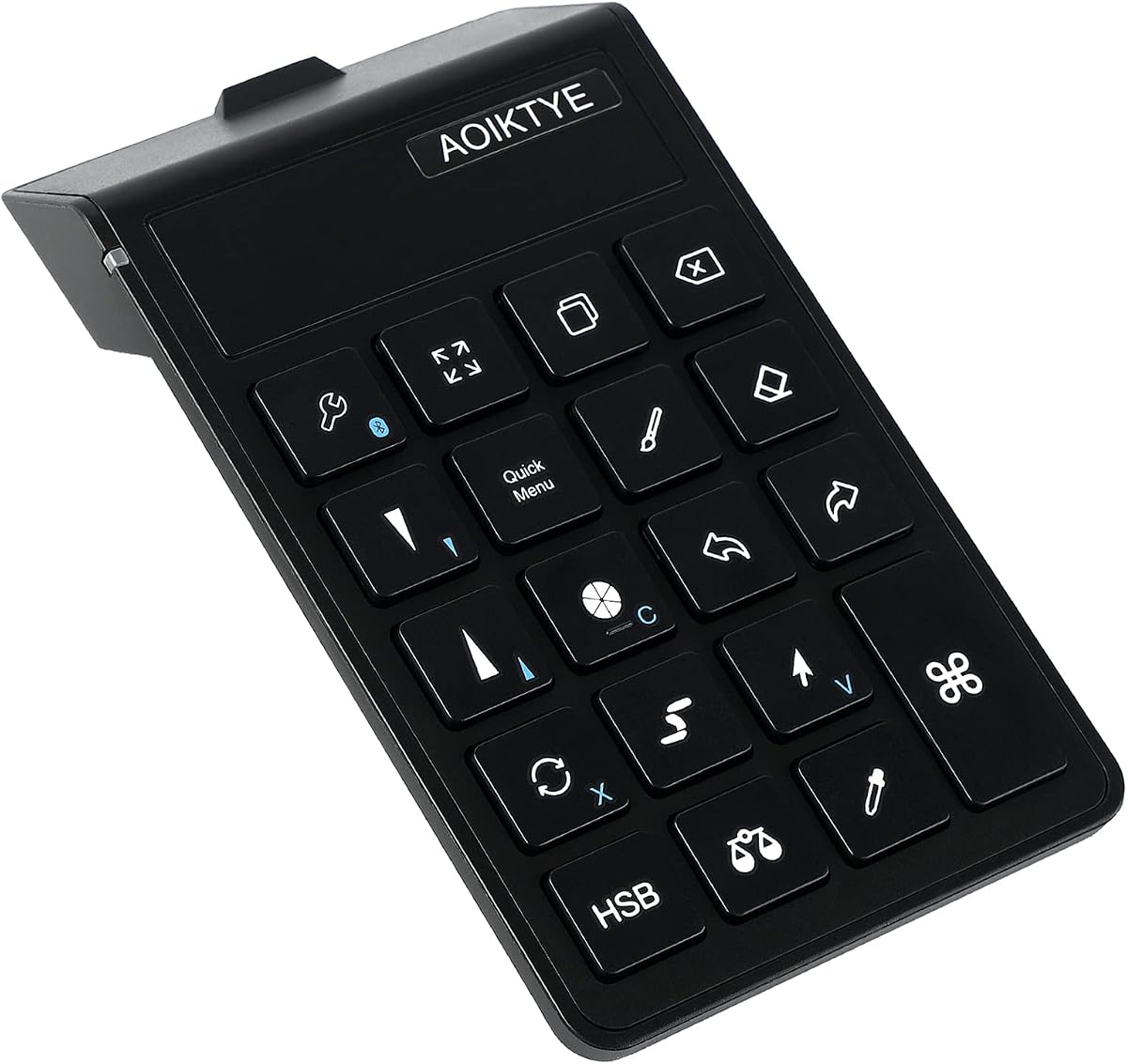
Keyboard for Procreate, 22 Shortcut Keys Wireless Keyboard for iPad Digital Drawing
4.5Editor score
Optimized for Procreate
22 shortcut functions
84-hour battery life
This guide compares the top iPad drawing Bluetooth controllers to help artists find the perfect wireless shortcut device for Procreate and other creative apps.
Finding the right iPad drawing Bluetooth controller can transform your digital art workflow significantly. These devices offer dedicated shortcuts and dials that speed up your creative process while keeping your focus on the canvas.
We evaluated ten top-rated models based on compatibility, battery life, and customization options. Each product was selected for its ability to integrate seamlessly with popular drawing software and iOS devices.
Every pick includes detailed specs, pros, and cons to guide your decision. Keep in mind that prices and availability may change over time, so verify current listings before purchasing.
4.5Editor score

4.2Editor score

5.0Editor score
This comparison table highlights the key specifications of each model to help you quickly identify the right controller for your specific needs.


The HUION Keydial Mini is a powerful Bluetooth keypad designed to streamline your digital art workflow. It offers 18 programmable shortcut keys and a customizable dial that can be mapped to various functions like brush size adjustment.
We may earn a commission when you buy through this link, at no additional cost to you.
Its 70-hour battery life ensures you can work through long sessions without frequent charging. The anti-ghosting technology allows multiple key presses simultaneously, which is crucial for complex shortcuts in apps like Photoshop.
While the device requires driver setup for full customization, the effort pays off with efficient control. The compact one-handed design makes it easy to use alongside your iPad or desktop setup.
Artists seeking a versatile and reliable shortcut device will find this model highly rewarding. It bridges the gap between touch controls and traditional keyboard efficiency perfectly.
Customizable shortcuts reduce time spent navigating menus and keep you focused on the creative process.
The dial can be set to manage brush sizes or timelines, providing tactile feedback for precise adjustments.
We may earn a commission when you buy through this link, at no additional cost to you.
This AOIKTYE keyboard is specifically designed to enhance your Procreate experience on iPad. It provides 22 shortcut keys that handle common tasks like undo, color selection, and brush size control efficiently.
We may earn a commission when you buy through this link, at no additional cost to you.
With an 84-hour battery life, you can work for weeks on a single charge. The ergonomic design places the most used keys within easy reach, improving comfort during long drawing sessions.
While it excels with Procreate, compatibility with other apps is limited compared to general keypads. However, for dedicated Procreate users, the value and convenience are unmatched.
Budget-conscious artists who focus primarily on Procreate should consider this keyboard. It offers a solid boost to productivity without a high financial investment.
Keys are mapped directly to essential Procreate commands, simplifying the learning curve for new users.
The built-in rechargeable battery supports continuous use for over three days without needing a plug.
We may earn a commission when you buy through this link, at no additional cost to you.
The DIGIDRAW K30 stands out with its dual dial design and 11 programmable keys. This setup allows for granular control over multiple parameters simultaneously, such as zooming and layer switching.
We may earn a commission when you buy through this link, at no additional cost to you.
Weighing only 82 grams, it is incredibly light and easy to hold for extended periods. Tactile markers on keys enable blind operation, keeping your eyes on the artwork.
While the price is higher than some competitors, the build quality and precision justify the investment. It supports major creative software through driver customization.
Serious digital artists seeking top-tier control and portability will appreciate this controller. Its premium features make it a standout choice for professional workflows.
Two dials allow you to manipulate different variables at once, significantly speeding up editing tasks.
Its light weight and compact shape make it ideal for travel and on-the-go creative sessions.
We may earn a commission when you buy through this link, at no additional cost to you.
The ShanWan controller is primarily a gamepad but supports keyboard and mouse modes for creative apps. Its analog sticks and buttons can be mapped to drawing functions for unique workflows.
We may earn a commission when you buy through this link, at no additional cost to you.
It offers a comfortable ergonomic grip suitable for long sessions. The controller supports multiple platforms including iPad and PC, making it flexible for mixed setups.
However, it lacks dedicated shortcuts or dials found in purpose-built art devices. Users may need time to map keys effectively for art tasks.
Artists who also game or want a multi-use device might find this appealing. It provides flexibility but requires customization to match art needs.
Works seamlessly across various devices including iOS and Android tablets for versatile connectivity.
Analog sticks can offer smooth input for certain drawing applications when configured correctly.
We may earn a commission when you buy through this link, at no additional cost to you.
This TNP remote offers a trackpad to move cursors and navigate apps on iPad. It includes a Home button for switching tasks and media controls for multimedia management.
We may earn a commission when you buy through this link, at no additional cost to you.
The Bluetooth 5.0 connection ensures stable communication with your device. It is particularly useful for presentations or managing non-art functions without touching the screen.
It does not provide dedicated art shortcuts or drawing tools. Its primary strength lies in media and system navigation rather than creative control.
Users needing a general-purpose remote with trackpad features will find this handy. It complements a tablet setup but does not replace a drawing controller.
The built-in trackpad allows mouse-like cursor movement for easier UI navigation.
Remote controls can help switch apps smoothly during presentations or streaming sessions.
We may earn a commission when you buy through this link, at no additional cost to you.
The XPPen ACK05 is a compact wireless remote with 10 keys and a customizable dial. It features anti-ghosting technology to support multiple simultaneous key presses.
We may earn a commission when you buy through this link, at no additional cost to you.
With a 1000 mAh battery, it offers around 300 hours of use between charges. The dial provides clear click feedback for precise adjustments like brush sizing.
Driver installation is needed to customize keys fully, which may be a hurdle for some users. However, its small size makes it easy to carry.
Artists looking for a portable shortcut device will find this useful. It balances functionality and portability effectively for mobile creative work.
Its thin profile and light weight make it easy to carry in a tablet case.
The large battery ensures weeks of usage without needing to recharge frequently.
We may earn a commission when you buy through this link, at no additional cost to you.
The TourBox Lite features a simplified 8-key layout with a knob and wheel for precise control. Its ergonomic design supports comfortable use during long creative sessions.
We may earn a commission when you buy through this link, at no additional cost to you.
The TourBox Console software provides ready-made presets for popular apps, reducing setup time. It supports wireless connection and works across Windows and macOS.
It focuses on essential shortcuts rather than extensive programmability. This simplicity can be an advantage for users who prefer quick access.
Users valuing ergonomics and ease of use will appreciate this device. It offers a polished experience for creative professionals.
Shaped for natural hand posture to reduce fatigue during extended use.
The Console software streamlines configuration with app-specific presets.
We may earn a commission when you buy through this link, at no additional cost to you.
This G8 PLUS controller includes Hall Effect sticks and motion sensing for accurate input. It is designed with magnetic interchangeable parts for customization.
We may earn a commission when you buy through this link, at no additional cost to you.
Vibration motors provide tactile feedback during use. The device supports many tablets and phones with holders available for various models.
It is primarily built for gaming but can be mapped for other uses. Setup may require technical knowledge to configure mapping correctly.
Tech-savvy users looking for customizable hardware might enjoy this model. It offers robust features but requires effort to adapt for art.
Hall Effect sensors provide long-lasting and accurate stick tracking.
Magnetic parts allow users to personalize appearance and function.
We may earn a commission when you buy through this link, at no additional cost to you.
The Clip Studio Tabmate 2 is designed specifically for Clip Studio Paint users. It assigns common operations to buttons to speed up production significantly.
We may earn a commission when you buy through this link, at no additional cost to you.
It includes a 12-month license for Clip Studio Paint, adding value. The device works across iPad, Android, and Windows devices.
However, it relies on AA batteries which need separate purchase. Compatibility is limited to CSP version 3.0 and later.
Dedicated CSP artists will find this device highly efficient. Its specialized functions are tailored to streamline workflows in that software.
Buttons are mapped directly to frequent commands within the software.
The package includes a full one-year license for the application.
We may earn a commission when you buy through this link, at no additional cost to you.
The Wacom Intuos Small is a full drawing tablet with Bluetooth connectivity. It features industry-leading pen pressure technology for natural drawing experiences.
We may earn a commission when you buy through this link, at no additional cost to you.
It supports wireless operation and includes creative software to help you get started. The compact size fits on any desk without taking much space.
While it is a full tablet rather than a shortcut controller, it replaces the need for one. Drawing directly on the surface enhances control.
Artists wanting to draw wirelessly with pen pressure will prefer this. It offers a complete digital art solution rather than just shortcuts.
The battery-free pen feels like writing on paper for intuitive control.
Bluetooth connectivity allows freedom of movement without cables.
We may earn a commission when you buy through this link, at no additional cost to you.
Selecting the right controller depends on your software preferences and workflow needs. Consider the following factors to find the best match.
Ensure the controller supports your primary art software. Some devices are optimized for Procreate or Clip Studio Paint while others work with Photoshop.
Check if the device supports your app before purchasing to avoid limitations.
Most modern controllers use Bluetooth 5.0 or later for stable connections. Look for models that offer a reliable range and minimal latency.
A strong connection ensures your inputs are registered quickly and without interruption.
Consider how long the battery lasts on a single charge. Devices with hundreds of hours of use reduce charging frequency.
Long battery life is essential for artists who work through long sessions or travel.
Programmable keys and dials allow you to map shortcuts to your workflow. Check if the device supports multiple profiles or layers.
Highly customizable devices adapt better to evolving needs and preferences.
An ergonomic design reduces strain on your hand and wrist. The device should be comfortable to hold for extended periods.
Prioritize models that feel natural in your hand to prevent fatigue.
Durable materials ensure the device withstands regular use. Look for reinforced buttons and solid construction.
Quality build quality extends the lifespan of your investment.
Some controllers offer motion sensing or media playback controls. These extras can add value depending on your usage.
Consider if features like trackpads or vibration feedback are useful to you.
Compare the features against the price to determine value. Higher cost often brings better materials or advanced customization.
Balance your budget with the features you truly need.
Begin by connecting the controller to your iPad via Bluetooth. Enable the pairing mode on the device and select it in your iOS settings.
Install any required software or drivers from the manufacturer. This step ensures all keys function correctly with your applications.
Keep the device clean by wiping it with a soft dry cloth. Avoid exposing it to moisture or extreme temperatures to maintain performance.
Yes many controllers work with Procreate especially those designed for iOS. Some models offer specific presets to enhance the experience in that app.
Turn on pairing mode on the device then go to Bluetooth settings on your iPad. Select the device name from the list to connect.
Most controllers are compatible with many drawing apps. Some offer multiple profiles or layers to switch between app mappings.
Some controllers require drivers for full customization. Others work out of the box for basic functions without extra software.
Battery life varies but many models last between 40 to 100 hours on a single charge. Check the specs for exact figures.
Some models designed as gamepads can be used for gaming. However dedicated drawing controllers focus on creative software shortcuts.
Most use USB-C or Micro-USB cables to recharge. Some older models require AA batteries instead of built-in batteries.
Many controllers support Android tablets in addition to iPads. Check the product details for full system compatibility.
We reviewed ten excellent controllers ranging from budget friendly options to premium devices. Each offers unique features tailored to different creative needs.
Prioritize compatibility with your software and battery life for uninterrupted work. Choose a design that feels comfortable in your hand.
Remember to check the current prices and availability before buying. Deals may vary so comparing options helps you find the best value.