
LA03DF Battery for HP 15-F Series
4.7Editor score
Low price point
Built-in circuit protection
31Wh capacity
This guide compares the top ten laptop batteries for replacement to help you find the right power solution for your specific HP or Dell laptop model.
Finding a reliable replacement power source is crucial for extending your device life. A high quality cell ensures stable voltage and long lasting performance during daily tasks.
We evaluated ten options based on compatibility, safety features, and user feedback. Each entry matches specific OEM part numbers to guarantee proper fit and function for your system.
Every pick includes detailed specs and honest pros. Prices fluctuate so verify current listings before buying to ensure you get the best value for your money today.
4.7Editor score

4.4Editor score
4.4Editor score
This side-by-side comparison helps you quickly identify the right power solution for your specific laptop model and usage needs.



This HT03XL replacement battery ranks as our top pick for HP users seeking reliable power. With a 4.4 star rating and broad compatibility across the Pavilion 15 and 17 series, it offers a dependable solution for restoring mobility to your device.
We may earn a commission when you buy through this link, at no additional cost to you.
The 41.7WH capacity provides enough energy for typical daily tasks like browsing or document editing. Including two screwdrivers and a user manual makes the installation process significantly easier for non technical users who lack specific tools.
While the 3-cell design is standard for this form factor, it limits total energy compared to larger 6-cell options. However, this is acceptable given the slim profile required by most Pavilion models. Ensure your part number matches exactly before purchasing to avoid fit issues.
If you own a compatible HP Pavilion model and need a straightforward replacement, this battery delivers strong performance. Its balance of capacity, included tools, and price makes it the ideal choice for most general users in 2026.
Supports numerous HP Pavilion series including 14, 15, and 17 with various sub-models and part numbers like L11119-855 and TPN-C136.
Comes with two screwdrivers and a manual to help you replace the battery safely without needing extra hardware or professional help.
We may earn a commission when you buy through this link, at no additional cost to you.
This polymer variant of the HT03XL battery stands out due to its generous 12-month warranty and 24×7 email support. It matches the same broad compatibility as other options in this category while offering a slightly higher capacity rating.
We may earn a commission when you buy through this link, at no additional cost to you.
The 41.9WH capacity ensures consistent power delivery for standard productivity tasks. The inclusion of auxiliary installation tools simplifies the replacement process. Just remember that the Amazon return window closes one month after delivery, so contact the seller immediately if issues arise.
While it shares the 3-cell design constraints of its peers, the added warranty peace of mind makes it a compelling choice. Users who prioritize long-term support and direct communication with the manufacturer will appreciate this feature set.
For HP owners seeking a reliable replacement with strong post-purchase support, this battery is an excellent selection. It balances standard performance specs with customer service features that are rarely found at this price point.
Provides 12 months of replacement coverage alongside a 30-day refund option, giving you extra security against early battery failures or defects.
Includes two auxiliary tools and a user manual to guide you through the physical replacement steps safely and efficiently at home.
We may earn a commission when you buy through this link, at no additional cost to you.
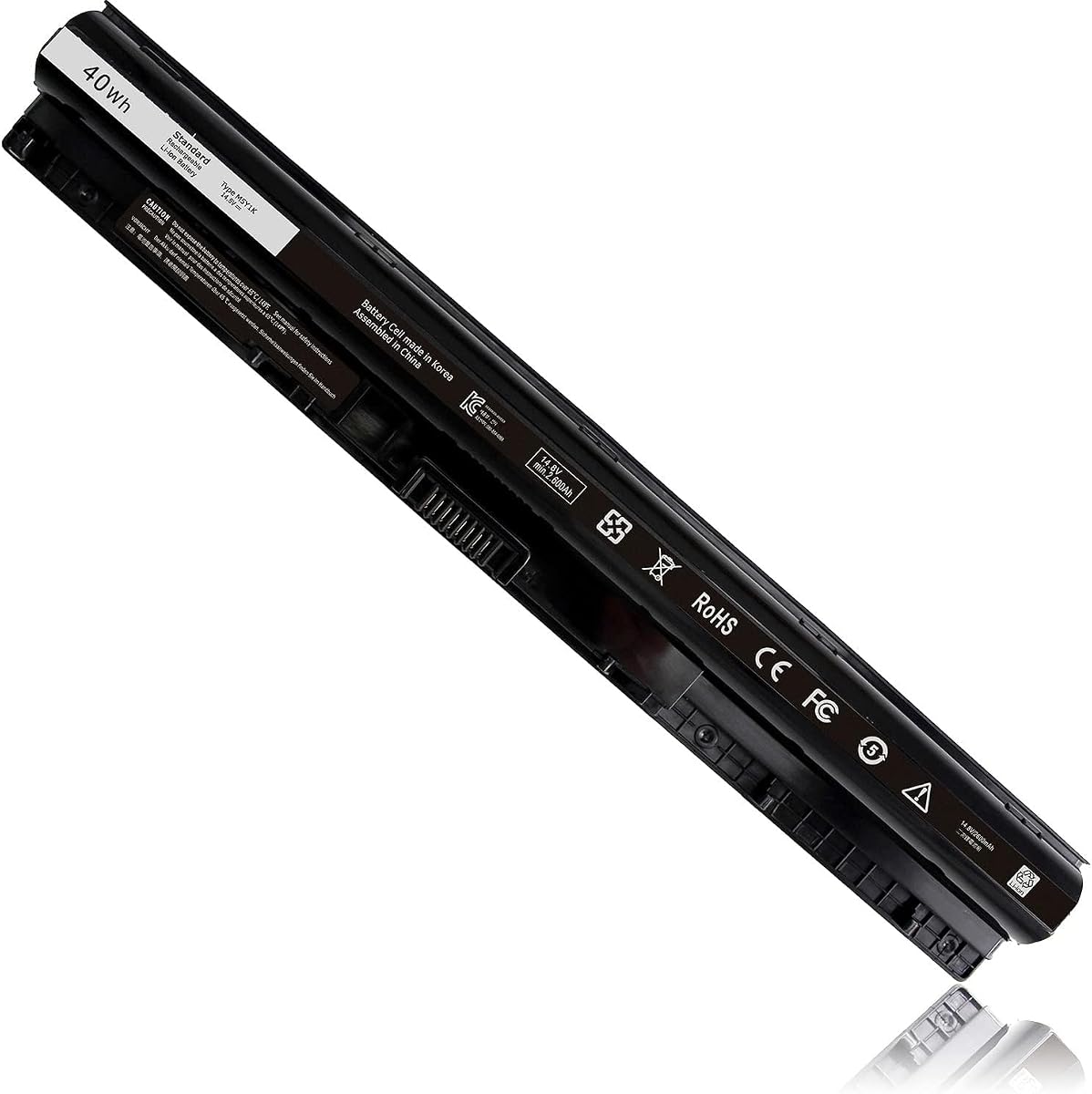
This M5Y1K replacement targets Dell Inspiron users needing a solid 4-cell option. The upgraded PCB board ensures full compatibility with original units regardless of model vintage, which is a significant plus for older laptops.
We may earn a commission when you buy through this link, at no additional cost to you.
The 40WH capacity supports standard workloads like web browsing or media consumption. The 4-cell design offers better energy density than 3-cell alternatives while fitting standard slim chassis. Users report over 1000 charge cycles, suggesting strong longevity.
While it is limited to specific Dell Inspiron and Vostro models, its compatibility list is extensive. The main trade-off is that users needing massive battery life may need to consider higher capacity 6-cell options if their chassis supports them.
Dell users with compatible Inspiron models will find this to be a reliable and affordable upgrade. The focus on PCB compatibility adds a layer of assurance that the battery will function correctly without technical glitches.
The internal PCB board has been upgraded to guarantee full compatibility with original Dell units without any model year restrictions or limitations.
Rated for more than 1000 charge cycles, this battery is designed to maintain performance longer than standard replacements before degradation occurs.
We may earn a commission when you buy through this link, at no additional cost to you.
This HT03XL unit offers another strong option for HP Pavilion owners. It explicitly lists compatibility with both the 14 and 17 series, ensuring you can find the correct fit even with less common model numbers.
We may earn a commission when you buy through this link, at no additional cost to you.
The 41.9WH capacity is robust for a 3-cell design. The polymer construction adds safety benefits by reducing the risk of swelling or overheating. Accessories like tools are included to simplify the physical swap.
While compatible with a wide range of HP systems, the replacement process still requires careful handling. Ensure your laptop model is verified against the list to avoid returns. The 3-cell limitation is standard for this chassis size.
For users prioritizing safety and exact part number matching, this battery is a solid choice. It provides a reliable power source that aligns well with OEM standards for performance and safety in daily use.
Matches specific part numbers like L11119-855 and HSTNN-UB7J to ensure your laptop recognizes the new battery without compatibility warnings.
Uses polymer chemistry for improved safety and stability during charging cycles, reducing risks associated with traditional older battery types.
We may earn a commission when you buy through this link, at no additional cost to you.
This model emphasizes security with certifications like CE, FCC, and RoHS. It includes smart chip protections against overcharging and short circuits, adding a layer of safety that is crucial for long-term laptop health.
We may earn a commission when you buy through this link, at no additional cost to you.
The 3610mAh capacity is standard for this type. The package includes screwdrivers for easy installation. A 60-day money refund window plus a 12-month replacement policy gives users significant peace of mind when buying.
The slightly lower capacity compared to other 41WH options is a trade-off for the certified safety features. If you prioritize reliability and certified materials over maximum runtime, this is an excellent option to consider.
Buyers seeking a safe and certified replacement for their HP Pavilion will appreciate the rigorous testing. The strong warranty terms show confidence in the product's durability and performance standards.
Passed strict intelligent detection for short circuit and over voltage protection, and carries CE FCC and RoHS certifications for safety assurance.
Offers 60 days money refund and 12 months replacement support backed by 24×7 email support for any issues or questions.
We may earn a commission when you buy through this link, at no additional cost to you.
The LA03DF battery wins our best budget award for delivering solid performance at a low cost. It boasts a 4.7 star rating, indicating strong user satisfaction despite its affordable price point.
We may earn a commission when you buy through this link, at no additional cost to you.
With 31Wh capacity and a low-power design, it offers decent runtime for basic tasks. Built-in circuit protection guards against overcharging and short circuits. This ensures steady performance without draining resources unnecessarily.
The capacity is lower than premium options, which means shorter usage time between charges. However, for users needing a cheap fix for older HP 15-F series laptops, the value proposition is hard to beat.
If you own an older HP model and need a cost-effective fix, this battery is ideal. It balances basic functionality with high user ratings and safety features at the lowest price in this guide.
Earns a 4.7 star rating from users who value its affordability and reliable performance for older HP Pavilion 15-F series machines.
Engineered for low power consumption to ensure extended battery life while maintaining consistent performance during typical tasks.
We may earn a commission when you buy through this link, at no additional cost to you.
This Futurebatt 33YDH battery stands out with a 56Wh capacity, which is higher than many standard options. It targets Dell Latitude and Inspiron users needing more energy for demanding workflows.
We may earn a commission when you buy through this link, at no additional cost to you.
The battery features Grade A cells for fast charging and low consumption. It includes 12 security protections and PC flame retardant materials to enhance stability. This makes it a robust option for heavy usage scenarios.
The 3.8 rating suggests some users face compatibility issues. Ensure your part number matches exactly before buying. The high capacity trade-off is worth it if your device supports it and you need longer runtime.
If you prioritize capacity and safety features, this model is a strong contender. It provides the extra energy needed for professional workloads where standard cells may fall short.
With 56Wh capacity it offers longer runtime compared to standard 40Wh options making it suitable for demanding tasks without frequent recharging.
Uses PC flame retardant materials and upgraded processes to increase stability during charging and discharge processes significantly.
We may earn a commission when you buy through this link, at no additional cost to you.
This M5Y1K variant is popular for Dell Inspiron 5559 users. It carries a 4.5 rating, suggesting high user satisfaction. The high-quality materials ensure good performance in daily tasks.
We may earn a commission when you buy through this link, at no additional cost to you.
The 4-cell 2600mAh design is compact. It meets CE, FCC, and RoHS certifications. The 60-day refund and 12-month replacement policy adds value. Support is available around the clock for installation help.
While the specs are standard, the focus on material quality is a strength. Ensure your part number matches exactly. It is a great choice for those needing a reliable swap for their 5559 models.
If you prioritize quality and support for your Dell Inspiron, this battery is a top contender. Its strong rating and warranty terms make it a dependable choice for general users.
Equipped with high quality material to ensure good performance and long life for compatible Dell Inspiron laptops in daily use.
Comes with 60 days money refund and 12 months replacement support backed by 24×7 email support for any issues.
We may earn a commission when you buy through this link, at no additional cost to you.
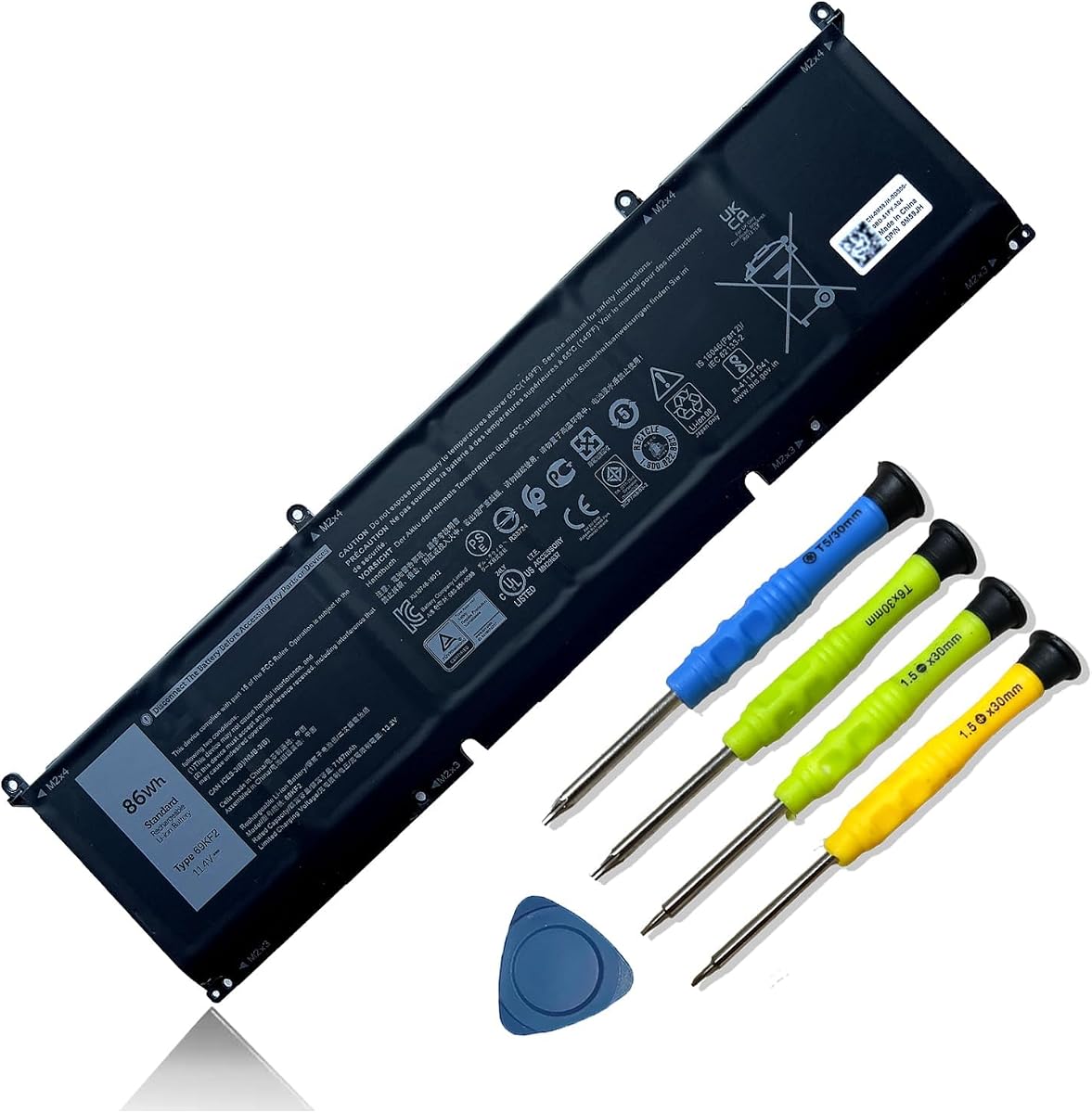
The 86Wh 69KF2 battery delivers premium performance for Dell XPS and Precision users. Its 6-cell design provides massive capacity for heavy workloads like video editing or CAD rendering without constant charging.
We may earn a commission when you buy through this link, at no additional cost to you.
Grade A cells support up to 500 recharge cycles. The product meets UL CE FCC and RoHS standards for safety. Screwdrivers are included to assist with the complex physical installation required for these devices.
The higher price is justified by the larger capacity. Ensure your laptop supports this 6-cell configuration before purchasing. For users who need extended runtime, this premium option is unmatched in this category.
If you run demanding tasks on a high-end Dell laptop, this battery is essential. It ensures you can work longer without losing productivity to low power states or frequent charging breaks.
Features 86Wh capacity to deliver extended runtime for power users needing to run demanding applications for long periods without charging.
Uses Grade A cells designed to provide reliable performance and support up to 500 recharge cycles over the battery life.
We may earn a commission when you buy through this link, at no additional cost to you.
This JC03 battery is a strong choice for HP 15-bs users. It holds a 4.5 rating and uses Grade A cells. The smart chip ensures safety against overheat and short circuits.
We may earn a commission when you buy through this link, at no additional cost to you.
The 31Wh capacity is standard for these older models. With over 1000 cycles rated life, it offers good longevity. The 60-day return policy adds confidence. It fits specific HP series like 15-bs or 17-bs.
While the capacity is lower than newer options, it is appropriate for the hardware. Ensure your part number matches. It provides a reliable fix for older devices needing a performance boost.
If you own a compatible HP model, this battery is a solid pick. It balances safety and cost effectively. The strong rating suggests it is a trustworthy option for restoring mobility.
Uses Grade A cells and meets certified standards to ensure reliability and safety during typical daily usage scenarios.
Offers 12-month warranty and 60-day return policy backed by 24/7 support for any issues or installation help.
We may earn a commission when you buy through this link, at no additional cost to you.
Selecting the right replacement requires matching your laptop model and understanding capacity needs.
The most critical factor is matching your laptop's specific part number. OEM numbers like HT03XL or M5Y1K are unique to specific chassis. Verify your current battery label before buying to ensure physical fit and electrical alignment. Incorrect models will not charge or fit properly.
Always check the part number printed on your current battery.
Capacity is measured in Watt-hours (WH). Higher capacity means longer battery life. A 40Wh cell supports roughly 4 to 6 hours of typical work. For heavy tasks, consider 6-cell options if your laptop supports them. Standard 3-cell designs are slim but have lower energy storage.
Look for higher WH ratings if you travel frequently or work remotely.
Batteries come in 3-cell, 4-cell, or 6-cell configurations. Cell count determines physical size and energy density. Slim laptops use 3-cell types. Workstations often need 6-cell for endurance. Ensure your laptop model supports the cell count you choose for proper fit.
Match the cell count to your laptop's hardware limitations and chassis size.
Safety is vital to prevent overheating or swelling. Look for certifications like CE, FCC, or RoHS. These ensure the battery meets strict international standards for electrical safety. Batteries without these certifications may pose risks during charging or discharging cycles.
Verify certifications on the product description to ensure safety compliance.
Replacements fail occasionally. A 12-month warranty shows the seller stands behind their product. Look for options that include 24×7 email support. Some sellers offer extended return windows like 60 days which helps if the battery arrives defective or incompatible.
Prioritize sellers offering clear warranty terms and accessible support channels.
Voltage must match exactly to avoid damage. A 10.95V battery will not work in a 11.55V slot. Always compare the voltage on the new battery against your existing one. Mismatched voltage can harm the motherboard or prevent charging entirely.
Check the voltage spec carefully to ensure it matches your original battery.
Many kits include tools like screwdrivers for ease of use. If you do not own specific tools, look for listings that mention included accessories. This saves time and cost. Some older models require specific tools that are hard to find otherwise.
Select kits that include tools if you lack proper equipment.
Reputable sellers provide better quality and customer service. Check reviews for patterns of compatibility issues. Established brands often have stricter quality control. Look for products with 4.0 stars or higher to ensure user satisfaction and reliability.
Read user reviews to confirm consistent quality across batches.
Install the battery in a clean environment. Disconnect the old battery before connecting the new one to prevent electrical shorts. Ensure the connector clicks into place securely. Close the back panel only after verifying the connection is stable.
Calibrate the new battery after installation. Charge it fully to 100 percent then let it discharge to 5 percent. Repeat this cycle three times to wake up the battery management system. This ensures accurate charge readings on your screen.
Care for your battery by avoiding extreme heat. Do not leave it in direct sunlight or hot cars. Charge it to 80 percent if storing it long term. Proper storage extends life. Avoid letting it sit fully discharged for months at a time.
No you should never mix old and new batteries. Different charge states cause imbalance which can damage the new unit. Always replace the entire battery pack at once for safe and consistent operation.
Quality replacements last for 3 to 5 years depending on usage. High quality cells can support over 1000 cycles. Proper care like avoiding heat and deep discharges extends this lifespan significantly.
Check the connector alignment and ensure it clicks securely. Sometimes the system needs recalibration. Discharge the battery to 5 percent then recharge it fully. If issues persist check your power adapter for faults.
Yes reputable replacements with CE or FCC certification are safe. They include protection circuits against overcharging. Always buy from trusted sources to ensure safety standards are met. Avoid uncertified generic units.
Many kits include small screwdrivers for installation. Some laptops require specific tools to open the case. Check the product description for included accessories. If unsure consult your laptop manual for instructions.
Recycle old batteries at designated electronic waste centers. They contain hazardous materials and should not go in regular trash. Many retail stores offer drop-off bins for safe recycling.
Our top picks like the HT03XL for HP and M5Y1K for Dell offer reliable power. Each selection was chosen based on compatibility safety and user feedback.
Prioritize matching your exact part number to ensure your device recognizes the new battery. Also check for safety certifications like CE or FCC for peace of mind.
Prices change so check current listings before finalizing your purchase. With the right choice your laptop can function like new again.