
BESIGN LS03 Aluminum Laptop Stand
4.8Editor score
Detachable aluminum alloy design
Ergonomic height elevation
Open design for ventilation
Finding the right laptop rack for desk setups is essential for maintaining a tidy and efficient workspace. Whether you work from home or in a busy office, having your devices organized helps reduce clutter and improves posture during long work sessions.
We have carefully selected and reviewed ten distinct models ranging from vertical stands to under desk mounts. Our comparison focuses on build quality, compatibility with various laptop sizes, and ergonomic benefits to ensure you find the perfect fit for your specific needs.
Each pick highlights unique strengths such as multi-device storage or portability. While prices may fluctuate over time, these products represent the best options available in November 2026 for keeping your tech accessible and your desk organized without sacrificing style.
4.8Editor score

4.8Editor score

4.6Editor score
As an Amazon Associate we earn from qualifying purchases.
This side-by-side comparison highlights the key specifications of each selected laptop rack for desk to help you make an informed decision based on your workspace requirements and device compatibility needs.





This OMOTON stand is designed for users who need to keep two laptops accessible while minimizing desktop clutter. With a solid 4.8 rating, it stands out as a reliable choice for dual device setups.
We may earn a commission when you buy through this link, at no additional cost to you.
The dual dock feature allows you to store two laptops side by side or stacked vertically depending on the specific configuration. The adjustable width ensures compatibility with various laptop thicknesses from 0.55 inches to 1.65 inches.
While the aluminum construction is durable and aesthetically pleasing it may require some cleaning to keep looking new. The wide base provides excellent stability preventing accidental tipping even when holding heavier machines.
If you frequently switch between multiple laptops for work or testing this is the ideal solution to keep your workspace organized and efficient without compromising on stability or style.
The ability to store two laptops simultaneously frees up valuable desk space for other essentials like monitors or notebooks.
Anodized aluminum ensures the stand resists scratches and maintains a premium look that matches MacBooks and other devices.
We may earn a commission when you buy through this link, at no additional cost to you.
The NODOCA vertical laptop rack offers a unique way to clear your desk by moving storage to the side. It is highly rated for its sturdy construction and thoughtful design features that enhance user convenience.
We may earn a commission when you buy through this link, at no additional cost to you.
This stand is mounted on the side of your desk allowing you to keep your laptops vertical and out of the way. The included headphone holder adds extra utility making it a great all-in-one solution.
Installation is straightforward but requires specific desk thickness limits to ensure a secure fit. The carbon steel construction ensures it can hold even heavier laptops without bending or wobbling during use.
For those looking to maximize every inch of their desk surface this side-mounted solution is an excellent option for keeping devices tidy and accessible without using valuable flat workspace.
Mounting the stand on the desk edge creates more room for keyboards and mice while keeping your laptop within easy reach.
The built-in hook at the bottom provides a convenient place to hang headphones or small bags keeping them organized.
We may earn a commission when you buy through this link, at no additional cost to you.
The BYMECOST mount is designed for those who want a completely invisible storage solution. With a strong 4.5 rating it proves to be a reliable way to store laptops or accessories under your work surface.
We may earn a commission when you buy through this link, at no additional cost to you.
This metal shelf attaches without drilling keeping your furniture intact. It holds up to 44 pounds which is sufficient for most laptops and peripheral devices like power strips or external drives.
You must ensure your table has enough width and no crossbars in the installation area. The hollow design helps with airflow and prevents dust buildup while maintaining structural integrity over time.
If you prefer a clutter-free desk where everything is out of sight this under desk mount offers a practical and sturdy way to organize your gear without permanent modifications.
Placing storage under the desk means your visible workspace remains clean and professional for video calls and clients.
The openings allow cords to pass through neatly reducing tangles and keeping your under-desk area tidy.
We may earn a commission when you buy through this link, at no additional cost to you.
This adjustable laptop rack provides significant ergonomic benefits by allowing you to set the perfect viewing angle. It is well reviewed for its ability to reduce neck strain during long working hours.
We may earn a commission when you buy through this link, at no additional cost to you.
The metal construction ensures stability while the ventilation holes help keep your laptop cool during heavy use. Rubber pads on the hook and base secure your device against sliding or scratching.
While the metal body is durable it may feel cold to the touch in cooler environments. The foldable feature makes it easy to pack away when not in use which is great for travelers.
If you often work from different locations or need to adjust your screen height frequently this stand offers a balanced mix of portability and ergonomic support for daily use.
Adjusting the stand to eye level reduces neck and back pain helping you maintain a healthier posture throughout the day.
The foldable design allows you to slip the stand into a backpack easily making it perfect for remote work or travel.
We may earn a commission when you buy through this link, at no additional cost to you.
The LOXP stand features a rotating base that makes sharing your screen with colleagues incredibly easy. It is a solid choice for teams or collaborative workspaces where quick sharing is needed.
We may earn a commission when you buy through this link, at no additional cost to you.
Built from fiber metal it offers better stability than standard aluminum stands. The rotating base allows you to turn the laptop to any angle without moving the whole stand.
The rotation mechanism is secure but might feel a bit stiff at first until it loosens with use. Ensure your laptop is under 16 inches as larger models may not fit securely on the rotating platform.
If you need to frequently show your screen to others around you this rotating stand is a unique solution that combines ergonomic height adjustment with flexible viewing angles.
The 360 degree rotation allows you to pass the laptop view to others without lifting the device off the stand.
The one-piece fiber metal material ensures the stand remains stable even during rotation and heavy usage.
We may earn a commission when you buy through this link, at no additional cost to you.
The BESIGN LS03 stands out as a highly rated budget option that does not compromise on quality. It is a favorite among users looking for reliable ergonomics at an accessible price.
We may earn a commission when you buy through this link, at no additional cost to you.
This stand elevates your laptop by six inches which helps align the screen with your eyes. The detachable design allows you to pack it flat for storage or travel without disassembly.
Since it is lightweight it may shift slightly if you type heavily without a separate keyboard. However for most users it provides a perfect balance of stability and ease of use for daily tasks.
If you are seeking an affordable yet effective laptop rack that improves posture and cooling this is the best choice on our list for value and performance.
You get high quality aluminum construction and ergonomic benefits without spending a premium price tag.
The detachable design means you can assemble and disassemble it quickly in three simple steps.
We may earn a commission when you buy through this link, at no additional cost to you.
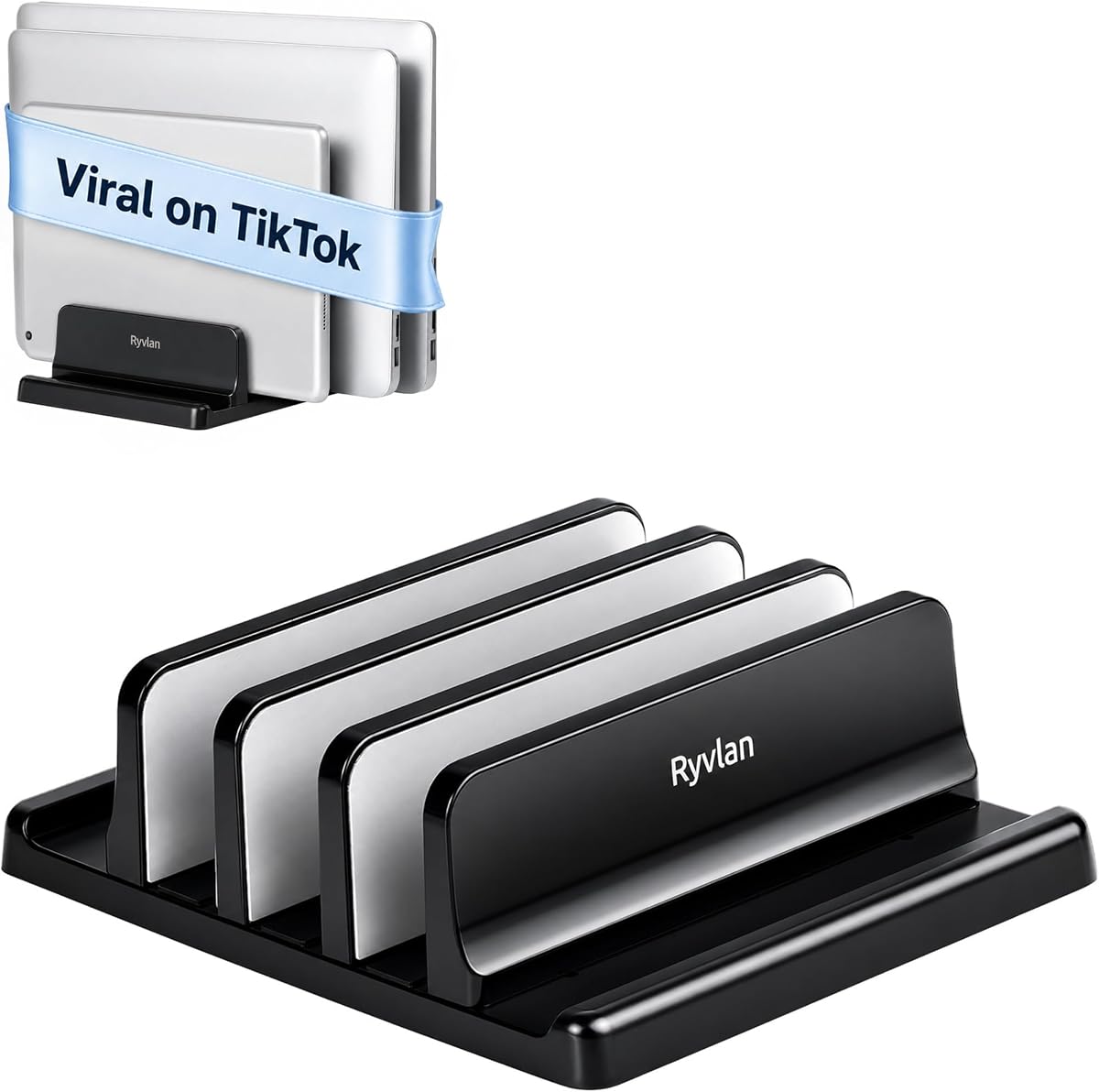
This Ryvlan stand is designed to maximize storage in a compact footprint. It is perfect for families or shared workstations where multiple laptops and tablets need organized storage.
We may earn a commission when you buy through this link, at no additional cost to you.
The three slots can hold laptops while two front slots accommodate tablets or phones. Each slot is adjustable to ensure a snug fit without wobbling during use.
While the plastic construction is lighter than metal it is impact-resistant and durable for daily use. The silicone padding protects devices from scratches and keeps the stand from sliding.
If you have a mix of devices that need to be stored vertically this multi-slot stand is the ideal solution to keep everything accessible and clutter-free.
Holding up to three laptops and two tablets allows you to store an entire family's devices in one place.
The small footprint means it takes up minimal desk space while providing maximum storage utility.
We may earn a commission when you buy through this link, at no additional cost to you.
The Vaydeer stand offers a simple and effective way to organize a laptop and phone or tablet together. It is well reviewed for its stability and smooth polished finish that looks good on any desk.
We may earn a commission when you buy through this link, at no additional cost to you.
Adjustable width ensures it can hold devices ranging from thin ultrabooks to thicker gaming machines. The soft silicone mats protect your devices from scratches while keeping them secure in place.
Since it is made of plastic it is lightweight but still stable enough for daily use. You should ensure your desk thickness meets the requirements for the base to stay properly secured.
If you need a cost-effective solution for vertical storage that handles various device sizes this stand is a practical and tidy option for smaller desks.
The adjustable width makes this stand compatible with a wide range of laptop models and sizes.
Polished surfaces and silicone mats ensure your device remains scratch-free while sitting vertically.
We may earn a commission when you buy through this link, at no additional cost to you.
The Elestoria vertical rack is the ultimate solution for high capacity storage. With a heavy duty aluminum build it stands out as the most premium and robust option available.
We may earn a commission when you buy through this link, at no additional cost to you.
It can hold up to four laptops and one tablet simultaneously. The adjustable brackets let you secure devices of varying thicknesses safely without the need for tools.
The closed design prevents devices from tipping over while maintaining airflow for cooling. The only trade-off is the larger size and higher price compared to simpler stands.
If you manage multiple laptops for work or testing and need a premium secure solution this stand offers unmatched capacity and build quality for professional environments.
Holding four laptops and a tablet makes this the most versatile storage option for managing a tech inventory.
Solid aluminum construction ensures maximum stability and a premium look that withstands long term use.
We may earn a commission when you buy through this link, at no additional cost to you.
The WALI stand is a versatile monitor riser that doubles as a laptop rack. It is highly rated for its large shelf and multiple height options to suit different user preferences.
We may earn a commission when you buy through this link, at no additional cost to you.
With a weight capacity of 44 pounds it can easily hold heavy laptops or even small printers. The under-stand storage space helps you organize keyboards or notebooks beneath the riser.
Unlike clamping stands this is a free-standing platform that requires no installation. The vented platform ensures good airflow keeping your device cool during operation.
If you need a sturdy flat surface to elevate your laptop or monitor while gaining extra storage space this riser is a practical and robust choice for your desk.
Supporting up to 44 lbs ensures it can handle heavy laptops or even larger devices without strain.
The open space below allows you to store accessories neatly reducing clutter on the desk surface.
We may earn a commission when you buy through this link, at no additional cost to you.
Choosing the right laptop rack requires considering various factors to ensure it meets your specific storage and ergonomic needs.
Determine how many devices you need to store simultaneously. Single slot stands are simple while multi-slot or under desk mounts offer higher capacity for multiple laptops or tablets.
Choose a capacity that matches your typical device load without overcrowding your workspace.
Aluminum stands offer premium durability and heat dissipation while plastic stands are lighter and more affordable. Metal or carbon steel stands provide maximum stability for heavy devices.
Select a material that balances durability weight and cost according to your usage needs.
Look for stands with adjustable width to accommodate different laptop thicknesses and models. Adjustable height and angle features enhance ergonomics by aligning your screen with eye level.
Prioritize adjustability if you work with multiple devices or need ergonomic comfort during long hours.
Consider whether you prefer a desk mount clamping to the edge or a free-standing riser. Under desk mounts usually require no drilling but need specific table dimensions.
Choose an installation method that fits your desk structure and does not require permanent modifications.
An elevated laptop stand reduces neck strain by raising the screen to eye level. Ensure the stand provides stable support so you can type comfortably using a separate keyboard and mouse.
Focus on ergonomics to maintain healthy posture and reduce discomfort during prolonged work sessions.
Open designs with ventilation holes help airflow to prevent laptops from overheating. Vertical stands also improve air circulation compared to flat surfaces.
Ensure your chosen rack has adequate ventilation to keep your device running cool.
Check the maximum weight capacity and stability features like rubber pads and wide bases. Heavy duty stands made of solid metal are better for heavier laptops or frequent adjustments.
Invest in a sturdy build to ensure the rack supports your devices securely over the long term.
Choose a design and finish that complements your workspace decor. Silver aluminum stands match MacBooks while black options suit modern minimal setups.
Select a style that enhances the visual appeal of your organized desk.
Start by assembling your chosen stand according to the manufacturer instructions. If it is adjustable use the provided tools or your hand to set the width to match your laptop thickness.
Place the stand on a flat stable surface and ensure any rubber pads are in contact with the desk. Slide your laptop vertically or horizontally depending on the stand design making sure it sits securely.
Clean the stand regularly with a soft damp cloth to remove dust and maintain its appearance. Avoid using harsh chemicals that might damage the metal or plastic finish over time.
Yes a laptop rack generally improves cooling by allowing better airflow around the device. Vertical stands let heat escape from the sides while elevated stands provide space for air to circulate underneath.
Most vertical stands are designed for storage rather than active typing. For active use choose a tilted or riser stand that keeps the keyboard accessible while elevating the screen.
Most stands accommodate laptops ranging from 10 inches to 17 inches. Check the width and thickness specifications to ensure your specific model fits securely in the slots.
No many stands like under desk mounts use clip-on mechanisms that do not require drilling. Ensure your desk thickness meets the requirements for a secure installation without tools.
Yes several stands feature foldable or detachable designs making them easy to pack in a backpack. Look for lightweight aluminum or plastic options if portability is a priority.
Most quality stands include soft silicone or rubber padding to protect your device. Ensure these pads are intact and clean to prevent any scratches during storage or movement.
Many multi-slot stands offer dedicated space for tablets or phones alongside laptops. Check the slot dimensions and adjustability to see if they support smaller devices securely.
Use a microfiber cloth slightly dampened with water to wipe down the surfaces. Avoid soaking the stand or using harsh cleaners that could damage the finish or padding.
We reviewed ten top laptop racks for desk including the OMOTON Dual Vertical Stand and the ELESTORIA Heavy Duty Rack. Each option offers unique strengths whether you need single device storage or multi-laptop capacity.
Consider your workspace size and device needs when selecting a stand. Ergonomic benefits and durability should guide your choice to ensure comfort and long-term reliability.
Remember to check current prices and availability before buying as these details may change over time. Invest in a high-quality rack to keep your desk organized and your workflow efficient.