
MokerLink 8 Port 10G Managed Ethernet Switch
4.3Editor score
8 x 10Gbps Ports
Web CLI Managed
Metal Desktop Rackmount
Discover the top Layer 3 Network Switch options for enterprise and home labs. This guide compares features, performance, and reliability to help you choose the
Choosing the right networking hardware is crucial for maintaining a stable and efficient digital environment. A Layer 3 Network Switch offers advanced routing capabilities that go beyond simple data forwarding. It helps manage traffic flow and improves overall network performance significantly for growing systems.
We have carefully evaluated ten top-rated models available on the market today. Our analysis focuses on port speeds, management features, and build quality. Each product was selected based on user feedback and technical specifications to ensure they meet diverse networking requirements effectively.
Each pick in this list highlights specific strengths and ideal use cases. Whether you need high throughput for a data center or smart management for an office, these switches deliver. Please note that availability and terms may change over time, so verify details before purchasing.
4.3Editor score

4.7Editor score
4.4Editor score
This side-by-side comparison highlights the key specifications and capabilities of each selected model. By reviewing port counts, management types, and physical features, you can quickly identify which switch aligns best with your specific network architecture and performance goals.




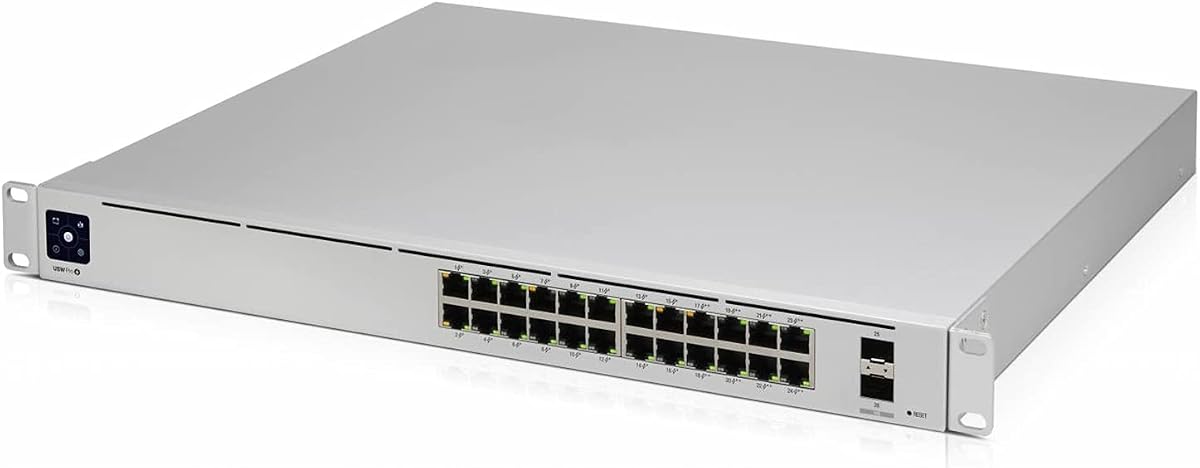
This switch stands out as a top choice for professionals needing reliable connectivity. It holds a strong rating and offers comprehensive Layer 3 features that enhance network management. The inclusion of PoE makes it versatile for powering connected devices directly.
We may earn a commission when you buy through this link, at no additional cost to you.
Its standout quality lies in the seamless integration with the UniFi ecosystem. Users benefit from intuitive control over traffic and security settings. The 24 ports provide ample room for expansion without compromising on speed or stability for critical tasks.
While the price is higher than basic models, the value delivered justifies the investment. The need for specific software might be a learning curve for some. However, the performance gains and ease of management make these trade-offs acceptable for most businesses.
Organizations looking for a scalable and powerful network core should consider this model. It delivers consistent performance and simplifies complex routing tasks. Ultimately, it is a recommended choice for those prioritizing long-term reliability and feature richness.
The UniFi software allows centralized control of multiple network devices, simplifying administration and monitoring across the entire infrastructure effectively.
Built-in PoE support eliminates the need for separate power injectors, reducing cable clutter and installation complexity for connected endpoints.
We may earn a commission when you buy through this link, at no additional cost to you.
This model offers excellent value for those needing high-speed connectivity without breaking the bank. It supports 10Gbps ports with auto-adaptive speeds for various devices. The management options allow users to configure routes and security settings easily.
We may earn a commission when you buy through this link, at no additional cost to you.
The auto-adaptive feature ensures compatibility with older and newer devices seamlessly. Metal casing provides durability and helps manage heat during heavy loads. Users can access configuration through web interfaces or command line for precise control over network traffic.
While it has fewer ports than larger switches, it suits smaller setups well. The interface is functional but lacks some advanced visual tools found in premium units. Still, the performance and cost balance make it a smart choice for budget-conscious buyers.
Small businesses or home labs needing 10G speeds will find this switch practical. It handles routing tasks efficiently and maintains stability under load. For those prioritizing cost and speed, this is a strong contender in the market.
Ports automatically adjust data rates to match connected devices, ensuring optimal performance and compatibility without manual configuration efforts.
Includes AAA authentication and DoS protection to safeguard network integrity against common threats and unauthorized access attempts.
We may earn a commission when you buy through this link, at no additional cost to you.
This switch is designed for environments where high-speed data transfer is critical. It provides reliable Layer 3 connectivity to maximize feasibility for complex networks. The absence of PoE allows focus on data throughput and efficiency in dedicated setups.
We may earn a commission when you buy through this link, at no additional cost to you.
Optical fiber media support ensures efficient and reliable connectivity over longer distances. The built-in power supply guarantees accurate voltage for all components. Rack mounting options help organize wires and secure cables for professional installations in server rooms.
The lack of PoE might limit some users needing device power directly. However, for pure data routing and switching, it excels. Performance is notably faster than standard Ethernet connectivity, making it ideal for demanding professional applications.
Network engineers looking for a dedicated data switch should consider this model. It balances performance and reliability effectively for core network tasks. Its design supports scalable growth while maintaining high standards for speed and stability.
Layer 3 switching enhances routing capabilities, enabling faster data movement between network segments without external router dependency.
Includes rack mounting features to secure the device properly, ensuring organized cabling and stable operation in server environments.
We may earn a commission when you buy through this link, at no additional cost to you.
This switch is built for power-hungry devices like Wi-Fi 7 access points and PTZ cameras. It offers massive switching capacity to ensure lightning-fast data transfers without bottlenecks. The PoE++ support delivers up to 90W per port for heavy loads.
We may earn a commission when you buy through this link, at no additional cost to you.
Features include Static Routing and OSPF for enterprise-grade control over traffic. A physical Console port alongside CLI and SSH offers precise management for professionals. The metal housing ensures durability while the cooling fan maintains peak performance under full load.
While the fan ensures cooling, it may introduce some noise in quiet spaces. The port count is modest but sufficient for targeted high-power applications. The balance of power and management makes it suitable for specific high-performance environments.
Users needing robust power and fast connectivity should look to this device. It handles high-bandwidth tasks well while keeping devices powered reliably. For studios or tech enthusiasts, it provides a solid foundation for advanced network setups.
Delivers up to 90W per port to support advanced access points and cameras without requiring separate power adapters.
Includes a physical console port for direct configuration and troubleshooting, offering flexibility for IT professionals and administrators.
We may earn a commission when you buy through this link, at no additional cost to you.
This switch offers optimal results for networks needing multiple 10G connections. It supports high-speed Ethernet with L3 capabilities for routing tasks. The 1U rack design keeps it compact while providing professional hardware quality for data centers.
We may earn a commission when you buy through this link, at no additional cost to you.
RouterOS provides extensive configuration options for advanced network management. Users can leverage powerful tools for traffic shaping and security. The material quality ensures durability in demanding environments where reliability is key for continuous operations.
The interface might have a learning curve for those unfamiliar with RouterOS. Basic documentation requires users to explore advanced features on their own. However, the performance and flexibility make it a strong choice for skilled administrators.
Network professionals needing dense 10G connectivity should consider this model. It balances speed and management capabilities effectively for high-performance networks. For those willing to learn the software, it offers significant control over network infrastructure.
Provides multiple high-speed ports to support bandwidth-intensive applications and fiber connections efficiently within a small rack space.
Enables deep network control through a powerful operating system that supports complex routing and firewall configurations.
We may earn a commission when you buy through this link, at no additional cost to you.
Designed for fiber-heavy environments, this switch provides sixteen SFP+ ports for high-speed connectivity. It operates as a managed L3 device to handle routing and segmentation efficiently. The 1U form factor fits standard racks for organized installations easily.
We may earn a commission when you buy through this link, at no additional cost to you.
The lack of copper ports makes it ideal for backbone or uplink scenarios. Users can connect multiple devices over fiber for long-distance and high bandwidth. The console port allows direct management via a standard RJ-45 interface for configuration.
While versatile for fiber, it cannot connect standard copper devices directly. The interface may require time to master for new users. However, the capacity for fiber links makes it invaluable for specific infrastructure needs.
Enterprises building fiber backbones should find this switch practical. It supports robust data movement with manageable routing features. For those prioritizing fiber connectivity, it delivers the density and control required for modern networks.
Features sixteen SFP+ slots to support extensive fiber connectivity, ideal for core network segments and long-range links.
Fits into standard 1U racks with included mounting grids, ensuring secure and organized placement in server rooms.
We may earn a commission when you buy through this link, at no additional cost to you.
This switch offers high density with 48 Gigabit ports for extensive connectivity. It includes four 10G SFP+ ports for fast uplinks to core systems. The touchscreen display provides quick visual status updates for network health and traffic.
We may earn a commission when you buy through this link, at no additional cost to you.
Layer 2 and 3 features enable flexible traffic management and routing options. SmartPower RPS input allows for redundant power supply to ensure uptime. The integration with UniFi makes centralized management convenient for larger networks.
User ratings are lower than other models, indicating potential complexity or quirks. The touchscreen is useful but may not justify costs for smaller setups. However, the sheer port count supports growth and high device volumes well.
Networks needing maximum wired connections should consider this device. It handles high volumes of traffic and supports robust uplinks. For expanding enterprises, it provides the scalability and features necessary for complex infrastructure.
Includes a 1.3-inch touchscreen display that shows real-time port status and network health at a glance.
Offers 48 Gigabit ports to support large numbers of devices in offices or environments with high connectivity demands.
We may earn a commission when you buy through this link, at no additional cost to you.
This switch is ideal for quiet spaces like offices or studios due to its fanless design. It supports 8x 10Gbps SFP+ ports for lag-free video editing and file transfers. Advanced L3 management includes Static Routing and OSPF for efficient traffic handling.
We may earn a commission when you buy through this link, at no additional cost to you.
The metal chassis dissipates heat passively ensuring quiet operation without fans. It handles inter-VLAN routing internally reducing load on primary routers. Secure features like ERPS ensure millisecond-level loop recovery for reliable connectivity.
Users must ensure SFP modules match the active mode to avoid disconnection. While silent, it requires separate transceivers for fiber connectivity. However, the stability and speed make it perfect for noise-sensitive creative and office environments.
Professionals needing silent high-speed networking should choose this model. It delivers reliable performance without disturbing workspaces. For home labs or studios, it offers a robust and quiet solution for advanced networking needs.
Fanless construction uses premium metal to dissipate heat, ensuring completely silent operation suitable for quiet environments.
Includes OSPF v2 and Static Routing to manage complex traffic paths efficiently without relying on external routers.
We may earn a commission when you buy through this link, at no additional cost to you.
This switch provides a mix of 2.5G and 1G ports for flexible connectivity. It is part of the Pro Max series offering enhanced performance for modern networks. The high rating reflects user satisfaction with its reliability and ease of use.
We may earn a commission when you buy through this link, at no additional cost to you.
Managed features allow precise control over network traffic and settings. It fits into the UniFi ecosystem for unified management alongside other devices. The design is compact yet supports significant throughput for growing business needs.
While versatile, it lacks PoE which might limit some setups. It relies on standard RJ45 cabling which is common but limits fiber options. Despite this, it remains a solid choice for those prioritizing speed and simplicity.
Users looking to upgrade from standard Gigabit speeds should consider this switch. It balances performance and usability well for mid-sized networks. For those in the UniFi ecosystem, it offers a seamless upgrade path.
Supports 2.5G speeds on selected ports to offer higher throughput than standard Gigabit for demanding applications.
Provides management capabilities to configure VLANs and prioritize traffic for optimal network performance.
We may earn a commission when you buy through this link, at no additional cost to you.
This switch delivers 180W total PoE availability for powering connected devices efficiently. Etherlighting ports illuminate to indicate port location and network status visually. It operates silently with a fanless cooling system for noise-free environments.
We may earn a commission when you buy through this link, at no additional cost to you.
Versatile mounting options allow desktop, wall, or rack installation. The PoE++ output supports devices requiring higher power levels. Performance remains high with 2.5 GbE and 10G SFP+ ports included in the configuration.
The lighting feature is helpful for quick identification of active connections. While the price is higher, the convenience and power budget justify it. It fits well in setups needing both power and speed without noise.
Those needing PoE with silent operation should consider this model. It simplifies cabling and monitoring for connected devices. For office or home networks needing power, it offers a comprehensive and elegant solution.
Ports light up to show speed and connection status, making it easy to identify active links without software.
Uses passive cooling to run completely silently, perfect for quiet spaces where fan noise would be distracting.
We may earn a commission when you buy through this link, at no additional cost to you.
Selecting the right switch involves evaluating several technical factors to ensure compatibility and performance. This guide outlines key aspects to consider before making a purchase decision for your specific network needs.
Determine how many devices you need to connect and at what speed. Higher port counts offer more flexibility for growth while faster speeds ensure data moves quickly without delays.
Assess your current device load and future expansion plans. Choose a switch with enough ports and speed to handle your traffic.
Power over Ethernet allows devices like cameras and access points to receive power through the same cable as data. Check if your devices need power and what wattage they require.
Verify the total PoE budget and per-port limits. Ensure the switch can support all connected powered devices simultaneously.
Layer 3 features enable routing between different network segments directly on the switch. This reduces load on routers and improves traffic management.
Look for support for protocols like OSPF and VLAN routing if you need complex network segmentation.
Managed switches allow configuration of settings like VLANs and security. Some use web interfaces while others use command line for detailed control.
Choose an interface you are comfortable with. Cloud or local management affects how easy it is to maintain the network.
Consider whether you need desktop or rackmount options for your installation. Active cooling uses fans while passive cooling relies on heat dissipation.
Check the noise level if installing in an office. Silent switches are better for quiet environments.
SFP+ slots allow connection via fiber optic cables for longer distances. This is vital for connecting separate buildings or distant servers.
Ensure the switch has the right slots if you plan to use fiber. You may need to buy transceivers separately.
Many switches work best with specific software ecosystems. Ensure compatibility with your existing network management tools.
Research whether the switch requires proprietary software to function fully. This affects future upgrade paths.
Prices vary significantly based on features and brand. Higher cost often brings better build quality and support.
Balance your needs with your budget to find the best value without overspending on unused features.
First, connect the power adapter and link your router to an uplink port. Ensure cables are secure and LEDs indicate proper connection status.
Next, access the management interface using a web browser or command line. Set up static routes and VLANs according to your network plan.
Regularly update the firmware to patch security vulnerabilities. Monitor logs for errors and keep the device clean from dust to maintain cooling.
A Layer 3 Network Switch performs routing functions in addition to switching. It can route traffic between different IP subnets, reducing load on external routers and improving performance.
If you need VLANs or traffic control, a managed switch is necessary. Unmanaged switches plug and play but offer no configuration options for complex setups.
Power over Ethernet allows devices to get power via data cables. This simplifies wiring for cameras and phones. Ensure your switch meets your wattage needs.
Access the switch CLI or web UI to set static routes. Define the destination network and next-hop IP to direct traffic correctly between segments.
Yes, most Layer 3 switches support VLANs and inter-VLAN routing. This allows you to segment traffic and route between segments internally.
Enable features like SSH for secure management and password protect access. Use port security to prevent unauthorized device connections effectively.
Check cable connections and try a different cable. Update firmware if needed. If hardware fails, contact support for warranty or replacement.
Fanless switches use heat sinks to cool passively. They work well for moderate loads but active cooling may be needed for heavy, constant usage.
We reviewed ten top Layer 3 Network Switch options ranging from budget to premium models. Each offers unique strengths in speed, power, and management for diverse needs.
Prioritize features like PoE budget and port speed that match your infrastructure. A well-matched switch ensures stability and performance for your specific use case.
Check current availability and terms before finalizing your purchase. Technology evolves quickly, so selecting the right model now ensures long-term satisfaction.