
darkFlash V92 9.2" PC Case Screen, 1920×462 IPS Sensor Panel Monitor, Black
4.1Editor score
9.2 inch wide display
Free Station Space software
USB or internal header power
Modern PC builds have evolved beyond simple RGB lighting. Enthusiasts now seek functional displays that showcase system stats and custom visuals. An LCD screen for PC case brings this capability directly into your chassis for real-time monitoring.
We evaluated ten top models based on screen quality, software support, and mounting flexibility. Our analysis focuses on resolution, compatibility, and ease of setup. This list covers diverse sizes from compact 6-inch panels to expansive 12-inch displays.
Each pick highlights specific strengths like touch support or magnetic mounting. We prioritize products with robust driver support and clear documentation. Note that availability and features may vary by region and time. Always check the latest specs before purchasing.
4.1Editor score

4.4Editor score

4.2Editor score
As an Amazon Associate we earn from qualifying purchases.
This section provides a side by side comparison of all ten selected models. We highlight key specifications like screen size, resolution, and connectivity options to help you find the perfect match for your specific PC case setup and monitoring needs.




This model stands out as the top choice for enthusiasts seeking a balance of size and functionality. It delivers a vibrant 8.8 inch screen that fits well in many modern chassis designs. The Lian Li ecosystem integration ensures a polished user experience out of the box.
We may earn a commission when you buy through this link, at no additional cost to you.
The included software allows deep customization with preset themes and modular information widgets. Users can upload their own photos and videos to create a truly unique display. The ARGB frame adds an extra layer of aesthetics that syncs with the rest of the system.
While installation requires attention to the specific screw instructions, the result is a sturdy and secure mount. The ability to use this as a secondary monitor without GPU ports is a significant advantage for compact builds. It effectively displays hardware stats or media content.
This screen is ideal for users who prioritize software polish and visual integration. It offers a professional look that enhances both gaming and workstation setups. For those building with Lian Li cases or seeking a universal solution, this is the recommended choice.
The flexibility to mount it on fan frames or case panels ensures optimal visibility from any angle. Customizable temperature units add to the practical utility for system monitoring. This product sets a high standard for PC case displays in terms of features and finish.
The diffused lighting strip enhances the overall aesthetic without being distracting. It provides a cohesive look when paired with other ARGB components in the build. The compact design ensures it does not obstruct airflow or block other internal components unnecessarily.
L Connect 3 provides a unified interface for managing display content and ARGB lighting effects.
The screen functions as a secondary monitor via USB, preserving valuable GPU ports for primary outputs.
We may earn a commission when you buy through this link, at no additional cost to you.
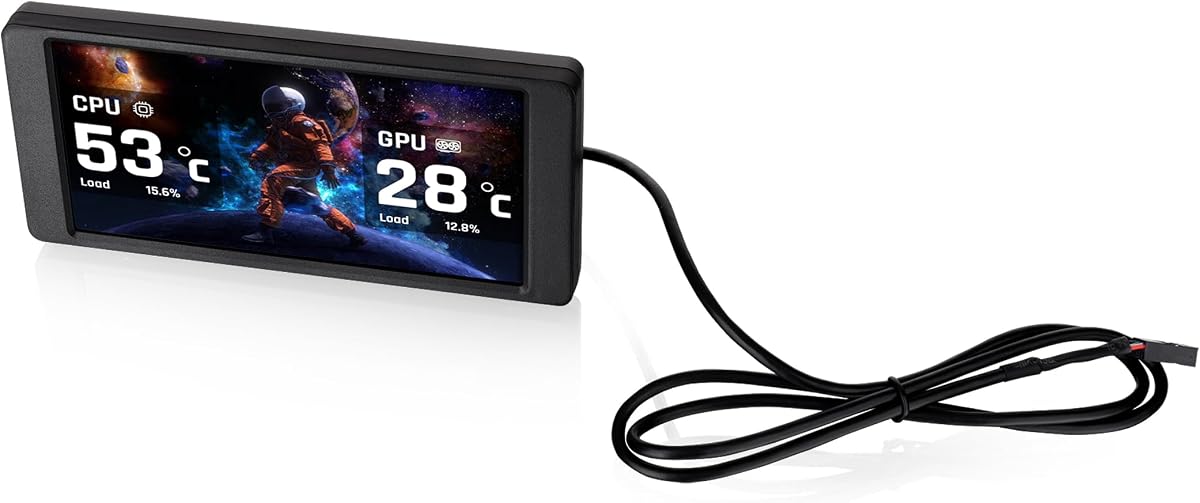
This offering brings a large 9.2 inch display to budget conscious builders without sacrificing quality. The IPS panel ensures sharp visuals and accurate colors even when viewed from the side. It is designed specifically to function as a dedicated PC monitor rather than a standard extension.
We may earn a commission when you buy through this link, at no additional cost to you.
Users can access real time data for CPU and GPU temperatures along with fan speeds and weather widgets. The Station Space software provides free themes and plugins to customize the look. It is a self contained solution that does not rely on paid add ons.
Installation is straightforward with provided cables for external USB or internal headers. The slim body design fits well behind tempered glass panels on many cases. However, users must check clearance dimensions before purchase to ensure it fits their specific chassis type.
This model is perfect for those seeking high specs at a lower price point. It delivers excellent value for the size and resolution offered. Ideal for beginners or enthusiasts who want monitoring capabilities without breaking the bank.
The hardware data monitoring helps keep track of system health at a glance. Clear visual indicators allow for quick identification of potential thermal issues. The wide viewing angle ensures the information is readable from most positions.
Support for GIF and video widgets adds a touch of personalization to the build. Users can display animations or stock tickers alongside performance metrics. This versatility makes it a flexible tool for various types of PC setups.
Delivers a large screen experience at a price that is accessible to a wider range of users.
Flexible mounting options allow for both horizontal and vertical installation depending on case space.
We may earn a commission when you buy through this link, at no additional cost to you.
This model redefines what a PC case screen can be by offering a massive 12.6 inch viewing area. It is built to integrate perfectly into the Hyte Y60 chassis but can work as a desktop monitor too. The HDMI input adds significant versatility for external use.
We may earn a commission when you buy through this link, at no additional cost to you.
The inclusion of dual built-in speakers means you do not need external audio for media playback. It supports plug and play connections via HDMI or mini HDMI cables. The resolution ensures text and images remain crisp even on such a large surface area.
Users who want a cinematic experience inside their PC will appreciate this sheer size. It allows for detailed monitoring of multiple widgets without cluttering the screen. The bracket system provided makes installation secure and straightforward for supported cases.
This is the top choice for users with large form factor cases who want maximum impact. It transforms the PC case into a media center element effectively. Ideal for streamers or those who prioritize visual presence in their setup.
The high resolution display supports detailed system tracking and animated content. Wide viewing angles ensure the content remains visible from various positions around the desk. The design prioritizes both function and aesthetic appeal equally.
Compatibility with desktop setups allows the screen to serve dual purposes easily. It acts as a secondary monitor when mounted outside the case. This dual functionality adds practical value beyond just system monitoring.
Integrated speakers and HDMI support make this screen suitable for video and audio content playback.
Optimized brackets ensure a perfect fit for Hyte Y60 chassis with minimal installation effort.
We may earn a commission when you buy through this link, at no additional cost to you.
This unit offers a unique ability to function as an extended desktop screen with a single cable. The setup process is simplified to a one click start making it accessible for all users. It uses a white housing which adds a clean look to light builds.
We may earn a commission when you buy through this link, at no additional cost to you.
Users can switch to desktop mode to use it as a secondary monitor for tasks or monitoring. The software supports dynamic video themes and allows custom layouts via a drag and drop editor. This flexibility is rare in this price segment.
Connection requires only one USB-C or 9 pin cable which reduces internal clutter significantly. The screen is thin and lightweight so it does not add bulk to the case. It supports auto start and auto off features to save power efficiently.
This screen is ideal for users who want simplicity and desktop utility. The ability to extend your desktop to the case front is a great productivity feature. Great for those who need quick access to tools or monitoring without opening apps.
The IPS panel provides excellent viewing angles for clear visibility of stats or videos. Custom themes allow you to personalize the look to match your desktop environment. The energy saving features help maintain system efficiency during idle times.
Software updates provide new images and themes to keep the display fresh over time. It includes protection features like brightness adjustment to reduce eye strain. This model combines functionality with ease of use in a unique package.
Single cable connection reduces cable management complexity inside the PC case.
Unique ability to function as an extended secondary monitor for broader desktop workspace.
We may earn a commission when you buy through this link, at no additional cost to you.
This device stands out for its capacitive touch interface which adds a new layer of interaction. Users can control display settings or media directly on the panel without external input devices. It is designed to work across multiple operating systems seamlessly.
We may earn a commission when you buy through this link, at no additional cost to you.
The screen offers high brightness and vibrant colors for clear visibility in all lighting conditions. It connects via HDMI or USB and requires no additional drivers to function. This makes it a plug and play solution for various projects.
Beyond PC case use it works great with Raspberry Pi and other SBCs for dashboard needs. The low power consumption makes it suitable for projects where energy usage is a concern. It supports Windows 7 through 11 for broad compatibility.
This model is perfect for tinkerers and users who want interactive displays. The touch capability allows for intuitive navigation through menus and stats. Ideal for those who want a modern interface on their PC case front panel.
The resolution provides enough clarity for detailed monitoring of system hardware. It offers a smooth dynamic picture quality for video playback on the screen. This versatility extends its use beyond just PC cases to various electronic projects.
Touch interaction allows for quick adjustments to settings or content directly on the panel. It reduces the need for mouse and keyboard interaction for simple tasks. This adds a unique interactive element to any setup where it is mounted.
Capacitive touch allows users to navigate menus and adjust settings directly on the screen.
Works with Windows and Linux including Raspberry Pi for diverse application scenarios.
We may earn a commission when you buy through this link, at no additional cost to you.
This model is optimized for integration with AIO coolers or compact case displays. The 9.16 inch size provides ample space for stats while remaining discreet. It uses a USB-C connection for quick and easy plug and play setup.
We may earn a commission when you buy through this link, at no additional cost to you.
The included TRCC software allows for multiple preset themes and full DIY customization. Users can track system health and performance data with complete control. The design focuses on fitting seamlessly into modern PC builds without clutter.
Installation is simple with no complicated drivers required for most Windows systems. The slim profile ensures it does not interfere with internal components or airflow. It offers a stylish way to add functionality to your PC case.
This screen is ideal for users seeking a clean and compact monitoring solution. The high resolution ensures all data is legible and clear. Perfect for those who want a subtle display that does not dominate the view.
The TRCC app provides extensive customization options for display layout and content. It supports both static and dynamic visuals to suit any preference. This flexibility ensures the screen adapts to your specific needs.
The USB-C interface simplifies connectivity and power delivery effectively. It reduces the need for multiple cables inside the chassis. This design choice enhances the overall neatness of the build.
USB-C connection ensures quick installation with minimal driver requirements.
TRCC app provides extensive options for themes and system monitoring widgets.
We may earn a commission when you buy through this link, at no additional cost to you.
This kit is designed to enhance Thermaltake chassis with a dedicated 6 inch display. It supports T RGB Plus 3.0 for expanded control and system monitoring. The standalone mode allows it to function independently of external software.
We may earn a commission when you buy through this link, at no additional cost to you.
Users can upload up to twenty custom graphics and videos to personalize the display. It provides real time information on CPU and GPU loads and temperatures. The resolution offers sharp visuals despite the smaller screen area.
The connection uses a Type-C to 9 pin interface for easy integration. It is built to fit specific case series for a clean integrated look. The software provides options for background graphics and system stats.
This model is best for existing Thermaltake users looking to upgrade their setup. It delivers a cohesive aesthetic that matches the chassis design. Great for those who prioritize case brand integration.
The T RGB Plus software allows for expanded compatibility and better system monitoring. Users can customize different options like frequency and load data. This provides flexibility in how data is presented on the screen.
Background options include default graphics and custom file formats. This allows users to set themes that match their PC build. The standalone nature ensures it works without heavy software dependencies.
Designed specifically for Thermaltake chassis to maintain aesthetic consistency.
Support for custom graphics and animations allows for personalized display styles.
We may earn a commission when you buy through this link, at no additional cost to you.
This model combines a large 12.6 inch display with robust touch capabilities. It supports up to 10 points of multi-touch for responsive control. The high resolution ensures sharp images and text for detailed monitoring.
We may earn a commission when you buy through this link, at no additional cost to you.
It is designed specifically to fit the Hyte Y60 case panel perfectly. The included screwdriver and hardware make installation straightforward without extra screws. Built-in speakers provide audio output without needing external devices.
Users can enjoy plug and play setup with Windows and macOS systems. The touch experience allows for intuitive navigation through menus and stats. It serves as both a secondary monitor and a dedicated case panel.
This screen is ideal for those who want a large interactive display on their PC. The high contrast ratio ensures vibrant colors from any viewing angle. Perfect for multimedia or complex system monitoring setups.
The large panel supports detailed widgets and animations effectively. Wide viewing angles maintain brightness and color consistency across the screen. This ensures clear visibility regardless of your position relative to the case.
Compatibility with macOS makes it a versatile option for hybrid workstations. It supports horizontal and vertical display settings for flexibility. This adaptability makes it a strong choice for diverse user needs.
Up to 10 point multi-touch allows for accurate and interactive control on the screen.
Designed specifically to match the Hyte Y60 case dimensions for seamless integration.
We may earn a commission when you buy through this link, at no additional cost to you.
This display features a unique magnetic suction design that eliminates the need for screws. It allows for easy installation and removal to adjust positioning as needed. The 9.16 inch IPS panel offers accurate color reproduction for visuals.
We may earn a commission when you buy through this link, at no additional cost to you.
Users can connect via USB Type-C and manage content with TRCC software. It supports switching between static and dynamic images and video playback. The screen is fully controlled by software for automatic start and taskbar management.
The magnetic design provides flexibility to move the screen to different positions. It ensures secure attachment without permanent modifications to the case. This is great for testing or temporary setups.
This model is ideal for users who value flexible installation and clean builds. The magnetic mount simplifies the installation process significantly. Perfect for those who want a screw free experience.
The resolution provides clear visuals for system monitoring and media. Software control allows for automatic background operation with the computer. This ensures the display is always ready when you power on.
Magnetic design simplifies maintenance and adjustments without tools. Users can reposition the screen to optimize viewing angles easily. This feature adds a unique practical value to the product.
Magnetic suction design allows for easy installation without screws or tools.
Users can move the screen to various positions within the chassis for optimal viewing.
We may earn a commission when you buy through this link, at no additional cost to you.
This unit offers a compact 6.86 inch display with magnetic mounting capabilities. It supports pairing with liquid coolers or chassis mounting with flexible positioning. The TRCC software provides full control over monitoring and visuals.
We may earn a commission when you buy through this link, at no additional cost to you.
Users can switch between various static and dynamic images to personalize the look. It supports detailed system parameter display via the dedicated software. The design allows for movement within the chassis without fixed positions.
The magnetic attraction ensures secure attachment to metal surfaces or radiator panels. It simplifies installation and allows for easy removal. This is perfect for cooling solutions that need monitoring capabilities.
This model is ideal for liquid cooling setups requiring compact monitoring. It balances size and functionality well for specific use cases. Great for enthusiasts focusing on cooling performance and stats.
The resolution provides enough detail for essential system metrics and images. Software control allows for automatic start and background operation. This ensures the display is functional with minimal manual intervention.
Flexible magnetic positioning allows users to optimize the view angle. It enhances the visual appeal of cooling systems effectively. This design choice adds practical value to the build.
Designed to pair with liquid coolers for direct performance monitoring and visuals.
Support for custom static and dynamic images allows for personalized monitoring.
We may earn a commission when you buy through this link, at no additional cost to you.
Selecting the right LCD screen for PC case requires considering several factors beyond size. This guide explains what specifications matter most to ensure you choose a display that meets your monitoring and aesthetic needs.
The physical size of the screen determines how much information you can display at once. Common sizes range from 6 inches to over 12 inches. Resolution affects clarity and text legibility. Look for IPS panels which offer better color accuracy and viewing angles.
Choose a resolution that ensures text remains sharp even at close range. Higher resolution is better for detailed monitoring of system stats. Ensure the size fits your case layout without blocking airflow.
Most screens use USB ports or internal headers for power and data. External USB is easier for initial setup while internal headers offer a cleaner look. HDMI or DisplayPort connections allow for desktop use outside the case. Check if your motherboard has available headers.
Ensure the power draw is compatible with your system. Some screens are fully USB powered while others may need extra power. Verify cable compatibility with your existing hardware ports.
Software quality is crucial for customizing content and monitoring stats. Some brands offer comprehensive apps with preset themes while others rely on third party tools like AIDA64. Check if the software supports your operating system version.
Look for software that is easy to use and actively updated. Good software allows you to switch between themes and widgets easily. Avoid models with discontinued software support.
Mounting options determine how the screen attaches to your case. Some use brackets for fans while others mount directly to panels. Magnetic mounting offers flexibility for adjusting position. Ensure the mounting method is secure to prevent movement.
Check clearance dimensions before purchasing to avoid obstruction. The screen should not block other components or cables. Adjustable mounting brackets provide better viewing angles.
Some larger screens include built-in speakers for media playback. This eliminates the need for external speakers for basic audio. HDMI support allows for video content playback inside the case. Check if speakers are adequate for your needs.
Multimedia features add value if you plan to display videos or animations. Ensure the software supports video playback formats. Audio outputs should be compatible with your system setup.
Touchscreens offer interactive control without external input devices. Capacitive touch provides a responsive experience. This is useful for navigating menus or adjusting settings directly on the screen. Not all models support touch functionality.
Touch adds a modern interactive element to your PC build. Ensure drivers are available for your operating system. Consider if touch is a necessary feature for your workflow.
Screens from brands like Lian Li or Thermaltake are designed to match their cases. This ensures a cohesive look and easier installation. Universal screens work with more cases but may require adapters. Consider your existing case brand.
Integration simplifies setup and ensures a professional aesthetic. Universal screens offer more flexibility if you switch cases. Check compatibility lists for specific case models.
Prices vary based on size, features, and brand. Larger screens with touch or HDMI are generally more expensive. Budget models offer essential monitoring without extra bells and whistles. Determine your budget and prioritize features accordingly.
Look for value in terms of software support and build quality. A slightly more expensive model with better software might be worth it. Avoid cheap models with poor display quality or software.
Begin by connecting the power and data cables to the appropriate ports. Install the manufacturer software or drivers if needed. Adjust the screen position using the included brackets or adhesive pads for optimal visibility.
Use the software to configure themes and widgets. Choose between static images or dynamic videos to display on the screen. Customize layout settings to show CPU or GPU stats clearly.
Clean the screen gently with a microfiber cloth to avoid scratches. Avoid spraying liquids directly onto the panel. Keep firmware and software updated to ensure the best performance and compatibility.
No, most screens connect via USB or internal headers so they do not use GPU video outputs. This leaves your graphics cards free for primary displays. Only HDMI compatible screens use video ports but these are rare for internal use.
Most PC case screens run on Windows software. Only models with HDMI connection generally work with macOS. Check product details carefully for macOS support before purchasing to ensure compatibility.
Connect via a USB Type-C or standard Type-A port if external power is needed. For internal connection use a USB 2.0 9 pin header on the motherboard. Ensure you have enough free headers for the connection.
Some screens are designed to attach directly to AIO radiators or pumps. Check product compatibility lists for specific cooler models. Universal screens can be mounted near coolers using brackets or adhesive.
Many models are plug and play requiring no manual driver installation. Software provided by the manufacturer is needed for customization. If using external connections drivers are rarely required by the system.
Most screens support JPG and PNG images along with GIF animations. Many also support MP4 and MOV video files. Check the manufacturer software for supported file types to ensure compatibility.
We reviewed ten top models including the Lian Li SM088X and Wisecoco 12.6 Inch. Each offers unique features from touch support to large multimedia displays. Your choice depends on whether you prioritize aesthetics or utility.
Prioritize software quality and connectivity options for a smooth experience. Ensure the screen fits your case dimensions and cooling layout. Consider touch features if interactive control is important to you.
Always check current availability and specifications before making a purchase. Prices and models may change so verify details on the retailer site. With the right screen your PC build will stand out as both functional and stylish.