
2026 WAVLINK AX3000 Outdoor WiFi 6 Extender
4.2Editor score
IP67 Weatherproof Rating
4x 8dBi Antennas
PoE Power Support
Discover the top long distance WiFi extender models for 2026. We compare range, speed, weatherproofing, and features to help you eliminate dead zones.
Finding a reliable long distance WiFi extender is essential for modern homes with large yards or multiple floors. These devices amplify your existing signal to ensure seamless connectivity throughout every corner of your property without costly upgrades.
We analyzed ten top-rated models based on performance, coverage area, and durability. Our evaluation focuses on real-world range capabilities, speed retention, and ease of installation to help you make an informed decision for your specific needs.
Each pick highlights key strengths and ideal use cases for different environments. Please note that pricing and availability fluctuate frequently, so checking current listings is recommended before finalizing your purchase decision.
4.2Editor score

4.1Editor score
4.9Editor score
This table provides a quick side-by-side overview of all ten models. Compare key specifications like coverage area, antenna configuration, and special features to find the right fit.


The TP-Link AX3000 stands out as a powerful choice for extending your network with the latest WiFi 6 technology. It offers speeds up to 2404 Mbps on the 5 GHz band and supports up to 64 devices simultaneously.
We may earn a commission when you buy through this link, at no additional cost to you.
Its two high-gain directional antennas use Beamforming technology to enhance signal strength and reliability across large homes. This ensures that dead zones are minimized for reliable 4K streaming and online gaming.
While it does not increase your internet speed beyond what your ISP provides, it stabilizes connections to boost overall performance. The device is also designed with advanced security as a core requirement for peace of mind.
This model is ideal for users seeking a whole-home solution that integrates seamlessly with EasyMesh-compatible routers. Setup is quick using the Tether app to find the optimal spot for installation.
TP-Link follows the CISA Secure-by-Design pledge ensuring advanced security features are built into the device hardware and software.
The Gigabit Ethernet port allows you to connect wired devices directly for maximum speed and reliability in any location.
We may earn a commission when you buy through this link, at no additional cost to you.
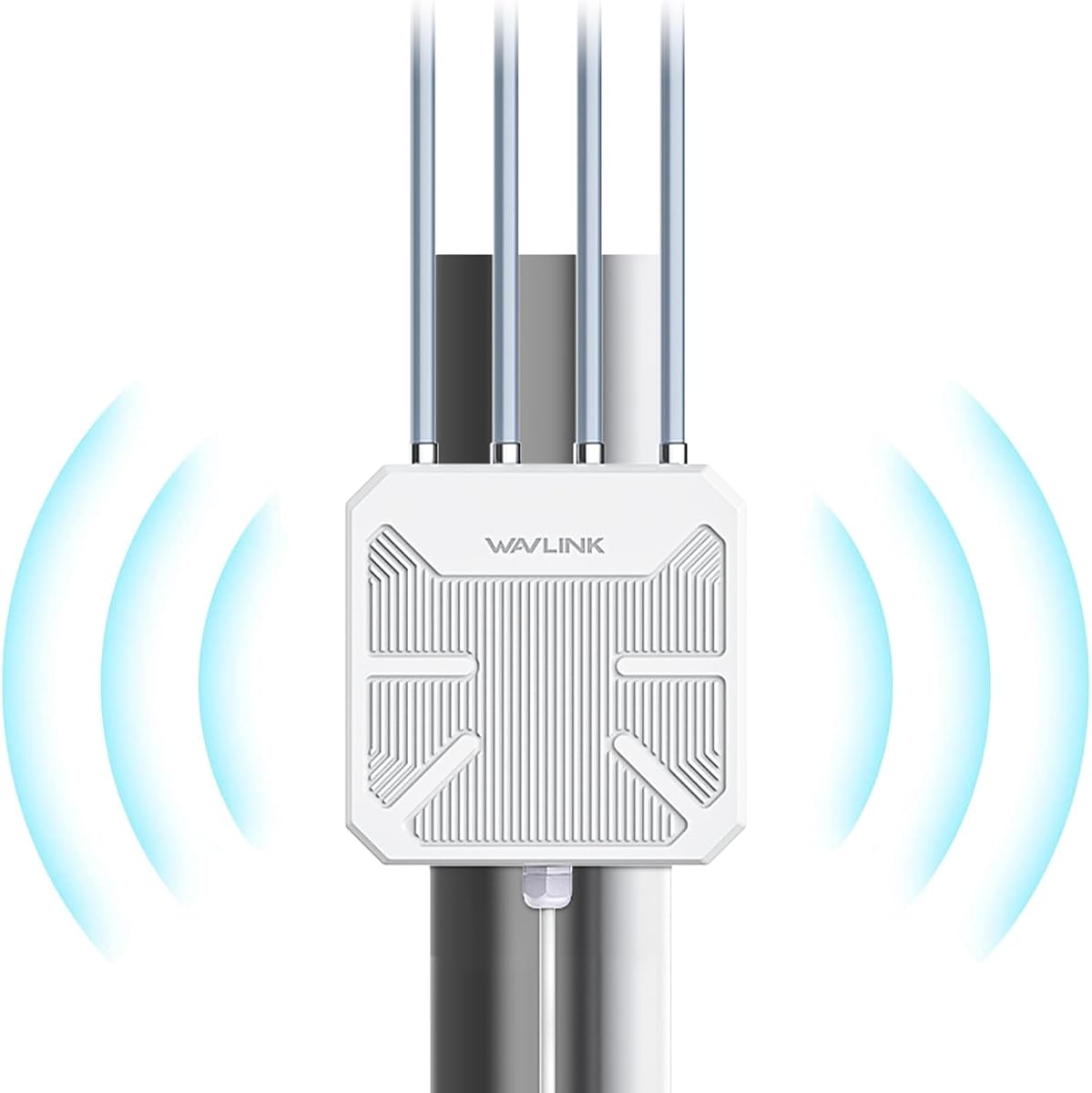
The WAVLINK AX3000 Outdoor is engineered for users who need robust connectivity beyond the walls of their home. With an IP67 waterproof enclosure, it withstands rain, snow, and extreme temperatures effectively.
We may earn a commission when you buy through this link, at no additional cost to you.
Its four high-gain antennas and built-in amplifiers provide a radius of up to 200-300 meters in line-of-sight environments. This makes it perfect for large estates or rural properties with significant outdoor space.
Support for Starlink routers via Ethernet adapter makes it a versatile option for remote homes using satellite internet. Advanced features like Mesh and MU-MIMO ensure stable connections even with multiple devices active.
Installation is simplified by PoE support allowing placement where power outlets are unavailable. Just remember that the PoE adapter must remain indoors for safety and weather protection.
Built with IP67 waterproofing and lightning protection to operate reliably in harsh outdoor conditions without signal loss.
Supports both active and passive PoE standards enabling installation up to 100 meters away from a power source.
We may earn a commission when you buy through this link, at no additional cost to you.
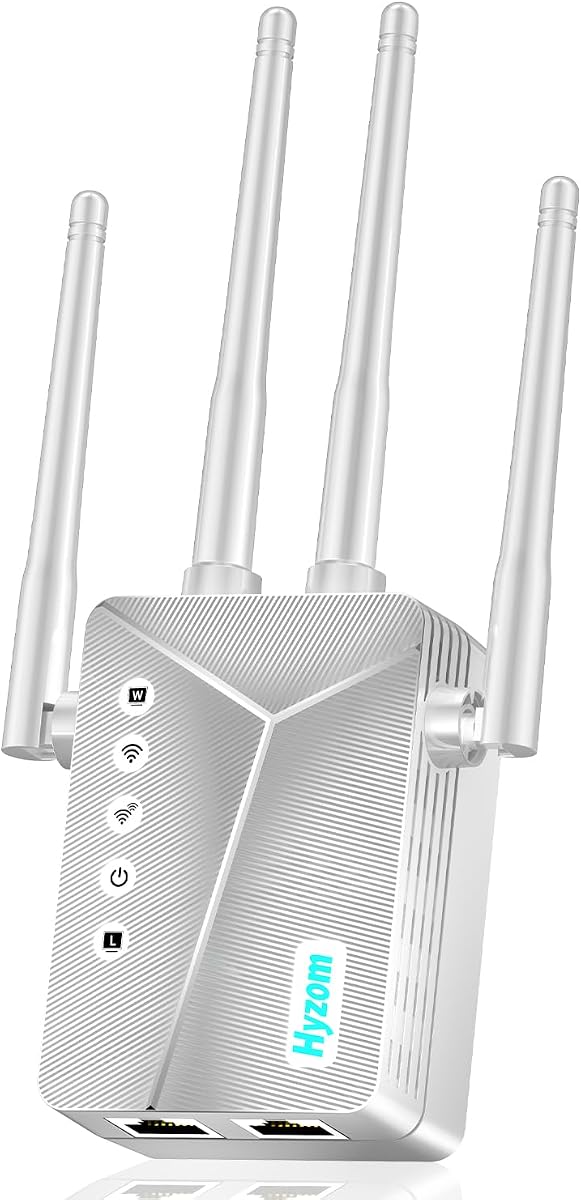
This Hyzom signal booster promises exceptional value with a claimed coverage of up to 18,000 square feet for its price range. It utilizes a Bionic Chip to optimize signal distribution across your entire property effectively.
We may earn a commission when you buy through this link, at no additional cost to you.
It supports over 65 devices simultaneously making it suitable for large households with heavy internet usage. The built-in Ethernet port allows for stable wired connections where wireless signals might struggle to reach.
Setup is designed to be user-friendly with a one-tap WPS option that requires no technical skills. It works with all standard routers to upgrade your network without replacing existing equipment entirely.
While it may lack some advanced customization options found in premium models, it delivers reliable performance for eliminating dead zones. It is a strong choice for budget-conscious buyers seeking immediate coverage improvements.
Capable of handling streaming, smart home devices, and laptops simultaneously without noticeable performance drops.
Uses WPA2-PSK encryption to protect personal data and network access from unauthorized users effectively.
We may earn a commission when you buy through this link, at no additional cost to you.
The WAVLINK AX1800 Outdoor offers a robust outdoor networking solution at a competitive price point. It provides a stable signal across line-of-sight environments up to 300 meters radius for various outdoor setups.
We may earn a commission when you buy through this link, at no additional cost to you.
Built with an IP67 weatherproof casing it resists moisture, dust, and temperature extremes reliably. This makes it ideal for covering backyards, farms, or garages without worrying about environmental damage.
It is fully compatible with Starlink Gen 2 and 3 systems via the Ethernet adapter which is rare for extenders. This feature supports remote homes seeking better internet distribution from satellite dishes.
Installation is flexible with optional PoE support allowing placement in locations without nearby power outlets. Just ensure the PoE adapter is kept indoors to avoid water ingress risks.
Designed specifically to extend Starlink internet to large yards and off-grid setups efficiently.
Supports Mesh, AP, and Repeater modes to adapt to different network configurations and needs easily.
We may earn a commission when you buy through this link, at no additional cost to you.
This model is designed to handle heavy network loads with support for over 256 devices simultaneously. Its six antennas and built-in amplifiers significantly enhance WiFi penetration in outdoor environments.
We may earn a commission when you buy through this link, at no additional cost to you.
It supports advanced Mesh technology allowing one-click connections to expand coverage without complex configuration. This makes it easier to maintain a single network name for seamless roaming across properties.
The device is versatile for both indoor and outdoor scenarios thanks to its durable build and environmental resistance. Proper grounding is recommended to prevent static damage during thunderstorms or harsh weather.
PoE compatibility simplifies installation by allowing power delivery through the Ethernet cable. Use CAT5E or better cables for optimal performance over longer distances without signal degradation.
Handles hundreds of connected devices without congestion suitable for large events or dense smart home setups.
Mesh mode ensures devices switch between access points automatically without dropping connections during movement.
We may earn a commission when you buy through this link, at no additional cost to you.
The TP-Link RE315 is a straightforward extender aimed at users needing to eliminate dead zones in smaller homes. Its dual-band design supports up to 32 devices efficiently for daily use scenarios.
We may earn a commission when you buy through this link, at no additional cost to you.
Adaptive Path Selection helps the device choose the strongest signal path automatically for consistent performance. This reduces manual tweaking required to maintain a stable connection across floors.
The Tether app provides an intuitive interface for setup and management without requiring a PC. An intelligent signal indicator helps locate the perfect spot for installation near existing routers.
While it does not offer the latest WiFi 6 speeds, it provides solid AC performance for standard internet plans. It is an affordable option for those prioritizing ease of use over maximum throughput.
Adaptive Path Selection ensures the device stays connected via the best available route automatically.
The Tether app allows quick access to settings and signal strength monitoring from your smartphone.
We may earn a commission when you buy through this link, at no additional cost to you.
The RE550 brings three adjustable external antennas to provide stronger signal penetration than single-antenna models. It covers up to 2100 square feet making it suitable for medium to large homes.
We may earn a commission when you buy through this link, at no additional cost to you.
With a Gigabit Ethernet port, users can connect high-bandwidth devices like gaming consoles or PCs directly. This ensures maximum speed for critical applications even when wireless signals are weak.
Setup is streamlined via the Tether app allowing for quick configuration and firmware updates. The device automatically keeps your network current with the latest security patches and performance improvements.
Although it uses AC WiFi rather than WiFi 6, it remains a reliable choice for existing home networks. Its compatibility with EasyMesh routers allows for future expansion if you upgrade your main router.
Three adjustable antennas allow precise aiming to cover specific dead zones effectively throughout your property.
The Gigabit port ensures wired devices get full speed without interference from wireless congestion.
We may earn a commission when you buy through this link, at no additional cost to you.
The ywstan extender stands out with its dual Gigabit Ethernet ports for simultaneous wired connections. This is useful for homes needing stable links for multiple devices like desktops and smart TVs.
We may earn a commission when you buy through this link, at no additional cost to you.
Its Smart IC Chip optimizes signal distribution to avoid congestion when many devices connect at once. This supports up to 88 devices ensuring stable connectivity for busy households and offices.
The dual-side ventilation design prevents overheating issues common in compact extenders during long operation. This ensures consistent performance without throttling during summer heat or extended usage periods.
WPA encryption protects your data while the device offers five modes for flexible networking setups. While basic in design, it delivers reliable performance for general home and office expansion needs.
Two Ethernet ports let you connect multiple wired devices directly for maximum stability and speed.
Unique dual-side ventilation ensures better heat dissipation to keep performance steady over time.
We may earn a commission when you buy through this link, at no additional cost to you.
This extender supports the latest Wi-Fi 7 standards for optimized signal distribution throughout your home. It achieves speeds up to 5764 Mbps on the 5 GHz band for high-demand tasks.
We may earn a commission when you buy through this link, at no additional cost to you.
A 2.5 Gbps LAN port allows for faster downloads and lower latency when connected to compatible modems. This makes it ideal for users with gigabit internet plans needing wired access at distance.
Multi-Link Operation combines frequency bands to deliver enhanced throughput and improved reliability. It is designed to pair with WiFi 7 routers to maximize the benefits of next-gen networking.
While it lacks the 6 GHz band, it remains a powerful upgrade for early adopters of modern networking. It is best suited for those already planning to upgrade their main router to WiFi 7 soon.
The 2.5G port unlocks full gigabit-plus speeds for wired devices anywhere in your home.
Multi-Link Operation ensures lower latency and stable connections for AR and VR gaming.
We may earn a commission when you buy through this link, at no additional cost to you.
This AX1800 outdoor extender features six high-gain antennas to maximize coverage in open spaces. It is designed for backyards, pools, and barns requiring strong stable signals over distances.
We may earn a commission when you buy through this link, at no additional cost to you.
With IP65 weatherproofing, it resists rain and dust for reliable operation in all weather. You can power it easily with PoE or a standard adapter for flexible placement options.
It supports Repeater, Router, and AP modes allowing versatile setups depending on your needs. Whether extending existing WiFi or creating a new network it adapts to different scenarios.
Setup is quick without technical skills enabling installation in minutes for immediate results. It remains a solid choice for those needing basic outdoor coverage without complex networking needs.
Suitable for various outdoor activities ensuring reliable connections for entertainment and security needs.
Designed for vertical or horizontal mounting to optimize signal direction for your specific area.
We may earn a commission when you buy through this link, at no additional cost to you.
Selecting the right extender requires evaluating several technical factors to ensure it meets your specific coverage needs.
The primary factor is determining how much square footage you need to cover. Look for devices rated for your home size plus any outdoor areas to ensure the signal reaches everywhere you need it.
Always check if the advertised range assumes ideal conditions as walls and interference can reduce effective range significantly.
Modern extenders support WiFi 6 or 7 which provide better efficiency and speed than older standards. WiFi 6 handles more devices simultaneously without slowing down making it ideal for smart homes.
If your main router is older you may not need the latest generation but upgrading ensures future compatibility and performance.
External antennas allow you to direct signals towards dead zones improving coverage precision. High-gain antennas provide stronger signal transmission over longer distances compared to internal ones.
Devices with adjustable antennas let you physically aim the signal path to maximize reach in multi-story buildings.
An Ethernet port allows you to connect devices that require stable connections like desktop computers or TVs. This creates a local network segment with maximum speed without wireless interference.
Gigabit ports ensure that wired connections do not bottleneck your internet speed when streaming or downloading large files.
For outdoor use ensure the device has an IP rating of at least IP65 or IP67 to resist rain and dust. Without this protection moisture can damage internal components and shorten device lifespan significantly.
Check operating temperature ranges to ensure the unit can withstand local climate extremes without performance drops.
Outdoor models often support Power over Ethernet (PoE) to allow placement where outlets are scarce. This simplifies installation by running both power and data through a single Ethernet cable.
Verify whether the PoE adapter is waterproof since it usually needs to be kept indoors for safety and longevity.
Ensure the extender works with your existing router brand if using proprietary mesh features. Some systems only mesh with their own brand while others support universal standards like EasyMesh.
Check compatibility with specific ISPs like Starlink if you use satellite internet to avoid connection issues.
Look for devices that offer WPS buttons or mobile apps for easy setup without technical knowledge. This saves time and helps you place the device in the optimal spot for maximum performance.
Features like signal indicators on the unit itself help you find the best location during installation.
Place the extender halfway between your router and the dead zone to ensure it receives a strong signal to amplify. If placed too far from the router it will repeat a weak signal which worsens performance.
Keep the unit away from heat sources and metal objects that can interfere with the radio signals. Ensure the ventilation slots are not blocked to prevent overheating during extended use.
Regularly update the firmware via the manufacturer app to maintain security and performance. Rebooting the device occasionally can also clear temporary glitches and restore optimal speed.
Most wireless extenders cut bandwidth in half because they must receive and retransmit signals. However using models with separate backhaul bands or Gigabit ports helps minimize this reduction significantly.
Only specific outdoor-rated models with IP65 or IP67 ratings should be used outdoors. Standard indoor units will fail quickly if exposed to rain or extreme temperature changes.
Use the signal indicator on the unit or the mobile app to find the optimal spot. It should be close enough to your router to get a strong signal but far enough to cover the dead zone.
Modern extenders support seamless roaming protocols that switch devices automatically. Older devices might need manual disconnection if the network names are not set correctly.
Yes but you must use an Ethernet adapter with the Starlink satellite dish to connect the extender. Some outdoor models specifically mention Starlink compatibility for rural setups.
AX refers to WiFi 6 which handles more devices efficiently than AC or WiFi 5. AX models offer better performance in crowded networks but cost more than AC options.
Yes the extender must be on the same network name as your router for seamless roaming. Some systems allow different names but manual switching is required between rooms.
Most models have a reset button that you hold for ten seconds to restore factory settings. This clears old configurations allowing you to set it up fresh again.
The top choices like the TP-Link AX3000 and WAVLINK outdoor series offer distinct advantages for different environments. Indoor models focus on speed and device capacity while outdoor units prioritize durability and range.
Prioritize the extender that matches your specific needs whether that is weather resistance for a backyard or high speed for a gaming setup. Consider your existing router and how the new device will integrate into your current network.
Always check current prices and stock availability as deals change frequently on major platforms. Investing in the right extender can significantly improve your connectivity experience without costly infrastructure changes.
