
BlueSwan for MacBook Air 15 inch Case
4.5Editor score
Ultra-slim lightweight design
Precise cutouts for ports
Reinforced PC material build
Protecting your valuable MacBook Air 15 Inch requires a high-quality case that balances durability with sleek design. A good protective case shields against scratches, dents, and daily wear while maintaining access to ports and cooling vents for optimal performance.
We evaluated ten leading options based on fit precision, material quality, and user feedback to compile this comprehensive list. Our analysis focuses on compatibility with M2 through M5 chips and real-world protection capabilities for students and professionals alike.
Each pick highlights specific strengths like slim profiles or rugged builds to help you match your lifestyle needs. Please note that pricing and availability fluctuate frequently so verify current details before finalizing your purchase decision today.
4.5Editor score

4.6Editor score

4.7Editor score
As an Amazon Associate we earn from qualifying purchases.
This side-by-side comparison highlights key specifications and features across all ten selected cases to help you quickly identify the best fit for your specific MacBook Air 15 Inch model and usage requirements.


The Soonjet case stands out as our top pick with its impressive 4.6 rating and precision engineering. It offers a second-skin fit that feels like part of the original device while providing robust protection against daily wear and tear.
We may earn a commission when you buy through this link, at no additional cost to you.
Its standout feature is the Invisible Armor technology which matches official Apple colors with high transparency and matte finishes. The patented micro-clips ensure a gap-free secure fit that protects the hinge and prevents edge lifting during regular use.
While it requires careful model verification before purchase, this ensures perfect compatibility with your specific Air model. The clear finish may show dust more than solid colors but the anti-fingerprint coating helps keep it looking pristine longer.
We recommend this case for users who prioritize aesthetics without sacrificing protection. It is ideal for professionals and students who need a slim profile that slides easily into bags while keeping their device safe from scratches and minor impacts.
Micro 3D cutting tech ensures the case matches original dimensions perfectly preserving airflow and cooling systems without any added bulk or interference.
Infused elastic micro-particles disperse corner stress to prevent cracking while the oil-repellent coating keeps fingerprints and smudges at bay for daily use.
We may earn a commission when you buy through this link, at no additional cost to you.
BlueSwan delivers excellent value with a 4.5 rating and a focus on essential protection without unnecessary features. Its midnight clear elegance replicates the original hue using advanced optical simulation for a seamless premium look.
We may earn a commission when you buy through this link, at no additional cost to you.
The reinforced PC material provides reliable resistance against cracks and scratches during daily commuting or travel. Installation takes less than a minute with secure clips that hold firmly yet release easily when cleaning is needed.
Budget-conscious buyers will appreciate that it does not sacrifice fit quality despite the lower price. The ultra-slim profile adds minimal bulk allowing it to fit comfortably in most standard laptop sleeves and backpacks.
This case is perfect for users who want discreet protection that blends with the device design. It offers a balance of affordability and durability making it a solid choice for students or secondary devices.
High-density PC material ensures long lasting durability against bumps and drops while maintaining a low-profile look for users who value discretion.
The secure snap-on design installs quickly without tools and allows quick removal for cleaning or charging connections as needed daily.
We may earn a commission when you buy through this link, at no additional cost to you.
UAG Plyo earns its premium rating with military standard drop protection and rugged construction designed for harsh environments. The translucent honeycomb body showcases the MacBook design while providing ultimate impact resistance for heavy users.
We may earn a commission when you buy through this link, at no additional cost to you.
Air-soft bumpers at the corners cushion daily impacts and the one-piece hinged design ensures stability. The non-slip tactile grip frame provides secure handling on slick surfaces and rubberized feet keep the device firmly in place.
While heavier than slim cases this added bulk translates to superior protection for those who frequently travel or work in demanding settings. Precise cutouts allow full access to ports without needing to remove the case regularly.
We recommend this for users who prioritize maximum durability over minimalism. It is an excellent choice for field work or adventurous lifestyles where protection against accidental drops and bumps is critical.
Meets MIL STD 810G 516.6 drop test standards ensuring reliability in tough situations and long term protection for expensive hardware.
Textured frame and rubberized feet prevent slipping on smooth desks ensuring your laptop stays secure during use and transport.
We may earn a commission when you buy through this link, at no additional cost to you.
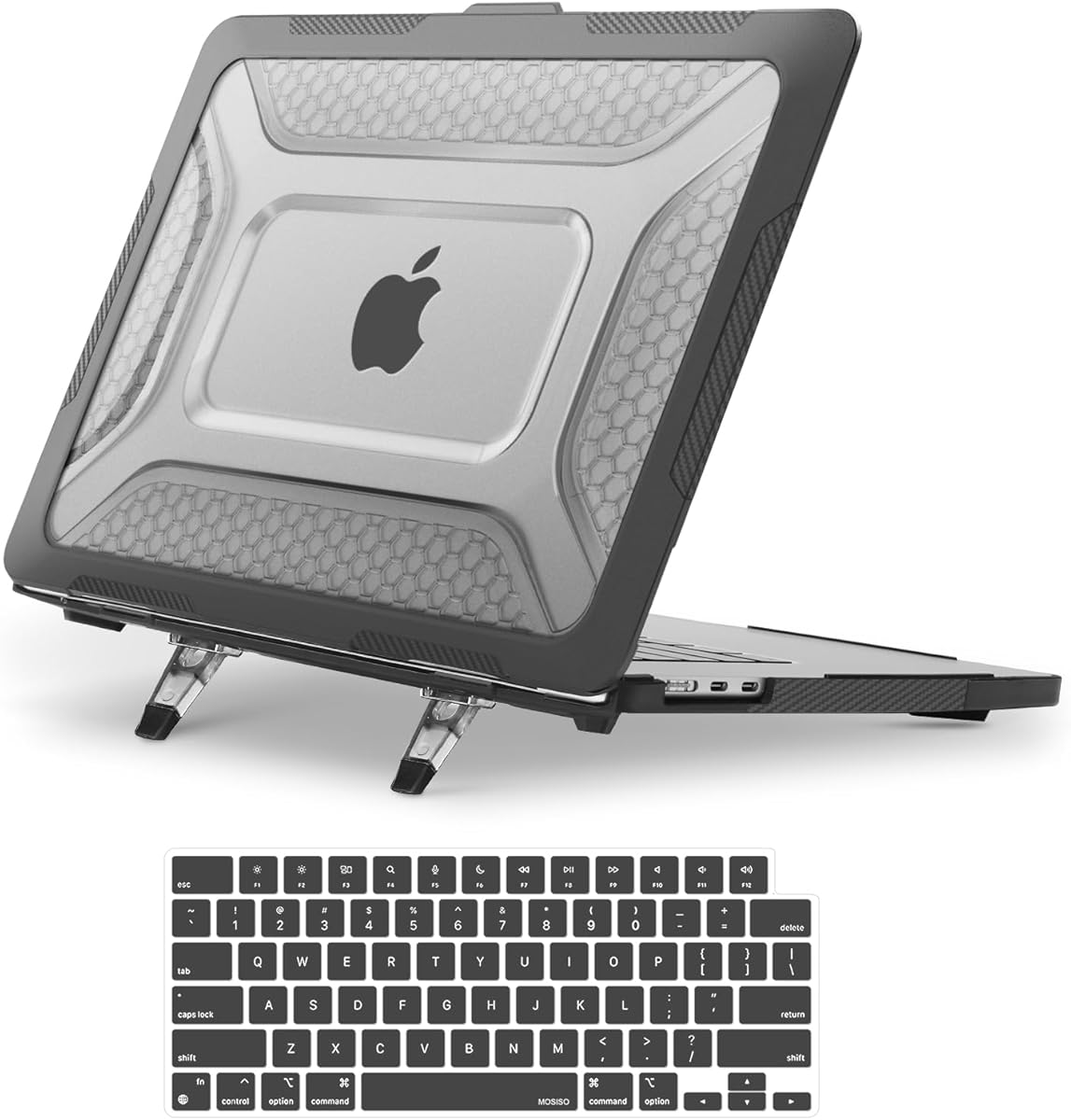
This MOSISO option offers robust protection with a 4.7 rating and includes a built-in kickstand for better viewing angles during work or media consumption. The shock-absorbing TPU bumper wraps the shell to guard against drops.
We may earn a commission when you buy through this link, at no additional cost to you.
The included keyboard cover adds extra value protecting keys from spills and dust. Precise cutouts ensure full access to all ports allowing users to connect peripherals without removing the case regularly.
The kickstand provides an ergonomic typing angle which reduces wrist strain during long typing sessions. However heavy use may eventually affect the snap mechanism on the stand over several years of daily use.
Ideal for users who need typing comfort alongside protection this kit covers most bases. It is especially useful for office workers or students who spend extended hours at their desk without an external keyboard.
Built-in kickstand creates a comfortable typing angle improving posture and reducing wrist strain during long work or study sessions.
Includes keyboard cover and robust case to protect against spills and scratches offering comprehensive protection right out of the box.
We may earn a commission when you buy through this link, at no additional cost to you.
This 4-in-1 kit provides comprehensive protection including a hard case keyboard cover screen protector and USB-C adapters. The shock-absorbing TPU exterior cushions against bumps while the rigid PC inner frame resists cracking.
We may earn a commission when you buy through this link, at no additional cost to you.
The included adapters help maintain stable connectivity when needed for older peripherals or docking stations. Precise fit mirrors the laptop contours ensuring smooth access to all ports without any interference or obstruction.
Managing multiple accessories may be tedious for users who prefer simplicity but the value is substantial. The screen protector and keyboard cover extend protection to sensitive areas beyond just the hard shell casing.
This package suits users who want a one stop solution for all basic needs. It is a great option for new owners setting up their device with all necessary protection accessories included in one purchase.
Includes screen protector keyboard cover and USB-C adapters offering full body protection and connectivity solutions in a single package.
TPU exterior cushions against drops and PC core keeps shape to maintain integrity against impacts and daily wear over time.
We may earn a commission when you buy through this link, at no additional cost to you.
SUPCASE delivers supreme protection with a unique shock-absorbing wraparound bumper designed to handle drops and falls effectively. The transparent cover keeps the Apple logo visible while maintaining a sleek look for the device.
We may earn a commission when you buy through this link, at no additional cost to you.
Raised rubber feet at the bottom corners improve heat disbursement and prevent surface scratches. Precise cutouts allow easy access to sensors speakers cameras and ports without any obstruction or need to remove the case.
While it adds a bit of weight the trade-off is significant protection for those prone to accidents. The design balances durability with style ensuring the device remains functional and stylish in daily use.
We recommend this for users who prioritize drop protection and heat management. It is a solid choice for active users who need confidence that their device can handle occasional bumps without damage.
Raised rubber feet allow better airflow underneath the device improving cooling efficiency and preventing heat buildup during heavy usage.
Wraparound bumper absorbs shock from drops and falls protecting vulnerable corners and edges from damage during daily transport.
We may earn a commission when you buy through this link, at no additional cost to you.
The tomtoc sleeve earns the highest rating of 4.8 with its CornerArmor technology and high-density soft padding. It provides 360 degree protection against falls shocks and vibrations while maintaining a sleek design.
We may earn a commission when you buy through this link, at no additional cost to you.
Constructed from premium spill-resistant recycled fabrics it meets high environmental standards. The front pocket offers storage for chargers or cables allowing users to carry essentials alongside their laptop securely.
It passed military drop tests ensuring reliability against tough situations. While it is a sleeve rather than a hard shell it excels at shock absorption and protection for devices stored in backpacks or bags.
We recommend this for users who need extra cushioning beyond a hard shell. It pairs well with a hard case for maximum protection or serves as a standalone solution for light daily commuting.
CornerArmor technology and high resilience edges protect vulnerable corners from impacts ensuring safety against falls and bumps.
Extra front pocket stores accessories conveniently and recycled fabrics reduce environmental impact while maintaining premium quality standards.
We may earn a commission when you buy through this link, at no additional cost to you.
Incase offers a professional look crafted from 100% Makrolon polycarbonate for a precise form-fitting shell. The matte edges and inset center window complement the original design while guarding against scratches and bumps.
We may earn a commission when you buy through this link, at no additional cost to you.
Rubberized feet enhance traction on desks preventing slips during typing. Intelligent air-flow ventilation supports thermal performance allowing the device to stay cool during extended use without obstruction.
The design prioritizes aesthetics and slim profile over rugged protection. While it may not offer the same drop protection as rugged cases it suits users who want a refined look for office environments.
This case is best for professionals who value elegance and brand alignment. It ensures a precise fit that respects the original profile making it a reliable choice for daily office use.
Matte edges and inset window complement original device design providing a sleek professional look for office environments.
Intelligent ventilation integrated into the shell supports cooling keeping your device at optimal temperatures during heavy tasks.
We may earn a commission when you buy through this link, at no additional cost to you.
This kit includes a hard case laptop sleeve screen protector and webcam cover for full privacy and protection. The 360 degree protective sleeve prevents accidental spills while keeping the device slim in briefcases or backpacks.
We may earn a commission when you buy through this link, at no additional cost to you.
The webcam cover adds an extra layer of security for privacy which is valuable for remote work or video conferencing. The case protects against scratches and the keyboard cover keeps keys clean from debris.
Managing multiple accessories requires some organization but the comprehensive protection is worth it. The case is transparent and may show color variations but it does not add significant thickness to the device.
Ideal for users who want total package coverage this kit covers hardware and privacy needs. It suits remote workers or families who value privacy alongside physical protection for the device.
Webcam cover provides security against hackers and spying offering peace of mind for remote work and video calls.
Includes protective sleeve that slides into briefcases and backpacks preventing accidental spills while traveling or commuting daily.
We may earn a commission when you buy through this link, at no additional cost to you.
Spigen offers a unique premium feel with a dual-layer design featuring a knit fabric exterior wrapped over a durable inner shell. This textured surface provides a secure non-slip grip reducing the risk of accidental drops.
We may earn a commission when you buy through this link, at no additional cost to you.
The fabric is resistant to scratches and fingerprints keeping the case looking clean. Raised TPU feet elevate the base for added cooling and stability during use on smooth surfaces like desks or tables.
Snap-on clips enable quick installation ensuring the case stays firmly in place. However fabric materials may absorb stains or require more care than hard plastic options over long periods.
This case is perfect for users who want a tactile experience and unique look. It suits daily commuters who value comfort and grip while carrying their device in hand or shoulder bags.
Textured fabric surface enhances comfort and reduces accidental drops providing a secure non-slip feel for daily handling.
Knit fabric exterior is scratch and fingerprint resistant maintaining a clean sleek look without needing frequent wiping.
We may earn a commission when you buy through this link, at no additional cost to you.
Choosing the right protective case involves balancing style, weight, and durability to match your daily needs.
Always verify the model number on the underside of your MacBook Air 15 inch before purchasing. Most cases listed support M2, M3, M4, and M5 chips released between 2023 and 2026, but specific model identifiers like A3448 or A3241 ensure a perfect fit.
Check the back of your device for the A number and compare it with the product description to avoid fit issues.
Polycarbonate is the standard for hard shells offering a balance of rigidity and light weight. Some premium options use reinforced or Makrolon polycarbonate for better impact resistance against drops and cracks.
Look for high-density PC materials that resist yellowing and maintain clarity over time.
Cases come in clear, matte, or solid colors. Matte finishes hide fingerprints better than clear glossy ones, while transparent cases preserve the original look of your device. Consider your lifestyle; matte is better for office work while clear suits those who want a minimal look.
Select a finish that matches your preference for cleaning effort and visual appeal.
Slim cases add minimal bulk, making them ideal for users who frequently carry their laptop in a sleeve. Rugged cases add thickness for better protection but may not fit all bags easily.
Prioritize lightweight options under 200g if portability is your main concern.
MacBook Air relies on passive cooling through vents. Ensure the case has precise cutouts or open bottoms that do not trap heat. Poor ventilation can lead to thermal throttling during intensive tasks.
Choose designs that align with the original hinge vents for maximum efficiency.
Snap-on designs with micro-clips allow for tool-free installation. Ensure the clips are secure but not so tight that they risk scratching the device during removal.
A case that is easy to remove helps with cleaning and maintenance.
Some kits include keyboard covers, screen protectors, or kickstands. While useful, these extras add complexity. Decide if you need all-in-one protection or prefer separate accessories.
Focus on the primary case quality before considering bundled items.
Look for brands that offer warranties or proven drop test certifications like MIL-STD. A good case should last for years without cracking or losing its shape.
Check customer reviews for long-term reliability reports before buying.
To install your hard shell case, align the hinges first and snap the corners gently using the micro-clips. Avoid forcing the case to prevent scratching the device edges. Ensure all ports are accessible before closing the lid.
Clean the case regularly with a soft, slightly damp cloth to remove dust and fingerprints. For matte finishes, avoid harsh chemicals that might damage the coating. Allow it to dry completely before reinstalling on your laptop.
Remove the case occasionally to wipe the surface of your MacBook Air to prevent dirt accumulation between the case and the device. This simple maintenance step ensures optimal cooling and appearance over time.
Most quality cases are designed with precise cutouts that do not block airflow. However, cases that trap heat at the bottom or cover vents can reduce cooling efficiency. Look for designs that mirror your device's original ventilation system.
Check the specific model number on the bottom of your laptop. Most current cases support models from 2023 to 2026 including M2 through M5 chips. Verify compatibility with model A3448 or A3241 before purchasing.
Yes, combining a hard case with a padded sleeve offers maximum protection. The hard case protects against scratches and the sleeve cushions against bumps and drops. Ensure your sleeve is large enough to accommodate the added thickness.
Many modern clear cases use UV-resistant materials that prevent yellowing. Look for brands that specify non-yellowing coatings or matte finishes. If yellowing occurs, wiping the case with a mild alcohol solution can help restore clarity.
Most snap-on cases require no tools and take less than a minute to install. Align the edges carefully to ensure a secure fit. Some models feature micro-clips that lock into place automatically for a snug fit.
PC polycarbonate cases are rigid and slim while TPU cases are flexible and offer better shock absorption. Many premium cases combine both materials for a balance of style and impact protection against drops.
The Soonjet and BlueSwan cases stand out for their balance of protection and aesthetics, offering slim designs that fit any lifestyle. For rugged needs, UAG Plyo delivers top-tier durability with military-grade testing.
When selecting a case, prioritize fit compatibility with your specific model and ventilation features. Accessories like keyboard covers are useful bonuses but should not compromise the primary protection quality.
Prices for protective cases vary widely so check current listings before buying. Ensure you select the right model number to guarantee a secure and long-lasting fit for your MacBook Air.